MLflow v0.8.1 was released this week. It introduces several UI enhancements, including faster load times for thousands of runs and improved responsiveness when navigating runs with many metrics and parameters. Additionally, it expands support for evaluating Python models as Apache Spark UDFs and automatically captures model dependencies as Conda environments.
Now available on [PyPI] and with docs online, you can install this new release with pip install mlflow as described in the MLflow quickstart guide.
In this post, we will elaborate on a couple of MLflow v0.8.1 features:
- A faster and more responsive MLflow UI experience when navigating experiments with hundreds or thousands of runs
- Expanded functionality of pyfunc_model when loaded as a Spark UDF. These UDFs can now return multiple scalar or string columns.
- Added support to automatically capture dependencies in a Conda environment when saving models, ensuring that they can be loaded in a new environment
- Ability to run MLflow projects from ZIP files
Faster and Improved MLflow UI Experience
In our continued commitment to give ML developers an enjoyable experience, this release adds further enhancements to MLflow Experiment UI:
- Faster Display of Experiments: The improved MLflow UI can quickly display thousands of experiment runs, including all of their associated parameters and artifacts. Users who train large numbers of models should observe quicker response times.
-
Better Visualizations With Interactive Scatter Plots: Scatter plots for comparing runs are now interactive, providing greater insight into model performance characteristics.
Enhanced Python Model as Spark UDF
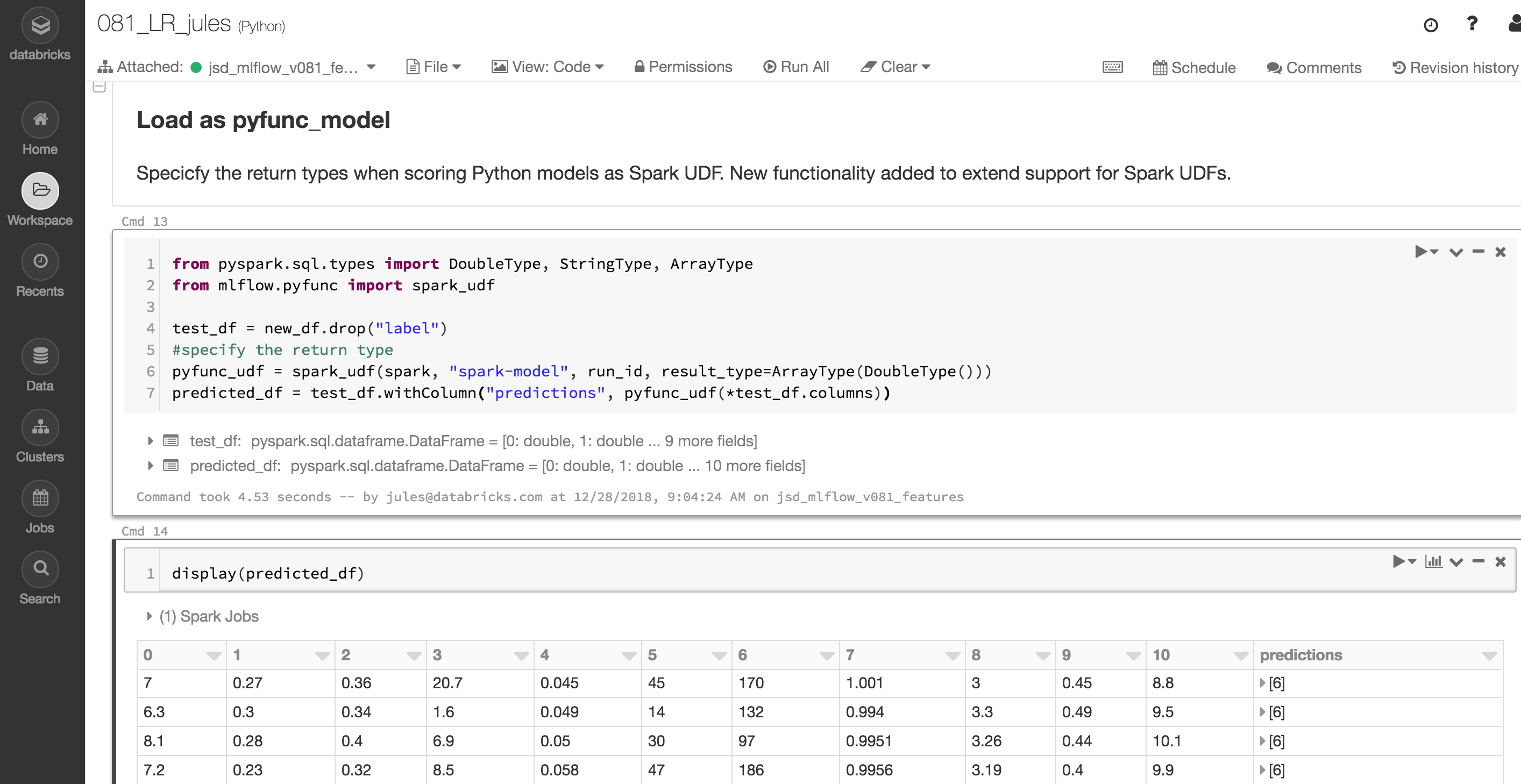
When scoring Python models as Apache Spark UDFs, users can now filter UDF outputs by selecting from an expanded set of result types. For example, specifying a result type of pyspark.sql.types.DoubleType filters the UDF output and returns the first column that contains double precision scalar values. Specifying a result type of pyspark.sql.types.ArrayType(DoubleType) returns all columns that contain double precision scalar values. The example code below demonstrates result type selection using the result_type parameter. And the short example notebook illustrates Spark Model logged and then loaded as a Spark UDF.
By default, pyfunc models produced by MLflow API calls such as save_model() and log_model() now include a Conda environment specifying all of the versioned dependencies necessary for loading them in a new environment. For example, the default Conda environment for the model trained in the example below has the following yaml representation:
channels:
- defaults
dependencies:
- python=3.5.2
- pyspark=2.4.0
name: mlflow-env
Other Features and Bug Fixes
In addition to these features, several other new pieces of functionality are included in this release. Some items worthy of note are:
Features
- [API/CLI] Support for running MLflow projects from ZIP files (#759, @jmorefieldexpe)
- [Python API] Support for passing model conda environments as dictionaries to save_model and log_model functions (#748, @dbczumar)
- [Models] Default Anaconda environments have been added to many Python model flavors. By default, models produced by save_model and log_model functions will include an environment that specifies all of the versioned dependencies necessary to load and serve the models. Previously, users had to specify these environments manually. (#705, #707, #708, #749, @dbczumar)
- [Scoring] Support for synchronous deployment of models to SageMaker (#717, @dbczumar)
- [Tracking] Include the Git repository URL as a tag when tracking an MLflow run within a Git repository (#741, @whiletruelearn, @mateiz)
- [UI] Improved runs UI performance by using a react-virtualized table to optimize row rendering (#765, #762, #745, @smurching)
- [UI] Significant performance improvements for rendering run metrics, tags, and parameter information (#764, #747, @smurching)
- [UI] Scatter plots, including run comparison plots, are now interactive (#737, @mateiz)
- [UI] Extended CSRF support by allowing the MLflow UI server to specify a set of expected headers that clients should set when making AJAX requests (#733, @aarondav)
Bug fixes
- [Python/Scoring] MLflow Python models that produce Pandas DataFrames can now be evaluated as Spark UDFs correctly. Spark UDF outputs containing multiple columns of primitive types are now supported (#719, @tomasatdatabricks)
- [Scoring] Fixed a serialization error that prevented models served with Azure ML from returning Pandas DataFrames (#754, @dbczumar)
- [Docs] New example demonstrating how the MLflow REST API can be used to create experiments and log run information (#750, kjahan)
- [Docs] R documentation has been updated for clarity and style consistency (#683, @stbof)
- [Docs] Added clarification about user setup requirements for executing remote MLflow runs on Databricks (#736, @andyk)
The full list of changes and contributions from the community can be found in the 0.8.1 Changelog. We welcome more input on mlflow-users@googlegroups.com or by filing issues on GitHub. For real-time questions about MLflow, we also offer a Slack channel. Finally, you can follow @MLflowOrg on Twitter for the latest news.
--
Try Databricks for free. Get started today.
The post MLflow v0.8.1 Features Faster Experiment UI and Enhanced Python Model appeared first on Databricks.
No comments:
Post a Comment