Tuesday, 31 July 2018
Geek Trivia: The Term “Cliffhanger”, To Refer To A Suspenseful But Unresolved Ending Originated With?
You Can Now Quickly Add Reaction GIFs in Gmail
The Endless Cycle: Websites Keep Getting Heavier as Internet Speeds Get Better
The Best Cordless Power Tool Systems for Every Skill Level and Budget

The cordless tool market has improved greatly over the years, but perhaps the greatest advancement has been the sheer variety.
Click Here to Continue Reading
Processing Petabytes of Data in Seconds with Databricks Delta
Introduction
Databricks Delta is a unified data management system that brings data reliability and fast analytics to cloud data lakes. In this blog post, we take a peek under the hood to examine what makes Databricks Delta capable of sifting through petabytes of data within seconds. In particular, we discuss Data Skipping and ZORDER Clustering.
These two features combined enable the Databricks Runtime to dramatically reduce the amount of data that needs to be scanned in order to answer highly selective queries against large Delta tables, which typically translates into orders-of-magnitude runtime improvements and cost savings.
You can see these features in action in a keynote speech from the 2018 Spark + AI Summit, where Apple’s Dominique Brezinski demonstrated their use case for Databricks Delta as a unified solution for data engineering and data science in the context of cyber-security monitoring and threat response.
How to Use Data Skipping and ZORDER Clustering
To take advantage of data skipping, all you need to do is use Databricks Delta. The feature is automatic and kicks in whenever your SQL queries or Dataset operations include filters of the form “column op literal”, where:
columnis an attribute of some Databricks Delta table, be it top-level or nested, whose data type is string / numeric / date/timestampopis a binary comparison operator,StartsWith / LIKE ‘pattern%’, or IN <list_of_values>literalis an explicit (list of) value(s) of the same data type as a column
AND / OR / NOT are also supported, as well as “literal op column” predicates.
As we’ll explain below, even though data skipping always kicks in when the above conditions are met, it may not always be very effective. But, if there are a few columns that you frequently filter by and want to make sure that’s fast, then you can explicitly optimize your data layout with respect to skipping effectiveness by running the following command:
OPTIMIZE <table> [WHERE <partition_filter>]
ZORDER BY (<column>[, …])
More on this later. First, let’s take a step back and put things in context.
How Data Skipping and ZORDER Clustering Work
The general use-case for these features is to improve the performance of needle-in-the-haystack kind of queries against huge data sets. The typical RDBMS solution, namely secondary indexes, is not practical in a big data context due to scalability reasons.
If you’re familiar with big data systems (be it Apache Spark, Hive, Impala, Vertica, etc.), you might already be thinking: (horizontal) partitioning.
Quick reminder: In Spark, just like Hive, partitioning 1 works by having one subdirectory for every distinct value of the partition column(s). Queries with filters on the partition column(s) can then benefit from partition pruning, i.e., avoid scanning any partition that doesn’t satisfy those filters.
The main question is: What columns do you partition by?
And the typical answer is: The ones you’re most likely to filter by in time-sensitive queries.
But… What if there are multiple (say 4+), equally relevant columns?
The problem, in that case, is that you end up with a huge number of unique combinations of values, which means a huge number of partitions and therefore files. Having data split across many small files brings up the following main issues:
- Metadata becomes as large as the data itself, causing performance issues for various driver-side operations
- In particular, file listing is affected, becoming very slow
- Compression effectiveness is compromised, leading to wasted space and slower IO
So while data partitioning in Spark generally works great for dates or categorical columns, it is not well suited for high-cardinality columns and, in practice, it is usually limited to one or two columns at most.
Data Skipping
Apart from partition pruning, another common technique that’s used in the data warehousing world, but which Spark currently lacks, is I/O pruning based on Small Materialized Aggregates. In short, the idea is to:
- Keep track of simple statistics such as minimum and maximum values at a certain granularity that’s correlated with I/O granularity.
- Leverage those statistics at query planning time in order to avoid unnecessary I/O.
This is exactly what Databricks Delta’s data skipping feature is about. As new data is inserted into a Databricks Delta table, file-level min/max statistics are collected for all columns (including nested ones) of supported types. Then, when there’s a lookup query against the table, Databricks Delta first consults these statistics in order to determine which files can safely be skipped. But, as they say, a GIF is worth a thousand words, so here you go:
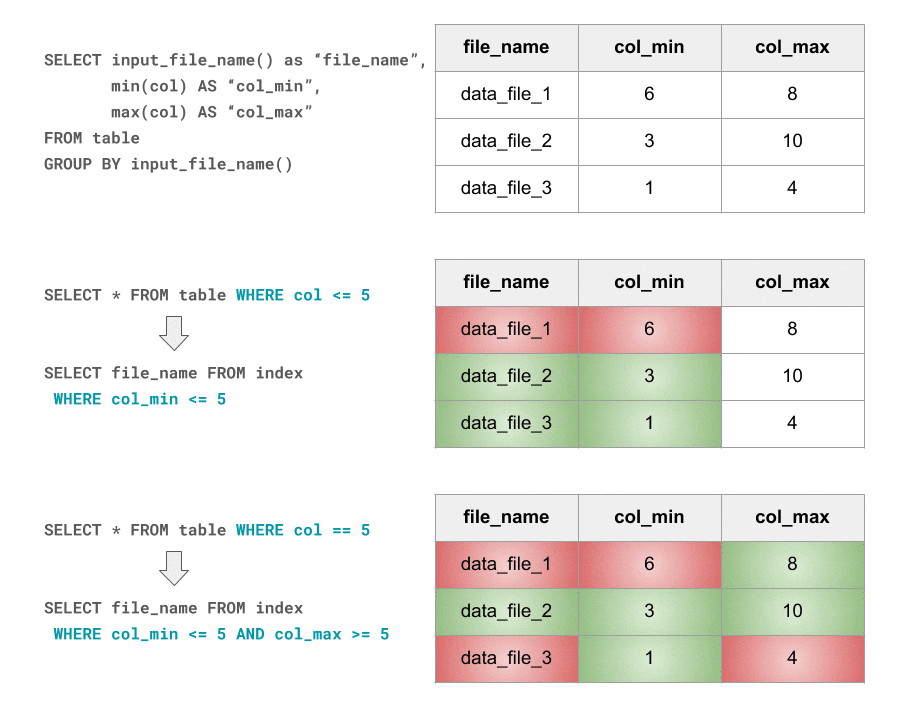
On the one hand, this is a lightweight and flexible (the granularity can be tuned) technique that is easy to implement and reason about. It’s also completely orthogonal to partitioning: it works great alongside it, but doesn’t depend on it. On the other hand, it’s a probabilistic indexing approach which, like bloom filters, may give false-positives, especially when data is not clustered. Which brings us to our next technique.
ZORDER Clustering
For I/O pruning to be effective data needs to be clustered so that min-max ranges are narrow and, ideally, non-overlapping. That way, for a given point lookup, the number of min-max range hits is minimized, i.e. skipping is maximized.
Sometimes, data just happens to be naturally clustered: monotonically increasing IDs, columns that are correlated with insertion time (e.g., dates / timestamps) or the partition key (e.g., pk_brand_name – model_name). When that’s not the case, you can still enforce clustering by explicitly sorting or range-partitioning your data before insertions.
But, again, suppose your workload consists of equally frequent/relevant single-column predicates on (e.g. n = 4) different columns.
In that case, “linear” a.k.a. “lexicographic” or “major-minor” sorting by all of the n columns will strongly favor the first one that’s specified, clustering its values perfectly. However, it won’t do much, if anything at all (depending on how many duplicate values there are on that first column) for the second one, and so on. Therefore, in all likelihood, there will be no clustering on the nth column and therefore no skipping possible for lookups involving it.
So how can we do better? More precisely, how can we achieve similar skipping effectiveness along every individual dimension?
If we think about it, what we’re looking for is a way of assigning n-dimensional data points to data files, such that points assigned to the same file are also close to each other along each of the n dimensions individually. In other words, we want to map multi-dimensional points to one-dimensional values in a way that preserves locality.
This is a well-known problem, encountered not only in the database world, but also in domains such as computer graphics and geohashing. The answer is: locality-preserving space-filling curves, the most commonly used ones being the Z-order and Hilbert curves.
Below is a simple illustration of how Z-ordering can be applied for improving data layout with regard to data skipping effectiveness. Legend:
- Gray dot = data point e.g., chessboard square coordinates
- Gray box = data file; in this example, we aim for files of 4 points each
- Yellow Yellow box = data file that’s read for the given query
- Green dot = data point that passes the query’s filter and answers the query
- Red dot = data point that’s read, but doesn’t satisfy the filter; “false positive”

An Example in Cybersecurity Analysis
Okay, enough theory, let’s get back to the Spark + AI Summit keynote and see how Databricks Delta can be used for real-time cybersecurity threat response.
Say you’re using Bro, the popular open-source network traffic analyzer, which produces real-time, comprehensive network activity information2. The more popular your product is, the more heavily your services get used and, therefore, the more data Bro starts outputting. Writing this data at a fast enough pace to persistent storage in a more structured way for future processing is the first big data challenge you’ll face.
This is exactly what Databricks Delta was designed for in the first place, making this task easy and reliable. What you could do is use structured streaming to pipe your Bro conn data into a date-partitioned Databricks Delta table, which you’ll periodically run OPTIMIZE on so that your log records end up evenly distributed across reasonably-sized data files. But that’s not the focus of this blog post, so, for illustration purposes, let’s keep it simple and use a non-streaming, non-partitioned Databricks Delta table consisting of uniformly distributed random data.
Faced with a potential cyber-attack threat, the kind of ad-hoc data analysis you’ll want to run is a series of interactive “point lookups” against the logged network connection data. For example, “find all recent network activity involving this suspicious IP address.” We’ll model this workload by assuming it’s made out of basic lookup queries with single-column equality filters, using both random and sampled IPs and ports. Such simple queries are IO-bound, i.e. their runtime depends linearly on the amount of data scanned.
These lookup queries will typically turn into full table scans that might run for hours, depending on how much data you’re storing and how far back you’re looking. Your end goal is likely to minimize the total amount of time spent on running these queries, but, for illustration purposes, let’s instead define our cost function as the total number of records scanned. This metric should be a good approximation of total runtime and has the benefit of being well defined and deterministic, allowing interested readers to easily and reliably reproduce our experiments.
So here we go, this is what we’ll work with, concretely:
case class ConnRecord(src_ip: String, src_port: Int, dst_ip: String, dst_port: Int)

def randomIPv4(r: Random) = Seq.fill(4)(r.nextInt(256)).mkString(".")
def randomPort(r: Random) = r.nextInt(65536)

def randomConnRecord(r: Random) = ConnRecord(
   src_ip = randomIPv4(r), src_port = randomPort(r),
   dst_ip = randomIPv4(r), dst_port = randomPort(r))
case class TestResult(numFilesScanned: Long, numRowsScanned: Long, numRowsReturned: Long)

def testFilter(table: String, filter: String): TestResult = {
   val query = s"SELECT COUNT(*) FROM $table WHERE $filter"

   val(result, metrics) = collectWithScanMetrics(sql(query).as[Long])
   TestResult(
      numFilesScanned = metrics("filesNum"),
      numRowsScanned = metrics.get("numOutputRows").getOrElse(0L),
      numRowsReturned = result.head)
}

// Runs testFilter() on all given filters and returns the percent of rows skipped
// on average, as a proxy for Data Skipping effectiveness: 0 is bad, 1 is good
def skippingEffectiveness(table: String, filters: Seq[String]): Double = { ... }
Here’s how a randomly generated table of 100 files, 1K random records each, might look like:
  SELECT row_number() OVER (ORDER BY file) AS file_id,
       count(*) as numRecords, min(src_ip), max(src_ip), min(src_port),
       max(src_port), min(dst_ip), max(dst_ip), min(dst_port), max(dst_port)
  FROM (
  SELECT input_file_name() AS file, * FROM conn_random)
  GROUP BY file

Seeing how every file’s min-max ranges cover almost the entire domain of values, it is easy to predict that there will be very little opportunity for file skipping. Our evaluation function confirms that:
skippingEffectiveness(connRandom, singleColumnFilters)

Ok, that’s expected, as our data is randomly generated and so there are no correlations. So let’s try explicitly sorting data before writing it.
spark.read.table(connRandom)
     .repartitionByRange($"src_ip", $"src_port", $"dst_ip", $"dst_port")
     // or just .sort($"src_ip", $"src_port", $"dst_ip", $"dst_port")
     .write.format("delta").saveAsTable(connSorted)
skippingEffectiveness(connRandom, singleColumnFilters)

Hmm, we have indeed improved our metric, but 25% is still not great. Let’s take a closer look:
val src_ip_eff = skippingEffectiveness(connSorted, srcIPv4Filters)
val src_port_eff = skippingEffectiveness(connSorted, srcPortFilters)
val dst_ip_eff = skippingEffectiveness(connSorted, dstIPv4Filters)
val dst_port_eff = skippingEffectiveness(connSorted, dstPortFilters)

Turns out src_ip lookups are really fast but all others are basically just full table scans. Again, that’s no surprise. As explained earlier, that’s what you get with linear sorting: the resulting data is clustered perfectly along the first dimension (src_ip in our case), but almost not at all along further dimensions.
So how can we do better? By enforcing ZORDER clustering.
spark.read.table(connRandom)
     .write.format("delta").saveAsTable(connZorder)

sql(s"OPTIMIZE $connZorder ZORDER BY (src_ip, src_port, dst_ip, dst_port)")
skippingEffectiveness(connZorder, singleColumnFilters)

Quite a bit better than the 0.25 obtained by linear sorting, right? Also, here’s the breakdown:
val src_ip_eff = skippingEffectiveness(connZorder, srcIPv4Filters)
val src_port_eff = skippingEffectiveness(connZorder, srcPortFilters)
val dst_ip_eff = skippingEffectiveness(connZorder, dstIPv4Filters)
val dst_port_eff = skippingEffectiveness(connZorder, dstPortFilters)

A couple of observations worth noting:
- It is expected that skipping effectiveness on src_ip is now lower than with linear ordering, as the latter would ensure perfect clustering, unlike z-ordering. However, the other columns’ score is now almost just as good, unlike before when it was 0.
- It is also expected that the more columns you z-order by, the lower the effectiveness.
For example,ZORDER BY (src_ip, dst_ip)achieves 0.82. So it is up to you to decide what filters you care about the most.
In the real-world use case presented at the Spark + AI summit, the skipping effectiveness on a typical WHERE src_ip = x AND dst_ip = y query was even higher. In a data set of 504 terabytes (over 11 trillion rows), only 36.5 terabytes needed to be scanned thanks to data skipping. That’s a significant reduction of 92.4% in the number of bytes and **93.2% **in the number of rows.
Conclusion
Using Databricks Delta’s built-in data skipping and ZORDER clustering features, large cloud data lakes can be queried in a matter of seconds by skipping files not relevant to the query. In a real-world cybersecurity analysis use case, 93.2% of the records in a 504 terabytes dataset were skipped for a typical query, reducing query times by up to two orders of magnitude.
In other words, Databricks Delta can speed up your queries by as much as 100X.
Note: Data skipping has been offered as an independent option outside of Databricks Delta in the past as a separate preview. That option will be deprecated in the near future. We highly recommend you move to Databricks Delta to take advantage of the data skipping capability.
Read More
Here are some assets for you:
- Databricks Delta Product Page
- Databricks Delta User Guide AWS or Azure
- Databricks Engineering Blog Post on Databricks Delta
- To be clear, here we mean write.partitionBy(), not to be confused with RDD partitions. ↩
- To get an idea of what that looks like, check out the sample Bro data that’s kindly hosted by www.secrepo.com. ↩
--
Try Databricks for free. Get started today.
The post Processing Petabytes of Data in Seconds with Databricks Delta appeared first on Databricks.
How to Add a Background Color, Picture, or Texture to a Word Document
Five Android Features Samsung Does Better Than Google

How to Disable the Articles on Chrome’s New Tab Page for Android and iPhone
Looking towards the Future with Business Analytics
How Water Damages Electronics
Introducing Jenkins Cloud Native SIG
On large-scale Jenkins instances master disk and network I/O become bottlenecks in particular cases. Build logging and artifact storage were one for the most intensive I/O consumers, hence it would be great to somehow redirect them to an external storage. Back in 2016 there were active discussions about such Pluggable Storage for Jenkins. At that point we created several prototypes, but then other work took precedence. There was still a high demand in Pluggable Storage for large-scale instances, and these stories also become a major obstacle for cloud native Jenkins setups.
I am happy to say that the Pluggable Storage discussions are back online. You may have seen changes in the Core for Artifact Storage (JEP-202) and a new Artifact Manager for S3 plugin. We have also created a number of JEPs for External Logging and created a new Cloud Native Special Interest Group (SIG) to offer a venue for discussing changes and to keep them as open as possible.
Tomorrow Jesse Glick and I will be presenting the current External Logging designs at the Cloud Native SIG online meeting, you can find more info about the meeting here. I decided that it is a good time to write about the new SIG. In this blogpost I will try to provide my vision of the SIG and its purpose. I will also summarize the current status of the activities in the group.
What are Special Interest Groups?
If you follow the developer mailing list, you may have seen the discussion about introducing SIGs in the Jenkins project. The SIG model has been proposed by R. Tyler Croy, and it largely follows the successful Kubernetes SIG model. The objective of these SIGs is to make the community more transparent to contributors and to offer venues for specific discussions. The idea of SIGs and how to create them is documented in JEP-4. JEP-4 is still in Draft state, but a few SIGs have been already created using that process: Platform SIG, GSoC SIG and, finally, Cloud Native SIG.
SIGs are a big opportunity to the Jenkins project, offering a new way to onboard contributors who are interested only in particular aspects of Jenkins. With SIGs they can subscribe to particular topics without following the entire Developer mailing list which can become pretty buzzy nowadays. It also offers company contributors a clear way how to join community and participate in specific areas. This is great for larger projects which cannot be done by a single contributor. Like JEPs, SIGs help focus and coordinate efforts.
And, back to major efforts… Lack of resources among core contributors was one of the reasons why we did not deliver on Pluggable Storage stories back in 2016. I believe that SIGs can help fix that in Jenkins, making it easier to find groups with the same interests and reach out to them in order to organize activity. Regular meetings are also helpful to get such efforts moving.
Points above are the main reasons why I joined the Cloud Native SIG. Similarly, that’s why I decided to create a Platform SIG to deliver on major efforts like Java 10+ support in Jenkins. I hope that more SIGs get created soon so that contributors could focus on areas of their interest.
Cloud Native SIG
In the original proposal Carlos Sanchez, the Cloud Native SIG chair, has described the purpose of the SIG well. There has been great progress this year in cloud-native-minded projects like Jenkins X and Jenkins Essentials, but the current Jenkins architecture does not offer particular features which could be utilized there: Pluggable Storage, High Availability, etc. There are ways to achieve it using Jenkins plugins and some infrastructure tweaks, but it is far from the out-of-the-box experience. It complicates Jenkins management and slows down development of new cloud-native solutions for Jenkins.
So, what do I expect from the SIG?
-
Define roadmap towards Cloud-Native Jenkins architecture which will help the project to stay relevant for Cloud Native installations
-
Provide a venue for discussion of critical Jenkins architecture changes
-
Act as a steering committee for Jenkins Enhancement Proposals in the area of Cloud-Native solutions
-
Finally, coordinate efforts between contributors and get new contributors onboard
What’s next in the SIG?
The SIG agenda is largely defined by the SIG participants. If you are interested to discuss particular topics, just propose them in the SIG mailing list. As the current SIG page describes, there are several areas defined as initial topics: Artifact Storage, Log Storage, Configuration Storage
All these topics are related to the Pluggable Storage Area, and the end goal for them is to ensure that all data is externalized so that replication becomes possible. In addition to the mentioned data types, discussed at the Jenkins World 2016 summit, we will need to externalize other data types: Item and Run storage, Fingerprints, Test and coverage results, etc. There is some foundation work being done for that. For example, Shenyu Zheng is working on a Code Coverage API plugin which would allow to unify the code coverage storage formats in Jenkins.
Once the Pluggable Storage stories are done the next steps are true High Availability, rolling or canary upgrades and zero downtime. At that point other foundation stories like Remoting over Kafka by Pham Vu Tuan might be integrated into the Cloud Native architecture to make Jenkins more robust against outages within the cluster. It will take some time to get to this state, but it can be done incrementally.
Let me briefly summarize current state of the 3 focuses listed in the Cloud Native SIG.
Artifact Storage
There are many existing plugins allowing to upload and download artifacts from external storage (e.g. S3, Artifactory, Publish over SFTP, etc., etc.), but there are no plugins which can do it transparently without using new steps. In many cases the artifacts also get uploaded through master, and it increases load on the system. It would be great if there was a layer which would allow storing artifacts externally when using common steps like Archive Artifacts.
Artifact storage work was started this spring by Jesse Glick, Carlos Sanchez and Ivan Fernandez Calvo before the Cloud Native SIG was actually founded. Current state:
-
JEP-202 "External Artifact Storage" has been proposed in the Jenkins community. This JEP defines API changes in the Jenkins core which are needed to support External artifact managers
-
Jenkins Pipeline has been updated to support external artifact storages for
archive/unarchiveandstash/unstash -
New Artifact Manager for S3 plugin reference implementation of the new API. The plugin is available in main Jenkins update centers
-
A number of plugins has been updated in order to support external artifact storage
The Artifact Manager API is available in Jenkins LTS starting from 2.121.1, so it is possible to create new implementations using the provided API and existing implementations. This new feature is fully backward compatible with the default Filesystem-based storage, but there are known issues for plugins explicitly relying on artifact locations in JENKINS_HOME (you can find a list of such plugins here). It will take a while to get all plugins supported, but the new API in the core should allow migrating plugins.
I hope we will revisit the External Artifact Storage at the SIG meetings at some point. It would be a good opportunity to do a retrospective and to understand how to improve the process in SIG.
Log storage
Log storage is a separate big story. Back in 2016 External logging was one of the key Pluggable Storage stories we defined at the contributor summit. We created an EPIC for the story (JENKINS-38313) and after that created a number of prototypes together with Xing Yan and Jesse Glick. One of these prototypes for Pipeline has recently been updated and published here.
Jesse Glick and Carlos Sanchez are returning to this story and plan to discuss it within the Cloud Native SIG. There are a number of Jenkins Enhancement proposals which have been submitted recently:
In the linked documents you can find references to current reference implementations. So far we have a working prototype for the new design. There are still many bits to fix before the final release, but the designs are ready for review and feedback.
This Tuesday (Jul 31) we are going to have a SIG meeting in order to present the current state and to discuss the proposed designs and JEPs. The meeting will happen at 3PM UTC. You can watch the broadcast using this link. Participant link will be posted in the SIGs Gitter channel 10 minutes before the meeting.
Configuration storage
This is one of the future stories we would like to consider. Although configurations are not big, externalizing them is a critical task for getting highly-available or disposable Jenkins masters. There are many ways to store configurations in Jenkins, but 95% of cases are covered by the XmlFile layer which serializes objects to disk and reads them using the XStream library. Externalizing these XmlFiles would be a great step forward.
There are several prototypes for externalizing configurations, e.g. in DotCI. There are also other implementations which could be upstreamed to the Jenkins core:
-
Alex Nordlund has recently proposed a pull request to Jenkins Core, which should make the XML Storage pluggable
-
James Strachan has implemented similar engine for Kubernetes in the kubeify prototype
-
I also did some experiments with externalizing XML Storages back in 2016
The next steps for this story would be to aggregate implementations into a single JEP. I have it in my queue, and I hope to write up a design once we get more clarity on the External logging stories.
Conclusions
Special Interest Groups are a new format for collaboration and disucssion in the Jenkins community. Although we have had some work groups before (Infrastructure, Configuration-as-Code, etc.), introduction of SIGs sets a new bar in terms of the project transparency and consistency. Major architecture changes in Jenkins are needed to ensure its future in the new environments, and SIGs will help to boost visibility and participation around these changes.
If you want to know more about the Cloud Native SIG, all resources are listed on the SIG’s page on jenkins.io. If you want to participate in the SIG’s activities, just do the following:
-
Subscribe to the mailing list
-
Join our Gitter channel
-
Join our public meetings
I am also working on organizing a face-to-face Cloud Native SIG meeting at the Jenkins Contributor Summit, which will happen on September 17 during DevOps World | Jenkins World in San Francisco. If you come to DevOps World | Jenkins World, please feel free to join us at the contributor summit or to meet us at the community booth. Together with Jesse and Carlos we are also going to present some bits of our work at the A Cloud Native Jenkins talk.
Stay tuned for more updates and demos on the Cloud-Native Jenkins fronts!
Anker Soundcore Space NC Headphones Review: An Ideal Budget Pick

Premium noise cancelling headphones are pretty expensive, but the Anker Soundcore Space NC sets out to prove they don’t have to be.
Click Here to Continue Reading
Monday, 30 July 2018
Geek Trivia: Which One Of These Common Food Crops Is Deadly If Stored Incorrectly?
YouTube Surrenders, Removes Black Bars From Vertical Videos
New Ecobee Feature Will Adjust Your Thermostat When Energy Rates Get Too High

Ecobee is rolling out a new feature to some users that will automatically tweak your thermostat when energy rates get too high.
The new…
Click Here to Continue Reading
The Best Compact Mobile Keyboards For Typing On The Go

So you want to start chipping away at that screenplay in your local coffee shop, but lugging your laptop along isn’t ideal.
Click Here to Continue Reading
How to Recover Your Forgotten WhatsApp PIN
Will MoviePass Please Die So People Stop Complaining About It
How to Roll Back to iOS 11 (If You’re Using the iOS 12 Beta)
How the Digital Ecosystem Will Revolutionize Business
The digital ecosystem is changing everything. Companies that don't adapt to this reality risk missing out on an exciting new way of doing business.
The post How the Digital Ecosystem Will Revolutionize Business appeared first on Hortonworks.
The Best Video Editing Tools for Chromebooks

How India's software skills are helping its hardware startups to rise again
How to Change a Picture to Black and White in Microsoft Word
How to Enable Windows Defender’s Secret Crapware Blocker
Sunday, 29 July 2018
Geek Trivia: Which Of These Used To Be An Official Olympic Sport?
The Best Manual Coffee Grinders For Delicious And Consistent Flavor

Fresh ground coffee tastes better, but really high quality grinders are expensive. What’s a coffee aficionado on a budget to do?
Click Here to Continue Reading
Cord Cutting Isn’t Just About Money: Streaming Services Are Better Than Cable
Saturday, 28 July 2018
Geek Trivia: How Fast Was The CPU In The Original IBM PC?
The Best Running Watch For Every Budget

If you’re running regularly, it’s useful to be able to track your progress, pace, elevation, and route.
Click Here to Continue Reading
Forget Voice Control, Automation Is the Real Smarthome Superpower
Facial Recognition Software Could Help Women Find Egg Donors Who Look Like Them
What Is a Log File (and How Do I Open One)?
Friday, 27 July 2018
MoviePass Had an Outage Because It Ran Out Money, So Maybe Use Yours Quick
What the Hell Does Valve Even Do Anymore (Besides Take Our Money)
The Best Automatic Dog Food Dispensers

Automated dog food dispensers won’t just make your life easier, they can also improve yo…
Click Here to Continue Reading
How to Type Accent Marks Over Letters in Microsoft Word
You Can Now Schedule Custom Routines in Google Home
The Best Photo Editors for Chromebooks
The Best Laptop Bags Under $40

So you just bought that dream laptop. Super-powerful. Amazingly thin.
Click Here to Continue Reading
What’s the Difference Between an Optical and Electronic Viewfinder?
How to Enable Dark Mode for Gmail
A note to India Inc on thinking through its Blockchain strategy
Bloom Energy raises $270M in NYSE listing
Qualcomm drops $44 billion NXP bid after failing to win China approval
How To Recover Your Forgotten Snapchat Password
The Best PC Gaming Headsets For Every Budget

If you want to feel immersed in your PC games and effectively communicate in online multiplaye…
Click Here to Continue Reading
Thursday, 26 July 2018
Geek Trivia: Besides Humans, The Only Mammal Known To Love Hot Peppers Is The?
Give All Your Smart Home Gadgets Unique Names, Even Across Different Services

Most smart home gadgets like Hue or Nest will make you use unique names within their service.
Click Here to Continue Reading
rquery: Practical Big Data Transforms for R-Spark Users
This is a guest community blog from Nina Zumel and John Mount, data scientists and consultants at Win-Vector. They share how to use rquery with Apache Spark on Databricks
Try this notebook in DatabricksIntroduction
In this blog, we will introduce rquery, a powerful query tool that allows R users to implement powerful data transformations using Apache Spark on Databricks. rquery is based on Edgar F. Codd’s relational algebra, informed by our experiences using SQL and R packages such as dplyr at big data scale.
Data Transformation and Codd’s Relational Algebra
rquery is based on an appreciation of Codds’ relational algebra. Codd’s relational algebra is a formal algebra that describes the semantics of data transformations and queries. Previous, hierarchical, databases required associations to be represented as functions or maps. Codd relaxed this requirement from functions to relations, allowing tables that represent more powerful associations (allowing, for instance, two-way multimaps).
Codd’s work allows most significant data transformations to be decomposed into sequences made up from a smaller set of fundamental operations:
- select (row selection)
- project (column selection/aggregation)
- Cartesian product (table joins, row binding, and set difference)
- extend (derived columns, keyword was in Tutorial-D).
One of the earliest and still most common implementation of Codd’s algebra is SQL. Formally Codd’s algebra assumes that all rows in a table are unique; SQL further relaxes this restriction to allow multisets.
rquery is another realization of the Codd algebra that implements the above operators, some higher-order operators, and emphasizes a right to left pipe notation. This gives the Spark user an additional way to work effectively.
SQL vs pipelines for data transformation
Without a pipe-line based operator notation, the common ways to control Spark include SQL or sequencing SparkR data transforms. rquery is a complementary approach that can be combined with these other methodologies.
One issue with SQL, especially for the novice SQL programmer, is that it can be somewhat unintuitive.
- SQL expresses data transformations as nested function composition
- SQL uses some relational concepts as steps, others as modifiers and predicates.
For example, suppose you have a table of information about irises, and you want to find the species with the widest petal on average. In R the steps would be as follows:
- Group the table into Species
- Calculate the mean petal width for each Species
- Find the widest mean petal width
- Return the appropriate species
We can do this in R using rqdatatable, an in-memory implementation of rquery:
library(rqdatatable)
## Loading required package: rquery
data(iris)

iris %.>%
  project_nse(., groupby=c('Species'),
              mean_petal_width = mean(Petal.Width)) %.>%
  pick_top_k(.,
             k = 1,
             orderby = c('mean_petal_width', 'Species'),
             reverse = c('mean_petal_width')) %.>%
  select_columns(., 'Species')
##      Species
## 1: virginica
Of course, we could also do the same operation using dplyr, another R package with Codd-style operators. rquery has some advantages we will discuss later. In rquery, the original table (iris) is at the beginning of the query, with successive operations applied to the results of the preceding line. To perform the equivalent operation in SQL, you must write down the operation essentially backwards:
SELECT
   Species
FROM (
   SELECT
     Species,
     mean('Petal.Width') AS mean_petal_width
   FROM
     iris
   GROUP BY Species ) tmp1
WHERE mean_petal_width = max(mean_petal_width) /* try to get widest species */
ORDER_BY Species /* To make tiebreaking deterministic */
LIMIT 1     /* Get only one species back (in case of ties) */
In SQL the original table is in the last or inner-most SELECT statement, with successive results nested up from there. In addition, column selection directives are at the beginning of a SELECT statement, while row selection criteria (WHERE, LIMIT) and modifiers (GROUP_BY, ORDER_BY) are at the end of the statement, with the table in between. So the data transformation goes from the inside of the query to the outside, which can be hard to read — not to mention hard to write.
rquery represents an attempt to make data transformation in a relational database more intuitive by expressing data transformations as a sequential operator pipeline instead of nested queries or functions.
rquery for Spark/R developers
For developers working with Spark and R, rquery offers a number of advantages. First, R developers can run analyses and perform data transformations in Spark using an easier to read (and to write) sequential pipeline notation instead of nested SQL queries. As we mentioned above, dplyr also supplies this capability, but dplyr is not compatible with SparkR — only with sparklyr. rquery is compatible with both SparkR and sparklyr, as well as with Postgres and other large data stores. In addition, dplyr’s lazy evaluation can complicate the running and debugging of large, complex queries (more on this below).
The design of rquery is database-first, meaning it was developed specifically to address issues that arise when working with big data in remote data stores via R. rquery maintains complete separation between the query specification and query execution phases, which allows useful error-checking and some optimization before the query is run. This can be valuable when running complex queries on large volumes of data; you don’t want to run a long query only to discover that there was an obvious error on the last step.
rquery checks column names at query specification time to ensure that they are available for use. It also keeps track of which columns from a table are involved with a given query, and proactively issues the appropriate SELECT statements to narrow the tables being manipulated.
This may not seem important on Spark due to its columnar orientation and lazy evaluation semantics, but can be a key on other data store and is critical on Spark if you have to cache intermediate results for any reason (such as attempting to break calculation lineage) and is useful when working traditional row-oriented systems. Also, the effect shows up on even on Spark once we work at scale. This can help speed up queries that involve excessively wide tables where only a few columns are needed. rquery also offers well-formatted textual as well as a graphical presentation of query plans. In addition, you can inspect the generated SQL query before execution.
Example
For our next example let’s imagine that we run a food delivery business, and we are interested in what types of cuisines (‘Mexican’, ‘Chinese’, etc) our customers prefer. We want to sum up the number of orders of each cuisine type (or restaurant_type) by customer and compute which cuisine appears to be their favorite, based on what they order the most. We also want to see how strong that preference is, based on what fraction of their orders is of their favorite cuisine.
We’ll start with a table of orders, which records order id, customer id, and restaurant type.
| Cust ID | Resturant_type | order_id |
|---|---|---|
| cust_1 | Indian | 1 |
| cust_1 | Mexican | 2 |
| cust_8 | Indian | 3 |
| cust_5 | American | 4 |
| cust_9 | Mexican | 5 |
| cust_9 | Indian | 6 |
To work with the data using rquery, we need a rquery handle to the Spark cluster. Since rquery interfaces with many different types of SQL-dialect data stores, it needs an adapter to translate rquery functions into the appropriate SQL dialect. The default handler assumes a DBI-adapted database. Since SparkR is not DBI-adapted, we must define the handler explicitly, using the function rquery::rquery_db_info(). The code for the adapter is here. Let’s assume that we have created the handler as db_hdl.
library("rquery")

print(db_hdl) # rquery handle into Spark
## [1] "rquery_db_info(is_dbi=FALSE, SparkR, <environment: 0x7fc2710cce40>)"
Let’s assume that we already have the data in Spark, as order_table. To work with the table in rquery, we must generate a table description, using the function db_td(). A table description is a record of the table’s name and columns; db_td() queries the database to get the description.
# assume we have data in spark_handle,
# make available as a view
SparkR::createOrReplaceTempView(spark_handle, "order_table")

# inspect the view for column names
table_description = db_td(db_hdl, "order_table")

print(table_description)
## [1] "table('`order_table`'; custID, restaurant_type, orderID)"
print(column_names(table_description))
## [1] "custID"          "restaurant_type" "orderID"
Now we can compose the necessary processing pipeline (or operator tree), using rquery’s Codd-style steps and the pipe notation:
rquery_pipeline <- table_description %.>%
  extend_nse(., one = 1) %.>%  # a column to help count
  project_nse(., groupby=c("custID", "restaurant_type"),
              total_orders = sum(one)) %.>% # sum orders by type, per customer
  normalize_cols(.,   # normalize the total_order counts
                 "total_orders",
                 partitionby = 'custID') %.>%
  rename_columns(.,  # rename the column
                 c('fraction_of_orders' = 'total_orders')) %.>%
  pick_top_k(.,  # get the most frequent cuisine type
             k = 1,
             partitionby = 'custID',
             orderby = c('fraction_of_orders', 'restaurant_type'),
             reverse = c('fraction_of_orders')) %.>%
  rename_columns(., c('favorite_cuisine' = 'restaurant_type')) %.>%
  select_columns(., c('custID',
                      'favorite_cuisine',
                      'fraction_of_orders')) %.>%
  orderby(., cols = 'custID')
Before executing the pipeline, you can inspect it, either as text or as a operator diagram (using the package DiagrammeR). This is especially useful for complex queries that involve multiple tables.
rquery_pipeline %.>%
  op_diagram(.) %.>%
  DiagrammeR::DiagrammeR(diagram = ., type = "grViz")

Notice that the normalize_cols and pick_top_k steps were decomposed into more basic Codd operators (for example, the extend and select_rows nodes).
We can also look at Spark’s query plan through the Databricks user interface.

You can also inspect what tables are used in the pipeline, and which columns in those tables are involved.
tables_used(rquery_pipeline)
## [1] "order_table"
columns_used(rquery_pipeline)
## $order_table
## [1] "custID"          "restaurant_type"
If you want, you can inspect the (complex and heavily nested) SQL query that will be executed in the cluster. Notice that the column orderID, which is not involved in this query, is already eliminated in the initial SELECT (tsql_*_0000000000). Winnowing the initial tables down to only the columns used can be a big performance improvement when you are working with excessively wide tables, and using only a few columns.
cat(to_sql(rquery_pipeline, db_hdl))
## SELECT * FROM (
##  SELECT
##   `custID`,
##   `favorite_cuisine`,
##   `fraction_of_orders`
##  FROM (
##   SELECT
##    `custID` AS `custID`,
##    `fraction_of_orders` AS `fraction_of_orders`,
##    `restaurant_type` AS `favorite_cuisine`
##   FROM (
##    SELECT * FROM (
##     SELECT
##      `custID`,
##      `restaurant_type`,
##      `fraction_of_orders`,
##      row_number ( ) OVER (  PARTITION BY `custID` ORDER BY `fraction_of_orders` DESC, `restaurant_type` ) AS `row_number`
##     FROM (
##      SELECT
##       `custID` AS `custID`,
##       `restaurant_type` AS `restaurant_type`,
##       `total_orders` AS `fraction_of_orders`
##      FROM (
##       SELECT
##        `custID`,
##        `restaurant_type`,
##        `total_orders` / sum ( `total_orders` ) OVER (  PARTITION BY `custID` ) AS `total_orders`
##       FROM (
##        SELECT `custID`, `restaurant_type`, sum ( `one` ) AS `total_orders` FROM (
##         SELECT
##          `custID`,
##          `restaurant_type`,
##          1  AS `one`
##         FROM (
##          SELECT
##           `custID`,
##           `restaurant_type`
##          FROM
##           `order_table`
##          ) tsql_80822542854048008991_0000000000
##         ) tsql_80822542854048008991_0000000001
##        GROUP BY
##         `custID`, `restaurant_type`
##        ) tsql_80822542854048008991_0000000002
##      ) tsql_80822542854048008991_0000000003
##      ) tsql_80822542854048008991_0000000004
##    ) tsql_80822542854048008991_0000000005
##    WHERE `row_number` <= 1
##   ) tsql_80822542854048008991_0000000006
##  ) tsql_80822542854048008991_0000000007
## ) tsql_80822542854048008991_0000000008 ORDER BY `custID`
Imagine typing in the above SQL. Finally, we can execute the query in the cluster. Note that this same pipeline could also be executed using a sparklyr connection.
execute(db_hdl, rquery_pipeline) %.>%
  knitr::kable(.)
| Cust ID | favorite_cuisine | fraction_of_orders |
|---|---|---|
| cust_1 | Italian | 0.3225806 |
| cust_2 | Italian | 0.3125000 |
| cust_3 | Indian | 0.2857143 |
| cust_4 | American | 0.2916667 |
| cust_5 | American | 0.2857143 |
| cust_6 | Italian | 0.2800000 |
| cust_7 | American | 0.2400000 |
| cust_8 | Indian | 0.2903226 |
| cust_9 | Chinese | 0.3000000 |
This feature can be quite useful for “rehearsals” of complex data manipulation/analysis processes, where you’d like to develop and debug the data process quickly, using smaller local versions of the relevant data tables before executing them on the remote system.
Conclusion
rquery is a powerful “database first” piped query generator. It includes a number of useful documentation, debugging, and optimization features. It makes working with big data much easier and works with many systems including SparkR, sparklyr, and PostgreSQL, meaning rquery does not usurp your design decisions or choice of platform.
What’s Next
rquery will be adapted to more big data systems allowing R users to work with the tools of their choice. rqdatatable will be extended to be a powerful in-memory system for rehearsing data operations in R.
You can try rquery on Databricks. Simpply follow the links below.
Read More
This example is available as a Databricks Community notebook here and as a (static) RMarkdown workbook here.
--
Try Databricks for free. Get started today.
The post rquery: Practical Big Data Transforms for R-Spark Users appeared first on Databricks.
Your Windows PC Might Finally Learn to Stop Rebooting While You’re Using It
How to Enable Dark Mode in Microsoft Edge
Alexa Cast is Amazon’s Answer to Google Cast—But Just for Music
How to Add Imported and iCal Calendars to Google Home
The Best Streaming TV Services for People with Young Kids

The way we shop for things changes once kids come into the picture—it’s no longer just about what we need or want, but what’s…
Click Here to Continue Reading
How to Control Line and Paragraph Spacing in Microsoft Word
How to Find (Or Make) Free Ringtones
The Best Clear iPhone 8 Cases To Protect (But Showcase) Your Phone

The iPhone 8 is a great looking phone and, naturally, you want to show off its stylish looks—but you also want to keep it safe from scra…
Click Here to Continue Reading
Amazon and Google Are Taking Over the Smarthome Industry
Wednesday, 25 July 2018
Join us at the Jenkins Contributor Summit San Francisco, Monday 17 September 2018
The Jenkins Contributor summit is where the current and future contributors of the Jenkins project get together. This summit will be on Monday, September 17th 2018 in San Francisco, just before DevOps World | Jenkins World. The summit brings together community members to learn, meet and help shape the future of Jenkins. In the Jenkins commmunity we value all types and sizes of contributions and love to welcome new participants. Register here.
Topics
There are plenty of exciting developments happening in the Jenkins community. The summit will feature a 'State of the Project' update including updates from the Jenkins officers. We will also have updates on the 'Big 5' projects in active development: * Jenkins Essentials * Jenkins X * Configuration as Code * Jenkins Pipeline * Cloud Native Jenkins Architecture
Plus we will feature a Google Summer of Code update, and more!
Agenda
The agenda is shaping up well and here is the outline so far.
-
9:00am Kickoff & Welcome with coffee/pastries
-
10:00am Project Updates
-
12:00pm Lunch
-
1.00pm BoF/Unconference
-
3.00pm Break
-
3.30pm Ignite Talks
-
5.00pm Wrap-up
-
6.00pm Contributor Dinner
The BoF (birds-of-a-feather) session will be an opportunity for in depth discussions, hacking or learning more about any of the big 5. Bring your laptop, come prepared with questions and ideas, and be ready for some hacking too if you want. Join in, hear the latest and get involved in any project during the BoF sessions. If you want to share anything there will be an opportunity to do a 5-min ignite talk at the end. Attending is free, and no DevOps World | Jenkins World ticket is needed, but RSVP if you are going to attend to help us plan. See you there!
Geek Trivia: Which Of These Games Is Credited With Defining The PC Adventure Gaming/RPG Genre?
Free Download: Shockingly Complete Archive of Old Mac and iPhone Wallpapers
The Best Portable Battery Packs For Every Situation

Your smartphone is kind of like a supervillain: it’s super-intelligent and has fantastic capabilities, but it’s also insanely hungry for…
Click Here to Continue Reading
These Popular Browser Extensions Are Leaking Your Full Web History On Purpose
Bay Area Apache Spark Meetup Summary @ Databricks HQ
On July 19, we held our monthly Bay Area Spark Meetup (BASM) at Databricks, HQ in San Francisco. At the Spark + AI Summit in June, we announced two open-source projects: Project Hydrogen and MLflow.
Partly to continue sharing the progress of these open-source projects with the community and partly to encourage community contributions, two leading engineers from the respective teams talked at this meetup, providing technical details, roadmaps, and how the community can get involved.
First, Xiangrui Meng presented Project Hydrogen: State-of-the-Art Deep Learning on Apache Spark, in which he elaborated minor shortcomings in using Apache Spark with deep learning frameworks and how this endeavor resolves it and integrates these frameworks as first-class citizens, taking advantage of Spark’s distributed computing nature and fault-tolerance capabilities at scale.
Second, Aaron Davidson shared MLflow: Infrastructure for a Complete Machine Learning Life Cycle. He spoke about challenges in ML cycle today and detailed how experimenting, tracking, deploying, and serving machine learning models can be achieved using MLflow’s modular components and APIs for an end-to-end machine learning model lifecycle.
View Slides to Project Hydrogen Presentation
View Slides to MLflow Presentation
You can peruse slides and watch the video at your leisure. To those who helped and attended, thank you for participating and continued community support.
--
Try Databricks for free. Get started today.
The post Bay Area Apache Spark Meetup Summary @ Databricks HQ appeared first on Databricks.
How to Turn Off New Message Alerts in Microsoft Outlook 2016 or 365
How to Leave Windows 10’s S Mode

How to Use Footnotes and Endnotes in Microsoft Word
How to Delete Your YouTube Watch History (and Search History)
ET Startup Awards 2018 Top Innovator: Sigtuple has its finger on the pulse
How to Properly Wrap Charging Cables to Prevent Damaging Them
The Five Must-Have Tools and Accessories for Charcoal Grilling

Grilling with charcoal is enjoyable, cheap, and usually results in better-tasting food, but it’s a little trickier than propane.
Click Here to Continue Reading

MLflow v0.3.0 Released
Today, we’re excited to announce MLflow v0.3.0, which we released last week with some of the requested features from internal clients and open source users. MLflow 0.3.0 is already available on PyPI and docs are updated. If you do pip install mlflow as described in the MLflow quickstart guide, you will get the recent release.

In this post, we’ll describe a couple new features and enumerate other items and bug fixes filed as issues on the Github repository.
GCP-Backed Artifact Support
We’ve added support for storing artifacts in Google Storage, through the --default-artifact-root parameter to the mlflow server command. This makes it easy to run MLflow training jobs on multiple cloud instances and track results across them. The following example shows how to launch the tracking server with a GCP artifact store. Also, you will need to setup Authentication as described in the documentation. This item closes issue #152.
mlflow server --default-artifact-root g3://my-mlflow-google-bucket/
Apache Spark MLlib Integration
As part of MLflow’s Model component, we have added Spark MLlib model as a model flavor.
This means that you can export Spark MLlib models as MLflow models. Exported models when saved using MLlib’s native serialization can be deployed and loaded as Spark MLlib models or as Python Function within MLflow. To save and load these models, use the spark.mflow API. This addresses issue #72. For example, you can save a Spark MLlib model, as shown in the code snippet below:
from pyspark.ml.pipeline.PipelineModel
from mlflow import spark

tokenizer = Tokenizer(inputCol="review", outputCol="words")
hashingTF = HashingTF(inputCol="words", outputCol="features")
lasso = LinearRegression(labelCol="rating", elasticNetParam=1.0, maxIter=20)
pipeline = Pipeline(stages=[tokenizer, hashingTF, lasso])
model = pipeline.fit(dataset)
mlflow.spark.log_model(model, "spark-model")
Now we can access this MLlib persisted model in an MLflow application.
from mlflow import spark

model = mlflow.spark.load_model("spark-model")
df = model.transform(test_df)
Other Features and Bug Fixes
In addition to these features, other items, bugs and documentation fixes are included in this release. Some items worthy of note are:
- [SageMaker] Support for deleting and updating applications deployed via SageMaker (issue #145)
- [SageMaker] Pushing the MLflow SageMaker container now includes the MLflow version that it was published with (issue #124)
- [SageMaker] Simplify parameters to SageMaker deployment by providing sane defaults (issue #126)
The full list of changes and contributions from the community can be found in the CHANGELOG. We welcome more input on mlflow-users@googlegroups.com or by filing issues or submitting patches on GitHub. For real-time questions about MLflow, we’ve also recently created a Slack channel for MLflow.
Read More
For an overview of what we’re working on next, take a look at the roadmap slides in our presentation from last week’s Bay Area Apache Spark Meetup or watch the meetup presentation.
--
Try Databricks for free. Get started today.
The post MLflow v0.3.0 Released appeared first on Databricks.
Tuesday, 24 July 2018
Geek Trivia: The Peace Symbol Is A Stylized Representation Of?
The iPod is Dead, and So Is Listening to Music Without Distractions
MoviePass Is Burning Money to Build a Userbase, But That’s Hardly Unique
How To Search Through (And Delete) Your Old Tweets
How to Fix All Your Samsung Phone’s Annoyances

How to Create and Format a Text Box in Microsoft Word
What is the New “Block Suspicious Behaviors” Feature in Windows 10?
Jenkins Javadoc: Service Improvements
Jenkins infrastructure is continuously improving. The latest service to get some attention and major improvement is the Jenkins javadoc.
There were a number of issues affecting that service:
-
Irregular updates - Developers wouldn’t find the latest java documentation because of inadequate update frequence.
-
Broken HTTPS support - when users would go to the Javadoc site they would get an unsafe site warning and then an incorrect redirection.
-
Obsolete content - Javadoc was not cleaned up correctly and plenty of obsolete pages remained which confused end users.
As Jenkins services migrate to Azure infrastructure, something that needed to be done was to move the javadoc service there as a standalone service. I took the same approach as jenkins.io, putting data on an azure file storage, using a nginx proxy in front of it and running on kubernetes. This approach brings multiple benefits:
-
We store static files on an azure file storage which brings data reliability, redundancy, etc.
-
We use Kubernetes Ingress to configure HTTP/HTTPS endpoint
-
We use Kubernetes Service to provide load balancing
-
We use Kubernetes deployment to deploy default nginx containers with azure file storage volume.
  +----------------------+     goes on     +------------------------------+
  |  Jenkins Developer   |---------------->+  https://javadoc.jenkins.io  |
  +----------------------+                 +------------------------------+
                                                                      |
  +-------------------------------------------------------------------|---------+
  | Kubernetes Cluster:                                               |         |
  |                                                                   |         |
  | +---------------------+     +-------------------+     +-----------v------+  |
  | | Deployment: Javadoc |     | Service: javadoc  <-----| Ingress: javadoc |  |
  + +---------------------+     +-------------------+     +------------------+  |
  |                                           |                                 |
  |                          -----------------+                                 |
  |                          |                |                                 |
  |                          |                |                                 |
  | +------------------------v--+    +--------v------------------+              |
  | | Pod: javadoc              |    | Pod: javadoc              |              |
  | | container: "nginx:alpine" |    | container: "nginx:alpine" |              |
  | | +-----------------------+ |    | +-----------------------+ |              |
  | | | Volume:               | |    | | Volume:               | |              |
  | | | /usr/share/nginx/html | |    | | /usr/share/nginx/html | |              |
  | | +-------------------+---+ |    | +----+------------------+ |              |
  | +---------------------|-----+    +------|--------------------+              |
  |                       |                 |                                   |
  +-----------------------|-----------------|-----------------------------------+
                          |                 |
                          |                 |
                       +--+-----------------+-----------+
                       |   Azure File Storage: javadoc  |
                       +--------------------------------+
The javadoc static files are now generated by a Jenkins job regularly and then published from a trusted jenkins instance. We only update what has changed and remove obsolete documents. More information can be find here
The next thing in continuously improving is also to look at the user experience of the javadoc to make it easier to discover javadoc for other components or versions. (Help Needed)
These changes all go towards improving the developer experience for those using javadocs and making life easier for core and plugin developers. See the new and improved javadoc service here Jenkins Javadoc.
Here’s How Gmail, Calendar, And Other Google Apps Might Look Soon
How to Limit Notifications on Your Nest Cam Using Activity Zones
The Best Toiletries and Gear to Put In Your Dopp Kit

A Dopp kit—named for American leatherworker Charles Doppelt who popularized the design—is an essential bit of travel gear.
Click Here to Continue Reading
Monday, 23 July 2018
The Best Way to Get a Phone Number for Your Small Business
Geek Trivia: The First Commercially Viable Strain Of Penicillin Was Created From Mold Found On A?
Netgear’s Arlo Adds a Smart, Audio-Only Doorbell to Its Home Security Product Line

Netgear has a line of security cameras under the Arlo brand, and now the company is expanding with a…
Click Here to Continue Reading
Buy It For Life: Our Office Gear That’s Stood the Test of Time

While the up front cost can be high, buying gadgets for life can save you a lot of hassle over the long run.
Click Here to Continue Reading
Your HomePod Could Soon Support Phone Calls
A Guide to AI, Machine Learning, and Deep Learning Talks at Spark + AI Summit Europe
Within a couple of years of its release as an open-source machine learning and deep learning framework, TensorFlow has seen an amazing rate of adoption. Consider the number of stars on its github page: over 105K; look at the number of contributors: 1500+; and observe its growing penetration and pervasiveness in verticals: from medical imaging to gaming; from computer vision to voice recognition and natural language processing.

As in Spark + AI Summit in San Francisco, so too in Spark + AI Summit Europe, we have seen high-caliber technical talks about the use of TensorFlow and other deep learning frameworks as part of the new tracks: AI, Productionizing ML, and Deep Learning Techniques. In this blog, we highlight a few talks that caught our eye, in their promise and potential. It always helps to have some navigational guidance if you are new to the summit or technology.
For example, look how Logical Clocks AB is using Apache Spark and TensorFlow to herald novel methods for developing distributed learning and training. Jim Dowling in his talk, Distributed Deep Learning with Apache Spark and TensorFlow, will explore myriad ways Apache Spark is combined with deep learning frameworks such as TensorFlow, TensorFlowonSpark, Horovod, and Deep Learning Pipelines to build deep learning applications.
Closely related to the above talk in integrating popular deep learning frameworks, such as TensorFlow, Keras or PyTorch, as first-class citizens on Apache Spark is Project Hydrogen: Unifying State-of-the-Art AI and Big Data in Apache Spark. Messrs Tim Hunter and Xiangrui Meng will share how to unify data and AI in order to simplify building production-ready AI applications. Continuing on how Spark integrates well with deep learning frameworks, Messrs Tim Hunter and Debajyoti Roy will discuss how to accomplish Geospatial Analytics with Apache Spark and Deep Learning Pipelines.
Now, if you are a news junky and wonder how to decipher and discern its emotive content, you may marvel at the use of sophisticated algorithms and techniques behind it and how to apply it. In this fascinating use case, An AI Use Case: Market Event Impact Determination via Sentiment and Emotion Analysis, Messrs Lei Gao and Jin Wang, both from IBM, will reveal the technical mastery. Similarly, if you are curious how social media images, when analyzed and categorized employing AI, are engaging, say for marketing campaigns, this session from Jack McCush will prove equally absorbing: Predicting Social Engagement of Social Images with Deep Learning.
At the Spark + AI Summit in San Francisco, Jeffrey Yau’s talk on Time Series Forecasting Using Recurrent Neural Network and Vector Autoregressive Model: When and How was a huge hit. He will repeat it in London on how two specific techniques—Vector Autoregressive (VAR) Models and Recurrent Neural Network (RNN)—can be applied to financial models. Also, IBM’s Nick Pentreath will provide an overview of RNN, modeling time series and sequence data, common architectures, and optimizing techniques in his talk, Recurrent Neural Networks for Recommendations and Personalization.
Data and AI are all about scale—about productizing ML models, about managing data infrastructure that supports the ML code. Three talks seem to fit the bill that may be of interest to you. First is from Josef Habdan, an aviation use case aptly titled, RealTime Clustering Engine Using Structured Streaming and SparkML Running on Billions of Rows a Day. Second is from Messrs Gaurav Agarwal and Mani Parkhe, from Uber and Databricks, Intelligence Driven User Communications at Scale. And third deals with productionizing scalable and high volume Apache Spark pipelines for smart-homes with hundreds of thousands of users. Erni Durdevic of Quby in his talk will share, Lessons Learned Developing and Managing High Volume Apache Spark Pipelines in Production.
At Databricks we cherish our founders’ academic roots, so all previous summits have had research tracks. Research in technology heralds paradigm shifts—for instance, at UC Berkeley AMPLab, it led to Spark; at Google, it led to TensorFlow; at CERN it led to the world wide web. Nikolay Malitsky’s talk, Spark-MPI: Approaching the Fifth Paradigm, will address the existing impedance mismatch between data-intensive and compute-intensive ecosystems by presenting the Spark-MPI approach, based on the MPI Process Management Interface (PMI). And Intel researchers Qi Xie and Sophia Sun will share a case study: Accelerating Apache Spark with FPGAs: A Case Study for 10TB TPCx-HS Spark Benchmark Acceleration with FPGA.
And finally, if you’re new to TensorFlow, Keras or PyTorch and want to learn how it all fits in the grand scheme of data and AI, you can enroll in a training course offered on both AWS and Azure: Hands-on Deep Learning with Keras, Tensorflow, and Apache Spark. Or to get a cursory and curated Tale of Three Deep Learning Frameworks, attend Brooke Wenig’s and my talk.
What’s Next
You can also peruse and pick sessions from the schedule, too. In the next blog, we will share our picks from sessions related to Data Science, Developer and Deep Dives.
If you have not registered yet, take advantage of the early bird before July 27, 2018 and save £300. See you there!
Read More
Find out more about initial keynotes: Spark + AI Summit Europe Agenda Announced
--
Try Databricks for free. Get started today.
The post A Guide to AI, Machine Learning, and Deep Learning Talks at Spark + AI Summit Europe appeared first on Databricks.