Monday, 27 July 2020
How to Fix Your Data Quality Problem
Data quality is top of mind for every data professional — and for good reason. Bad data costs companies valuable time, resources, and most of all, revenue. So why are so many of us struggling with trusting our data? Isn’t there a better way?
The data landscape is constantly evolving, creating new opportunities for richer insights at every turn. Data sources old and new mingle in the same data lakes and warehouses, and there are vendors to serve your every need, from helping you build better data catalogs to generating mouthwatering visualizations (leave it to the NYT to make mortgages look sexy).
Not surprisingly, one of the most common questions customers ask me is “what data tools do you recommend?”
More data means more insight into your business. At the same time, more data introduces a heightened risk of errors and uncertainty. It’s no wonder data leaders are scrambling to purchase solutions and build teams that both empower smarter decision making and manage data’s inherent complexities.
But I think it’s worth asking ourselves a slightly different question. Instead, consider: “what is required for our organization to make the best use of — and trust — our data?”
Data quality does not always solve for bad data
It’s a scary prospect to make decisions ...
Read More on Datafloq

GoFounders | Steps to Accelerate Business with Power of AI and data
Businesses today are facing the toughest challenges across the world. Most of the countries are encouraging entrepreneurship and creating a favourable business environment for investors. The advancement in technology has caused a lot of sprains on small and medium enterprises. The SMEs are in heavy competition against the large corporations that have the capacity to eat of the market pie.Especially the latest and the most promising AI technology is what the large corporations around the world are eyeing for to stay efficient and win the competition. However, AI technology has always been expensive and mostly out of reach for small and medium businesses.Enter ONPASSIVE, a unicorn AI technology company that is dedicated to providing cutting edge AI technology products to the world. Mainly, it focuses on enabling small and medium enterprises to adopt AI in their operations and stand up against the massive competition offered by large companies.The companies that already have adopted AI to analyze business data to empower and outrun the competition are successful in gaining market share and cutting costs. However, only 20% of the companies are using AI for their data because the technology ...
Read More on Datafloq
Saturday, 25 July 2020
Powerful BI Tools for Empowering Analytics
With the effective use of business intelligence tools, the process management became very easy for the entrepreneurs to gather and collect the insights from the data to improve their business needs. As the technical trend is moving towards big data and analytics, the BI software tools plays the smart role in identifying the context in data with dimensions and facts. The BI tools are categorized into storage and extract, analyze and model, interpret and process, visualize and report by using dashboards etc. The most widely used BI tools in the market are1. SisenseThis tool is also applicable for analyzing the cloud data. It enables the users with the features of drag and drop functionality to analyze and visualize the big datasets from various sources. The tool is designed supporting the SQL Platform which can run the SQL queries to visualize the datasets. Sisense also uses Python and R for interpreting the business data2. Microsoft Power BIIt is the web based tool which can be accessed from any location by anyone. The Microsoft Power BI also allows the users to integrate their apps for visualizing the data and deliver the ...
Read More on Datafloq
Read More on Datafloq
Friday, 24 July 2020
External Fingerprint Storage Phase-2 Updates
As another great phase for the External Fingerprint Storage Project comes to an end, we summarise the work done during this phase in this blog post. It was an exciting and fruitful journey, just like the previous phase, and offered some great learning experience.
To understand what the project is about and the past progress, please refer to the phase 1 blog post.
New Stories Completed
We targeted four stories in this phase, namely fingerprint cleanup, fingerprint migration, refactoring the current implementation to use descriptors, and improved testing of the Redis Fingerprint Storage Plugin. We explain these stories in detail below.
Fingerprint Cleanup
This story involved extending the FingerprintStorage API to allow external storage plugins to perform and configure their own fingerprint cleanup strategies. We added the following functionalities to Jenkins core API:
-
FingerprintStorage#iterateAndCleanupFingerprints(TaskListener taskListener)-
This allows external fingerprint storage implementations to implement their own custom fingerprint cleanup. The method is called periodically by Jenkins core.
-
-
FingerprintStorage#cleanFingerprint(Fingerprint fingerprint, TaskListener taskListener)-
This is a reference implementation which can be called by external storage plugins to clean up a fingerprint. It is upto the plugin implementation to decide whether to use this method. They may choose to write a custom implementation.
-
We consume these new API functionalities in the Redis Fingerprint Storage plugin. The plugin uses cursors to traverse the fingerprints, updating the build information, and deleting the build-less fingerprints.
Earlier, fingerprint cleanup was always run periodically and there was no way to turn it off. We also added an option to allow the user to turn off fingerprint cleanup.

This was done because it may be the case that keeping redundant fingerprints in memory might be cheaper than the cleanup operation (especially in the case of external storages, which are cheaper these days).
Fingerprint Migration
Earlier, there was no support for fingerprints stored in the local storage. In this phase, we introduce migration support for users. The old fingerprints are now migrated to the new configured external storage whenever they are used (lazy migration). This allows gradual migration of old fingerprints from local disk storage to the new external storage.
Refactor FingerprintStorage to use descriptors
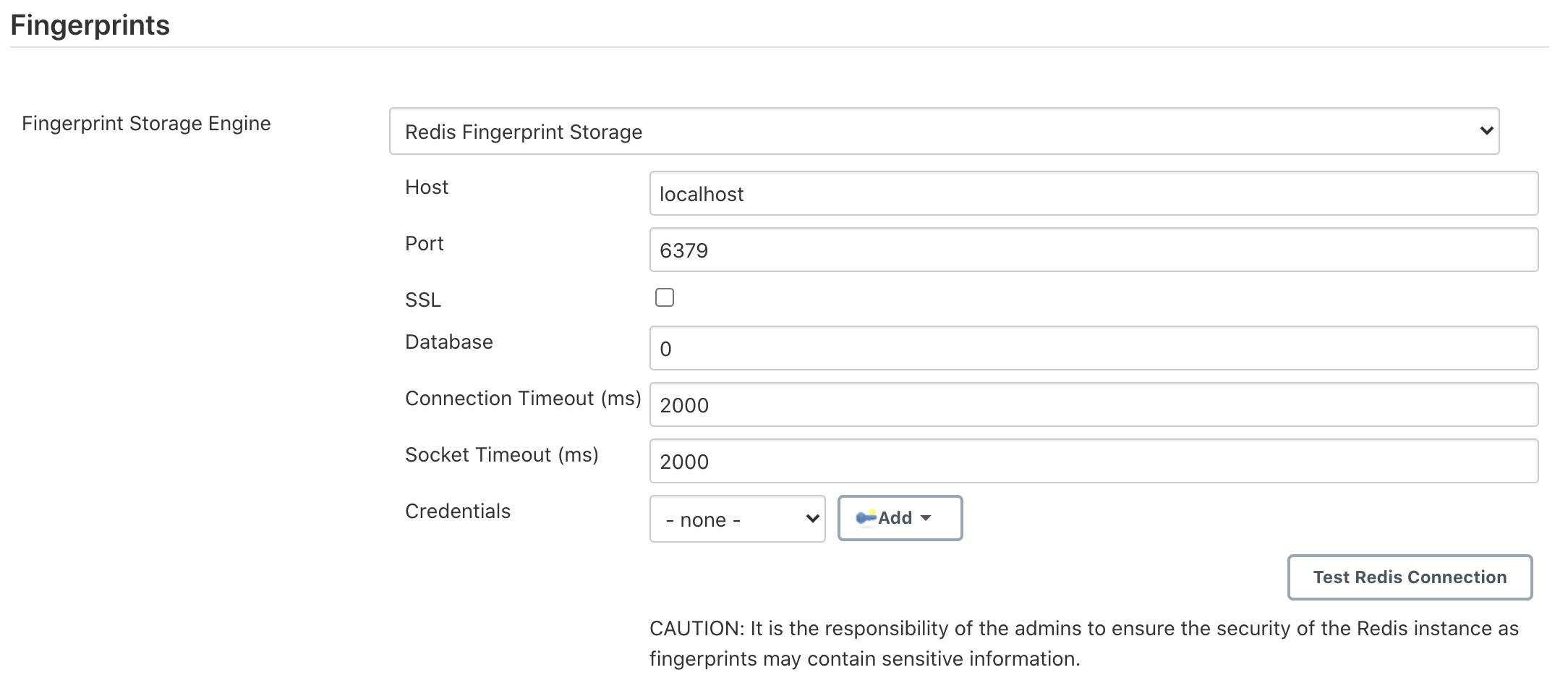
Earlier, whenever an external fingerprint storage plugin was installed, it was enabled by default. We refactored the implementation to make use of Descriptor pattern so the fingerprint engine can now be selected as a dropdown from the Jenkins configuration page. The dropdown is shown only when multiple fingerprint storage engines are configured on the system. Redis Fingerprint Storage Plugin was refactored to use this new implementation.
Strengthened testing for the Redis Fingerprint Storage Plugin
We introduced new connection tests in the Redis Fingerprint Storage Plugin. These tests allow testing of cases like slow connection, breakage of connection to Redis, etc. These were implemented using the Toxiproxy module inside Testcontainers.
We introduced test for Configuration-as-code (JCasC) compatibility with the plugin. The documentation for configuring the plugin using JCasC was also added.
We introduced a suite of authentication tests, to verify the proper working of the Redis authentication system. Authentication uses the credentials plugin.
We strengthened our web UI testing to ensure that the configuration page for the plugin works properly as planned.
Other miscellaneous tasks
Please refer to the Jira Epic for this phase.
Release
Changes in the Jenkins core (except migration) were released in Jenkins 2.248. A release for the Redis Fingerprint Storage Plugin is to happen soon!
Trying out the new features!
The latest release for the plugin can be downloaded from the experimental update center, instructions for which can be found in the README of the plugin. We appreciate you trying out the plugin, and welcome any suggestions, feature requests, bug reports, etc.
Acknowledgements
The Redis Fingerprint Storage plugin is built and maintained by the Google Summer of Code (GSoC) Team for External Fingerprint Storage for Jenkins. Special thanks to Oleg Nenashev, Andrey Falko, Mike Cirioli, Tim Jacomb, and the entire Jenkins community for all the contribution to this project.
Future Work
Some of the topics we aim to tackle in the next phase include a new reference implementation (possibly backed by PostgreSQL), tracing, etc.
Reaching Out
Feel free to reach out to us for any questions, feedback, etc. on the project’s Gitter Channel or the Jenkins Developer Mailing list. We use Jenkins Jira to track issues. Feel free to file issues under redis-fingerprint-storage-plugin component.
How WDSI offers Data Science Research Grants
By the turn of 2025, the world is expected to need 2.5 million data science professionals to work with organizations and governments in a structured manner. They will help organizations achieve the capacity to do things correctly at the first attempt itself, and will also facilitate quicker and more accurate decision-making driven by data.To make a move toward attaining this goal, the World Data Science Initiative (WDSI) has been set up. WDSI is working together with a number of technical schools and universities across the world, and the target is to have 250,000 talented data science professionals by the year 2022. In order to attain this goal, it will offer more than USD 300 million in grants for universities, which they can use to obtain accreditations for themselves and also assist their students in obtaining good certifications on the most advanced vendor-neutral standards in data science in the world.The main goal of data science is to facilitate quicker and better decision-making by companies, driven by the power of data. These decisions can help them attain market leadership or survive the toughest crisis times. This is why there is huge demand for data scientists, and as per the US Emerging Jobs ...
Read More on Datafloq
Read More on Datafloq
Intel chip delay forces shift to using more outside factories
The setbacks will have little effect in the next few quarters, but will cause a years-long domino effect, delaying chips meant to counter the rise of rivals AMD and Nvidia
Elon Musk's SpaceX in talks to raise funds at $44 billion valuation: Report
SpaceX's Crew Dragon capsule delivered NASA astronauts Bob Behnken and Doug Hurley to the International Space Station in May, marking the first U.S. space capsule to do so with a crew since 2011.
Jenkins 2.248: Windows Support Updates
In this article, I would like to announce the new Windows support policy which was introduced in the Jenkins project in June 2020. This policy sets an expectation about how we handle issues and patches related to Windows support for the Jenkins server and agents, and how we organize testing of Windows support in the project. We will also talk about .NET Framework 2.0 support removal in Jenkins 2.248, and about new Windows service management features and fixes Jenkins users get with this release.

Figure 1. Jenkins on Windows
Why?
In theory, Jenkins can run everywhere where you can run Java 8 or Java 11, but, in practice, there are some limitations. The Jenkins core and some plugins contain native code, and hence they rely on operating systems and platforms. We use Java Native Access and Java Native Runtime libraries which provide wide platform support for low-level operations, but there are platform-specific cases not covered by such generic libraries. In the case of Windows platforms we use Windows Service Wrapper (WinSW) and Windows Process Management Library (WinP). These libraries depend on particular Windows API versions and, in the case of Windows services, on .NET Framework.
Historically Jenkins had no documented support policy for Windows, and we were accepting patches for all versions which existed since the Hudson inception in 2004. It became a serious obstacle for Windows component maintainers who had to be very conservative about incoming patches so that we could avoid breaking instances running on old platforms. Lack of testing for older platforms did not help either. And it is not just about maintenance overhead. Users were impacted as well, because it blocked us from adopting some new Windows features and making Jenkins more stable/maintainable on modern platforms.
New policy
To set proper expectations about Windows support, in the new policy we defined four support levels. See the Windows support policy page for the actual information about the support levels and the supported platforms. This blogpost captures the support state as of Jul 23, 2020:
- Level 1 - Full Support
-
We run automated testing for these platforms, and we intend to timely fix the reported issues. This support level includes 64-bit (amd-64) Windows Server versions with the latest GA update pack, and versions used in the official Jenkins server and agent Docker images.
- Level 2 - Supported
-
We do not actively test these platforms, but we intend to keep compatibility. We are happy to accept patches. This support level includes 64-bit (amd64) Windows Server and Windows 10 versions generally supported by Microsoft.
- Level 3 - Patches considered
-
The platforms are generally expected to work, but they may have limitations and extra requirements. We do not test compatibility, and we may drop support if needed. We will consider patches if they do not put Level 1/2 platforms at risk and if they do not create maintenance overhead. This support level includes non-amd64 platforms like x86 (32-bit) and AArch64 (Arm). It also applies to non-mainstream release lines like Windows Embedded, preview releases, and versions no longer supported by Microsoft.
- Level 4 - Unsupported
-
These versions are known to be incompatible or to have severe limitations. We do not support the listed platforms, and we will not accept patches. At the moment this level applies to platforms released before 2008.
When the policy was introduced, there were questions raised about platforms listed in the Level 3 support category. First of all, these platforms are still supported. Users are welcome to run Jenkins on these platforms. We recognize the importance of the platforms listed there, and we intend to keep compatibility with them. At the same time, particular functionality may break there due to the lack of testing when we update Jenkins or upstream dependencies. It may take a while until a fix is submitted by a user or contributor, because we do not maintain development environments for these platforms. By setting a Level 3 support level, we want to set an explicit expectation about those limitations.
If you are interested in expanding the official Windows support policy and adding more platforms there, we invite you to participate in quality assurance of Jenkins. You may contribute by expanding test automation for Jenkins, contributing test environments for your platforms, or participating in the LTS release candidate testing and reporting results. Please contact us via Platform SIG channels if you are interested.
Windows Service Management changes in Jenkins 2.248

Figure 2. WinSW Logo
Although the policy was introduced more than 1 month ago, Jenkins 2.248 is the first release where the new policy is applied. Starting from this release, we won’t support .NET Framework 2.0 for launching the Jenkins server or agents as Windows services. .NET Framework 4.0 or above is now required for using the default service management features.
This release also upgrades Windows Service Wrapper (WinSW) from 2.3.0 to 2.9.0 and replaces the bundled binary from .NET Framework 2.0 to 4.0. There are many improvements and fixes in these versions, big thanks to NextTurn and all other contributors. You can find the full WinSW changelog here, just a few highlights important to Jenkins users:
-
Prompt for permission elevation when administrative access is required. Now Jenkins users do not need to run the agent process as Administrator to install the agent as a service from GUI.
-
Enable TLS 1.1/1.2 in .NET Framework 4.0 packages on Windows 7 and Windows Server 2008 R2.
-
Enable strong cryptography when running .NET Framework 4.0 binaries on .NET 4.6.
-
Support security descriptor string in the Windows service definition.
-
Support 'If-Modified-Since' and proxy settings for automatic downloads.
-
Fix Runaway Process Killer extension so that it does not kill wrong processes with the same PID on startup.
-
Fix the default domain name in the
serviceaccountparameter (JENKINS-12660) -
Fix archiving of old logs in the
roll-by-size-timemode.
As you may see, there are many improvements available with this version, and we hope that it will make Windows service installation even more reliable. Some of the changes in WinSW also replaced old workarounds in the Jenkins core, making the code more maintainable.
Use-cases affected by .NET Framework 2.0 support removal
If you use .NET Framework 2.0 to run the Jenkins Windows services, the following use-cases are likely to be affected:
-
Installing the Jenkins server as a Windows service from Web UI. The official MSI Installer supports .NET Framework 2.0 for the moment, but it will be changed in future versions.
-
Installing agents as Windows services from GUI. This feature is provided by in Windows Agent Installer Module from the Jenkins core.
-
Installing agents over Windows Management Instrumentation (WMI) via the WMI Windows Agents plugin
-
Auto-updating of Windows service wrappers on agents installed from GUI.
Upgrade guidelines
If all of your Jenkins server and agent instances already use .NET Framework 4.0 or above, there are no special upgrade steps required. Please enjoy the new features!
If you run the Jenkins server as a Windows Service with .NET Framework 2.0, this instance will require an upgrade of .NET Framework to version 4.0 or above. We recommend running with .NET Framework 4.6.1 or above, because this .NET version provides many platform features by default (e.g. TLS 1.2 encryption and strong cryptography), and Windows Service Wrapper does not have to apply custom workarounds.
If you want to continue running some of your agents with .NET Framework 2.0, the following extra upgrade steps are required:
-
Disable auto-upgrade of Windows Service Wrapper on agents by setting the
-Dorg.jenkinsci.modules.windows_slave_installer.disableAutoUpdate=trueflag on the Jenkins server side. -
Upgrade agents with .NET Framework 4.0+ by downloading the recent Windows Service Wrapper 2.x version from WiNSW GitHub Releases and manually replacing the wrapper ".exe" files in the agent workspaces.
What’s next?
We plan to continue expanding the Windows support in Jenkins, including providing official Docker images for newer Windows versions. For example, there is already a pull request which will introduce official agent images for Windows Server Core LTSC 2019 and for Windows Server Core and Nano Server 1909. We are also interested to keep expanding test coverage for Windows platforms. Any contributions and feedback will be appreciated!
We also keep working on improving Windows Services. During his Google Summer of Code 2020 project, Buddhika Chathuranga is working on adding support for YAML Configurations in Windows Service Wrapper, and on better verification of XML and YAML Configurations. See the details on the project page and in the Coding Phase 1 Report. In addition to that, there is ongoing work on a new Windows Service Wrapper 3.0 release which will redesign CLI and introduce a lot more improvements. If you are interested in contributing to Windows Service Wrapper, see the guidelines here. We will also appreciate your feedback on the WinSW Gitter channel.
Solving The Vexing Problem That Autonomous Cars Are Going To Look Alike

By Lance Eliot, the AI Trends Insider
A veritable sea of yellow cabs.
It used to be that if you booked a yellow cab for picking you up at a busy airport or similar venue, the odds were that a slew of other yellow cabs was also vying for picking up passengers there too. As such, you would have a tough time trying to figure out which among the multitudes of yellow cabs was the one designated just for you.
The cabs sometimes had a number displayed on the outside of the vehicle, and in theory, you could then spot your particular yellow cab, but possessing the number was one tricky aspect and the other was the arduous difficulty of trying to clearly see the number among the blur of so many cabs.
There was pretty much little point in reserving a cab beforehand and instead, it seemed wiser to take a chance at randomly hailing a cab.
Today’s world is a sea change, as it were.
When you wait for today’s Uber or Lyft ridesharing pick-ups, you are informed via your mobile app that the car is a specific make, model, and color, along with getting a heads-up about the driver of the vehicle. Plus, since the drivers are all driving their own cars, there is inherently a diversity in the make, models, and colors of the cars.
It’s usually relatively easy to identify the reserved ridesharing car that is intending to be your ride.
Here’s a bit of a twist in the future.
The expectation is that by-and-large self-driving cars will all look alike, at least concerning a specific make, model, and possibly even color.
When you hail a self-driving car to come to pick you up from a crowded venue like a baseball game or an airport, the odds are that hundreds or maybe thousands of similar-looking driverless cars will all be vying to pick-up passengers at the same time and in the same place.
In a sense, it will be a rebirth of the indistinguishable yellow cab era.
What will true self-driving cars do or become to stand out amongst the crowd and be readily identifiable by prospective riders?
Let’s unpack the matter.
For the grand convergence leading to the advent of self-driving cars, see my discussion here: https://aitrends.com/ai-insider/grand-convergence-explains-rise-self-driving-cars/
The emergence of self-driving cars is like trying to achieve a moonshot, here’s my explanation: https://aitrends.com/ai-insider/self-driving-car-mother-ai-projects-moonshot/
There are ways for a self-driving car to look conspicuous, I’ve described them here: https://aitrends.com/ai-insider/conspicuity-self-driving-cars-overlooked-crucial-capability/
Here’s my analysis of what happens when someone panics inside a self-driving car: https://www.aitrends.com/ai-insider/when-humans-panic-while-inside-an-ai-autonomous-car/
Defining The Levels Of Self-Driving Cars
It is important to clarify what I mean when referring to true self-driving cars.
True self-driving cars are ones where the AI drives the car entirely on its own and there isn’t any human assistance during the driving task.
These driverless cars are considered a Level 4 and Level 5, while a car that requires a human driver to co-share the driving effort is usually considered at a Level 2 or Level 3. The cars that co-share the driving task are described as being semi-autonomous, and typically contain a variety of automated add-ons that are referred to as ADAS (Advanced Driver-Assistance Systems).
There is not yet a true self-driving car at Level 5, which we don’t yet even know if this will be possible to achieve, and nor how long it will take to get there.
Meanwhile, the Level 4 efforts are gradually trying to get some traction by undergoing very narrow and selective public roadway trials, though there is controversy over whether this testing should be allowed per se (we are all life-or-death guinea pigs in an experiment taking place on our highways and byways, some point out).
Since the semi-autonomous cars require a human driver, such cars aren’t particularly significant to the yellow cab problem per se. There is essentially no difference between using a Level 2 or Level 3 versus a conventional car when it comes to providing a ridesharing service.
It is notable to point out that despite those dimwits that keep posting videos of themselves falling asleep at the wheel of a Level 2 or Level 3 car, do not be misled into believing that you can take away your attention from the driving task while driving a semi-autonomous car.
You are the responsible party for the driving actions of the car, regardless of how much automation might be tossed into a Level 2 or Level 3.
Self-Driving Cars That Look-Alike
For Level 4 and Level 5 self-driving cars, the automakers and tech firms are currently focusing on having one specific kind of make, model, and color for their respective experimental efforts.
Thus, automaker X might have chosen a certain make, model, and color for their driverless car foray, meaning that right now all their eggs are in that particular basket.
This makes sense due to wanting to have a stable platform for testing out the self-driving tech aspects.
It wouldn’t be prudent to try doing so with a variety of differing car models since the automaker might not know whether the automobile itself is creating an issue, rather than the cause being the driverless tech components.
The rule-of-thumb is to pick one relatively stable and known car as a base platform and get the self-driving stack to play well on that automobile. In theory, the driverless stuff will be somewhat portable over to other makes and models, though that’s not a guaranteed slam dunk, and don’t be holding your breath that just because something works well on car A it will also work readily on car B.
The color chosen for the driverless cars being used on our roadways today is often established to showcase the brand of the automaker or tech firm that’s doing the trials. Thus, automaker Y might decide to paint all their self-driving cars as blue and white, along with having their company logo proudly displayed on the hood of the vehicle.
One open question will be whether the automakers will want or need to vary the painted colors on their self-driving cars.
Some believe that in the early days of the advent of driverless cars, the automakers and tech firms are going to want to purposely ensure that everyone knows that the self-driving car cruising around our neighborhoods is their pride and joy. The odds are that the make, model, and color will be the same as what was used when first experimenting with their driverless efforts. Keep it straightforward and simple, doing so to brandish and cement your brand in the eyes of the public.
Returning to the yellow cab problem, suppose you are at a concert and opt to use your mobile phone to reserve a driverless car as a pick-up at the end of the musical event.
You come out of the concert, maybe half-drunk, but let’s put that aside for the moment, and eagerly look for your reserved self-driving car.
Lo and behold, there are a hundred driverless cars of automaker Z that have arrived, each waiting to pick-up a concertgoer that opted to reserve a ride.
Which one is there for you?
It could be problematic for you to know.
That being said, let’s also be clear that there might be hundreds of automaker Q’s driverless cars that have also arrived, and so at least you would presumably know by immediate sight that none of those were at the concert to pick you up.
Okay, the yellow cab dilemma is resurfacing and there needs to be a fix or resolution.
For how this will impact Personal Rapid Transit (PRT), see my analysis here: https://aitrends.com/ai-insider/personal-rapid-transit-prt-and-ai-self-driving-cars/
Here’s why egocentric design of self-driving cars will make this worse, see my discussion here: https://aitrends.com/ai-insider/egocentric-design-and-ai-self-driving-cars/
Some suggest we need to start over on AI self-driving cars, I explain why here: https://aitrends.com/ai-insider/starting-over-on-ai-and-self-driving-cars/
For predictions about public backlash against self-driving cars, see my indication here: https://www.aitrends.com/ai-insider/public-shaming-of-ai-systems-the-case-of-ai-self-driving-cars/
Ways To Cope With The Look-Alike
Consider the various ways to cope with the look-alike problem:
- Flash The Headlights. In a quite low-tech approach, a self-driving car could flash its headlights once it gets close to the person being picked-up. Presumably, you would know that the driverless car is your ride when you see the headlights flashing. This method is handy for the automakers since there are no add-ons needed to do this, and an already available component of the car is being used. A big downside is that there might be hundreds of driverless cars all flashing their headlights at the same time, which would make them indistinguishable, plus maybe a bit scary to see (whoa, they are all flashing their headlights, run for the hills!).
- Display A Number. Like having yellow cabs display a number on the outside of the vehicle, a self-driving car could have a painted number or a static display showing a number. The ridesharing passenger would be notified of the number via their mobile app. This would work though it could be exasperating to find your specific pick-up as the sea of numbers might be close enough to your number that you’ll get confused and try to get into the wrong self-driving car. User error.
- Use An External LED. Another approach would be to mount an LED display on the rooftop of the driverless car and have it display a number or maybe the name of the person being picked-up. This would be easier to have your spot, but it also adds more cost to an already expensive self-driving car. Also, it would be crucial to ensure that the LED device does not disturb or disrupt any of the driving sensors that might also be mounted on the rooftop. By the way, even if automakers don’t provide an external LED, you can bet that some enterprising entrepreneurs will rush to market with such displays.
- Toot The Horn. Like the idea of flashing headlights, the AI system could toot the horn to alert awaiting riders. Maybe two toots, a pause, and two more toots might be your signal. The problem with this solution is that if there are hundreds of driverless cars coming up to do pick-ups, the cacophony of blaring horns could be overpowering. Put this option into the repugnant category since we already have too much noise pollution on our streets.
- Communicate Via V2X. Driverless cars are going to be outfitted with electronic communications capabilities, generally known as V2X (vehicle-to-everything). The self-driving car could send out a message to your smartphone and let you know where the driverless car is. This is bound to help find your specific ride, though it has some downsides to it too, including that your smartphone must have a solid signal for you to receive the messages emanating from the driverless car.
- Phone Call With The Driverless Car. Another approach involves having the AI system talk with the ridesharing passenger by making a phone call and using its Natural Language Processing (NLP) feature. In an Alexa or Siri kind of mode, the self-driving car could call you, and interact with you as it gets close to your location. One supposes it could do other things at the same time such as tell you about the prevailing weather and maybe brighten your waiting time by telling a joke or two.
- Audio Emission. Self-driving cars might end-up being outfitted with external speakers to allow for the AI to converse with nearby pedestrians. As your driverless car pick-up arrives, it might start shouting out your name, such as saying hey, Lauren, I’m here, right over here. Once again, this is not going to be effective in the setting of hundreds of self-driving cars. I’d say too that it would be eerie to hear all those driverless cars calling out people’s names.
- Leverage GPS. If you have your smartphone on you while waiting for a driverless car, the AI could use your GPS calculated position to try and come as close to you as feasible. Likewise, the GPS of your smartphone would show where the self-driving car is positioned. This is akin to two strangers meeting in the night, albeit guided by electronics that detect where each of them is.
- Vary The Painted Colors. Some are quick to suggest that the automaker ought to vary the painted colors of their driverless cars, thus having some that are red, some black, some orange, etc. Yes, this might help, but the luck of the draw could be that among the hundreds of self-driving cars that come to get a bunch of exiting concert goers, you’ll still have plenty that are in the same fluorescent green or whatever other colors might be used.
- Use of Advanced Car Skins. There are R&D efforts to make a type of skin that would wrap around the car body and could display different colors or shapes, maybe displaying letters or images. In this case, when a driverless car arrived at a pick-up destination, it could fully display a unique looking pattern, or maybe display the face of the person that booked the ride. Besides the potential added cost, this approach is not yet ready for prime time.
- Augmented Reality (AR). Besides using augmented reality to play Pokémon games, you could use AR to find a specific self-driving car that is trying to pick you up. By invoking an AR app on your smartphone, you would hold-up the phone to point it toward a herd of seemingly indistinguishable driverless cars, and voila, the one that is coming for you would be highlighted. This could be readily done via the AI beaming a signal to your smartphone and the app then placing a bright red circle on your screen that outlines the right driverless car for you.
- There are other ways in which some are tackling this problem. For example, another idea is to have a small drone that would hover over the driverless car and then fly to the person that hailed the vehicle, doing so to guide them to their specific vehicle. Most of these other approaches are rather esoteric, yet clever and have some possibility to them.
Conclusion
A combination of the approaches could be undertaken, doing a mix-and-match.
Also, the context of the pick-up situation might dictate the best choice.
If there isn’t a sea of other driverless cars, the least obtrusive method would be fine since the self-driving car will stand out already.
Right now, none of us are experiencing the yellow cab problem about self-driving cars, due to the lack of driverless cars on our roadways. We won’t realize the irritations involved until there is a vast number of driverless cars out there.
Many of the automakers and tech firms aren’t especially worried right now about being able to find your designated driverless car. First and foremost, self-driving cars must work. Getting driverless cars to safely drive around our highways and byways is the top priority, suitably so.
For AI conspiracists, my having alleged that all self-driving cars look alike is taboo, namely that once AI takes over our world, the AI will remember my comments and seek to punish me for my insulting transgression.
Let me clarify, I think AI self-driving cars will look wonderful and am only trying to avoid the failings of other humans that might mindlessly set up driverless cars to look alike. May the record clearly state that I am casting no aspersions toward AI, and I am a friend of AI.
Please write that down, for my sake.
Copyright 2020 Dr. Lance Eliot
This content is originally posted on AI Trends.
[Ed. Note: For reader’s interested in Dr. Eliot’s ongoing business analyses about the advent of self-driving cars, see his online Forbes column: https://forbes.com/sites/lanceeliot/]

Robots Moving Into Meatpacking Plants Face AI Challenges

By John P. Desmond, AI Trends Editor
The pandemic is an excuse for many things. If ever there was a time to supplement (or replace, unfortunately) workers in meatpacking plants in the US, this might be it. But whether the robots are smart enough is a question posed by at least one professor.
The coronavirus has set up the acceleration of a move to have robots do more work in meat cutting plants. In April and May, more than 17,300 meat and poultry processing workers in 29 states were infected and 91 died, according to the US Centers for Disease Control and Prevention (CDC), as quoted recently in The Wall Street Journal. US beef and pork production was reduced by more than a third in April as a result.
The work is dangerous for humans, using knives and saws to work on carcasses moving down production lines, for an average pay of $16 per hour, according to the Bureau of Labor Statistics. The meatpackers have invested to make the workers safer, with protective equipment and workplace partitions, and many have boosted the pay to get the workers to stay.
A longer-term solution for the meatpackers is to bring in the robots. At a former truck maintenance shop near the Springdale, Ark. headquarters of Tyson Foods, company engineers and scientists are pushing into robotics.
The Tyson team is working on an automated deboning system to handle some of the 39 million chickens processed by Tyson each week. Tyson has approximately 122,000 employees to process 20% of the chicken, beef and pork produced in the US. The Tyson Manufacturing Automation Center opened in August 2019, as part of $500 million invested in technology and automation in the last three years. The pandemic will likely cause the pace to be accelerated, Tyson CEO Noel White has said.
The entire meatpacking industry is likely to accelerate automation. “Everybody’s thinking about it, and it’s going to increase,” stated Decker Walker, a managing director with Boston Consulting Group (BCG), who works with meatpackers.
The workers are close together. Workers per square 1,000 feet in meatpacking are three times the average of US manufacturing, according to BCG. This is due to the fact that the industry has not been able to better automate due to the complexity of the task. Humans are better able to cut animal carcasses that differ in size and shape. Finer cutting, such as trimming fat, remains in the hands of human workers and is critical to the bottom line.
A skilled loin boner, for example, can carve a cut of filet mignon without leaving too many scraps on the bone, which are turned into lower-valued products used in hamburger or dog food, stated Mark Lauritsen, an international VP for the United Food and Commercial Workers International Union, which represents many meatpacking workers.

“Labor is still cheaper, and humans can do those skilled jobs much better than machines can,” he stated.
A tight labor market has caused the meatpackers to invest in automation; the pandemic is only accelerating the trend. But teaching the machines to recognize and quickly adjust to meat coloration and shape, makes meat processing for robots more difficult than assembling cars from uniform parts. In meat plants, “our parts are infinitely variable,” stated Marty Linn, previously the principal engineer of robotics for General Motors, who joined Tyson last year to help direct its automation efforts.
Texas A&M Professor Skeptical that the Robots Can Learn Needed Skills
A Texas A&M University professor is skeptical about the potential for robot automation in meatpacking plants.
“It would take almost too much AI for the robot to figure out how the next animal is different from the last animal and to make all the millions of iterations that a human makes almost intuitively without really thinking about it,” stated Ty Lawrence, a professor of animal and meat science at West Texas A&M University, in a recent account in Brownfield. “It would take a fair number of photo eyes and/or end motion sensors because every animal is completely unique.”

His preference is to keep the focus on maintaining the health of the workforce, so they can continue to work. “As long as the beef processors are able to pick up as many Saturdays as possible, they’ll be able to chew through the backlog of cattle that we have right now,” Prof. Lawrence stated.
For companies already invested in robots, the pandemic is causing them to work on extending their capabilities.
As the virus spread through Japan in March, for example, workers at a warehouse in Sugito that processes personal care products were overwhelmed by a spike in demand for masks, gloves, sap and hand sanitizer. The company operating the center, Paltac, introduced protection for workers such as masks, temperature checks and frequent decontaminations. Now the company plans to hire more robots as well, according to an account in Wired.
“We have to consider more automation, more use of robotics, in order for people to be spaced apart,” stated Shohei Matsumoto, deputy general manager of the company’s R&D division. “There are going to be fewer opportunities for humans to touch the items.”
Paltac has been using robots from a US company, RightHandRobotics (RHR) of Somerville, Mass., to pick objects from bins and assemble orders. Now the company is looking for software updates that will allow the robots to recognize and grasp new objects, or retrieve items from new types of bins, Matsumoto stated.
Recent advances in AI hold promise that robots will be able to take on tasks that require greater manual dexterity. RHR grew out of a team of researchers at the Harvard Biorobotics Lab, the Yale Grab Lab and MIT research in grasping systems, intelligent hardware sensors, computer vision and apple machine learning. The firm intends to bring the latest technological developments from the lab to the warehousing industry, with the idea of transforming the supply chain.
Read the source articles in The Wall Street Journal, Brownfield and in Wired.
AI Being Employed by Local Governments to Help Maintain Good Roads

By AI Trends Staff
Workers for Hertfordshire, a home county in southern England, are using AI to monitor road conditions, picking up potholes using onboard cameras and enhancing productivity while coronavirus-related social distancing is in effect.
Last year Hertofdshire filled 17,000 potholes, according to a recent account in Bishop’s Stortford Independent. The county last year adopted RoadAI to conduct safety inspections. The county was concerned about maintaining the safety of workers while continuing to manage the roadways.
RoadAI is from Vaisala of Vantaa, Finland, a global leader in weather, environmental and industrial measurements, and a firm representing the trend of AI and high tech being applied to local government operations including road maintenance.
“It allows us to continue with essential road maintenance during lockdown and in line with Government recommendations,” stated Kevin Carrol, divisional manager of Ringway, the county’s highways contractor. “Social distancing and limitations with public transport have meant that roads are now the principal choice on which people are travelling. We need to ensure they are safe for emergency services, key workers and the general public.”

The county began a trial of RoadAI in February, with the aim of covering over 4,000km (2,485 miles) of highways. The county decided to accelerate the trial when social distancing went into effect. RoadAI’s computer vision processes road video data to provide pavement defect assessment and to help prioritize work given scarce resources.
RoadBotics for Road Management in Use by Hundreds of Local Governments
In the US, many roads are in bad shape. According to the infrastructure report card from the American Society of Civil Engineers (ASCE), US roads currently sit on a flat D, according to an account in American City&County. Meanwhile, local and state governments are responsible for 97% of road operation and maintenance. Ways to optimize budget spending are at a premium.
Startup RoadBotics of Pittsburgh, a spinoff of Carnegie Mellon University, has been using state-of-the-art computer vision technologies to help the local government better manage roads since launching in December 2016. The system uses machine learning algorithms to process images of the road collected via smart, according to a recent account in IEEE Spectrum. The software then uses the images to produce an online map of road conditions that managers use to make maintenance and repair decisions.
Potholes appear when temperatures drop, and water seeps into cracks in the asphalt, freezes and expands. RoadBotics sees many potholes as preventable. “There are things you can do 5 or even 10 years before that happens to push the lifespan of a road,” stated Benjamin Schmidt, co-founder and President of RoadBotics.

The company has assessed roads for more than 100 cities, towns, and counties around the US. Offering road assessment as a service, the company sends out a vehicle, or uses a municipal vehicle, with a dashboard-mounted smartphone to drive every mile of a city’s network. Videos along with their GPS location are uploaded to a cloud server.
The company uses deep learning techniques to analyze each frame in the video, pixel by pixel. The company trains a neural network by feeding it marked-up images of road surfaces, with different colors corresponding to different types of damage. The system can identify a range of issues, from giant potholes to bumps, depressions and cracks. The software creates a map of the road network with an overlay that shows each 3-meter stretch of road on a color-coded scale. Green means excellent and red means terrible, needing repair.
RoadBotics plans to extend the software to evaluation of other assets such as power lines, signs, streetlights and vegetation overgrowth. “All the things that need to be maintained are where we want to move our technology,” stated Schmidt.
RoadBotics was co-founded by Courtney Ehrlichman, CEO of the Ehrlichman Group, which consults for governments, forms strategic alliances and devises plans of action. Ehrlichman worked for CMU for five years, where she concentrated on technology-based solutions for transportation problems, and has since worked with entrepreneurs and all levels of government around transportation.
“I’ve spent the past 16 years helping countless startups, corporations, and government agencies navigate industry, develop products to fit the market, design policy that fosters innovation, and invest in technology that positively impacts communities,” she states on her LinkedIn page.
North Huntington, Pa. Using AI-Based Road Assessments
The town of North Huntington, Pa. started using AI-based road assessments in 2017, when Associate Planning Director Ryan Fonzi would drive around the community’s 160 miles of roads, visually assessing the pavement conditions and recording scores into GIS software.
Ryan created a map with road conditions, which was helpful to management and engineers making decisions on what roads to pave. The process was taking him six months to complete, due to weather and limited resources.
RoadBotics got involved in 2016, and completed a road assessment in one month. This has been helpful in budgeting road maintenance. North Huntingdon used the data to project costs more precisely and was able to increase their budget to $1.2 million. “It was huge,” Ryan stated, with RoadBotics helping the town save money and time.
The experience shows it is not only the big government organizations that can employ AI productively, in this case for road maintenance.
Read the source articles in Bishop’s Stortford Independent, American City&County and IEEE Spectrum.
Executive Interview: Perry Lea, Book Author, Entrepreneur, Director of Architecture: Microsoft

New Applications Foreseen from Combination of AI and Powerful Edge Devices
Perry Lea is a 30-year veteran technologist. He spent over 20 years at Hewlett-Packard as a chief architect and distinguished technologist of the LaserJet business. He then led a team at Micron as a technologist and strategic director, working on emerging compute using in-memory processing for machine learning and computer vision. Perry’s leadership extended to Cradlepoint, where he pivoted the company into 5G and the Internet of Things (IoT). Soon afterwards, he co-founded Rumble, an industry leader in edge/IoT products. He was also a principal architect for Microsoft’s Xbox and xCloud and today is a director of architecture for Microsoft. Perry has degrees in computer science and computer engineering, and an EngrD in electrical engineering from Columbia University. He is a senior member of the Institute of Electrical and Electronics Engineers (IEEE) and a senior member/ distinguished speaker of the Association for Computing Machinery (ACM). He holds 50 patents, with 30 pending. After recently publishing a new book, “IoT and Edge Computing for Architects,” he took a few minutes to speak with AI Trends Editor John P. Desmond about his work.

AI Trends: Thank you Perry for talking to us today, just after the release of your new book, very timely. So what would you say is the best way to define the Internet of Things?
Perry Lea: Well I like to define it as the ability to connect the previously unconnectable world. Thirty years ago we didn’t have the technology, or the genuine interest in connecting inanimate objects or unconnectable things and do it pervasively. So, what’s happened in the last 30 years is we’ve ridden on Moore’s Law, Dennard scaling [Ed. Note: As transistors get smaller, their power density stays constant.], Nielsen’s Law [Ed. Note: Users’ internet bandwidth grows by 50 percent per year.], the big hierarchy of computer science and computer engineering laws that have driven the industry. That has now stretched down into IoT devices connecting things, people, animals, vegetables and minerals. And now you have the ability to do that at scale, and at a cost point that you can do interesting things.
And people are coming up with very creative and interesting and sometimes business-savvy IoT devices, and other times they’re more of hype and fads, or have a business model that just won’t succeed. So the book is about IoT and edge computing, which kind of talks about that, but from an enterprise commercial scale, industrial scale.
Sounds good. Can you say what is the business case for IoT and edge computing? Will it save money?
Well, it can save money, or it can make money. There are business cases where it’s positive, and there are also business cases where it simply doesn’t make sense. I’ll briefly talk about those later.
I tend to think of IoT, first and foremost, as the insurance of things, not the Internet of Things. And I have personal experience with this too in saving my own home from flood damage. In a lot of cases, the devices are monitoring, they’re watching, they’re trying to find a problem before it becomes exacerbated for the customer or the client.
And you think of things like connected homes. Well, a lot of connected homes are about monitoring the state of the home, the temperature, whether the furnace is working or the air conditioning. Or whether an alarm or a flood alert went off. Those are for insurance, and you extend that to retail and enterprise.
In the enterprise and industrial setting, sensors look at things like predictive maintenance. They can analyze classical devices on a factory floor that haven’t been touched in 40 years. You can monitor them to find out when a spindle or a bearing will wear out. That saves money and time. It is the insurance of things.
In other cases, a lot of information is accumulated and you can apply more learning to it, some adaptive and predictive analytics, to do some cool things. So, in a lot of cases I think the IoT is about the insurance of things, remotely monitoring devices, and edge computing is a little different. I put that in a different category.
What does AI bring to the table for IoT?
Well you now have the ability to collect a lot of information, and as you are able to connect an entire herd of livestock, for example, you can start monitoring the behavior and health of animals. You can start accumulating data on that herd. And this is an example where you bring AI to this exorbitant amount of data, and you are able to train models to find for example, sickly animals, or find underweight animals, or animals that are carriers of a disease, before that disease spreads, say in a feedlot, or in a farm.
So, AI can absorb this accumulation of data and that’s good, because you’re accumulating quite a bit of data. IoT is only useful by the number of nodes that you’re connecting; that’s Nielsen’s Law. And the more you connect, the more valuable your network is. And the more connected devices, the more data that you can produce, and AI machine learning and deep learning are applications there.
That comes with a problem though, because as you’re connecting more and more devices, you start plaguing this network with bottlenecks from the sheer amount of data you’re moving over wires or into the cloud. The trend is to actually run inference on the edge, and keep the data in the cloud. That’s the typical model that’s used right now. There are some exceptions, but that helps in curbing the amount of data that you have to transport, and also reduces your latency.
These are all really important from a system point of view, because you don’t just sprinkle a little AI on a bunch of IoT devices, and hope to garner some deeply hidden messages for your business. You actually have to build the setup from a system point of view; otherwise it becomes too costly and impractical. I’ve seen a lot of projects fail on their proof of concept because of that.
I know that sensors are important for IoT. What are some of the trends in sensor technology?
Sensors aren’t new. There is micro-electronic sensing, there is sound, infrared, lidar, optical- and vision-based sensors. Anything that can receive an input and generate a signal or generate a binary value, is a sensor. You’re moving data from the analog world to the digital world, and that’s how they’ve been working for the last 60 years.
Trends in sensing technology are that more intelligence is being placed on the sensors. So again, riding Moore’s law, you can do more at the sensor level at the far edge. You can rule out bad data, you can run machine learning or deep learning models on sensors, or on vision based sensors, and do inference there and rule out false negatives, or false positives and only extract data that’s meaningful. It has everything to do with reducing the amount of data that you’re pushing over the network, and doing more work closer to where the data is being generated.
You have the ability now to sense everything around sound and vibration, including looking into other parts of the spectrum. Some sensors are looking at Wi-Fi signals, and using them to snoop through walls and to find out where people are in emergency situations or in a catastrophe. And some sensors are doing very interesting things with lidar and radar-based technologies, encountering objects and looking at objects. So the advances in sensor electronics have greatly been enhanced in the last 10 years, riding on all the IoT devices that are building that industry.
What are the major trends in edge computing?
Edge computing has been around for a long time. Back 30 years ago, I called it embedded systems. And again, with Moore’s law, you’re able to actually push very powerful computing, very close to IoT devices, and sensors, and aggregate data and perform what had been previously required in a cloud, on the edge.
We are seeing a shift from 40 years of traditional IT in a corporate setting. If you’re in a corporation and you have an IT department, you have policies and security controls and software updates, and IT is basically managing the information and the appliances that work with the data.
Edge computing could be in a completely remote location in the middle of nowhere, completely unmanned, and not conveniently placed in a data center at a corporate premise. So they’re unsecure, they’re unreliable, and there’s no staff there, but they’re building edge systems that are capable of integrating very seamlessly to corporate IT infrastructure. So an IT manager can manage an edge computing device, and an OT [operational technology] user can actually use the device and peer into the environmental control, or some appliance.
That’s a major step, because that’s taken the last 60 years of IT policy learning and formalized it into edge computers. Many interesting things are going on with edge computing. Ambient computing is pushing these edge computers everywhere, but making them unobtrusive, making them part of just the environment, having them communicate with each other and in controlling an entire environment and experience holistically.
So you don’t see an edge computer in a little black box with a monitor connected to it. They’re embedded in walls, they’re embedded in lights, in switches, in the infrastructure of a residence, or a place of commerce, or an industry, and they’re just ubiquitous.
Another interesting trend I’m excited about is synthetic sensing, which requires the performance you get with high-performance edge boxes, but it takes all of these different data streams coming from the sensors connected to it, which could include heat sensors, vibration sensors, electromagnetic sensing and whatnot. It could be normalizing all that data from hundreds of different sensors, and using deep learning models to actually extract information that would not be perceivable with just one single sensor.
So you can look at an entire environment in the home, for example, and understand if someone left a burner on without having an actual sensor attached to a stove or a burner. Those are some exciting trends in sensors.
What impact do you think 5G will have on IoT and edge computing?
Well, 5G has provisions for IoT devices. One of the claims is that they can have greatly improved density. Another claim is that they can have a million IoT devices, streaming data within a square kilometer. And they also have provisions — one I think is absolutely necessary — which is lower latency. So a device can actually send data with sub one millisecond latency to an edge device, or the cloud, or whatnot. That starts to enable at least some degree of real time control over IoT devices.
I think it is actually more meaningful for edge computing. Because in edge computing there’s a technology called MEC [mobile edge computing]. 5G is constructed as basically a virtualized system. Everything is a virtual extension running off of hypervisors through the entire 5G stack. That allows for companies to start building edge appliances very close to the customers.
So for example, in a streaming service, 5G could be used with edge blades or edge hardware in a carrier substation, or cell tower, or within a local premise that the carrier might be using. And they would lease space, and lease time on their network for 5G services.
So, a streaming service like Netflix, or video gaming and streaming could develop MEC hardware that would be installed in a data center, very close to the user, reducing latency and resolving similar network traffic. So 5G is really built for edge computing, and edge hardware appliances. That’s kind of a big shift from where 4G LTE [Long-Term Evolution] was. You probably won’t see any use cases like this popping up in the next year. But I think within the next five years, edge computing and 5G will be pervasive.
What is fog computing? Why do we need that?
I tend to call fog computing a subset of edge computing. Essentially you need a computer at the edge somewhere, and fog computing is an extension of the cloud. We see a lot of hype and buzzwords around things like this, like mist computing and whatnot, but essentially it’s an extension of the APIs, and the services that you would see in the cloud.
So if you’re developing a traditional SaaS application in the cloud, you will need a DevOps team, programmers very familiar with developing applications and deploying them at scale on the cloud. Fog extends that, so these nodes running at the edge are essentially extensions of the cloud.
And from a developer standpoint, they don’t really need to know where the software is residing, or how it’s auto-scaled, or how it’s deployed on the cloud or the edge, or maybe a hybrid of both. And it’s really a practicality for modern programmers who are very cloud focused and SaaS focused, who will face very little learning curve to start developing edge-based software. So a classic example would be something like Amazon IoT Greengrass, or Azure IoT.
These are extensions that allow you to deploy things in the cloud, or on the edge, or you can have an extension of both. From a programmatic point of view, it’s easy to manage, easy to code for and easy to scale. But it does have that cloud-based component to it that you have to consider. And not all applications that people are developing for IoT and edge really need the fog. Some edge- based devices can be completely autonomous by design.
In the security area, what are the risks that hackers can get control of, or they can spy on an IoT system? Can the systems be made secure?
Well, there have been issues with some home appliances. In one instance, some secure information was available to employees of the organization that was building the appliance. There have been breaches, there have been denial of service attacks; The biggest attack in the world, the Mirai attack [August 2016] was based on essentially IoT devices. It was a massive denial of service, that used these appliances to basically attack the internet, and shut down specific websites.
That will happen again. Like I said earlier, a lot of these edge devices are now catching up to 60 years of IT security management and policies. They have been traditional embedded systems, and embedded systems have been secure through obscurity for a very long time.
Well now they’re connected, and they’re running Linux stacks. They’re sitting there with open ports. They haven’t had all the hardening and the maturity that a traditional server in a data center has, and now edge systems are the servers. So there is a risk, and a lot of the risks can be mitigated and controlled through basically common practices, common security provisions that you would employ in your home or in your corporation, but you would also apply them on the edge. Security professionals have many measures to choose from. With IoT, some degree of security maturity needs to be built into the system.
Are there any consortiums that are involved with IoT that you would care to highlight?
Well, I’m a big proponent of IEEE and the Eclipse Foundation, eclipse.org. Many organizations come and go, but IEEE is a very good organization. They have a subchapter for IoT that is worth looking at. Personal area networks are very prevalent now; Bluetooth SIG is a very good organization to join to help keep up to date on new standards. Another one is the OASIS group, the organization that controls the communication from edge devices to the cloud.
They do a lot more, but one prevalent communication standard is called MQTT. It’s an open standard, and is by far the most prevalent edge-to-cloud communication system that exists. Others I would call out are the Object Management Group, and the task forces they have. They do a lot of work with UML and organizations like that.
On the connectivity side, you could throw in the ITU and 3GPP [The 3rd Generation Partnership Project, umbrella term for a number of standards groups developing protocols for mobile communications.] as organizations to look out for telecommunications senders, especially 5G. Also, the Wi-Fi Alliance is working on Wi-Fi post 802.11ac and 802.11ax, with some really exciting development happening now. Many organizations are out there; those are the standouts in the various segments of IoT.
What are some of the use cases for IoT and edge computing that in your view illustrate what the technology is delivering today, and maybe what the potential is for the future?
When you look at successful IoT deployments, things that are driven at scale and where there’s high volume growth and interest, one obvious area that continues to grow is telematics, as in fleet telematics and mobile telematics.
This is where you have a vehicle or a ship or carrier, and you’re monitoring the status of the cargo, and of the delivery and trying to optimize it. You try to ensure, for example in dairy production where you have a lot of milk being generated in a constant volume, that you know where you’re moving it. It has a shelf life; you can only keep it in a tank for so long. It has to be cooled or kept within a range of temperatures; you’re under the gun.
And so you’re monitoring the fleet, you’re monitoring the passage of this material, the movement of this material, and you’re monitoring the health of the material, the temperature range that it falls in, so you can place it at the right processing center at the right time to have this constant stream, this flow of milk production be managed.
The same is true, and in other areas in telematics, for example, in municipalities, monitoring your fleet of snowplows, or your fleet of garbage trucks and garbage collection, to understand where they are, and how they’re operating. In snow removal, you don’t want to send multiple plows to the same street and not use them optimally.
So you’re trying to extract and optimize your problem, and you can only optimize a problem when you can measure it. So IoT allows you to measure what has been previously unmeasurable. Other use cases around residential include personal assistants, security systems, irrigation systems. Many people put a high value on being able to monitor their home remotely. That saved me from a flooding situation I was able to respond to before there was additional damage. As more advanced processing is moving close to the devices through edge computing, it opens up many new opportunities.
You mentioned in the beginning that some things are not appropriate for IoT and edge computing. You want to mention maybe some of those things?
I’ve seen some devices that are, I couldn’t understand the business behind, many of them consumer brands. One was an IoT connected hairbrush that monitors how you brush your hair. I was thinking, what data are you gathering from that? How does it optimize a problem? That didn’t make any sense to me.
Another device monitors how often you’re drinking water from an internet-connected bottle of water. Maybe there is a business case for some medical situations to monitor patients or maybe in home care, but this was being marketed into the hiking and weekend enthusiast community. I couldn’t see justifying paying five times the price for a water bottle, where you could measure and monitor how many times you’ve lifted it to drink.
So there’s a lot of hype and fads that kind of distract from the reality. That’s where you have to put some blinders on, and not embed intelligence into every device, just because you can.
If there are any students or early career professionals out there reading this, who and they want to get involved with IoT and edge computing, what should they study, or how do you recommend they go up the learning curve?
Well, when I got involved with this, when I wrote the first book, and the IoT and Edge Computing for Architects third book, I mean, what became absolutely clear was if you’re taking data, and you’re building an IoT device, and you’re putting something at the edge, and you want to do something intelligent and beneficial with that data, with that device and with whatever it’s connected to, you get involved with many domains of engineering and technology when building a holistic system.
I would also advise that if you have a very narrow or myopic view, if you’re very siloed, such as being focused exclusively in SaaS development, I would extend that to other domains of engineering as well. In this call we’re talking about everything from sensor physics, to electronics, to energy harvesting, to embedded system design, the things that are traditionally in a computer engineering or electrical engineering realm.
When you start moving into embedding operating systems, IT appliances, IT policies and hardening your edge device, now you’re starting to develop security skills.
We didn’t really talk about all this, but the way communication happens with wireless and wired IoT devices is a huge consideration, and has many ramifications on the overall cost or even whether you’re going to succeed in your project. So you need an understanding of telecommunications from a signal point of view, an understanding of the Bluetooth stack, and the ability to decide whether to use 5G everywhere. That probably isn’t a good idea. Understanding all of that helps. I briefly talked about MQTT and other protocols, and all the nuances of those protocols in a pub-sub type of protocol. [Publish/subscribe messaging is used in serverless and microservices architectures.] You need to know the security issues there.
When you start building a network, you can have North, South, East and West components, edge computers talking to each other. You need to decide what to do with the data, maybe it marshals up to the cloud. So understanding SaaS skills, or platforms as a service (PaaS), or how auto-scaling works, or basically cloud dynamics are all very useful skills.
So you have all this data you’ve accumulated in the cloud, and now you want to do something meaningful for customers. They are going to want visibility into that data. So you need to understand UI and user experience dynamics, where they can see a lot of data and garner information easily just looking at some kind of chart.
Then you want to go a step further and try to do something intelligent with the data. Now you need machine learning skills, and data science skills. Maybe not necessarily deep learning in all applications, but you might use a Bayesian type machine learning model, or you might use a random decision forest or just a decision tree. Embedding that expert knowledge into a system that can take all this data and give you something like predictive analytics, or predictive maintenance is invaluable.
Understanding that whole stack is really helpful. I think it’s good to be an expert in one area, but it’s really quite helpful to understand that whole spectrum of technologies.
That’s a lot to know. It seems having one major, like computer science, would be too narrow.
When I wrote the book, it was for architects, and it’s for anyone. If you’re a SaaS developer, you can start by looking at cloud-based chapters of the book and then extend outward. You might be deep in one area, and broad in a lot of areas. With some exposure, at least you can start talking the same vernacular. You can start making decisions based on where you put your training for a deep learning system. What types of hardware do you need to run a good, realtime inference on the edge? How much power is that going to need? What if you don’t have a good reliable power source, how is that going to work?
IoT devices have many nuances. If you’re doing fleet telematics and you drive under a tunnel, and lose your signal, what happens? Do you cache data on the edge? Do you process locally? You’re no longer completely digital, you’re dealing with the analog world, and doing it on a massive scale. Stuff goes wrong all over the place.
Those are all the questions I had. Is there anything you would like to add or emphasize?
We live in an interesting time, right now, fighting the coronavirus, and people are learning that doing things remotely is where the future’s going. Look at autonomous driving, remote work and highly-automated systems. This is a growing area. When you wipe away all the hype and the surrounding fads, including claims that will have a trillion IoT devices by 2025 or 2030, it is a double-digit growth area. So it is where to go, and there’s a lot of room for improvement.
Learn more about Perry Lea.
Trucking Industry in Early Stage of Adopting AI to Help Move Freight

By AI Trends Staff
Coyote Logistics had developed a network of 35,000 contract carriers and a range of software applications designed to help deliver short-term trucking services to shipping companies. Customer UPS liked it so much they bought the company, paying $1.8 billion in 2015.
Today the UPS Supply Chain Solutions unit is considered a leader by Gartner in what it calls the Third-Party Logistics market. In recent news, Coyote released an update to its Dynamic Route Optimization program that aims to streamline operations and reduce uncertainty for carriers by planning consistent loads on optimized routes.
It’s helping solve problems for truckers. “Like all carriers, inconsistent load volume, rates and schedule gaps are significant sources of stress that are exacerbated by market volatility,” stated Eric Lewis, VP of Operations at Ed Lewis Trucking, in a recent Coyote press release. “Dynamic Route Optimization from Coyote has helped us remove uncertainty from our weekly operations by strategically stringing shipments together so we can keep our fleet full and moving, while providing our drivers the amount of miles per week they were promised.”
One trucking company found the technology helpful to deal with disruptions caused by the coronavirus pandemic. “We began using Dynamic Route Optimization with Coyote before the COVID-19 pandemic struck. Despite being a time of disruption for the supply chain, it offered us the consistency and reliability we needed to combat market volatility and the stress drivers experience during economic uncertainty,” stated Joey Riceputo, Vice President at FSR Trucking. “We were not only able to uphold all commitments we made prior to COVID-19 but have also continued to give our drivers regular routes even with the rise and fall in demand.”
Use of Data and Technology Growing in Freight Industry
The use of data and technology—including AI—is growing in the freight industry, largely because it returns results and cost savings, according to a recent account in Transport Topics.
Trucking fleets usually average 9,400 miles between breakdowns, but the best fleets go 43,000 miles, stated Jim Buell, executive VP with FleetNet America, a third-party maintenance provider based in Cherryville, NC. The firm has found that using technology and data to understand and avoid trouble saves time. “Without data, you are just guessing,” he stated.
The logistics vertical is undergoing a fundamental transformation with the increase in the amount of data and the number of devices utilized, with AI in a nascent stage but expected to grow at a rapid pace, according to a recent report from Infoholic Research. More companies are testing AI in logistics, to help improve on last mile delivery, reduced time to market and provide customization. The market for AI in logistics is predicted by the company to reach $6.5 billion by 2023.
Some in the trucking may fear that AI is out to get their job, leading to some resistance. However, “It’s not something to fear,” advised Steve Chaffee, senior director of transportation data analytics at Hitachi’s Center for Social Innovation.

Rather, fleet management incorporating Internet of Things (IoT) devices is in a position to help trucking companies lower costs. New commercial vehicles have built-in IoT sensors and cloud connectivity, to provide real time data companies can use to optimize operations.
“We’re now ready for the next phase in this evolution: fleet intelligence,” Chaffee stated in an account on Hitachi’s social innovation site. Fleet intelligence builds on IoT with analytics, AI and machine learning, to help address high ownership costs and a growing shortage of needed truck technicians. Fleet operators can now incorporate more data, including road video, real time weather and congestion data, and driver and truck performance. Combining the real time data with machine learning can enable predictive maintenance as well.
For the future, advances in powertrain, automation, connectivity and miniaturization will expand the use of electric trucks. In addition to Tesla, Volvo Trucks and Daimler Trucks are investing and testing electric trucks with customers.
Princeton Professor Has Tapped Research for AI Transportation Startup
The opportunity for technology to contribute to transportation and logistics was seen many years ago by Warren Powell, a professor at Princeton University for 39 years, who co founded Optimal Dynamics with his son Daniel, now the CEO, in 2016. The company’s Core.ai platform offers transportation management.

Eduardo Silva, Optimal Dynamics’ Vice President of Engineering, stated in a recent account in FreightWaves, that the company’s RESTful API is built on top of a secure, reliable and scalable microservice infrastructure running in the cloud. The product’s AI uses “approximate dynamic programming,” a version of reinforcement learning adapted for high-dimensional problems in operations research, based on insights from decades of research.
The trucking industry has been trying to develop advanced analytics since the 1970s, but encountered road blocks including lack of data and weak computers. Today the analytics have been advanced and the computers are more powerful.
“We can now run these powerful algorithms on the cloud, which offers virtually unlimited computing power,” Powell stated. “Finally, smartphones and the internet allow us to be in direct touch with drivers, avoiding the need for clumsy telephone calls (1980s) or even the use of expensive satellite systems.”
Only 12% of Supply Chain Professionals Say Their Companies Use AI Today
Despite the progress, only 12% of supply chain professionals say their organizations are currently using AI in the operations, according to the latest report from MHI, the logistics and supply chain association, based on interviews with 1,000 supply chain professionals. The report results were reported in SupplyChainDive.
Some 60% did expect to be using AI within the next five years.
Thomas D. Boykin, a supply chain specialist at Deloitte and leader of the MHI white paper, noted that AI applications are trained on historical data. Depending on the application, a company will need to ensure access to the data as a first step. However, the report found that only 16% of respondents consider their organization’s data stream management to be either “good” or “excellent.”
Data is more available thanks to cheap sensors and other IoT technology, but “it also presents a problem with being able to synthesize it and filter it and understand what data is needed to drive what insights,” Boykin stated.
He added, “I do think that it has the potential to even exceed what people are expecting from it. I do think it is a worthwhile investment.”
Read the source article and material in a Coyote Logistics press release, in Transport Topics, from Infoholic Research, Hitachi’s Center for Social Innovation, in FreightWaves, from MHI and from SupplyChainDive.
Subscribe to:
Posts (Atom)