Thursday, 25 June 2020

Announcing MLflow Model Serving on Databricks

Databricks MLflow Model Serving provides a turnkey solution to host machine learning (ML) models as REST endpoints that are updated automatically, enabling data science teams to own the end-to-end lifecycle of a real-time machine learning model from training to production.

When it comes to deploying ML models, data scientists have to make a choice based on their use case. If they need a high volume of predictions and latency is not an issue, they typically perform inference in batch, feeding the model with large amounts of data and writing the predictions into a table. If they need predictions at low latency, e.g. in response to a user action in an app, the best practice is to deploy ML models as REST endpoints. This allows apps to send requests to an endpoint that’s always up and receive the prediction immediately.

On Databricks, we have already simplified the workflow of deploying ML models in a batch or streaming fashion to big data, using MLflow’s spark_udf. For situations that require deploying models in a real-time fashion, we are introducing Databricks MLflow Model Serving: a new turnkey service that simplifies both the workflow of initially deploying a model and also of keeping it updated. Databricks MLflow Model Serving ties directly into the MLflow Model Registry to automatically deploy new versions of a model and route requests to them, making it easy for ML developers to directly manage which models they are serving.

Watch Spark + AI Summit Keynotes here

Serving models

Today, serving models can be complex because it requires running a separate serving system, such as Kubernetes, which ML developers might not have access to. Moreover, developers must be careful to update the versions of the model used there as they design new models, and route requests to the right model.

Databricks MLflow Model Serving solves this issue by integrating with the Model Registry. The model registry can store models from all machine learning libraries (TensorFlow, scikit-learn, etc), and lets you store multiple versions of a model, review them, and promote them to different lifecycle stages such as Staging and Production. Model Serving makes use of these stages;  you can make the latest production model available at “/model/<model_name>/Production” and other models available at URIs for those specific models. Under the hood, Model Serving manages compute clusters to execute the requests and ensure that they are always up to date and healthy.

Databricks MLflow architecture highlighting Model Serving, giving data teams end-to-end control of the real-time machine learning model development and deployment lifecycle.

Once Model Serving is enabled, a Databricks cluster launches, which hosts all active model versions associated with the registered model as REST endpoints. Each model runs in a conda environment that reflects the environment it was trained with.

Once the endpoint is running, you can test queries from the Databricks UI, or submit them yourself using the REST API. We also integrate with the recently released model schema and examples (available in MLflow 1.9 to allow annotating models with their schema and example inputs) to make it even easier and safer to test out your served model.

Once Model Serving is enabled, a Databricks cluster launches, thus hosting all active model versions associated with the registered model as REST endpoints.

The same request can be sent through the REST API using standard Databricks authentication, for example using curl:

curl -u token:XXX
https://dogfood.staging.cloud.databricks.com/model/model_with_example/Production/invocations
-H 'Content-Type: application/json; format=pandas-records' -d '[[5.1,3.5,1.4,0.2]]'

Note that the URL contains “Production”, meaning that this is a stable URL that points to the latest Production version. You can also directly reference a model version by number, if you want to lock your application to a specific version (for example “/model/model_with_example/1”).

Evolving your model

Many use cases start with an initial model as a proof-of-concept, but in the course of model development, data scientists often iterate and produce newer and better versions of models. Model Serving makes this process as easy as possible.

Suppose you have Version 1 of your model in production, and are ready to try out and release the next version. You first register the second model in the Model Registry and promote it to “Staging”, indicating that you want to test it out a bit more before replacing your Production version.

Since the model has model serving enabled, new model versions are automatically launched onto the existing cluster as they’re added. You can see below that you have both versions and can query either of them.

Sample MLflow Model Serving UI, demonstrating how it facilitates the iterative process by allowing data teams to automatically launch and test new models in their clusters.

Note the URL for each model: you can query either by the version number (1 or 2) or by the stage (Production or Staging). This way you can have your live site point to the current Production version and have a test site pointed to the Staging version, and it will automatically pick up the latest model versions as they’re promoted through the Registry.

When you’re ready to promote a model version to Production, you simply transition its stage in the Registry, moving it from Staging to Production. This change will be reflected within the served model and REST endpoints within a few seconds — the URL for Production will now point to Version 2.

Because everything is running in the same cluster, the marginal resource and time cost of spinning up a new version is very small. You don’t have to worry about a multi-minute iteration cycle, or losing track of old versions.

Monitoring your model

Since model servers are long-lived, it’s important to be able to easily monitor and maintain the availability of your models. Model Serving makes this easy by exposing two kinds of information: logs and events.

Logs for each model version are available via UI and API, allowing you to easily emit and see issues that are related to malformed data or other runtime errors. Events supplement the model’s own logs by detailing when a model process crashed and was restarted, or when a whole virtual machine was lost and replaced. As simple as it sounds, having easy access to these logs and events makes the process of developing, iterating, and maintaining model servers much less time-consuming.

To recap, Model Serving on Databricks provides cost-effective, one-click deployment of models for real-time inference, integrated with the MLflow model registry for ease of management. Use it to simplify your real-time prediction use cases! Model Serving is currently in Private Preview, and will be available as a Public Preview by the end of July. While this service is in preview, we recommend its use for low throughput and non-critical applications.

Happy serving!

--

Try Databricks for free. Get started today.

The post Announcing MLflow Model Serving on Databricks appeared first on Databricks.

Introducing the Next-Generation Data Science Workspace

At today’s Spark + AI Summit 2020, we unveiled the next generation of the Databricks Data Science Workspace: An open and unified experience for modern data teams.

Existing solutions make data teams choose from three bad options. Giving data scientists the freedom to use any open-source tools on their laptops doesn’t provide a clear path to production and governance and creates compliance risks. Simply hosting those same tools in the cloud may solve some of the data privacy and security issues but doesn’t provide a clear path to production, nor improve productivity and collaboration. Finally, the most robust and scalable DevOps production environments can hinder innovation and experimentation by slowing data scientists down.

The next-generation Data Science Workspace on Databricks navigates these trade-offs to provide an open and unified experience for modern data teams. Specifically, it will provide you with the following benefits:

  • Open and collaborative notebooks on a secure and scalable platform: Databricks is built on the premise that developer environments need to be open and collaborative. Because Databricks is rooted in open source, your tools of choice are made available on an open and collaborative platform capable of running all your analytics workloads at massive big data scale while helping you meet security and compliance needs. With native support for the Jupyter notebook format, the next-generation Data Science Workspace eliminates the trade-off between open standards and collaborative features provided by Databricks.
  • Best-of-breed developer environment for Git-based collaboration and reproducibility: The industry is already leveraging best practices for robust code management in complex settings, and they are Git based. So we further integrated our platform with the Git ecosystem to help bring those best practices to data engineering and data science, where reproducibility is becoming more and more important. To facilitate this integration, we’re introducing a new concept called Databricks Projects. This will allow data teams to keep all project dependencies in sync via Git repositories.
  • Low-friction CI/CD pipelines from experimentation to production deployments: With a new API surface based on the aforementioned Git-based Projects functionality, we’re introducing new capabilities to more seamlessly integrate developer workflows with automated CI/CD pipelines. This will allow data teams to take data science and ML code from experimentation to production faster, leveraging scalable production jobs, MLflow Model Registry, and new model serving capabilities — all on an open and unified platform that can scale to meet any use case.

We’re very excited about bringing these innovations to the Unified Data Analytics Platform. Over the past few years, we continuously gathered feedback from thousands of users to help shape our road map and design these features. In order to enable this new experience, we’ll release new capabilities in phases, as described below.

Watch Spark + AI Summit Keynotes here

Available in preview: Git-based Databricks Projects

First, we’re introducing a new Git-based capability named Databricks Projects to help data teams keep track of all project dependencies including notebooks, code, data files, parameters, and library dependencies via Git repositories (with support for Azure DevOps, GitHub and BitBucket as well as newly added support for GitLab and the on-premises enterprise/server offerings of these Git providers).

Databricks Projects allow practitioners to create new or clone existing Git repositories on Databricks to carry out their work, quickly experiment on the latest data, and easily access the scalable computing resources they need to get their job done while meeting security and compliance needs.


Figure 1: Databricks Projects allows data teams to quickly create or clone existing Git repositories as a project.

This also means that exploratory data analysis, modeling experiments and code reviews can be done in a robust, collaborative and reproducible way. Simply create a new branch, edit your code in open and collaborative notebooks, commit and push changes.


Figure 2: The new dialog for Databrick’s Git-based Projects allows developers to switch between branches, create new branches, pull changes from a remote repository, stage files, and commit and push changes.

In addition, this will also help accelerate the path from experimentation to production by enabling data engineers and data scientists to follow best practices of code versioning and CI/CD. As part of the new Projects feature, a new set of APIs allows developers to set up robust automation to take data science and ML code from experimentation to production faster.


Figure 3: With Git-based Projects and associated APIs, the new Databricks Data Science Workspace makes the path from experimentation to production easier, faster and more reliable.

As  a result, setting up CI/CD pipelines to manage data pipelines, keep critical dashboards up to date, or iteratively train and deploy new ML models to production has never been this seamless. Data engineers and data scientists using the Git-based Projects feature ensure that their code is delivered to repositories in an easy and timely manner, where Git automation can pick up and improve reliability and availability of production systems by performing tests before the code is deployed to production Projects on Databricks.

This enables a variety of use cases, from performing exploratory data analysis, to creating dashboards based on the most recent data sets, training ML models and deploying them for batch, streaming or real-time inference — all on an open and unified platform that can scale to meet demanding business needs.

Coming soon: Project-scoped environment configuration with Conda

At the intersection of Git-based Projects and environment management is the ability to store your environment configuration alongside your code. We’ll integrate the Databricks Runtime for Machine Learning with Projects to automatically detect the presence of environment configuration files (e.g., requirements.txt or conda.yml) and activate an environment scoped to your project. This means, you’ll no longer have to worry about installing library dependencies, such as NumPy, yourself.


Figure 4: Integration between Databricks Runtime and Projects allows data teams to automatically detect the presence of environment specification files (e.g. requirements.txt) and install the library dependencies.

To go beyond what you are used to on your laptop, Databricks makes sure that, once an environment is created for your Project, all workers of an autoscaling cluster consistently have the exact same environment enabled.

Coming soon: Databricks Notebook Editor support for Jupyter notebooks

The Databricks Notebook Editor already provides collaborative features like co-presence, co-editing and commenting, all in a cloud-native developer environment with access control management and the highest security standards. To unify data teams, the Databricks Notebooks Editor also supports switching between the programming languages Python, R, SQL and Scala, all within the same notebook. Today, the Databricks Notebook Editor is used by tens of thousands of data engineers, data scientists and machine learning engineers daily.

To bring the real-world benefits of the Databricks Notebook Editor to a broader audience, we’ll support Jupyter notebooks in their native format on Databricks, providing you with the ability to edit Jupyter notebooks directly in the Databricks Notebook Editor. As a result, you’ll no longer have to make the trade-off between collaborative features and open-source standards like Jupyter.


Figure 5: Support for opening Jupyter notebooks with the Databricks Notebook Editor  provides data teams with collaborative features for standard file formats.

However, if your tool of choice is Jupyter, you’ll still be able to edit the same notebook using Jupyter embedded directly in Databricks, as shown below.


Figure 6: Support for opening Jupyter notebooks with JupyterLab is embedded within the Databricks Workspace.

Next steps

You can watch the official announcement and demo by Clemens Mewald and Lauren Richie at Spark + AI Summit:

As shared in our keynote today, we’ve been testing these capabilities in private preview for a while and are now excited to open up access to existing customers in preview. Sign up here to request access. We look forward to your feedback!

--

Try Databricks for free. Get started today.

The post Introducing the Next-Generation Data Science Workspace appeared first on Databricks.

MLflow Joins the Linux Foundation to Become the Open Standard for Machine Learning Platforms

Watch Spark + AI Summit Keynotes here

At today’s Spark + AI Summit 2020, we announced that MLflow is becoming a Linux Foundation project.

Two years ago, we launched MLflow, an open source machine learning platform to let teams reliably build and productionize ML applications. Since then, we have been humbled and excited by the adoption of the data science community. With more than 2.5 million monthly downloads, 200 contributors from 100 organizations, and 4x year-on-year growth, MLflow has become the most widely used open source ML platform, demonstrating the benefits of an open platform to manage ML development that works across diverse ML libraries, languages, and cloud and on-premise environments.

Together with the community, we intend to keep growing MLflow. Thus, we’re happy to announce that we’ve moved MLflow into the Linux Foundation as a vendor-neutral non-profit organization to manage the project long-term. We are excited to see how this will bring even more contributions to MLflow.

At Databricks, we’re also doubling down on our investment in MLflow. At Spark+AI Summit we talked about three ongoing efforts to further simplify the machine learning lifecycle: autologging, model governance and model deployment.

Autologging: data versioning and reproducibility

MLflow already has the ability to track metrics, parameters and artifacts as part of experiments. You can manually declare each element to record, or simply use the autologging capability to log all this information with just one line of code for the supported libraries. Since introducing this feature last year, we’ve seen rapid adoption of autologging, so we’re excited to extend the capabilities of this feature.

One of the biggest challenges machine learning practitioners face is how to keep track of intermediate data sets (training and testing) used during model training. Therefore, we introduced autologging for Apache Spark data sources in MLflow 1.8, our first step into data versioning with MLflow. This means that if you’re using Spark to create your features or training pipelines, you can turn on Spark autologging and automatically record exactly which data was queried for your model.

And if you’re using Delta Lake — which supports table versioning and traveling back in time to see an old version of the data — we also record exactly which version number was used. This means that if you’re training a model based on a Delta table and use Spark autologging, MLflow automatically records which version of the data was used. This information can be useful for debugging your models or reproducing a previous result.


Figure 1: MLflow 1.8 introduced autologging from Spark data sources including Delta table versions

Autologging currently supports six libraries: TensorFlow, Keras, Gluon, LightGBM, XGBoost and Spark. There is also ongoing work from Facebook to add support for PyTorch soon, and from Databricks to add support for scikit-learn.

For users of the Databricks platform, we’re also integrating autologging with the cluster management and environment features in Databricks. This means that  if you’re tracking your experiments on Databricks — from a notebook or a job — we will automatically record the snapshot of the notebook that you used, the cluster configuration, and the full list of library dependencies.

This will allow you and your peers to quickly recreate the same conditions from when the run was originally logged. Databricks will clone the exact snapshot of the Notebook, create a new cluster with the original cluster specification, and install all library dependencies needed. This makes it easier than ever to pick up from a previous run and iterate on it, or to reproduce a result from a colleague.


Figure 2: MLflow supports reproducibility by allowing data teams to replicate a run based on the auto-logged notebook snapshot, cluster configuration, and library dependencies on Databricks.

Stronger model governance with model schemas and MLflow Model Registry tags

Once you’ve logged your experiments and have produced a model, MLflow provides the ability to register your model into one centralized repository – the MLflow Model Registry – for model management and governance. The MLflow Model Registry rate of adoption is growing exponentially and we’re seeing hundreds of thousands of models being registered on Databricks every week. We’re excited to add more features to strengthen model governance with the Model Registry.

One of the most common pain points when deploying models is making sure that the schema for production data used to score your models is compatible to the schema of data used when training the model, and that the output from a new model version is what you expect in production. Therefore, we’re extending the MLflow model format to include support for model schemas, which will store the features and predictions requirements for your models (inputs/outputs names and data types). One of the most common sources of production outages in ML is a mismatch of model schemas when a new model is deployed. With the integration of the model schema and the model registry, MLflow will allow you to compare model versions and their schemas, and alert you if there are incompatibilities.

Figure 3: With built-in model schemas compatibility checking, MLflow Model Registry eliminates the possibility for mismatched model schemas –one of the biggest sources of ML production outages.

To make custom model management workflows easier and more automated, we’re introducing custom tags as part of the MLflow Model Registry.

Many organizations have custom internal processes for validating models. For example, models may have to pass legal review for GDPR compliance or pass a performance test before deploying them to edge devices. Custom tags allow you to add your own metadata for these models and keep track of their state. This capability is also provided through APIs so you can run automatic CI/CD pipelines that test your models, add these tags, and make it very easy to check whether your model is ready for deployment.

Figure 4: The introduction of custom tags in MLflow Model Registry makes it easier for data teams to validate and monitor the state of their models.

Accelerating model deployment with simplified API and model serving on Databricks

MLflow already has integrations with several model deployment options, including batch or real-time serving platforms. Because we’ve seen an increasing number of contributions in this space, we wanted to provide the community with a simpler API to manage model deployment.

The new Deployments API for managing and creating deployment endpoints will give you the same commands to deploy to a variety of environments, removing the need to write custom code for the individual specifications of each. This is already being used to develop two new endpoints for RedisAI and Google Cloud Platform, and we are working on porting a lot of the past integrations (including Kubernetes, SageMaker and AzureML) to this API. This will give you a simple and uniform way to manage deployments and to push the models to different serving platforms as needed.

mlflow deployments create -t gcp -n spam -m models:/spam/production

mlflow deployments predict -t gcp –n spam -f emails.json

Finally, for Databricks customers, we are excited to announce that we’ve integrated Model Serving as a turnkey solution on Databricks.

Setting up environments to serve ML models as REST endpoints can be cumbersome and require significant integration work. With this new capability Databricks streamlines the process of taking models from experimentation to production. While this service is in preview, we recommend its use for low throughput and non-critical applications.


Figure 5: MLflow’s integrated Model Serving solution streamlines the process of taking models from experimentation to production.

Next Steps

You can watch the official announcement and demo by Matei Zaharia and Sue Ann Hong at Spark + AI Summit:

Ready to get started with MLflow? You can read more about MLflow and how to use it on AWS or Azure. Or you can try an example notebook [AWS] [Azure]

If you are new to MLflow, read the open source MLflow quickstart with the lastest MLflow 1.9 to get started with your first MLflow project. For production use cases, read about Managed MLflow on Databricks and get started on using the MLflow Model Registry.

--

Try Databricks for free. Get started today.

The post MLflow Joins the Linux Foundation to Become the Open Standard for Machine Learning Platforms appeared first on Databricks.

Introducing GlowGR: An industrial-scale, ultra-fast and sensitive method for genetic association studies

Today, we announce that we are making a new whole genome regression method available to the open source bioinformatics community as part of Project Glow.

Large cohorts of individuals with paired clinical and genome sequence data enable unprecedented insight into human disease biology. Population studies such as the UK Biobank, Genomics England, or Genome Asia 100k datasets are driving a need for innovation in methods for working with genetic data. These methods include genome wide association studies (GWAS), which enrich our understanding of the genetic architecture of the disease and are used in cutting-edge industrial applications, such as identifying therapeutic targets for drug development. However, these datasets pose novel statistical and engineering challenges. The statistical challenges have been addressed by tools such as SAIGE and Bolt-LMM, but they are difficult to set up and prohibitively slow to run on biobank-scale datasets.

In a typical GWAS, a single phenotype (the observable traits of an organism) such as cholesterol levels or diabetes diagnosis status is tested for statistical association with millions of genetic variants across the genome. Sophisticated mixed model and whole genome regression-based approaches have been developed to control for relatedness and population structure inherent to large genetic study populations when testing for genetic associations; several methods such as BOLT-LMM, SAIGE, and fastGWA use a technique called whole genome regression to sensitively analyze a single phenotype in biobank-scale projects. However, deeply phenotyped biobank-scale projects can require tens of thousands of separate GWASs to analyze the full spectrum of clinical variables, and current tools are still prohibitively expensive to run at scale. In order to address the challenge of efficiently analyzing such datasets, the Regeneron Genetics Center has just developed a new approach for the whole-genome regression method that enables running GWAS across upwards of hundreds of phenotypes simultaneously. This exciting new tool provides the same superior test power as current state-of-the-art methods at a small fraction of the computational cost.

This new whole genome regression (WGR) approach recasts the whole genome regression problem to an ensemble model of many small, genetic region-specific models. This method is described in a preprint released today, and implemented in the C++ tool regenie. As part of the collaboration between the Regeneron Genetics Center and Databricks on the open source Project Glow, we are excited to announce GlowGR, a lightning-fast and highly scalable distributed implementation of this WGR algorithm, designed from the ground up with Apache Spark™ and integrated with other Glow functionality. With GlowGR, performing WGR analyses on dozens of phenotypes can be accomplished simultaneously in a matter of minutes, a task that would require hundreds or thousands of hours with existing state-of-the-art tools. Moreover, GlowGR distributes along both the sample and genetic variant matrix dimensions, allowing for linear scaling and a high degree of data and task parallelism. GlowGR plugs seamlessly into any existing GWAS workflow, providing an immediate boost to association detection power at a negligible computational cost.

Achieving High Accuracy and Efficiency with Whole-Genome Regression

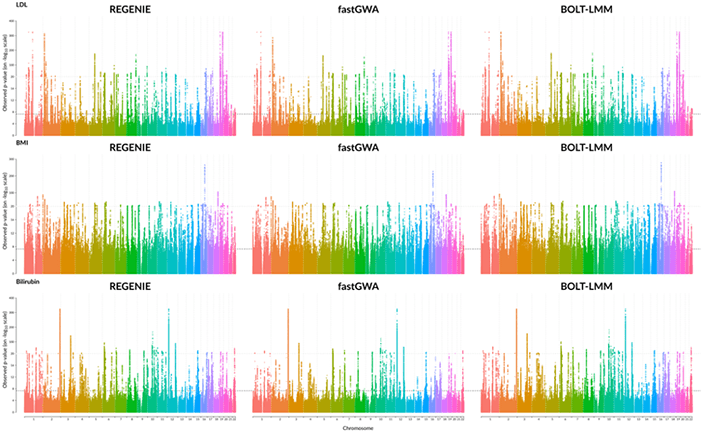
This whole genome regression tool has a number of virtues. First, it is more efficient: as implemented in the single node, open-source regenie tool, whole genome regression is orders of magnitude faster than either SAIGE, Bolt-LMM, or fastGWA, while producing equivalent results (Figure 1). Second, it is straightforward to parallelize: in the next section, we describe how we implemented whole genome regression using Apache Spark in the open-source Project Glow.

Comparison of GWAS results for three quantitative phenotypes from the UK Biobank project, produced by REGENIE/GloWGR, BOLT-LMM, and fastGWA.

Figure 1: Comparison of GWAS results for three quantitative phenotypes from the UK Biobank project, produced by REGENIE/GloWGR, BOLT-LMM, and fastGWA.

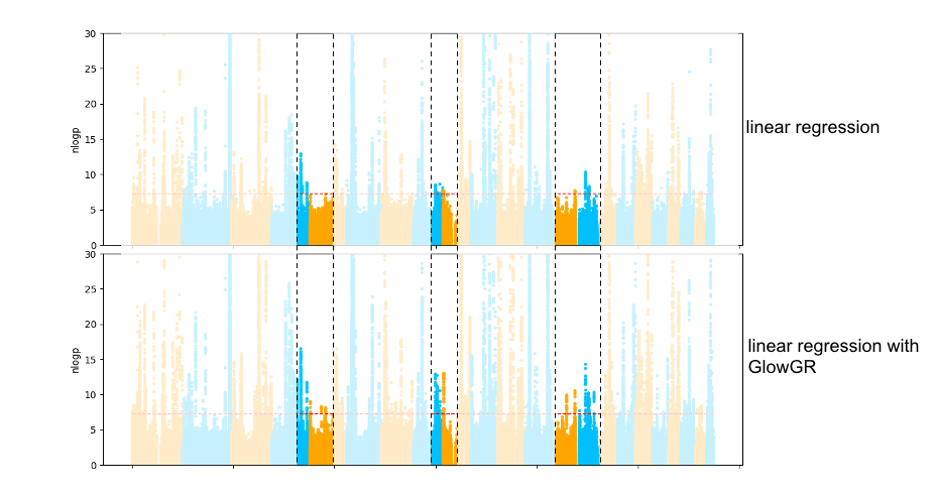
In addition to performance considerations, the whole genome regression approach produces covariates that are compatible with standard GWAS methods, and which eliminate spurious associations caused by population structure that are seen with traditional approaches. The Manhattan plots in figure 2 below compare the results of a traditional linear regression GWAS using standard covariates, to a linear regression GWAS using the covariates generated by WGR. This flexibility of GlowGR is another tremendous advantage over existing GWAS tools, and will allow for a wide variety of exciting extensions to the association testing framework that is already available in Glow.

Example plots demonstrating the gains provided by GlowGR over the GWAS linear regressions.

Figure 2: Comparison of GWAS results of the quantitative phenotype bilirubin from the UK Biobank project, evaluated using standard linear regression and linear regression with GlowGR. The heightened peaks in the highlighted regions show the increase in power to detect subtler associations that is gained with GlowGR.

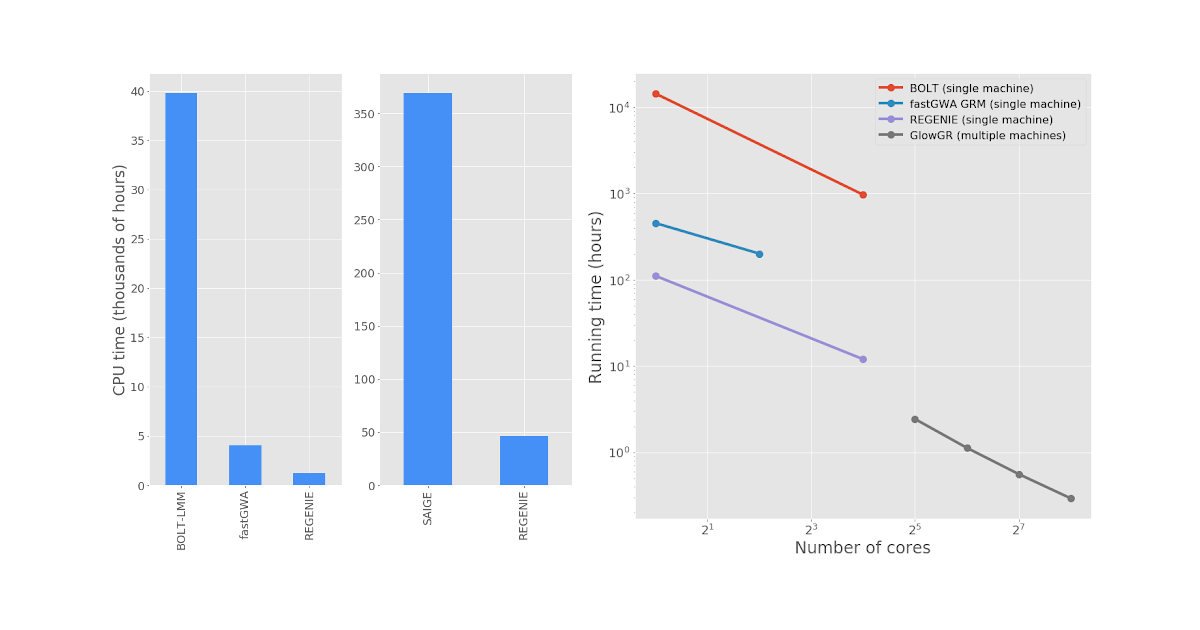
Figure 3 shows performance comparisons between GlowGR, REGENIE, BoltLMM, and fastGWA. We benchmarked the whole genome regression test implemented in Glow against the C++ implementation available in the single-node regenie tool to validate the accuracy of the method. We found that the two approaches achieve statistically identical results. We also found that the Apache Spark™ based implementation in Glow scales linearly with the number of nodes used.

Sample visualization benchmarking the whole genome regression test implemented in Glow against the C++ implementation available in the single-node regenie tool, fastGWA, and BOLT-LMM

Figure 3: Left: end-to-end GWAS runtime comparison for 0 quantitative traits from the UK Biobank project. Right: Run time comparison to fit WGR models against 50 quantitative phenotypes from the UK Biobank project. GlowGR scales well with cluster size, allowing for modeling of dozens of phenotypes in minutes without costing additional CPU efficiency. The exact list of phenotypes and computation environment details can be found here.

Scaling Whole Genome Regression within Project Glow

Performing WGR analysis with GlowGR has 5 steps:

  • Dividing the genotype matrix into contiguous blocks of SNPs (~1000 SNPs per block, referred to as loci)
  • Fitting multiple ridge models (~10) within each locus
  • Using the resulting ridge models to reduce the locus from a matrix of 1,000 features to 10 features (each feature is the prediction of one of the ridge models)
  • Pooling the resulting features of all loci into a new reduced feature matrix X (N individuals by L loci x J ridge models per locus)
  • Fitting a final model from X for the genome-wide contribution to phenotype Y.

Glow provides the easy-to-use abstractions shown in figure 4 for transforming large genotype matrices into the blocked matrix (below, left) and then fitting the whole genome regression model (below, right). These can be applied to data loaded in any of the genotype file formats that Glow understands, including VCF, Plink, and BGEN formats, as well as genotype data stored in Apache Spark™ native file formats like Delta Lake.

Creating a matrix grouped by locus and fitting mixed ridge regression models using GlowGR.

Figure 4: Creating a matrix grouped by locus and fitting mixed ridge regression models using GlowGR

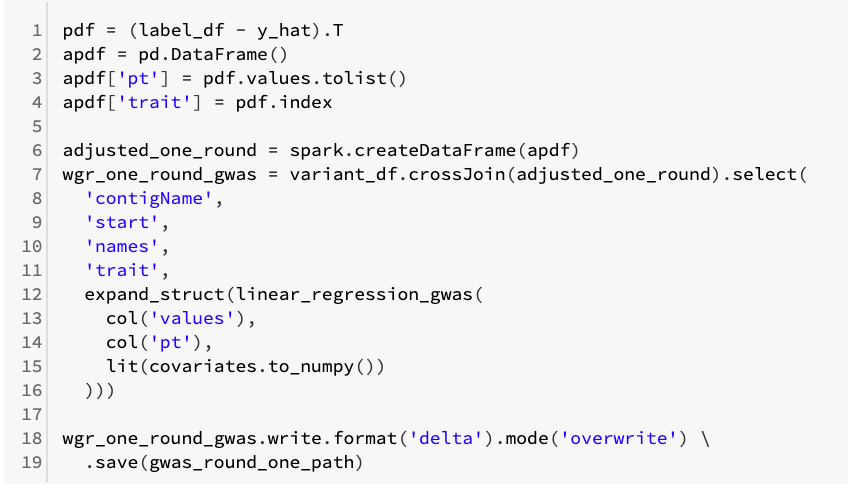
Glow provides an implementation of the WGR method for quantitative traits, and a binary trait variant is in progress. The covariate-adjusted phenotype created by GlowGR can be written out as an Apache Parquet™ or Delta Lake dataset, which can easily be loaded by and analyzed within Apache Spark, pandas, and other tools. Ultimately, using the covariates computed with WGR in a genome-wide association study is as simple as running the command shown in Figure 5, below. This command is run by Apache Spark™, in parallel, across all of the genetic markers under test.

 Updating phenotypes with the WGR results and running a GWAS using the built-in association test methods from Glow

Figure 5: Updating phenotypes with the WGR results and running a GWAS using the built-in association test methods from Glow

Join us and try whole genome regression in Glow!

Whole genome regression is available in Glow, which is an open source project hosted on Github, with an Apache 2 license. You can get started with this notebook that shows how to use GloWGR, by reading the preprint, by reading our project docs, or you can create a fork of the repository to start contributing code today. Glow is installed in the Databricks Genomics Runtime (Azure | AWS and you can start a preview today.

--

Try Databricks for free. Get started today.

The post Introducing GlowGR: An industrial-scale, ultra-fast and sensitive method for genetic association studies appeared first on Databricks.

Isro to move satellites, rockets to NSIL; boost for private sector in space

India’s space agency will move all its operational satellites, rockets and applications to its commercial arm, New Space India Ltd.

In-SPACE will be the new space regulator; Navigation bill on cards: K Sivan

In-Space will have members from academia, government, as well as industry representatives on its board and, will be under the Space Commission.

Isro forms body to hand-hold private players

New Space India Ltd, the commercial arm of Isro, will engage with startups and private companies for new applications and use the space infrastructure to build them.

Wednesday, 24 June 2020

Welcoming Redash to Databricks

This morning at Spark and AI Summit, we announced that Databricks has acquired Redash, the company behind the popular open source project of the same name. With this acquisition, Redash joins Apache Spark, Delta Lake, and MLflow to create a larger and more thriving open source system to give data teams best-in-class tools. I would like to take this opportunity to send a warm public welcome to the Redash team and the open source community, and share with you our thinking behind the acquisition.
 
Databricks welcomes Redash
As part of the announcement, we also shared our plan for a hosted version of Redash that will be fully integrated into the Databricks platform to create a rich visualization and dashboarding experience. The integrated experience is currently available in private preview, and you can sign up for the private preview waitlist to be the first to try it out.

What is Redash?

Redash is a collaborative visualization and dashboarding platform designed to enable anyone, regardless of their level of technical sophistication, to share insights within and across teams. SQL users leverage Redash to explore, query, visualize, and share data from any data sources. Their work in turn enables anybody in their organization to use the data. Every day, millions of users at thousands of organizations around the world use Redash to develop insights and make data-driven decisions.

Redash includes the following features:

  1. Query editor: Quickly compose SQL and NoSQL queries with a schema browser and auto-complete.
  2. Visualization and dashboards: Create beautiful visualizations with drag and drop, and combine them into a single dashboard.
  3. Sharing: Collaborate easily by sharing visualizations and their associated queries, enabling peer review of reports and queries.
  4. Schedule refreshes: Automatically update your charts and dashboards at regular intervals you define.
  5. Alerts: Define conditions and be alerted instantly when your data changes.
  6. REST API: Everything that can be done in the UI is also available through REST API.
  7. Broad support for data sources: Extensible data source API with native support for a long list of common SQL, NoSQL databases and platforms.

Easily run SQL queries against Delta Lake or any other data sources

Redash features a  Query editor, which allows you to easily run SQL queries against Delta Lake any other data sources.

Quickly turn results into visualizations

Use Redash to quickly turn results into visualizations.

Share live dashboards with collaborators

Use Redash to build dashboards and share them live with collaborators.

Redash and Databricks

We first heard about Redash a few years ago through some of our early customers. As time progressed, more and more of them asked us to improve the integration between Databricks and Redash. Earlier this year, we invited Arik Fraimovich, Redash’s founder and CEO, to visit Databricks to discuss how we can collaborate and make data easier to consume.

Within the first hour of meeting Arik, it became very obvious to us that the two companies have so much in common. Our acquisition of Redash was driven not only by the great community and product they’ve developed, but also the same core values we share. Both our organizations have sought to make it easy for data practitioners to collaborate around data, and democratize its access for all teams. Most importantly though, has been the alignment of our cultures to help data teams solve the world’s toughest problems with open technologies.

We’re excited to welcome Arik and the Redash team to Databricks, and to further develop Redash together and deliver a seamless and more powerful experience for our customers and the broader open source communities.

Manage, use, and now consume data with a single platform

The new integrated Redash service gives SQL analysts a familiar home in Databricks, and gives data scientists and data engineers a place to easily query and visualize data in Delta Lakes and other data sources.

It seamlessly integrates with the existing Databricks platform: this service will be available in all data centers Databricks operate in; identity management and data governance are unified without additional configuration; SQL endpoints are automatically populated in Redash; catalogs and metadata are shared by two products.

And most importantly, for customers who are already using the two products: shift+enter (the keyboard shortcut to execute a query in Databricks) will also now function the same way in Redash! 🙂

Creating an open, unified platform for all data teams

Our vision at Databricks has been to deliver a unified data analytics platform that can help every data team throughout a company solve the world’s toughest problems — including data analysts, data engineers, data scientists, and machine learning engineers. By giving each team the tools they need for their own work, while also having a shared platform where they can collaborate, every data team can be successful together. This ultimately helps to deliver on the promise of the lakehouse data management paradigm, by combining the best capabilities of data lakes and data warehouses together, in a unified architecture where every team can work together on the same complete and authoritative source of data.

Again, we’re excited to be bringing this new data visualization and dashboarding experience to our customers. The integrated Redash experience is currently available in private preview, and you can sign up for the private preview waitlist to be the first to try it out.

Read the Redash team’s blog post on redash.io

--

Try Databricks for free. Get started today.

The post Welcoming Redash to Databricks appeared first on Databricks.

Introducing Koalas 1.0

Koalas was first introduced last year to provide data scientists using pandas with a way to scale their existing big data workloads by running them on Apache SparkTM without significantly modifying their code. Today at Spark + AI Summit 2020, we announced the release of Koalas 1.0. It now implements the most commonly used pandas APIs, with 80% coverage of all the pandas APIs. In addition, Koalas supports Apache Spark 3.0, Python 3.8, Spark accessor, new type hints, and better in-place operations. This blog post covers the notable new features of this 1.0 release, ongoing development, and current status.

If you are new to Koalas and would like to learn more about how to use it, please read the launch blog post, Koalas: Easy Transition from pandas to Apache Spark. 

Rapid growth and development

The open-source Koalas project has evolved considerably. At launch, the pandas API coverage in Koalas was around 10%–20%. With heavy development from the community over many, frequent releases, the pandas API coverage ramped up very quickly and is now close to 80% in Koalas 1.0.

Increase in API coverage as Koalas development progressed from 0.1.0 to the current 1.0.0 release.

In addition, the number of Koalas users has increased rapidly since the initial announcement, comprising one-fifth of PySpark downloads, roughly suggesting that 20% of PySpark users use Koalas.
 
Koalas’ use and adoption have grown rapidly since its April 2019 release, with it now comprising 20% of all PySpark downloads.

Better pandas API coverage

Koalas implements almost all widely used APIs and features in pandas, such as plotting, grouping, windowing, I/O, and transformation.

In addition, Koalas APIs such as transform_batch and apply_batch can directly leverage pandas APIs, enabling almost all pandas workloads to be converted into Koalas workloads with minimal changes in Koalas 1.0.0.

Apache Spark 3.0, Python 3.8 and pandas 1.0

Koalas 1.0.0 supports Apache Spark 3.0. Koalas users will be able to switch their Spark version with near-zero changes. Apache Spark has more than 3,400 fixes in Spark 3.0, and Koalas shares the fixes in many components. Please see the blog, Introducing Apache Spark 3.0.

With Apache Spark 3.0, Koalas supports the latest Python 3.8 version that has many significant improvements, which you can see in the Python 3.8.0 release notes. Koalas exposes many APIs similar to pandas in order to execute native Python code against a DataFrame, which would benefit from the Python 3.8 support. In addition, Koalas aggressively leverages the Python type hints that are under heavy development in Python. Some type hinting features in Koalas will likely only be allowed with newer Python versions.

One of the goals in Koalas 1.0.0 is to track the latest pandas releases and cover most of the APIs in pandas 1.0. API coverage has been measured and improved in addition to keeping up to date with API changes and deprecation. Koalas also supports the latest pandas version as a Koalas dependency, so users of the latest pandas version can easily jump into Koalas.

Spark accessor

Spark accessor was introduced from Koalas 1.0.0 in order for Koalas users to leverage existing PySpark APIs more easily. For example, you can apply the PySpark functions as below:


import databricks.koalas as ks
import pyspark.sql.functions as F

kss = ks.Series([1, 2, 3, 4])
kss.spark.apply(lambda s: F.collect_list(s))

You can even convert a Koalas series to a PySpark column and use it with Series.spark.transform.


from databricks import koalas as ks

df = ks.DataFrame({"a": [1, 2, 3], "b": [4, 5, 6]})
df.a.spark.transform(lambda c: c + df.b.spark.column)    

PySpark features such as caching the DataFrame are also available under Spark accessor:


from databricks import koalas as ks

df = ks.DataFrame([(.2, .3), (.0, .6), (.6, .0), (.2, .1)])
df = df.transform(lambda x: x + 1) # transform Koalas DataFrame

with df.spark.cache() as cached_df:
    # Transformed Koalas DataFrame is cached,
    # and it only requires to transform once even
    # when you trigger multiple executions.
    print(cached_df.count())
    print(cached_df.to_pandas())

Faster performance

Many Koalas APIs depend on pandas UDFs under the hood. New pandas UDFs are introduced in Apache Spark 3.0 that Koalas internally uses to speed up performance, such as in DataFrame.apply(func) and DataFrame.apply_batch(func).

Koalas 1.0.0 achieves significant performance gains over previous versions, evidenced by the 20%–25% faster performance demonstrated by Koalas 1.0.0 with Spark 3.0.0.

In Koalas 1.0.0 with Spark 3.0.0, we’ve seen 20%–25% faster performance in benchmarks.

Better type hint support

Most of Koalas APIs that execute Python native functions actually take and output pandas instances. Previously, it was necessary to use Koalas instances for the return type hints, which look slightly awkward.


def pandas_div(pdf) -> ks.DataFrame[float, float]:
    # pdf is actually a pandas DataFrame.
    return pdf[['B', 'C']] / pdf[['B', 'C']]

df = ks.DataFrame({'A': ['a', 'a', 'b'], 'B': [1, 2, 3], 'C': [4, 6, 5]})
df.groupby('A').apply(pandas_div)

In Koalas 1.0.0 with Python 3.7 and later, you can also use pandas instances in the return type:


def pandas_div(pdf) -> pd.DataFrame[float, float]:
    return pdf[['B', 'C']] / pdf[['B', 'C']]

In addition, a new type hinting has been experimentally introduced in order to allow users to specify column names in the type hints:


def pandas_div(pdf) -> pd.DataFrame['B': float, 'C': float]:
    return pdf[['B', 'C']] / pdf[['B', 'C']]

Users can also experimentally use pandas dtype instances and column indexes for the return type hint:


def pandas_div(pdf) -> pd.DataFrame[new_pdf.dtypes]:
    return pdf[['B', 'C']] / pdf[['B', 'C']]

def pandas_div(pdf) -> pd.DataFrame[zip(new_pdf.columns, new_pdf.dtypes)]:
    return pdf[['B', 'C']] / pdf[['B', 'C']]

Broader plotting support

The API coverage in Koalas’ plotting capabilities has reached 90% in Koalas 1.0.0. Visualization can now easily be done in Koalas, the same way it is done in pandas. For example, the same API call used in pandas to draw area charts can also be used against a Koalas DataFrame.


kdf = ks.DataFrame({
    'sales': [3, 2, 3, 9, 10, 6, 3],
    'signups': [5, 5, 6, 12, 14, 13, 9],
    'visits': [20, 42, 28, 62, 81, 50, 90],
}, index=pd.date_range(start='2019/08/15', end='2020/03/09', freq='M'))
kdf.plot.area()

The example draws an area chart and shows the trend in the number of sales, sign-ups, and visits over time.
Example area chart, demonstrating Koalas 1.0.0’s increased API coverage and plotting capabilities.

Wider support of in-place update

In Koalas 1.0.0, in-place updates in Series are applied into the DataFrame naturally as if the DataFrame is fully mutable. Previously, several cases of the in-place updates in Series were not reflected in the DataFrame.

For example, the in-place updates in Series.fillna updates its DataFrame as well.


kdf = ks.DataFrame({"x": [np.nan, 2, 3, 4, np.nan, 6]})
kser = kdf.x
kser.fillna(0, inplace=True)

In addition, now it is possible to use the accessors to update the Series and reflect the changes into the DataFrame as below.


kdf = ks.DataFrame({"x": [np.nan, 2, 3, 4, np.nan, 6]})
kser = kdf.x
kser.loc[2] = 30

kdf = ks.DataFrame({"x": [np.nan, 2, 3, 4, np.nan, 6]})
kser = kdf.x
kdf.loc[2, "x"] = 30

Better support of missing values, NaN and NA

There are several subtle differences in handling missing data between PySpark and pandas. For example, missing data is often represented as None in PySpark but NaN in Pandas. In addition, pandas has introduced new experimental NAvalues, which are currently not supported very well in Koalas.

Most other cases are now fixed, and Koalas is under heavy development to incrementally address this issue. For example, Series.fillna now handles NaN properly in Koalas 1.0.0.

Get started with Koalas 1.0

There are many ways to install Koalas, such as with package managers like pip or conda. The instructions are available in the Koalas installation guide. For Databricks Runtime users, you can follow these steps to install a library on Databricks.

Please also refer to the Getting Started section in the Koalas documentation, which contains many useful resources.

If you have been holding off on trying Koalas, now is the time. Koalas brings a more mature implementation of pandas that’s designed to help you scale your work on Spark. Large data sets should never be a blocker to data science projects, and Koalas helps make it easy to get started.

--

Try Databricks for free. Get started today.

The post Introducing Koalas 1.0 appeared first on Databricks.

Introducing Delta Engine

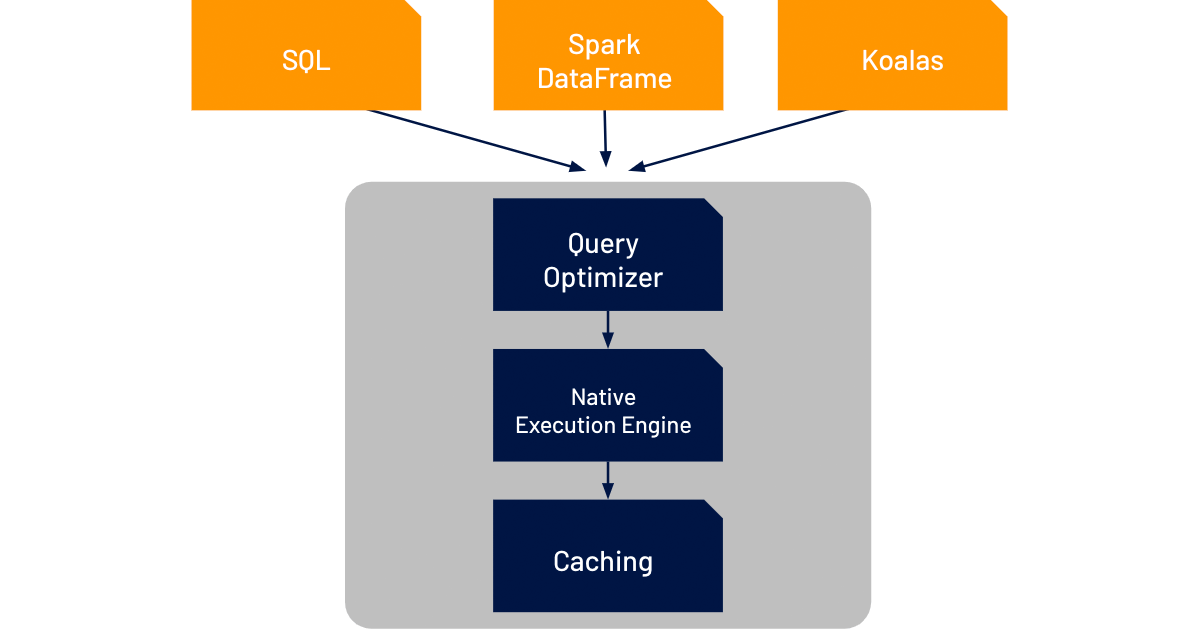
Today, we announced Delta Engine, which ties together a 100% Apache Spark-compatible vectorized query engine to take advantage of modern CPU architecture with optimizations to Spark 3.0’s query optimizer and caching capabilities that were launched as part of Databricks Runtime 7.0. Together, these features significantly accelerate query performance on data lakes, especially those enabled by Delta Lake, to make it easier for customers to adopt and scale a lakehouse architecture.

Scaling Execution Performance

One of the big hardware trends over the last several years is that CPU clock speeds have plateaued. The reasons are outside the scope of this blog, but the takeaway is that we have to find new ways to process data faster beyond raw compute power. One of the most impactful methods has been to improve the amount of data that can be processed in parallel. However, data processing engines need to be specifically architected to take advantage of this parallelism.

In addition, data teams are being given less and less time to properly model data as the pace of business increases. Poorer modeling in the interest of better business agility drives poorer query performance. Naturally, this is not a desired state, and organizations want to find ways to maximize both agility and performance.

Announcing Delta Engine for high performance query execution

Delta Engine accelerates the performance of Delta Lake for SQL and data frame workloads through three components: an improved query optimizer, a caching layer that sits between the execution layer and the cloud object storage, and a native vectorized execution engine that’s written in C++.

Delta Engine brings increased performance to all your data workloads through several components

The improved query optimizer extends the functionality already in Spark 3.0 (cost-based optimizer, adaptive query execution, and dynamic runtime filters) with more advanced statistics to deliver up to 18x increased performance in star schema workloads.

Delta Engine’s caching layer automatically chooses which input data to cache for the user, transcoding it along the way in a more CPU-efficient format to better leverage the increased storage speeds of NVMe SSDs. This delivers up to 5x faster scan performance for virtually all workloads.

However, the biggest innovation in Delta Engine to tackle the challenges facing data teams today is the native execution engine, which we call Photon. (We know. It’s in an engine within the engine…) This completely rewritten execution engine for Databricks has been built to maximize the performance from the new changes in modern cloud hardware. It brings performance improvements to all workload types, while remaining fully compatible with open Spark APIs.

In the near future, we’ll dive under the hood of Photon in another blog to show you how it works and, most importantly, how it performs.

Getting started with Delta Engine

By linking these three components together, we think it will be easier for customers to understand how improvements in multiple places within the Databricks code aggregate into significantly faster performance for analytics workloads on data lakes. The improved query optimizer and caching improvements are available today, and we’ll be making Photon available to increasingly more customers throughout the rest of the year.

We’re excited with the value that Delta Engine delivers to our customers. While the time and cost savings are already valuable, its role in the lakehouse pattern supports new advances in how data teams design their data architectures for increased unification and simplicity.

--

Try Databricks for free. Get started today.

The post Introducing Delta Engine appeared first on Databricks.

Marketing analytics and why is it important?

A topic of growing importance, Marketing analytics, plays a crucial role in identifying business opportunities and improving operational excellence. At a time, when the value and power of data is tremendous, marketing analytics is important for marketers, more than ever before, to overcome their challenges and benefit from big data. As a matter of fact, the global marketing analytics market is expected to reach $5.52 billion by 2025 (Verified Market Research). What is marketing analytics? Marketing analytics is the practice of measuring, managing, and analysing the marketing efforts from various data sources like social media, emails, events, websites, blogs, etc. Marketing analytics is crucial as it provides a holistic view of the performance of the marketing activities of an organization. Why is it important? According to Forbes, companies that don’t make data-driven decisions in marketing and sales are losing a 15-20% increase in marketing ROI. Data and marketing analytics can empower businesses to make better decisions. Following are the reasons that underline why marketing analytics is important in the big data world: To learn what has happened: Using marketing analytics, businesses can glean insights on the performance of previous strategies and study them to understand why results have shaped ...


Read More on Datafloq

Tuesday, 23 June 2020

Key sessions for Microsoft Azure customers at Spark + AI Summit

At Databricks, we are extremely excited to have Microsoft as a Diamond sponsor of the first virtual Spark + AI Summit. Microsoft and Azure Databricks customers are coming together at Summit. Rohan Kumar, Corporate Vice President of Azure Data, will deliver a keynote on Thursday morning. Additional Microsoft speakers and Azure Databricks practitioners will present a wide variety of topics in breakout sessions as well.

The first-ever virtual Spark + AI Summit is this week, the premier event for data teams — data scientists, engineers and analysts — who will tune in from all over the world to share best practices, discover new technologies, network and learn. We are excited to have Microsoft as a Diamond sponsor, bringing Microsoft and Azure Databricks customers together for a lineup of great keynotes and sessions.
 
Key Sessions for Azure customers featured at the Spark + AI 2020 Summit
Rohan Kumar, Corporate Vice President of Azure Data, returns as a keynote speaker for the third year in a row, along with presenters from a number of Azure Databricks customers including Starbucks, Credit Suisse, CVS, ExxonMobil, Mars, Zurich North America and Atrium Health. Below are some of the top sessions to add to your agenda:

KEYNOTE
How Starbucks is achieving its ‘Enterprise Data Mission’ to enable data and ML at scale and provide world-class customer experiences
Starbucks During the WEDNESDAY MORNING KEYNOTE, 8:30 AM – 10:30 AM (PDT)
Vishwanath Subramanian, Director of Data and Analytics Engineering, Starbucks

Starbucks makes sure that everything we do is through the lens of humanity – from our commitment to the highest quality coffee in the world, to the way we engage with our customers and communities to do business responsibly. A key aspect to ensuring those world-class customer experiences is data. This talk highlights the Enterprise Data Analytics mission at Starbucks that helps making decisions powered by data at tremendous scale. This includes everything ranging from processing data at petabyte scale with governed processes, deploying platforms at the speed-of-business and enabling ML across the enterprise. This session will detail how Starbucks has built world-class Enterprise data platforms to drive world-class customer experiences.

KEYNOTE
Responsible ML – Bringing Accountability to Data Science
Microsoft During the THURSDAY MORNING KEYNOTE, 9:00 AM – 10:30 AM (PDT)
Rohan Kumar, Corporate Vice President of Azure Data, Microsoft
Sarah Bird, AI Research and Products, Microsoft

Responsible ML is the most talked about field in AI at the moment. With the growing importance of ML, it is even more important for us to exercise ethical AI practices and ensure that the models we create live up to the highest standards of inclusiveness and transparency. Join Rohan Kumar, as he talks about how Microsoft brings cutting-edge research into the hands of customers to make them more accountable for their models and responsible in their use of AI. For the AI community, this is an open invitation to collaborate and contribute to shape the future of Responsible ML.

KEYNOTE
How Credit Suisse is Leveraging Open Source Data and AI Platforms to Drive Digital Transformation, Innovation and Growth
Credit Suisse During the THURSDAY MORNING KEYNOTE, 9:00 AM – 10:30 AM (PDT)
Anurag Sehgal, Managing Director, Credit Suisse Global Markets

Despite the increasing embrace of big data and AI, most financial services companies still experience significant challenges around data types, privacy, and scale. Credit Suisse is overcoming these obstacles by standardizing on open, cloud-based platforms, including Azure Databricks, to increase the speed and scale of operations, and the democratization of ML across the organization. Now, Credit Suisse is leading the way by successfully employing data and analytics to drive digital transformation, delivering new products to market faster, and driving business growth and operational efficiency.

Automating Federal Aviation Administration’s (FAA) System Wide Information Management ( SWIM ) Data Ingestion and Analysis
Microsoft, Databricks and U.S. DOT WEDNESDAY, 12:10 PM (PDT)

The System Wide Information Management (SWIM) Program is a National Airspace System (NAS)-wide information system that supports Next Generation Air Transportation System (NextGen) goals. SWIM facilitates the data-sharing requirements for NextGen, providing the digital data-sharing backbone of NextGen. The SWIM Cloud Distribution Service (SCDS) is a Federal Aviation Administration (FAA) cloud-based service that provides publicly available FAA SWIM content to FAA approved consumers via Solace JMS messaging. In this session we are going to showcase the work we did at USDOT-BTS on Automating the required Infrastructure, Configuration, Ingestion and Analysis of public SWIM Data Sets.

How Azure and Databricks Enabled a Personalized Experience for Customers and Patients at CVS Health

CVS Health WEDNESDAY, 2:30 PM (PDT)

CVS Health delivers millions of offers to over 80 million customers and patients on a daily basis to improve the customer experience and put patients on a path to better health. In 2018, CVS Health embarked on a journey to personalize the customer and patient experience through machine learning on a Microsoft Azure Databricks platform. This presentation will discuss how the Microsoft Azure Databricks environment enabled rapid in-market deployment of the first machine learning model within six months on billions of transactions using Apache Spark. It will also discuss several use cases for how this has driven and delivered immediate value for the business, including test and learn experimentation for how to best personalize content to customers. The presentation will also cover lessons learned on the journey in the evolving industries of cloud computing and machine learning in a dynamic healthcare environment.

Productionizing Machine Learning Pipelines with Databricks and Azure ML

ExxonMobil WEDNESDAY, 2:30 PM (PDT)

Deployment of modern machine learning applications can require a significant amount of time, resources, and experience to design and implement – thus introducing overhead for small-scale machine learning projects.

In this tutorial, we present a reproducible framework for quickly jumpstarting data science projects using Databricks and Azure Machine Learning workspaces that enables easy production-ready app deployment for data scientists in particular. Although the example presented in the session focuses on deep learning, the workflow can be extended to other traditional machine learning applications as well.

The tutorial will include sample-code with templates and recommended project organization structure and tools, along with shared key learnings from our experiences in deploying machine learning pipelines into production and distributing a repeatable framework within our organization.

Cloud and Analytics—From Platforms to an Ecosystem

Zurich North America WEDNESDAY, 3:05 PM (PDT)

Zurich North America is one of the largest providers of insurance solutions and services in the world with customers representing a wide range of industries from agriculture to construction and more than 90 percent of the Fortune 500. Data science is at the heart of Zurich’s business with a team of 70-data scientists working on everything from optimizing claims-handling processes to protecting against the next risk to revamping the suite of data and analytics for the customers.

In this presentation, we will discuss how Zurich North America implements a scalable self-service data science ecosystem built around Databricks to optimize and scale the activities in the data science project lifecycle and integrates the Azure data lake with analytical tools to streamline machine learning and predictive analytics efforts.

Building the Petcare Data Platform using Delta Lake and ‘Kyte’: Our Spark ETL Pipeline

Mars THURSDAY, 12:10 PM (PDT)

At Mars Petcare (in a division known as Kinship Data & Analytics) we are building out the Petcare Data Platform – a cloud based Data Lake solution. Leveraging Microsoft Azure, we were faced with important decisions around tools and design. We chose Delta Lake as a storage layer to build out our platform and bring insight to the science community across Mars Petcare. We leveraged Spark and Databricks to build ‘Kyte’, a bespoke pipeline tool which has massively accelerated our ability to ingest, cleanse and process new data sources from across our large and complicated organisation. Building on this we have started to use Delta Lake for our ETL configurations and have built a bespoke UI for monitoring and scheduling our Spark pipelines. Find out more about why we chose a Spark-heavy ETL design and a Delta Lake driven platform, and why we are committing to Spark and Delta Lake as the core of our Platform to support our mission: Making a Better World for Pets!

Leveraging Apache Spark for Large Scale Deep Learning Data Preparation and Inference

Microsoft THURSDAY, 3:05 PM (PDT)

To scale out deep learning training, a popular approach is to use Distributed Deep Learning Frameworks to parallelize processing and computation across multiple GPUs/CPUs. Distributed Deep Learning Frameworks work well when input training data elements are independent, allowing parallel processing to start immediately. However preprocessing and featurization steps, crucial to Deep Learning development, might involve complex business logic with computations across multiple data elements that the standard Distributed Frameworks cannot handle efficiently. These preprocessing and featurization steps are where Spark can shine, especially with the upcoming support in version 3.0 for binary data formats commonly found in Deep Learning applications. The first part of this talk will cover how Pandas UDFs together with Spark’s support for binary data and Tensorflow’s TFRecord formats can be used to efficiently speed up Deep Learning’s preprocessing and featurization steps. For the second part, the focus will be techniques to efficiently perform batch scoring on large data volume with Deep Learning models where real-time scoring methods do not suffice. Upcoming Spark 3.0’s new Pandas UDFs’ features helpful for Deep Learning inference will be covered.

All In – Migrating a Genomics Pipeline from BASH/Hive to Spark (Azure Databricks) – A Real World Case Study

Atrium Health THURSDAY, 3:40 PM (PDT)

Molecular profiling provides precise and individualized cancer treatment options and decisions points. By assessing DNA, RNA, proteins, etc. clinical teams are able to understand the biology of the disease and provide specific treatment plans for oncology patients. An integrated database with demographic, clinical and molecular data was created to summarize individualized genomic reports. Oncologist are able to review the reports and receive assistance interpreting results and potential treatments plans. The architecture to support the current environment includes Wasbi storage, bash/corn/PowerShell, Hive and Office 365 (SharePoint). Via an automated process personalized genomics data is delivered to physicians. As we supported this environment we noted unique challenges and brainstormed a plan for the next generation of the critical business pipeline line.

After researching different platforms we felt that Databricks would allow us to cut cost, standardize our workflow and easily scale for a large organization. This presentation will detail some of the challenges with the previous environment, why we chose Apache Spark and Databricks, migration plans and lessons learned, new technology used after the migration (Data Factory/Databricks, PowerApp/Power Automate/Logic App, Power BI), and how the business has been impacted post migration. Migration to Databricks was critical for our organization due to the time sensitivity of the data and our organizational commitment to personalized treatment for oncology patients.

SparkCruise: Automatic Computation Reuse in Apache Spark

Microsoft FRIDAY, 10:35 AM (PDT)

Queries in production workloads and interactive data analytics are often overlapping, i.e., multiple queries share parts of the computation. These redundancies increase the processing time and total cost for the user. To reuse computations, many big data processing systems support materialized views. However, it is challenging to manually select common computations in the workload given the size and evolving nature of the query workloads. In this talk, we will present Spark Cruise, an automatic computation reuse system developed for Spark. It can automatically detect overlapping computations in the past query workload and enable automatic materialization and reuse in future Spark SQL queries.

SparkCruise requires no active involvement from the user as the materialization and reuse is applied automatically in the background as part of query processing. We can perform all these steps without changing the Spark code, thus demonstrating the extensibility of Spark SQL engine. Spark Cruise has shown to improve the overall runtime of TPC-DS queries by 30%. Our talk will be divided into three parts. First, we will explain the end-to-end system design with focus on how we added workload awareness to the Spark query engine. Then, we will demonstrate all the steps including analysis, feedback, materialization, and reuse on a live Spark cluster. Finally, we will show the workload insights notebook. This Python notebook displays the information from query plans of the workload in a flat table. This table helps the users and administrators to understand the characteristics of their workloads and the cost/benefit tradeoff of enabling SparkCruise.

Deploy and Serve Model from Azure Databricks onto Azure Machine Learning

Microsoft FRIDAY, 11:10 AM (PDT)

We demonstrate how to deploy a PySpark based Multi-class classification model trained on Azure Databricks using Azure Machine Learning (AML) onto Azure Kubernetes (AKS) and associate the model to web services. This presentation covers end-to-end development cycle; from training the model to using it in web application. Machine Learning problem formulation The current solutions to detect semantic types of tabular data mostly rely on dictionary/vocabulary, regular expressions and rule-based look up to identify the semantic types. However, these solutions are 1. Not robust to dirty and complex data and 2. Not generalized to diverse data types. We formulate this into a Machine Learning problem by training a multi-class classifier to automatically predict the semantic type for tabular data. Model Training on Azure Databricks We choose Azure Databricks to perform the featurization and model training using PySpark SQL and Machine Learning Library. To speed up the featurization process, we leverage the PySpark Functions (UDF) to register and distribute the featurization functions into UDFs. For the model training, we pick the Random Forests as the classification algorithms and optimize the model hyperparameters using PySpark MLLib. Model Deployment using Azure Machine Learning Azure Machine Learning provided the reusable and scalable capabilities to manage the lifecycle of Machine Learning models. We developed the E2E deployment pipeline on Azure Machine Learning including model preparation, computing initialization, model registration, and web service deployment. Serving as Web Service on Azure Kubernetes Azure Kubernetes provide the fast response and autoscaling capabilities serving model as web service together with the security authorization. We customized the AKS cluster with PySpark runtime to support PySpark based featurization and model scoring. Our model and scoring service are being deployed onto an AKS cluster and served as HTTPS endpoints with both key-based and token-based authentication.

We look forward to connecting with you at Spark + AI Summit!  If you have questions about Azure Databricks or Azure  service integrations, please visit the Microsoft Azure virtual booth at Spark + AI Summit.

For more information about Azure Databricks, go to www.databricks.com/azure

--

Try Databricks for free. Get started today.

The post Key sessions for Microsoft Azure customers at Spark + AI Summit appeared first on Databricks.

Key sessions for AWS customers at Spark + AI Summit

At Databricks, we are excited to have Amazon Web Services (AWS) as a sponsor of the first virtual Spark + AI Summit. Our work with AWS continues to make Databricks better integrated with other AWS services, making it easier for our customers to drive huge analytics outcomes.
 
Key sessions at the Spark + AI 2020 Summit for AWS customers
As part of Spark + AI Summit, we wanted to highlight some of the top sessions that AWS customers might be interested in. A number of customers who are running Databricks on AWS are speaking at Spark + AI Summit – from organizations such as AirBNB, CapitalOne, Lyft, Zynga and Atlassian. The sessions  below were chosen based upon their topical matter for customers using Databricks on the AWS cloud platform, demonstrating key service integrations. If you have questions about your AWS platform or service integrations, visit the AWS booth at Spark + AI Summit.

Building A Data Platform For Mission Critical Analytics
Hewlett Packard WEDNESDAY, 11:00 AM (PDT)

This session will feature a presentation by Sally Hoppe, Big Data System Architect at HP. Sally and her team have developed an amazing data platform to handle IOT information from HP printers, enabling them to derive insights into customer use and to deliver a better and more continuous service experience from HP printers. The HP platform includes integrations between Databricks and Delta Lake with AWS services such as Amazon S3 and Amazon Redshift as well as other technologies such as Apache Airflow and Apache Kafka. This session will also feature Igor Alekseev, Partner Solution Architect at AWS, and Denis Dubeau, Partner Solution Architect at Databricks.

Data Driven Decisions at Scale

Comcast WEDNESDAY, 11:35 AM (PDT)

Comcast is the largest cable and internet provider in the US, reaching more than 30 million customers, and continues to grow its presence in the EU with the acquisition of Sky. Comcast has rolled out their Flex device which allows for customers to stream content directly to their TVs without needing an additional cable subscription. Their customer data analytics program is  generating data at a rate of more than 25TBs per day with over 3PBs of data being used for consumable insights. In order for the PABS team to be able to continue to drive consumable insights on massive data sets while still being able to control the amount of data being stored, the PABS team have been using Databricks and Databricks Delta Lake on S3 to do high current low latency read/writes in order to build reliable real-time data pipelines to deliver insights and also be able to do efficient deletes in a timely manner.

Deep Learning Enabled Price Action with Databricks and AWS

WEDNESDAY, 2:30 PM (PDT)

Predicting the movements of price action instruments such as stocks, ForEx, commodities, etc., has been a demanding problem for quantitative strategists for years. Simply applying machine learning to raw price movements has proven to yield disappointing results. New tools from deep learning can substantially enhance the quality of results when applied to traditional technical indicators rather than prices including their corresponding entry and exit signals. In this session Kris Skrinak and Igor Alekseev explore the use of Databricks analysis tools combined with deep learning training accessible through Amazon’s SageMaker to enhance the quality of predictive capabilities of two technical indicators: MACD and Slow stochastics.

Saving Energy in Homes with a Unified Approach to Data and AI

Quby THURSDAY, 11:35 AM (PDT)

Quby is an Amsterdam based technology company offering solutions to empower homeowners to stay in control of their electricity, gas and water usage. Using Europe’s largest energy dataset, consisting of petabytes of IoT data, the company has developed AI-powered products that are used by hundreds of thousands of users daily to maintain a comfortable climate in their homes and reduce their environmental footprint. This session will cover how Quby leverages the full Databricks stack to quickly prototype, validate, launch and scale data science products. They will also cover how Delta Lake allows batch and streaming on the same IoT data and the impact these tools have had on the team itself.

The 2020 Census and Innovation in Surveys

US Census Bureau THURSDAY, 12:10 PM (PDT)

The U.S. Census Bureau is the leading source of quality data about the people of the United States, and its economy. The Decennial Census is the largest mobilization and operation conducted in the United States – enlisting hundreds of thousands of temporary workers – and requires years of research, planning, and development of methods and infrastructure to ensure an accurate and complete count of the U.S. population, estimated currently at 330 million.

Census Deputy Division Chief, Zack Schwartz, will provide a behind the scenes overview on how the 2020 Census is conducted with insights into technical approaches and adopting industry best practices. He will discuss the application monitoring systems built in Amazon’s GovCloud to monitor multiple clusters and thousands of application runs that were used to develop the Disclosure Avoidance System for the 2020 Census. This presentation will leave the audience with an appreciation for the magnitude of the Census and the role that technology plays, along with a vision for the future of surveys, and how attendees can do their part in ensuring that everyone is counted.

Building a Real-Time Feature Store at iFood

iFood THURSDAY, 2:30 PM (PDT)

iFood is the largest food tech company in Latin America. We serve more than 26 million orders each month from more than 150 thousand restaurants. In this talk, you will see how iFood built a real-time feature store, using Databricks and Spark Structured Streaming in order to process events streams, store them to a historical Delta Lake Table storage and a Redis low-latency access cluster, and structured their development processes in order to do it with production-grade, reliable and validated code.

Continuous Delivery of Deep Transformer-Based NLP Models Using MLflow and AWS Sagemaker for Enterprise AI Scenarios

Outreach Corporation FRIDAY, 10:00 AM (PDT)

In this presentation, Outreach will demonstrate how they use MLflow and AWS Sagemaker to productionize deep transformer-based NLP models for guided sales engagement scenarios at the leading sales engagement platform, Outreach.io.

Example of how Outreach uses MLflow and AWS Sagemaker to productionize deep transformer-based NLP models.

We are super excited about this session from a ML Ops perspective. The Outreach team will share their experiences and lessons learned in the following areas:

  1. A publishing/consuming framework to effectively manage and coordinate data, models and artifacts (e.g., vocabulary file) at different machine learning stages
  2. A new MLflow model flavor that supports deep transformer models for logging and loading the models at different stages
  3. A design pattern to decouple model logic from deployment configurations and model customizations for a production scenario using MLProject entry points: train, test, wrap, deploy.
  4. A CI/CD pipeline that provides continuous integration and delivery of models into a Sagemaker endpoint to serve the production usage

We think this session is not to be missed.

We hope you find these sessions super useful for learning more ways to integrate Databricks on your AWS platform. Please visit the AWS booth to discuss your use cases and to get an opportunity to get the perspective of AWS experts.  More information around our AWS partnership and integrations is available at www.databricks.com/aws

--

Try Databricks for free. Get started today.

The post Key sessions for AWS customers at Spark + AI Summit appeared first on Databricks.