Amazon Web Services (AWS) is currently the most widely adopted cloud service provider, with nearly a million companies using their services. With exabytes of data stored in their services, it should be no wonder that data security is a huge issue for AWS and the customers it serves.
If you are one of these customers, this article should help you understand how security is managed in AWS and teach you some best practices for ensuring that your data remains secure.
Security Responsibility in AWS
Before considering best practices for keeping your data secure in AWS, it helps to first know what you are responsible for. AWS services operate under a shared security responsibility model which states that Amazon is responsible for infrastructure and you are responsible for everything else, including access and authentication, data, operating systems, external networks, applications, and third-party integrations.
To help with this responsibility, however, Amazon does provide tools for your use, such as built-in encryption and Identity and Access Management (IAM). Some of these features are enabled by default, depending on the service you’re using, but in the end, it’s up to you to make sure that your configuration is appropriate and that you are making use of the resources ...
Read More on Datafloq
Thursday, 29 August 2019

How Marketers Can Use Big Data for Digital Marketing Success
Marketing plays a significant role in the success of any business, that offers a relationship between customer and organisation. Hence, it is very important to have strong marketing strategies to understand the market, competitors, customers and more. For that, companies need to focus on big data.
“Marketing without data is like driving with your eyes closed.“ - Dan Zarrella
Gone are the days when organisations have to be dependent on experiments. Today, big data plays an important role when it comes to marketing decisions. Insights from big data can guide businesses to better marketing & strategic decisions.
Today, companies have both - structured and unstructured data since the number of outputs has multiplied, and at this level, traditional analytics and tools won’t be of any help.
In this article, I have explained how big data can help with digital marketing success.
Understanding of Target Audience & Creating of Marketing Campaigns
“When you align your message with what people are already passionate about, you are able to make an emotional connection.” - Tim Burke, Co-Founder and CEO of Affinio
This shows the importance of the audience and their needs, but marketers need to wrap their heads about it. Ultimately, marketers are responsible to engage the users and convert ...
Read More on Datafloq
“Marketing without data is like driving with your eyes closed.“ - Dan Zarrella
Gone are the days when organisations have to be dependent on experiments. Today, big data plays an important role when it comes to marketing decisions. Insights from big data can guide businesses to better marketing & strategic decisions.
Today, companies have both - structured and unstructured data since the number of outputs has multiplied, and at this level, traditional analytics and tools won’t be of any help.
In this article, I have explained how big data can help with digital marketing success.
Understanding of Target Audience & Creating of Marketing Campaigns
“When you align your message with what people are already passionate about, you are able to make an emotional connection.” - Tim Burke, Co-Founder and CEO of Affinio
This shows the importance of the audience and their needs, but marketers need to wrap their heads about it. Ultimately, marketers are responsible to engage the users and convert ...
Read More on Datafloq
Jack Ma vs Elon Musk: Tech titans spar on future of AI
Jack Ma believes artificial intelligence poses no threat to humanity, but Elon Musk called that "famous last words"
Global retailers to gain from easier single-brand FDI rules
While the present policy mandates that a single-brand retail company that has more than 51% FDI in India has to source 30% locally of the total value of goods sold in the country, the changed norms will allow it to include exports as well.
Wednesday, 28 August 2019
Three Surprising Ways Big Data is Helping Our World
We have more information about our own lives and the world around us than ever before. But how are we using that data? And when there's so much information to keep track of, how do we choose what to study and capture the most important insights?
Big data is a phrase for technology that collects and analyzes huge amounts of data, on any topic that can be measured — like health, business, or transit. The technology sifts through this data to uncover new patterns and optimize in ways that weren't possible before.
Big data approaches are flexible and applicable to just about every field. That means that big data helps out in all the places you expect — but you may be surprised about some of the ways that big data is helping our world.
Data-Driven Health and Wellness
Clinics, hospitals and out-patient healthcare facilities produce vast amounts of medical data — enough data that big data analysis is one of the best ways to study it. Some hospital associations have even created their own big data analytics centers, hoping to develop solutions to problems like access-to-care barriers and the relationship between mental health and substance abuse.
Big data is also changing health at the ...
Read More on Datafloq
Big data is a phrase for technology that collects and analyzes huge amounts of data, on any topic that can be measured — like health, business, or transit. The technology sifts through this data to uncover new patterns and optimize in ways that weren't possible before.
Big data approaches are flexible and applicable to just about every field. That means that big data helps out in all the places you expect — but you may be surprised about some of the ways that big data is helping our world.
Data-Driven Health and Wellness
Clinics, hospitals and out-patient healthcare facilities produce vast amounts of medical data — enough data that big data analysis is one of the best ways to study it. Some hospital associations have even created their own big data analytics centers, hoping to develop solutions to problems like access-to-care barriers and the relationship between mental health and substance abuse.
Big data is also changing health at the ...
Read More on Datafloq
How Artificial Intelligence and Machine Learning Transforms Video Technology
We hear a lot in the media about Artificial Intelligence (AI) and Machine Learning (ML) and their big impact on our lives. Artificial Intelligence is the ability of machines to demonstrate intelligence. Machine learning is a subset of artificial intelligence, which has the ability to learn and improve without being programmed. With the big advances in cloud computing and cloud storage, machine learning has become a technology that can be accessible to everyone.
On the other hand, Artificial Intelligence and Machine Learning technologies have a big impact on the media itself, especially on video technology. In this article, we will see how AI technologies shape the video technology, and we'll see how AI is used in video technology.
The Video, AI, and ML Connection
Video has an important role in any website or application. According to a forecast published by Cisco, by 2021 video traffic will be 82 percent of all consumer Internet traffic. The evolution and growth of video and image lead to the development of AI applications designed for various aspects of their usage over the internet.
The big variety and quantities of video content present a challenge on websites and applications on how to choose the best content for their users. ...
Read More on Datafloq
On the other hand, Artificial Intelligence and Machine Learning technologies have a big impact on the media itself, especially on video technology. In this article, we will see how AI technologies shape the video technology, and we'll see how AI is used in video technology.
The Video, AI, and ML Connection
Video has an important role in any website or application. According to a forecast published by Cisco, by 2021 video traffic will be 82 percent of all consumer Internet traffic. The evolution and growth of video and image lead to the development of AI applications designed for various aspects of their usage over the internet.
The big variety and quantities of video content present a challenge on websites and applications on how to choose the best content for their users. ...
Read More on Datafloq
The Paradoxes in AI
Artificial intelligence is riddled with paradoxes. As if the subject is not ethically and technically complex enough, AI also proves challenging in terms of its many self-contradictions.
For a technology ruled by logic, AI presents a series of illogical conflicts. Indeed, we’re still grappling to define what AI is and what it means even as we develop and deploy it at a never-before-seen level.
Here’s a closer look at four of the most hotly discussed AI paradoxes, and what they mean for today’s artificial intelligence.
Paradox 1: Moravec’s paradox
Moravec’s paradox revolves around the ability of AI tools. It observes that ‘high-level reasoning’ takes less computation than ‘low-level sensorimotor skills’.
In other words, the tricky things like advanced mathematics and logic take less for AI to pick up. We have put effort into learning these tasks and so know how to teach them to AI.
But when it comes to ‘simple’ skills — those we learn naturally as babies and toddlers — it’s a different story. These are skills such as sight, speech, comprehension and movement. And having an AI do these things is much harder, requiring more computation and effort.
This is why we already have AI that can handle complex mathematics, yet we’re only now ...
Read More on Datafloq
For a technology ruled by logic, AI presents a series of illogical conflicts. Indeed, we’re still grappling to define what AI is and what it means even as we develop and deploy it at a never-before-seen level.
Here’s a closer look at four of the most hotly discussed AI paradoxes, and what they mean for today’s artificial intelligence.
Paradox 1: Moravec’s paradox
Moravec’s paradox revolves around the ability of AI tools. It observes that ‘high-level reasoning’ takes less computation than ‘low-level sensorimotor skills’.
In other words, the tricky things like advanced mathematics and logic take less for AI to pick up. We have put effort into learning these tasks and so know how to teach them to AI.
But when it comes to ‘simple’ skills — those we learn naturally as babies and toddlers — it’s a different story. These are skills such as sight, speech, comprehension and movement. And having an AI do these things is much harder, requiring more computation and effort.
This is why we already have AI that can handle complex mathematics, yet we’re only now ...
Read More on Datafloq
Micromax co-founder's new startup Revolt to take electric motorcycles to the masses
The RV300, which is the company’s entry-level offering, will be available at a monthly charge of Rs 2,999, while the RV400 will come with two plans – Rs 3,499 per month and Rs 3,999 per month.
Jenkins World Contributor Summit and Ask the Expert booth
Jenkins turns 15 years old! Jenkins World brings together DevOps thought leaders, IT executives, continuous delivery practitioners and the Jenkins community and ecosystem in one global event, providing attendees with the opportunity to learn, explore, network face-to-face and help shape the next evolution of Jenkins development and solutions for DevOps.
There is also the Jenkins Contributor Summit in San Francisco. The Jenkins Contributor Summit is the place where current and future contributors get together to discuss, learn and collaborate on the latest and greatest efforts within Jenkins project. The morning portion of the summit is a mix of presentations by the core contributors. The presentations highlight what each effort is about and what community members can do to help. In the afternoon breakout sessions with Birds of a Feather tables for in-depth discussion, and collaboration with sub-project contributors.
I feel very honored to have been a part of this.

Day 1
Day one started with the contributor summit. This was a chance for everyone to get together and talk about contributions and put faces to names. Most people I had only met via video chat or on gitter so I was super excited. We gathered to hear about the start of the Jenkins open source landscape.
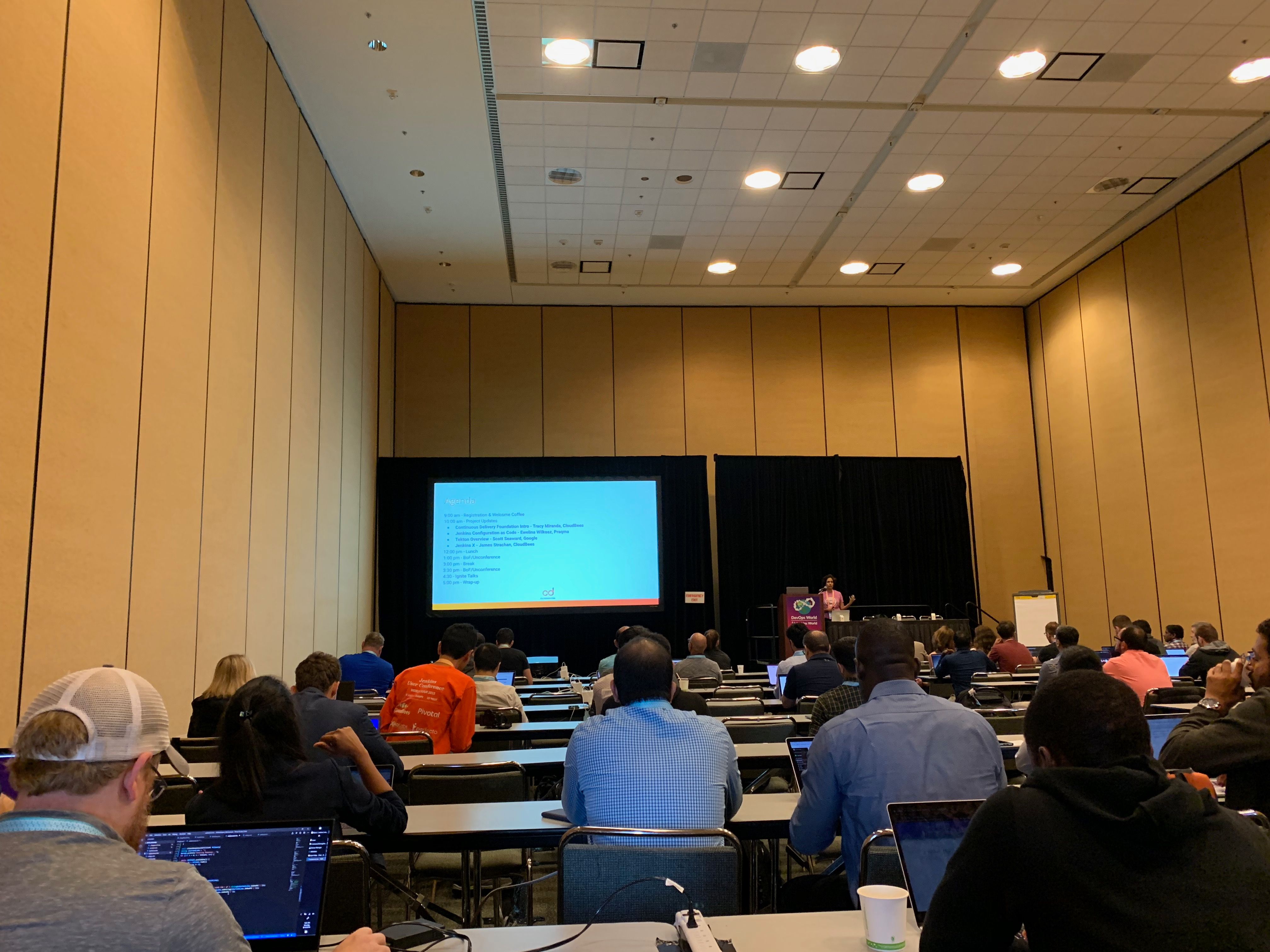
Next up was the BoF/Unconference. I was leading these sessions and I felt they went really well. We had fellow org admins Martin d’Anjou and Jeff Pearce give a talk about Google Summer of Code projects.

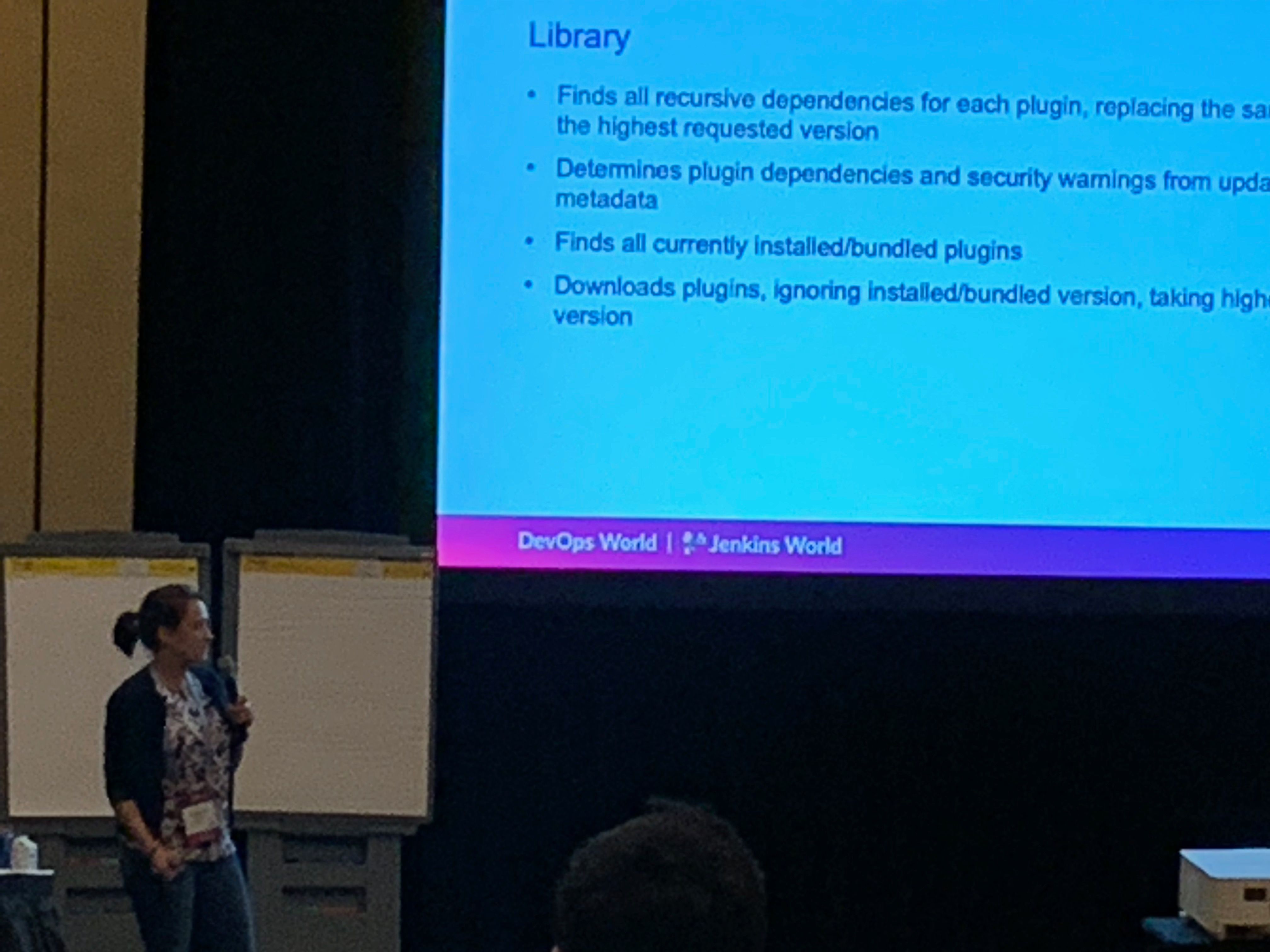
Google Summer of Code student Natasha Stopa presented her project, Plugin Installation Manager Library/CLI Tool. This is a super cool project and very well received in the community.
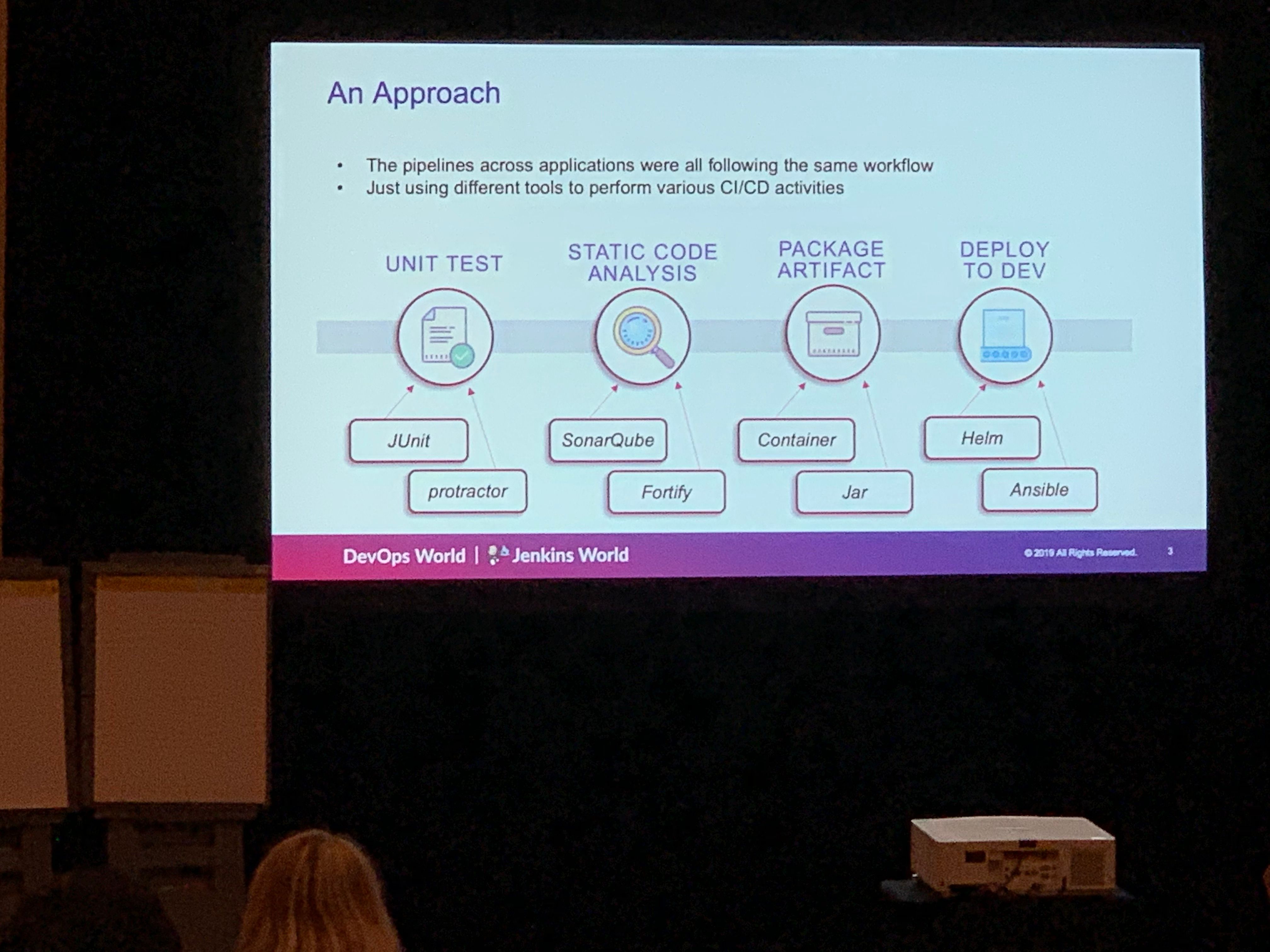
We closed out the session with a presentation from Steven Terrana from Booz Allen Hamilton and the awesome Jenkins Templating Engine. If you have not had a chance to try this, please make sure you do at https://github.com/boozallen/jenkins-templating-engine.
Main Expo Hall
Day two and onward saw me and other Jenkins org admins in the Ask the Expert booth for the Jenkins community.

This was a really cool experience and gave me a chance to hear about things the community is working on and help with issues they are facing. There were a range of questions from Jenkins X to many of the plugins I maintain such and the Jenkins Prometheus and the Sysdig Secure Scanning plugins. There were also a lot of Kubernetes questions. There is a lot of marketing data regarding the increased usage of Kubernetes but I was seriously surprised by the massive interest in Jenkins on Kubernetes. Of course there were opportunities for selfie requests.

Lunch time demos got underway and we had a busy schedule. First up was the awesome Mark Waite to talk about the Git plugin. A lot of people use git in Jenkins. Thank you so much for all that you do Mark.
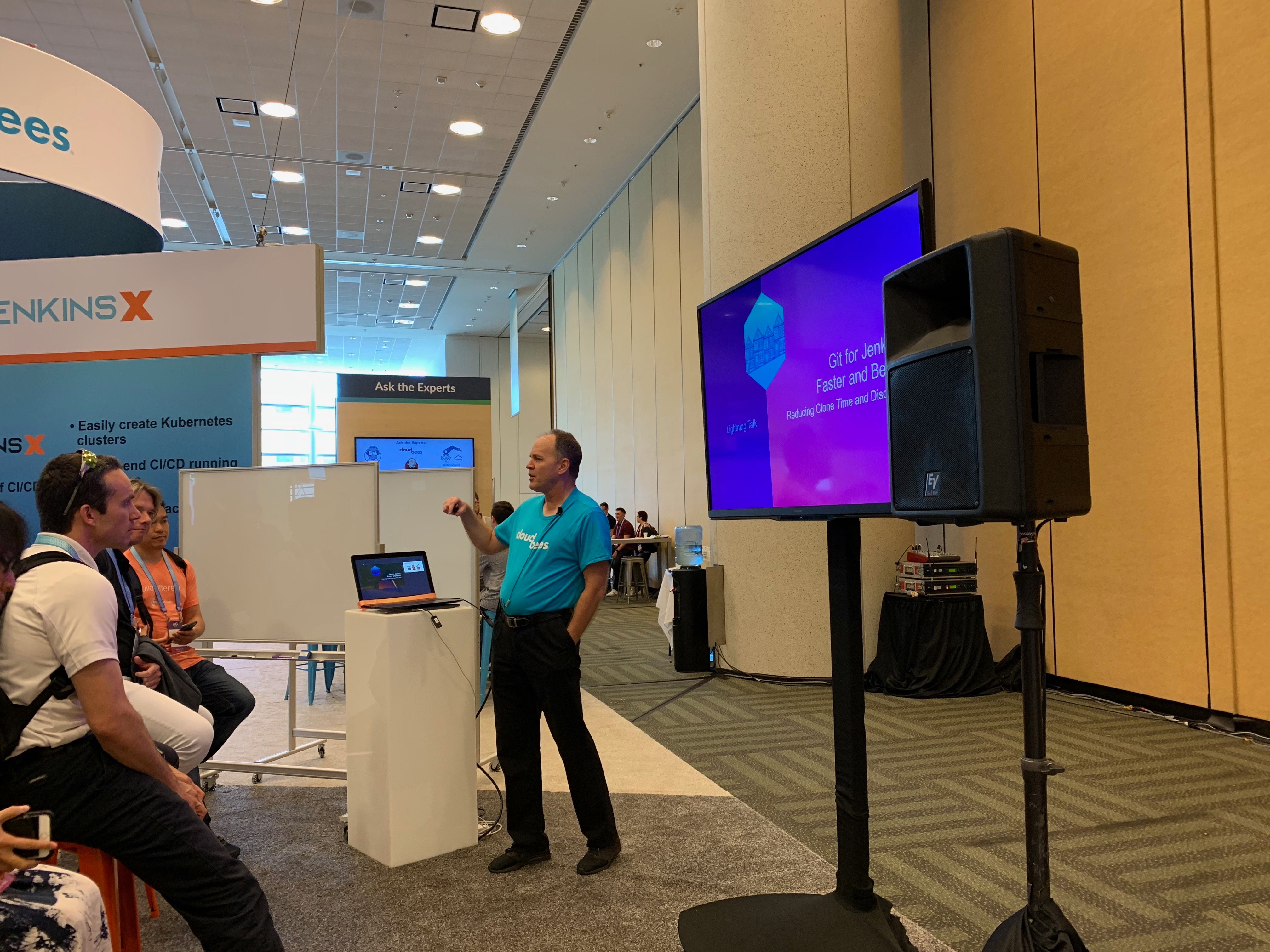
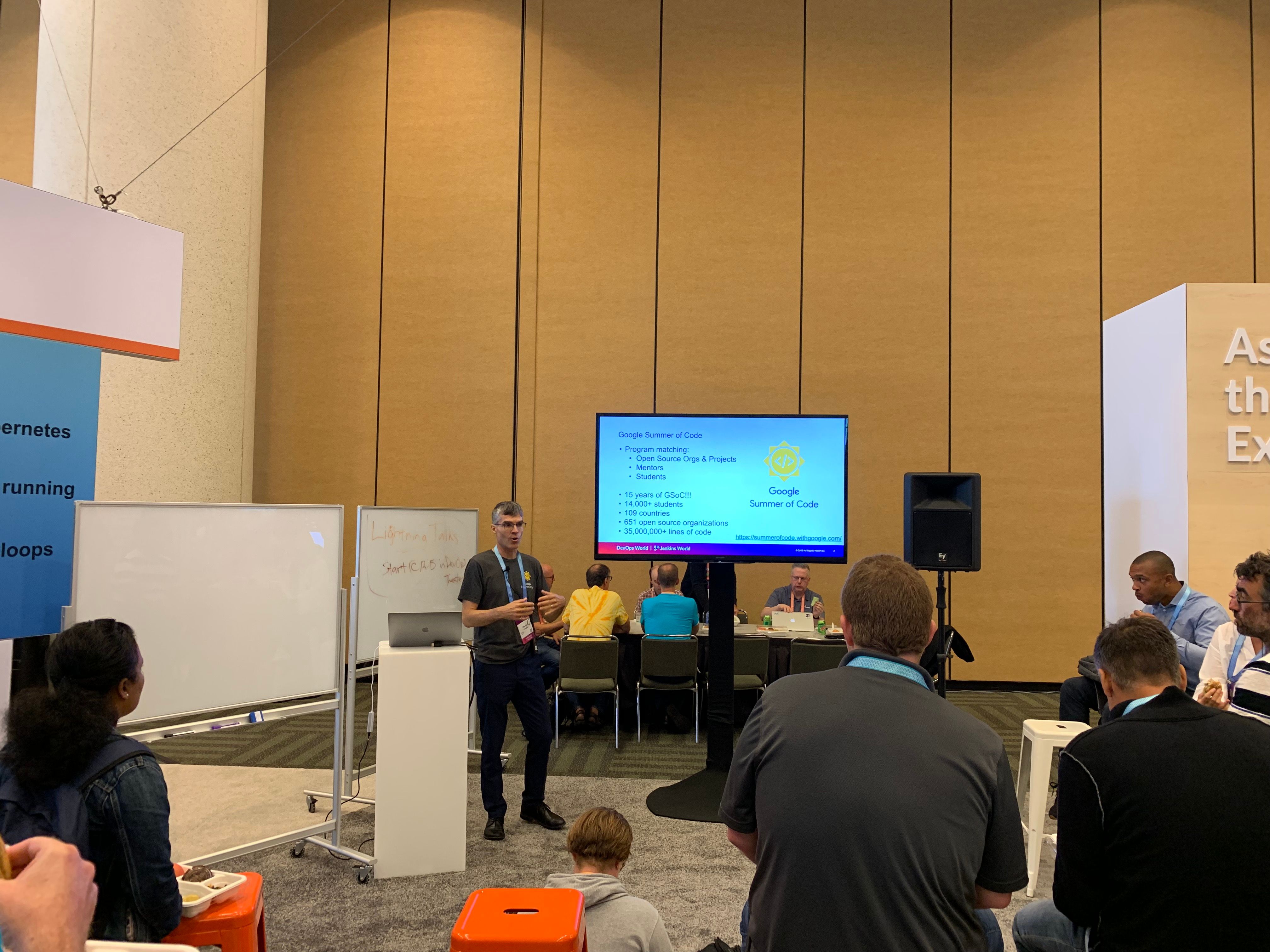
Jenkins org admin Martin d’Anjou was next on deck to talk about the Google Summer of Code. So amazing to think that the Google Summer of Code is also in its 15th year like Jenkins!
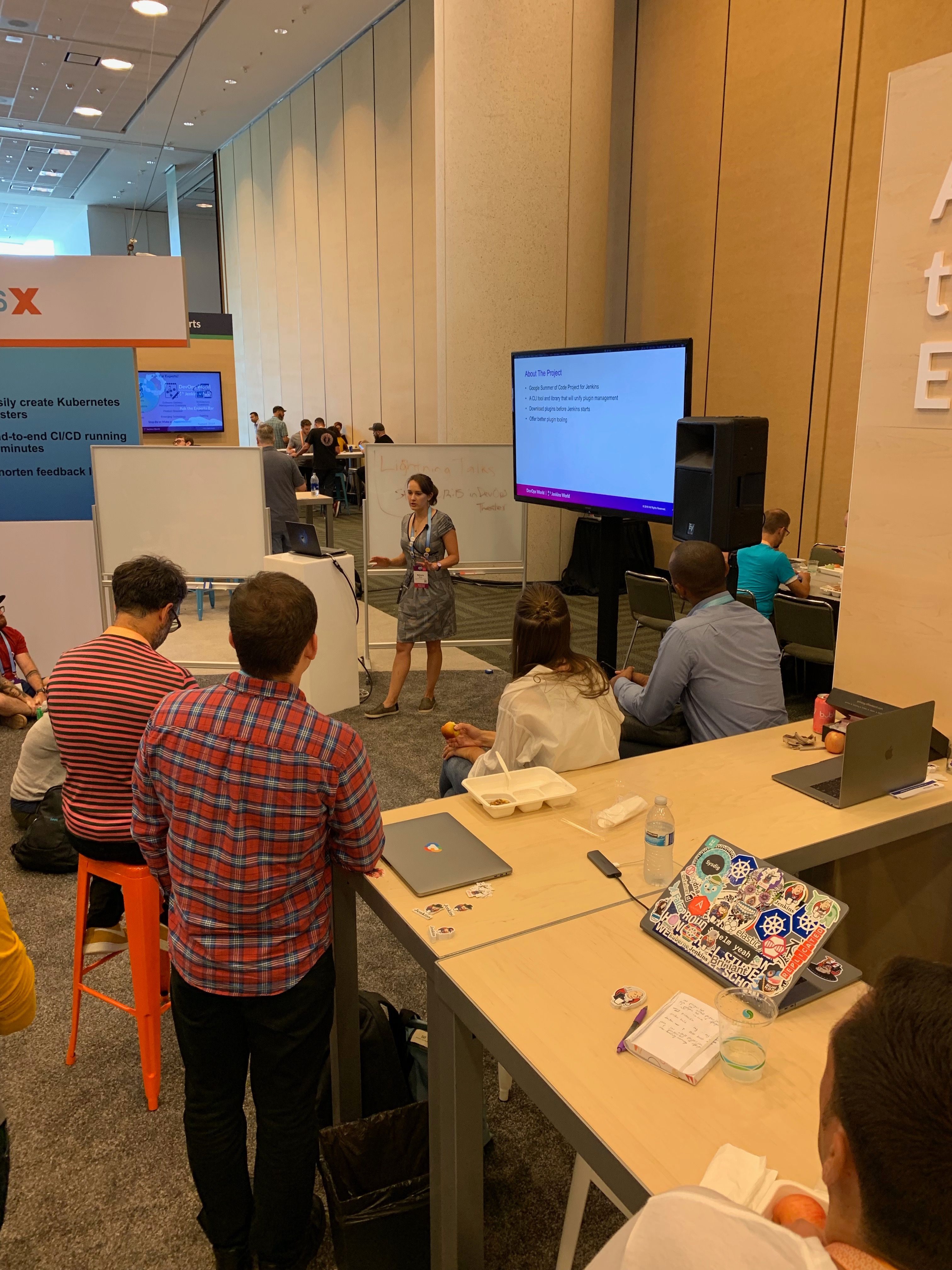
Natasha Stopa is a Google Summer of Code student and she presented her project Plugin Installation Manager Library/CLI Tool. Natasha really put a lot of hard work in to this plugin and it was really awesome to see the turn out and support during her presentation.
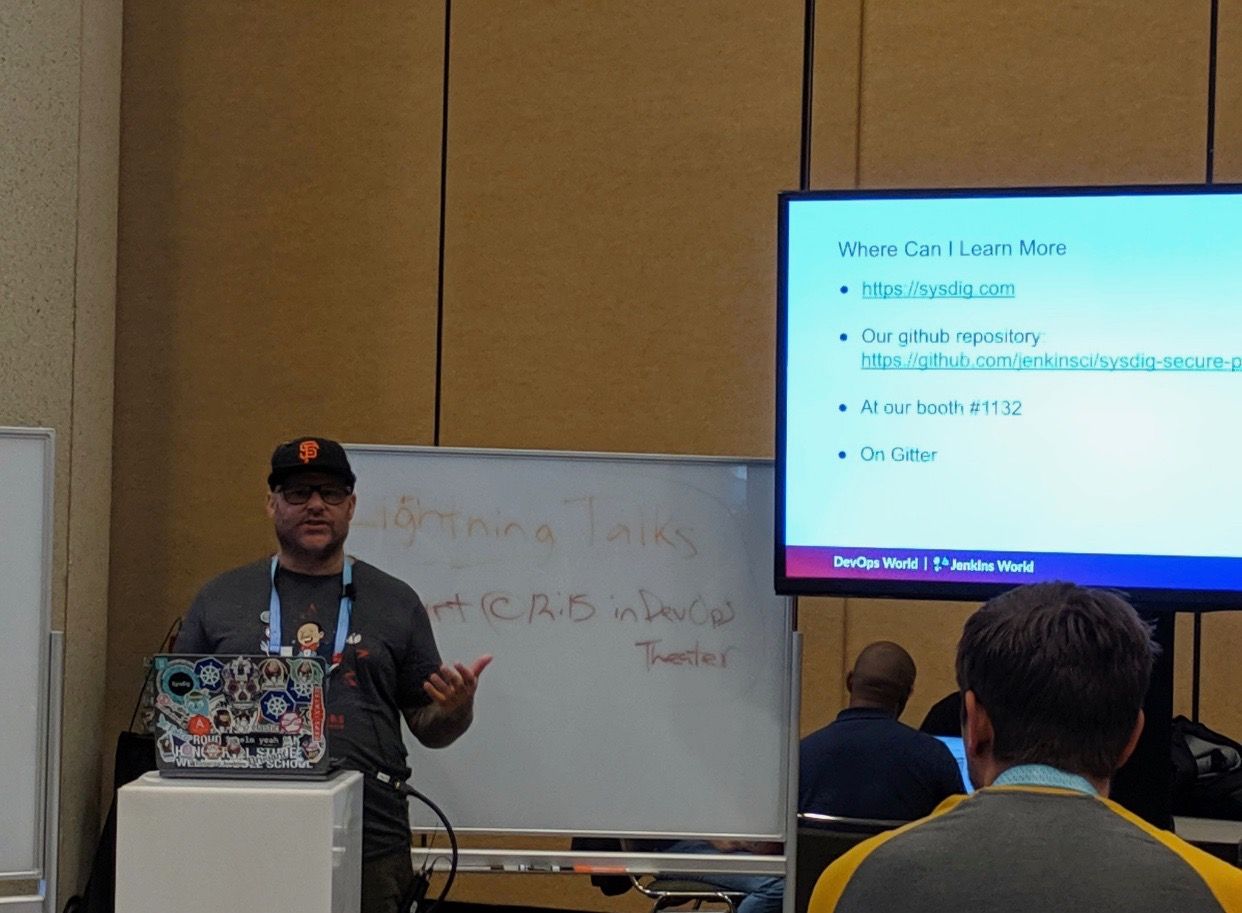
Finally there was me. I presented the Sysdig Secure Scanning Jenkins plugin which I am a maintainer of. I thank everyone who attended
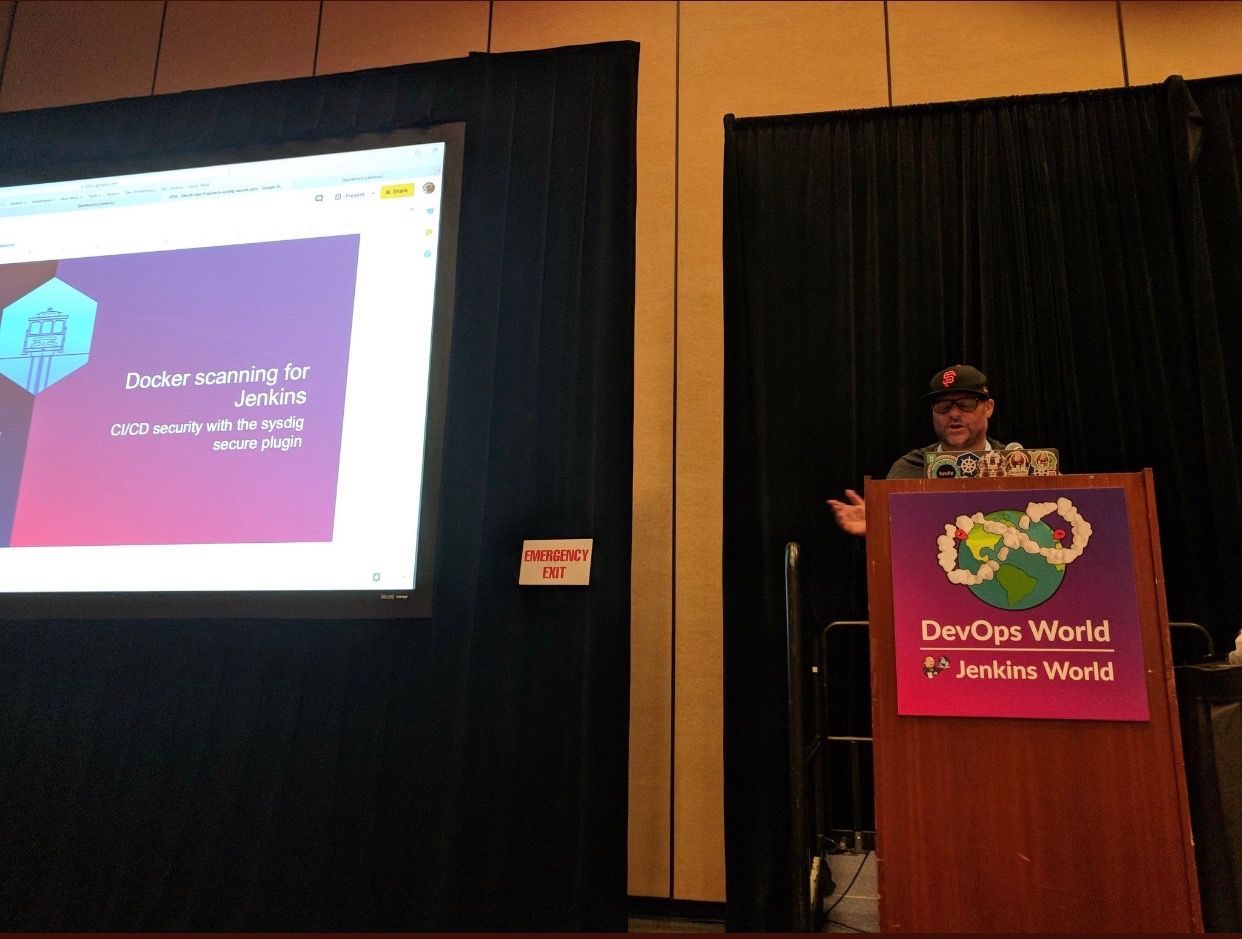
Right after the lunch time demos I also oversaw the Jenkins open space. This was an opportunity for the community to talk about items and let them flow organically. I really enjoyed this session and felt it was also well received.
We closed out the day and the event with a picture of some of the Jenkins org admins and Google Summer of Code students. Missing from this photos are fellow org admins, Lloyd Chang and Oleg Nenashev
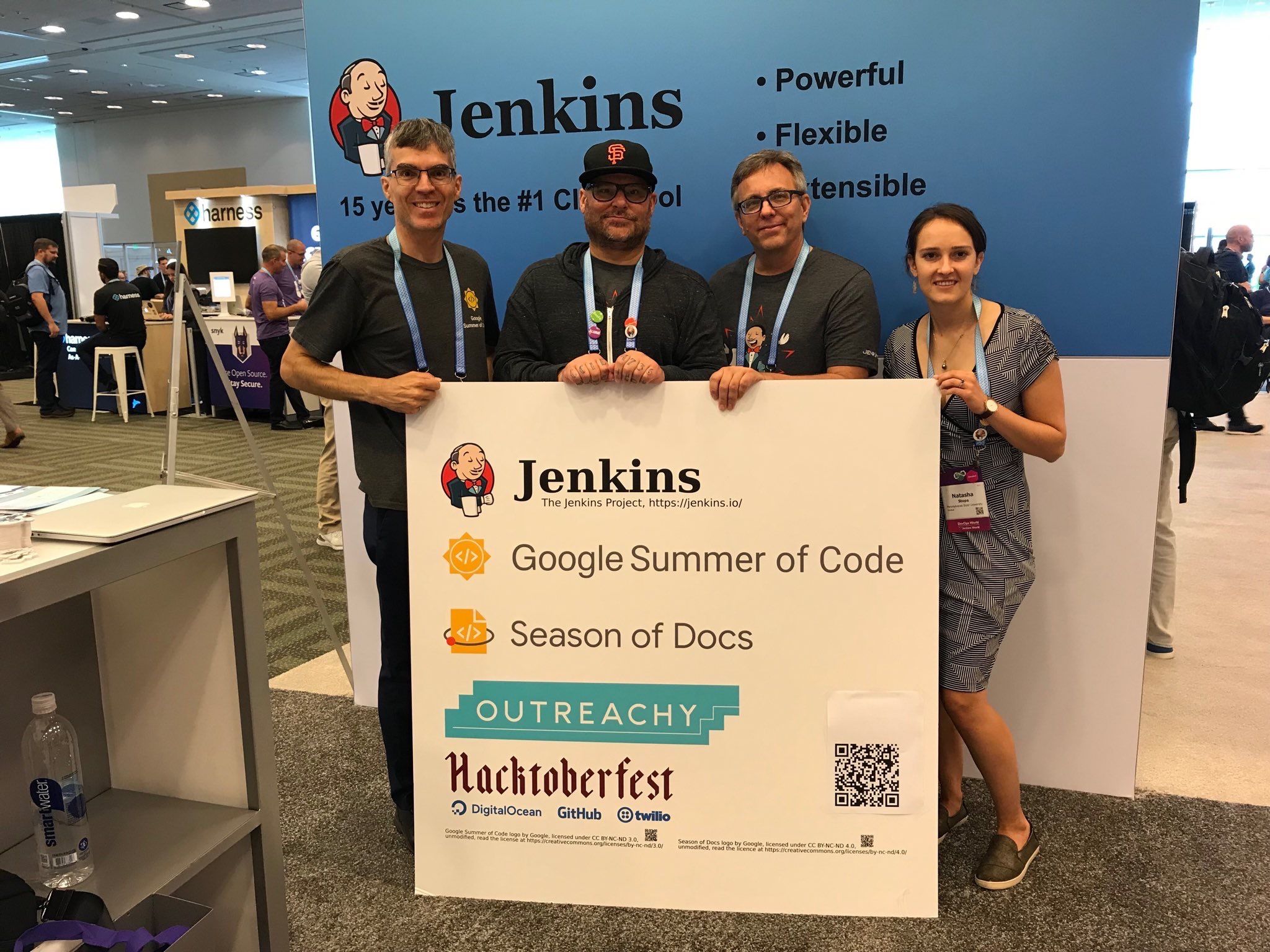
Closing
This was an amazing experience. Huge thanks to CloudBees, the Jenkins community, Google Summer of Code, Tracy Miranda, Alyssa Tong and my employer Sysdig.
To think Jenkins is 15 years old is amazing! There has been so much accomplished and the future is so bright. I am so thankful for the opportunity to serve and be a part of the open source community. Here’s to 15 more years all!
If you are interested in joining any one of the Jenkins open source special interest groups, look here. We can use your help: https://jenkins.io/sigs/
If you are interested in joining the Summer of Code, look here: https://jenkins.io/projects/gsoc/ If you want to chat with us, find us here: https://jenkins.io/chat/ Or if you want to email us, reach out at: https://jenkins.io/mailing-lists/
Some photos outtakes:



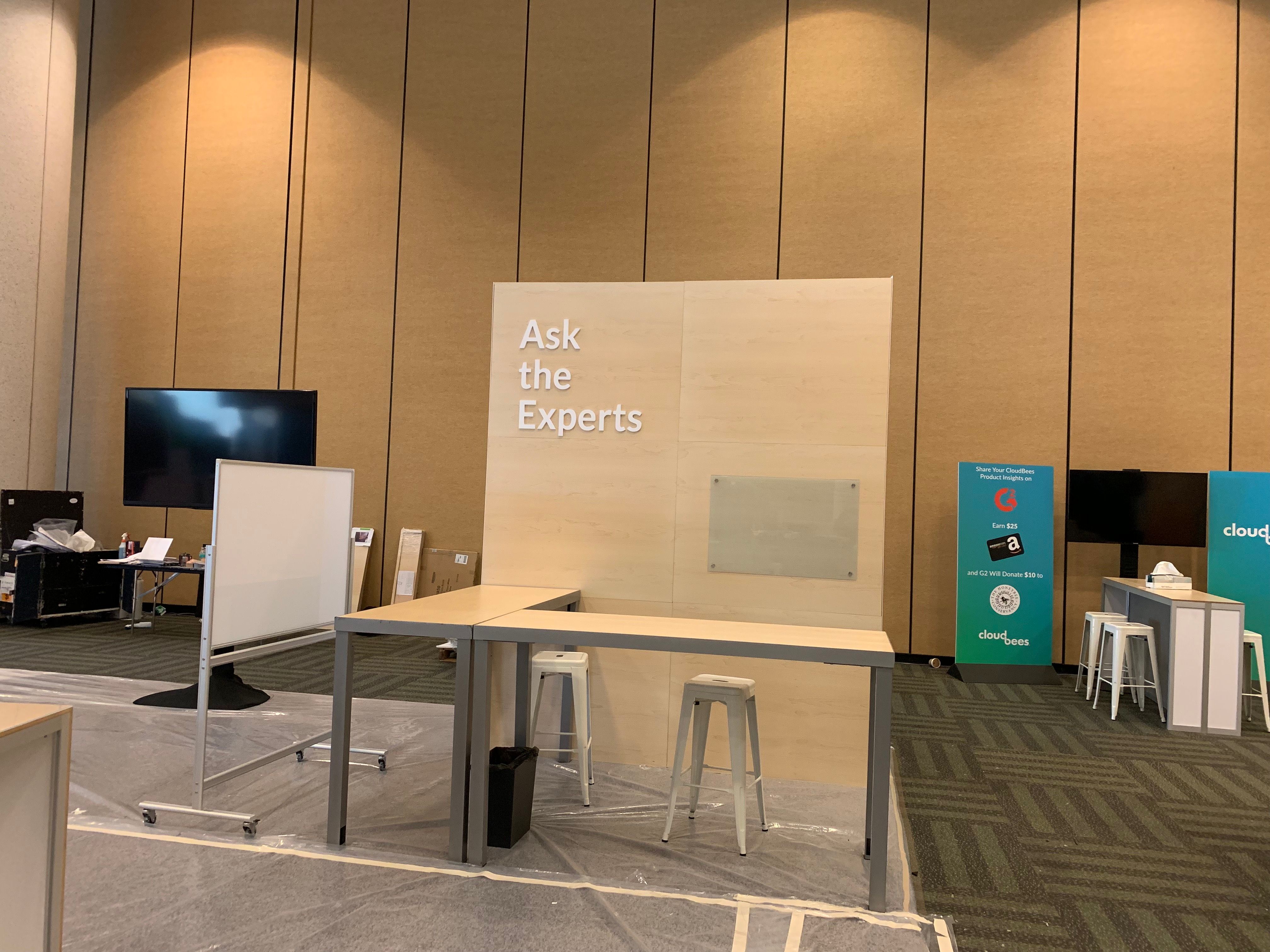
Tuesday, 27 August 2019
Are You Ready to Be Agile?
Today it is almost “bon ton” to talk about being “agile”. It is as if the word is written on billboards along every road you take: if you want innovations, be agile; if you want to understand your clients, be agile; if you want to manage your personnel, you seem to have no other choice.
And the market responds. Your bank is introducing a new agile team to react to clients’ demands. A software company you approach to make a webshop proudly describes its agile processes.
In reality, these are different agiles and you may be prepared that businesses in different industries have quite different approaches.
Agile Organization
In a broad sense, the one that you usually come across when speaking about the organization of a business as a whole, “agile” refers to the type of organization that incorporates small independent teams of people who have many or most of the skills the team needs to carry out its mission. Such teams are usually focused and dedicated groups of specialists created to work on a specific project that typically requires communication with customers and prompt decisions.
What characterizes such groups
Small size: A fun fact: Amazon CEO Jeff Bezos contends that a team is too big when it ...
Read More on Datafloq
And the market responds. Your bank is introducing a new agile team to react to clients’ demands. A software company you approach to make a webshop proudly describes its agile processes.
In reality, these are different agiles and you may be prepared that businesses in different industries have quite different approaches.
Agile Organization
In a broad sense, the one that you usually come across when speaking about the organization of a business as a whole, “agile” refers to the type of organization that incorporates small independent teams of people who have many or most of the skills the team needs to carry out its mission. Such teams are usually focused and dedicated groups of specialists created to work on a specific project that typically requires communication with customers and prompt decisions.
What characterizes such groups
Small size: A fun fact: Amazon CEO Jeff Bezos contends that a team is too big when it ...
Read More on Datafloq
What the AT&T Cloud Partnerships Mean for the Phone Industry?
The utility industries used to have a reputation for technological conservatism. They rarely indulged in the exploration of new technology. In previous decades, changes were primarily limited to maintenance of existing infrastructures. A lack of innovation led to stagnation in these industries.
This has changed in recent years. A number of utility companies have started experimenting with cloud solutions, artificial intelligence and other cutting-edge technology.
AT&T is one of the utility companies that has started making real headway with cloud technology. The telecommunications giant has forged partnerships with IBM, Microsoft and other technology leaders to handle new cloud processes. An estimated 96% of businesses use the cloud, so any breakthroughs in enterprise cloud technology will carry benefits that transcend industries.
These new contracts could set the stage for unprecedented breakthroughs in cloud technology, which will have a tremendous impact on the phone industry for years to come. The proposed solutions are currently focused on aiding enterprise clients, but they will probably be expanded to the consumer segment shortly thereafter.
AT&T and IBM form cloud partnership to serve enterprise customers
AT&T has been rather resilient at retaining its residential market share. However, it faces a much fiercer fight over its enterprise client base.
The telecom giant built ...
Read More on Datafloq
This has changed in recent years. A number of utility companies have started experimenting with cloud solutions, artificial intelligence and other cutting-edge technology.
AT&T is one of the utility companies that has started making real headway with cloud technology. The telecommunications giant has forged partnerships with IBM, Microsoft and other technology leaders to handle new cloud processes. An estimated 96% of businesses use the cloud, so any breakthroughs in enterprise cloud technology will carry benefits that transcend industries.
These new contracts could set the stage for unprecedented breakthroughs in cloud technology, which will have a tremendous impact on the phone industry for years to come. The proposed solutions are currently focused on aiding enterprise clients, but they will probably be expanded to the consumer segment shortly thereafter.
AT&T and IBM form cloud partnership to serve enterprise customers
AT&T has been rather resilient at retaining its residential market share. However, it faces a much fiercer fight over its enterprise client base.
The telecom giant built ...
Read More on Datafloq
Guest Blog: Using Databricks, MLflow, and Amazon SageMaker at Brandless to Bring Recommendation Systems to Production
This is a guest blog from Adam Barnhard, Head of Data at Brandless, Inc., and Bing Liang, Data Scientist at Brandless, Inc.
Launched in July 2017, Brandless makes hundreds of high-quality items, curated for every member of your family and room of your home, and all sold at more accessible price points than similar products on the market. We sell exclusively through our website, ship directly to our customers, and collaborate directly with our partners to manufacture our assortment. These direct relationships provide a unique opportunity to capture and use data to better serve our customers and share their feedback with our partners.
The data team at Brandless is a small team of fewer than ten people (in a total company of ~115) covering centralized analytics, algorithm development, and data engineering. Among the many responsibilities we have, we create systems and processes that allow us to utilize our large datasets to ensure each customer gets a personalized and optimized experience. We are also responsible for making sure our business leaders are equipped with the proper data and analysis to make decisions.
Building Out the Analytics Stack
We use a variety of third-party, open source, and in-house built tools for our data stack. We made these decisions based on the capabilities of what is available on the market and whether or not an in-house tool would serve as a competitive advantage for Brandless. To implement our core stack, we utilized Amazon Redshift to house our data, Airflow to manage our Extract, Transform, and Load (ETL) jobs, and a variety of BI tools to present our metrics to stakeholders.
As the need for data and an optimized site experience grew, we set our sights on a production machine learning model: a product recommendation system that would serve up relevant products to customers as they visited our site.
As we started building the recommendation system in a local Python script, we quickly realized that the processing logic was more complex than what an out-of-the-box model provided.
We needed to understand the difference between new and old products, as well as develop a complex set of post-processing logic. Here is a diagram that outlines the model and processing flow:
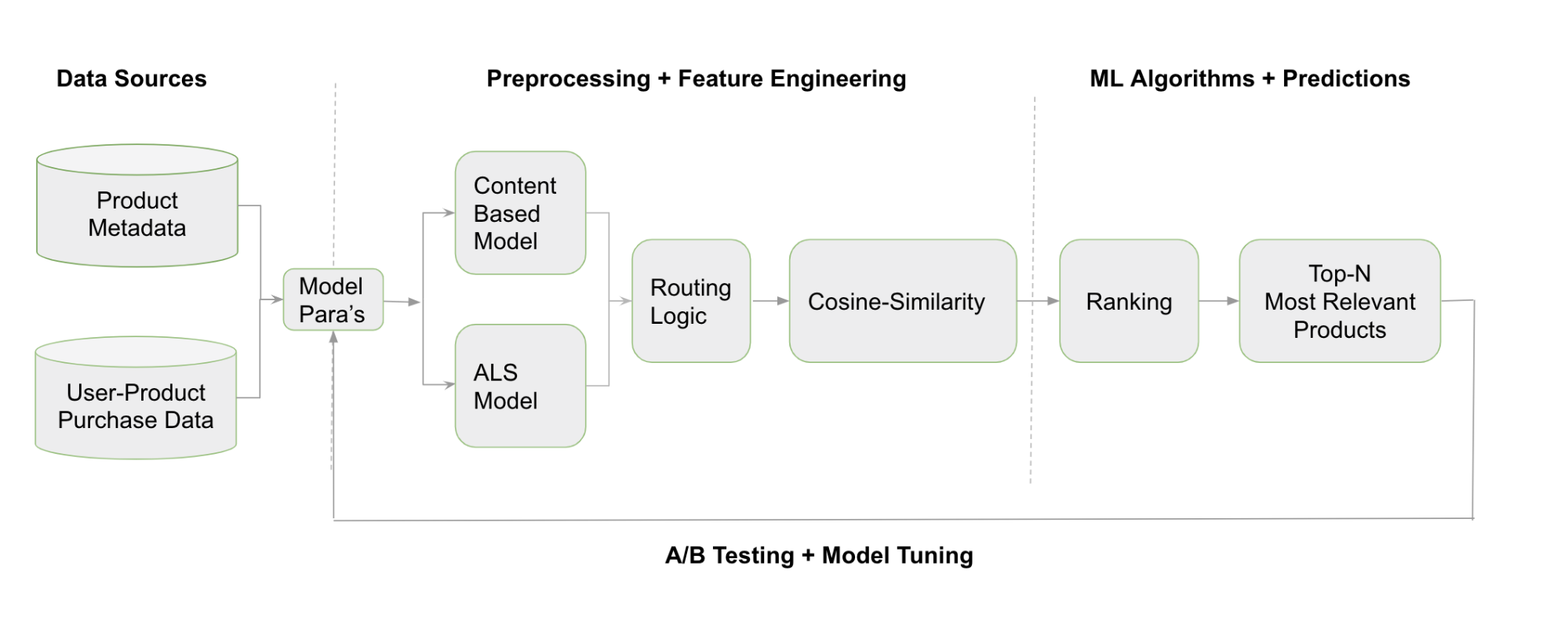
End-to-end machine learning workflow at Brandless.
We pull a variety of data to train two separate models. One collaborative filter utilizing user-product purchase data (ALS on Apache Spark) and one content-based system using product metadata. Depending on the age of the product, we route between the two different models. Next, we calculate cosine similarities between the input and the available recommendations. Finally, we rank products based on similarity and other factors such as cross-category exposure.
We dreamed of using a system like Uber’s Michelangelo or Airbnb’s Bighead, but we weren’t able to find a set of tools that would meet our requirements.
Brandless has a relatively small (and highly utilized) engineering team, so we needed a system that could be built and maintained by the data team. We had a fairly straightforward list of requirements:
- Easy sandbox to test a variety of models and complex pre- and post-processing.
- Model-management system to keep track of different model versions and iterations.
- Easy, engineering-minimal deployment capabilities.
- Simple A/B testing frameworks.
- Open-source software that we could contribute back to in the future (if possible).
How it Works
After exploring a variety of different systems and tools, we landed on the following toolkit:
- Databricks Unified Analytics Platform: To develop, iterate, and test custom-built models.
- MLflow: To log models and metadata, compare performance, and deploy to production.
- Amazon Sagemaker: To host production models and run A/B tests on different models.
The solution feeds raw data from Amazon Redshift to Databricks Unified Analytics Platform, which trains recommendation system models and develop custom pre and post-processing logic. We use the Databricks notebook functionality to collaborate in real time on model development and logic. We also performs a bit of offline testing within the Databricks platform.
Next we push the data to our MLflow tracking server, which acts as a source of truth for our models. MLflow will store the model hyperparameters, metadata as well as actual model artifacts. Once we have two different models sitting on the tracking server, we use the MLflow deploy commands to push these models into Amazon Sagemaker.
Our environment is stored in a Docker container, and the custom-packaged model pipeline is sent into Amazon Sagemaker’s inference platform. This final step also enables us to run multiple models in parallel, as shown below.
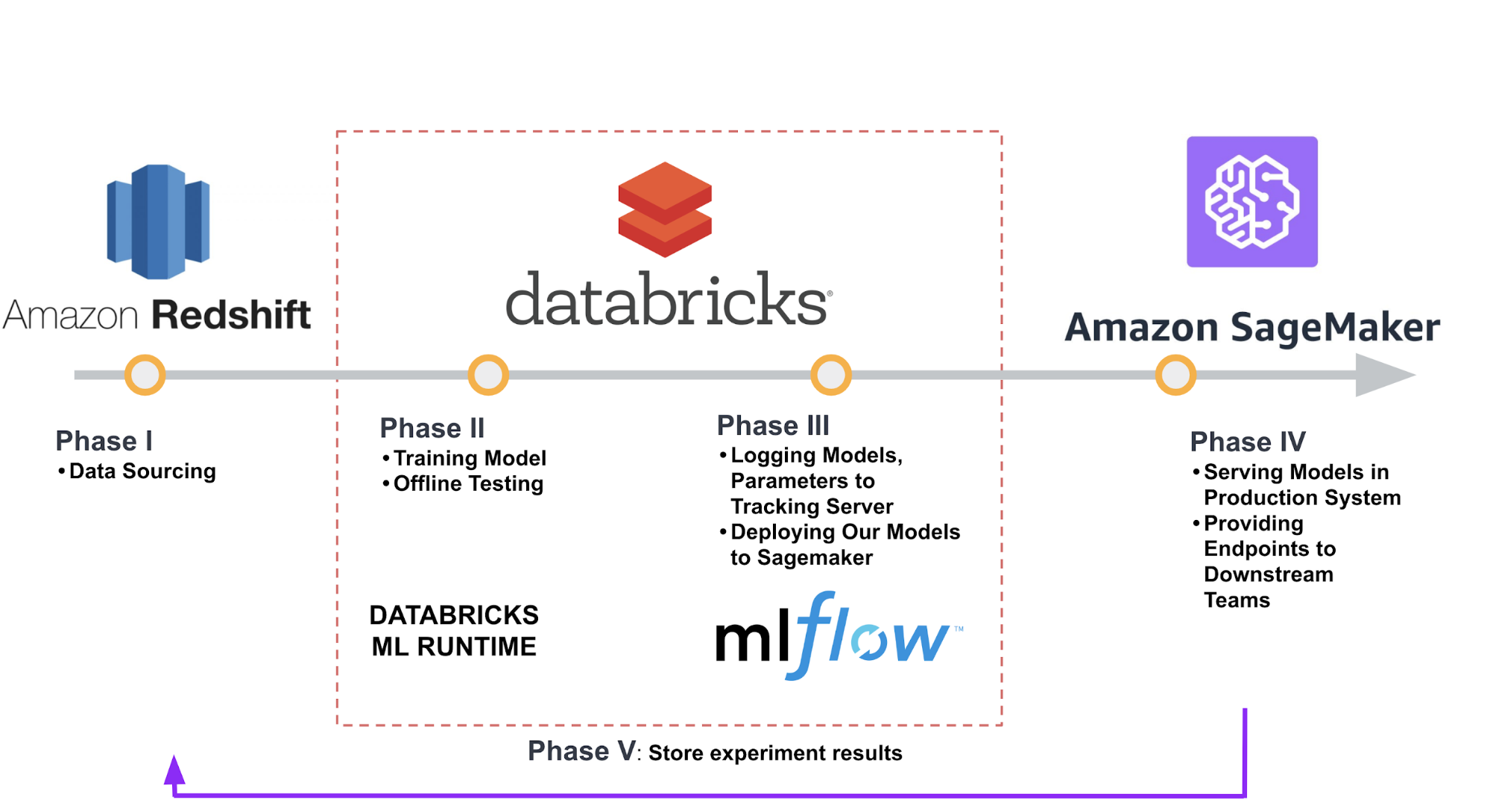
Production machine learning workflow.
Once we have pushed a model to production with Amazon SageMaker, we can use the A/B testing functionality to iterate through different models and understand which version performs best. We will push two different model variants to a single endpoint and use the UpdateEndpointWeightsAndCapacities functionality to set specific weights to each model variant. Users on Brandless.com will now be assigned model variants in a random occurrence. We record which variant each user receives as well as the actions taken after the recommendation system displays for the customer. Finally, we calculate model performance for each variant.
Results
Now that Brandless has been using the Databricks-MLflow-Amazon SageMaker combination, the deployment process has evolved and become more efficient over time.
It originated as a process that required manual checks as we trained the model, pushed to MLflow, and deployed to Amazon SageMaker. We now have a one-click process that automatically checks for errors at each step. We run this process roughly once a week.
Since our initial deployment, we have tested and iterated through approximately 10 different models in production. These versions have different model hyperparameters, utilize increasingly complex post-processing, or combine multiple models in a hierarchy.
We measure online performance by calculating the percentage of Brandless.com visitors that interact with our recommended product carousels. We have seen performance increases on all but one of these model versions, with an estimated 15% improvement overall in comparison to our original model.
The team has also used the Databricks-MLflow-Amazon SageMaker combination to move faster with development for other ML models. These use cases range from customer service improvements to logistics optimization, and all of the models follow the same process.
Challenges and Learnings
We ran into a couple of challenges along the way! Below, we outline a few of these and what we learned:
- Leave time for DevOps and bug fixes: Whether we were setting up proper AWS permissions or debugging an issue while alpha testing MLflow, we needed to leave more time for general debugging the first time the system was set up. Each of the fixes and changes that we made apply to the system as a whole, meaning new models generally take less time from start to finish.
- Optimize for latency: When we first deployed our model, we saw latency above 500ms due to complex Spark operations. This was too slow for our use cases on Brandless.com. To handle this, we built a system that pre-computed model outputs, ultimately bringing latency down below 100ms. We now consider and plan for latency at the beginning of model development.
- Dependency management: Due to the variety of environments that our process uses (multiple systems executing code, different Spark clusters, etc..) we occasionally run into problems managing our library and dataset dependencies. To solve this problem, we wrap all of our custom code into a Python egg package and upload it into all systems. This creates an extra step and can cause confusion across egg versions, so we hope to implement a fully-integrated container system in the future.
Summary
The Databricks-MLflow-Sagemaker combination has allowed the Brandless data team to move much faster with development for other machine learning models. We have used the system to build, schedule and serve a customer service optimization model, and we are currently working on a dynamic shipping fee model.
Looking forward, we plan to further build out the online testing system to provide better support for more advanced frameworks such as a multi-armed bandit. We are continuing to optimize our deployment systems to add automation, alerting and monitoring. We plan to contribute these upgrades to the MLflow open source project after we build and test internally.
Thanks for reading! Watch our story here, and please feel free to reach out to Adam Barnhard (adam@brandless.com) if you have any questions or would like to discuss further.
If you’re an existing Databricks user you can start using Managed MLflow right now. Visit the Databricks Managed MLflow guide and the Quick Start notebook to get started. If you’re not yet a Databricks user, visit databricks.com/mlflow to learn more and start a free trial of Databricks and Managed MLflow.
To learn more about open source MLflow, visit www.mlflow.org and join the community!
--
Try Databricks for free. Get started today.
The post Guest Blog: Using Databricks, MLflow, and Amazon SageMaker at Brandless to Bring Recommendation Systems to Production appeared first on Databricks.
Sleeping Inside an AI Autonomous Self-Driving Car

By Lance Eliot, the AI Trends Insider
(Ed. Note: For reader’s interested in Dr. Eliot’s ongoing business analyses about the advent of self-driving cars, see his online Forbes column: https://forbes.com/sites/lanceeliot/)
When I was working on my doctorate degree (some years ago, admittedly), doing so at a prominent west coast university, I decided that during the summer break I would go visit various doctoral colleagues that were doing their PhDs at east coast universities, along with meeting faculty at those institutions as a form of introduction about my research and efforts. I was going to fly to the east coast on the cheapest flight I could find and would have to pinch pennies during the multi-week adventure. I would be using a low-end super-cheap compact rental car to drive to campuses such as MIT, Harvard, Yale, Princeton, etc. and it would be my largest overall expense for the trip.
I was a starving student at the time and was trying to stay within a minimal budget for the trip.
Once I arrived to the east coast and had picked-up the rental car, I drove to the first of the series of campus visits. I had not booked any hotels as yet and figured that once I got to a particular university, I’d find a nearby inexpensive hotel to stay the night and then continue onward to the next campus. Upon trying to find a hotel that first night, I discovered that the only rooms available were quite highly priced and it seemed a shame to pay such an exorbitant cost for just a place to sleep for the night.
I decided therefore to sleep in the rental car for the night.
Sounds kind of questionable, I realize. since I was not destitute per se. It just seemed like the easiest way and most practical approach to do things at the time.
No need to check-in and check-out and I would avoid the hotel cost.
When I had walked around the campus and met with some of the doctoral students, they showed me the campus gym and explained that anyone could make use of it, though this was not publicized per se. In essence, even a non-student of the campus could use the gym. I decided that since I was going to sleep in my car, I could use the campus gym the next morning to get a shower and shave and be tidied-up accordingly and be prepared for visiting the next campus on my list.
Overall, this is the same methodology I used for the entire trip.
I would drive to the next campus on my list, stay the day and make visits with various contacts, sleep the night in my rental car, get up and use the campus gym, and then proceed onward to the next destination. I actually somewhat enjoyed the adventure of it. Besides avoiding the cost of the hotels, it was logistically a lot easier to simply find a place to park the car and get some shut-eye.
I did learn some handy lessons about sleeping in a car.
My Personal Journey
First, I slept in the backseat since the front seats were separate bucket seats and it would not be possible to sleep across the two seats.
When I tried to recline the driver’s seat all the way back to see if I could sleep in that position, it would not go far enough back to let me lay relatively prone. If I slept in the front row driver’s seat it would be like sleeping in a seat on a plane. I opted instead to sleep in the backseat since I could lay down. Unfortunately, I was too tall and could not completely stretch out, but this was not too bad and if I merely curled-up I was able to passably sleep on the backseat.
For the first night, I had parked on-campus in a parking lot that was near to the research building that I visited my fellow doctoral students.
I did not realize that there was a rule that no overnight parking was allowed in that parking lot. Sure enough, at about 3 a.m., a campus security guard tried to put a ticket on my windshield. In so doing, he noticed that there was a human actually in the car (that was me!) and rapped on the car window to awaken me. I groggily rolled down the window and he explained that I could not stay parked there. I apologized and woke-up sufficiently to go find a different place to park my rental car and then continue my snooze.
I was wearing my jacket as I slept in the rental car at night, but eventually I realized that I was stinking up my jacket by my evening sleeping and it would have to last me during the daylight hours too.
I went and purchased an inexpensive blanket so that I could use it over me when I was sleeping in the car. I selected a blanket that was nondescript and the colors matched the interior of the car. I thought this would be a means to disguise my sleeping in the backseat. Anyone that looked into the window of the car would only see a bland looking blanket that happened to be somewhat bulky looking, which was due to the fact that it had me underneath it.
Part of the reason that I wanted to be covered while sleeping in the backseat was due to the aspect that people tend to look into the car during the late evening and early morning hours.
I never realized that people would be nosy enough to glance into cars, but they do. I was surprised on the first few nights to have quite a number of walking passerby’s that looked into the car. Keep in mind that I was relatively well hidden at this point and so it wasn’t as though they had somehow caught a glimpse of a person inside the car and thus naturally would have gotten their curiosity going. I was tempted to put up makeshift window shades to give me some greater privacy, though it seemed a bit extreme and also I assumed it might actually draw undue attention to the car.
I learned the hard way that light and sound can be a significant factor in sleeping.
When I got to the third campus of my journey, I parked in the morning in a parking lot that seemed to allow for overnight parking. What I failed to notice was that I had parked directly under a street light that was setup in the parking lot. In fact, this parking lot happened to have some of the brightest night time lighting I had ever seen. When I settled into the car for my night’s sleep, I tried to pull the blanket entirely over my head and hoped that the light would not impact my sleep. It kept me up for most of the night.
Speaking of light, there’s nothing like the morning sunrise to also potentially wake you up. Most of the trip, I tended to get up once the sun had risen. This was partially due to the light that shone inside the car, and also due to the aspect that the car would start to get rather warm inside as the sun beats down on the exterior of the car. The heating of the interior and the lights were enough to wake me up, and I dare say probably wake-up most people.
In terms of sounds, I am a relatively light sleeper and have a tendency to wake-up if there are strong sounds or unusual sounds. I was sleeping even more lightly too due to sleeping inside a car. I dreaded the possibility that vandals might try to break into my car, doing so while I was sleeping in it. Or, suppose a car thief opted to try and break-in and steal the car. Imagine me on national TV, waving frantically while in the back-seat, essentially being car-jacked, though the thief might have only been seeking to steal the rental car and did not realize a human was in the backseat.
Anyway, the sounds of people walking past the car were usually not enough to awaken me. But, on several occasions, having parked mainly on college campuses, there would be those drunken undergrads (well, Okay, I realize they might have been grad students too) wandering around and yelling and screaming and having a good old time. This woke me up. One time a street sweeper came up to my car and swept around it. The sounds woke me up. Generally, there were a wide variety of sounds and most of the time it would stir me to wake-up.
In case you are wondering whether I unduly weathered the interior of the rental car, I assure you that when I turned-in the rental car it was no worse for the wear due to my sleeping in it. You would not have had any means of knowing that I had slept in the car. The best news was that I saved literally several thousand dollars by avoiding the nightly costs of being in a hotel over those many weeks of my trip.
Also, I only sleep about 6 hours a night anyway and so mainly did things at the campuses until late in the evening, got into my “sleeper” usually past midnight, and was up and going once the sun rose. Why use a hotel for such a short stint, was my thinking at the time. Furthermore, the college campuses had all the other resources I needed. I was able to work out, shower, change clothes, wash clothes, and do other such chores at the campuses.
It was quite a memorable several weeks and I realize now that sleeping in my car seems a bit off-putting to most people when I tell the story of it.
I didn’t tell anyone at the time that I was doing so and knew that if I did, they would think it was quite peculiar. In my mind, I didn’t see any difference between renting an RV and using it to drive around and then use it for sleeping at night and doing the same thing with a conventional car. Sure, the conventional car is not quite as accommodating, but the idea is the same. The notion was to use the vehicle that got you from place to place as the means to also sleep in it. That seemed logical to me.
Would you look askance at someone that rented an RV for a several weeks trip?
I think not.
Some More Facets About Sleeping Inside Cars
As an aside, I read once that humans supposedly have evolved in a manner such that we prefer to sleep in a cool and dark location, one that is relatively noiseless, something akin to a cave.
This makes sense since it would be best to be in a protected place to be somewhat safe from predators and also mitigate the outdoors environmental conditions while you are sleeping. My rental car was my cave. It just so happened that I was a mobile cave, in the sense that I was able to take my cave with me.
For more about the nature of sleeping and especially dreaming, see my article: https://aitrends.com/selfdrivingcars/sleeping-ai-mechanism-self-driving-cars/
Several years after my starving student trip, I came to realize that sleeping inside a car can have nearly magical properties.
Here’s the skinny on that.
When my children were first born, they sometimes at night would have a hard time sleeping. As anyone with newborns knows, babies can have the worst sleeping cycles. You might find yourself never getting much sleep during the night as they awaken frequently and unexpectedly. It could be they have some gas in their stomach and need to burp it out. It could be they have a full diaper that needs changing. It could be that they just aren’t sleepy anymore. It could be a thousand different reasons.
After several nights of being continually disrupted in trying to sleep when they were sleeping, I had a thought that prompted me to try something. Whenever I had driven the kids to see the doctor or over to go shopping, they tended to fall asleep in their baby seats in the car. I would have to awaken then when we reached our destination. It was nearly a sure fire way to presumably get them to fall asleep.
I decided to give this a try late one night when they were fussing and would not go to sleep. I drove around the neighborhood with them safely tucked away in their baby seats. Sure enough, they fell asleep. It was a miracle! I assumed it was either the motion of the car that soothed them, or perhaps it was the feeling of being snugly packed into their car seat, or some other such reason. I didn’t really care why it worked, it just plain worked and that was good enough.
Once they seemed fully immersed in sleep, I would drive back to the house and gingerly move them into the house. If I did anything jarring or made any sudden moves, they would awaken right away. Most of the time, by treading very carefully, I was able to use the short car drive to get them into a sleeping state, and then transfer them into the house and they would remain asleep for quite some time. This was obviously better than trying to give them some kind of prescribed or over-the-counter medication to get them to sleep.
This method was far more effective than rocking their baby sleeper by hand or putting them into one of those automatic rocking baby carriages.
The car seemed to have magical powers.
It could get them into a sleeping mode that was assured. The funny thing is that to this day, now they are much older, and they report that they do sometimes find themselves starting to fall asleep when a passenger in a car at nighttime. Did I create a habit that now will be with them forever? Or, was I merely tapping into a natural born instinct? Another one of life’s mysteries of nature versus nurture.
I don’t want you to assume that there weren’t some potential downsides to the nighttime sleeping drives. There were some occasions that they would fall victim to motion sickness. I felt bad about that. It would seem to make their tummies go sour and they might spit-up because of it. Luckily, this was relatively rare. There are some people that are quite prone to motion sickness while inside a moving car. They seemed to not succumb to this and it was rare that they exhibited any car motion sickness symptoms.
For more about car motion sickness, see my article: https://aitrends.com/selfdrivingcars/kinetosis-anti-motion-sickness-ai-self-driving-cars/
AI Autonomous Self-Driving Cars And Sleeping Inside Them
What does this have to do with AI driverless self-driving autonomous cars?
At the Cybernetic AI Self-Driving Car Institute, we are developing AI software for self-driving cars. One aspect that can be expected to occur would be that people will likely want to sleep in their AI self-driving cars, doing so from time-to-time. As such, the AI ought to be established to appropriately deal with sleeping human occupants.
Allow me to elaborate.
I’d like to first clarify and introduce the notion that there are varying levels of AI self-driving cars. The topmost level is considered Level 5. A Level 5 self-driving car is one that is being driven by the AI and there is no human driver involved. For the design of Level 5 self-driving cars, the automakers are even removing the gas pedal, the brake pedal, and steering wheel, since those are contraptions used by human drivers. The Level 5 self-driving car is not being driven by a human and nor is there an expectation that a human driver will be present in the self-driving car. It’s all on the shoulders of the AI to drive the car.
For self-driving cars less than a Level 5, there must be a human driver present in the car. The human driver is currently considered the responsible party for the acts of the car. The AI and the human driver are co-sharing the driving task. In spite of this co-sharing, the human is supposed to remain fully immersed into the driving task and be ready at all times to perform the driving task. I’ve repeatedly warned about the dangers of this co-sharing arrangement and predicted it will produce many untoward results.
For my overall framework about AI self-driving cars, see my article: https://aitrends.com/selfdrivingcars/framework-ai-self-driving-driverless-cars-big-picture/
For the levels of self-driving cars, see my article: https://aitrends.com/selfdrivingcars/richter-scale-levels-self-driving-cars/
For why AI Level 5 self-driving cars are like a moonshot, see my article: https://aitrends.com/selfdrivingcars/self-driving-car-mother-ai-projects-moonshot/
For the dangers of co-sharing the driving task, see my article: https://aitrends.com/selfdrivingcars/human-back-up-drivers-for-ai-self-driving-cars/
Let’s focus herein on the true Level 5 self-driving car. Much of the comments apply to the less than Level 5 self-driving cars too, but the fully autonomous AI self-driving car will receive the most attention in this discussion.
Here’s the usual steps involved in the AI driving task:
- Sensor data collection and interpretation
- Sensor fusion
- Virtual world model updating
- AI action planning
- Car controls command issuance
Another key aspect of AI self-driving cars is that they will be driving on our roadways in the midst of human driven cars too. There are some pundits of AI self-driving cars that continually refer to a utopian world in which there are only AI self-driving cars on public roads. Currently there are about 250+ million conventional cars in the United States alone, and those cars are not going to magically disappear or become true Level 5 AI self-driving cars overnight.
Indeed, the use of human driven cars will last for many years, likely many decades, and the advent of AI self-driving cars will occur while there are still human driven cars on the roads. This is a crucial point since this means that the AI of self-driving cars needs to be able to contend with not just other AI self-driving cars, but also contend with human driven cars. It is easy to envision a simplistic and rather unrealistic world in which all AI self-driving cars are politely interacting with each other and being civil about roadway interactions. That’s not what is going to be happening for the foreseeable future. AI self-driving cars and human driven cars will need to be able to cope with each other.
For my article about the grand convergence that has led us to this moment in time, see: https://aitrends.com/selfdrivingcars/grand-convergence-explains-rise-self-driving-cars/
See my article about the ethical dilemmas facing AI self-driving cars: https://aitrends.com/selfdrivingcars/ethically-ambiguous-self-driving-cars/
For potential regulations about AI self-driving cars, see my article: https://aitrends.com/selfdrivingcars/assessing-federal-regulations-self-driving-cars-house-bill-passed/
For my predictions about AI self-driving cars for the 2020s, 2030s, and 2040s, see my article: https://aitrends.com/selfdrivingcars/gen-z-and-the-fate-of-ai-self-driving-cars/
AI And Sleeping Humans
Returning to the topic of sleeping inside an AI self-driving car, let’s consider some of the ramifications about doing so and how the AI should be designed and developed to accommodate this likely aspect.
Let’s start by dividing up the matter into two parts, there is the situation of sleeping while in a moving car, and a separate matter involves sleeping in a parked car.
My story about having visited numerous college campuses and sleeping in my car overnight is an example of sleeping in a parked car. I had mentioned several lessons learned from that experience.
An AI self-driving car should presumably be a “partner” in assisting any human occupants that might want to sleep inside the AI self-driving car when it is parked. This consists of the AI offering to find a suitable place to park the AI self-driving car.
I realize that some pundits would say that it is not up to the AI to help determine where to park the self-driving car and that instead this is a matter entirely for the human occupants to decide.
I’d vote instead that it be a two-way street, of sorts, in that the human occupants might offer ideas or suggestions of where to park the self-driving car, of which the AI might try and ascertain the suitability. Likewise, the AI might offer suggestions and see what the human occupants think of the proposed locations. This would be an interactive NLP (Natural Language Processing) dialogue between the human occupants and the AI.
The AI might have a sophisticated GPS and mapping system access that could let it know whether the place to park is appropriate. Perhaps it is illegal to park where the human occupants want to sleep inside the car. Maybe it’s a location that is rampant with crime and thus might be considered riskier to park there for sleeping purposes. And so on.
In fact, there are some that predict that in the future, since AI self-driving cars will be prevalent, and since people will be using their AI self-driving cars 24×7, we might have special parking areas for those that want to indeed sleep inside their AI self-driving car. The AI system might have access to a database indicating those locations.
Perhaps it might even use a blockchain for purposes of booking and paying to be able to park there.
For my article about NLP, see: https://aitrends.com/selfdrivingcars/car-voice-commands-nlp-self-driving-cars/
For more about conversing with AI, see my article: https://aitrends.com/features/socio-behavioral-computing-for-ai-self-driving-cars/
For my article about 24×7 of self-driving cars, see: https://aitrends.com/selfdrivingcars/non-stop-ai-self-driving-cars-truths-and-consequences/
For my article about blockchain, see: https://aitrends.com/selfdrivingcars/blockchain-self-driving-cars-using-p2p-distributed-ledgers-bitcoin/
Please realize that the future might be quite different than things are today.
I mention this because it might become relatively commonplace to sleep inside your parked AI self-driving car. In my case of sleeping in a rental car for my campuses journey, it seemed likely odd to you.
It is predicted that due to the ridesharing economy that will be spurred by the advent of AI self-driving cars, sleeping inside an AI self-driving car will be considered ordinary and routine.
Advent Of Self-Driving Cars As Sleeper Vehicles
Why will things be different about sleeping in a car?
First, you will be able to presumably go greater distances by having an AI automated system that can drive your car for you.
Rather than taking a train that perhaps has a sleeper compartment, you might instead just get into your AI self-driving car and tell it to drive you from say Los Angeles to Chicago. You’ll likely sleep inside the AI self-driving car during that lengthy trip.
Also, the interior of AI self-driving cars will likely be different than the interior of today’s conventional cars. If you remove the driver controls such as the steering wheel and pedals, you no longer need to have a driver’s seat that is fixed into position at the front of the car. Instead, most designs suggest that we’ll have swivel seats in AI self-driving cars, allowing the human occupants to swivel around and see each other directly and chat with each other. No more of the backseat facing the backs of the front seat passengers.
It is also envisioned that the swivel seats might be convertible into being sleeper seats. They either will recline to allow for sleeping, or maybe connect with each other to make a bed, or perhaps be removable and you can readily place inside a sleeper “seat” when you know in-advance that you are going to be sleeping during a driving trip.
For some people it is hard to imagine a future in which we all will be willingly and purposely wanting to sleep in our cars. Today, you usually only hear about sleeping in a car when it is someone that is homeless and has no other choice of a place to sleep. In fact, here in Los Angeles, there is an ongoing heated debate about sleeping in cars. Where should someone be allowed to sleep in their car? Do they need to move the car every so often or can they park it in-place and leave it there? Does sleeping in cars potentially raise health concerns and other societal considerations? And so on.
As a society, we are likely to go from perceiving sleeping in a car as something untoward to instead it will become a norm of a kind. When I say this, please note that there is a difference between “living” in your car and sleeping from time-to-time in your car. If you park a car at a spot and leave it there for months at a time and sleep and live out of it, this seems different than using an AI self-driving car that generally is going to be in-motion and from time-to-time will need to park someplace. The parking would also likely include recharging the car, assuming that it is an Electrical Vehicle (EV), along with letting the human occupants sleep too.
Overall, one would expect that an AI self-driving car will nearly always be in-motion rather than sitting someplace for someone to sleep in it. The cost of the AI self-driving car is likely to be affordable by being offset by the money that can be made by using it as a ridesharing service. One would assume that the human occupants will pay mainly for the time that the AI self-driving car is taking them to their desired destination. When the AI self-driving car is parked, it is less likely to be making money.
Of course, there are some ridesharing arrangements that will likely include the ability to pay for sleeping while the AI self-driving car is parked. It’s another way to make some bucks.
For more about ridesharing, see my article: https://aitrends.com/selfdrivingcars/ridesharing-services-and-ai-self-driving-cars-notably-uber-in-or-uber-out/
For the affordability of AI self-driving cars, see my article: https://aitrends.com/selfdrivingcars/affordability-of-ai-self-driving-cars/
For the dangers of robojacking, see my article: https://aitrends.com/features/robojacking-self-driving-cars-prevention-better-ai/
For the use of virtual spike strips, see: https://aitrends.com/selfdrivingcars/virtual-spike-strips-and-ai-self-driving-cars/
Dangers Of Robojacking
One potential danger about parking an AI self-driving car just anyplace might be the potential for robojacking.
Robojacking involves someone trying to steal your AI self-driving car, and you are inside of it when they do so.
Remember how I mentioned that when I was parking on college campuses that I dreaded the possibility of a car thief trying to steal my car when I was “hiding” inside on the backseat while sleeping?
The same worry could occur with AI self-driving cars.
Some would argue that it makes little sense for a car thief to merely steal the AI self-driving car itself, because presumably the only humans allowed to give commands to the AI would be those properly registered to do so. Therefore, the car thieves will have an incentive to only steal the AI self-driving car when there is a human occupant in it, and presumably they can pressure the human occupant to instruct the AI self-driving car for them in their heinous crime.
That’s an adverse consequence, for sure.
Sleeping Inside A Moving Autonomous Car
I’d like to next consider the aspects of sleeping as it relates to being in a moving AI self-driving car.
Recall that I told the story of using my conventional car to take my young children for late night short drives to get them to fall asleep. That’s an example of a car being in-motion and sleeping in it. With the advent of true Level 5 AI self-driving cars, no longer will we have a human driver that might inadvertently fall asleep at the wheel. There isn’t a human driver involved at all. Instead, any of the human occupants being chauffeured by the AI can opt to fall asleep whenever they darned well please to do so.
One prediction is that people might choose to live much further from work than they do today.
The logic is that they can merely get into their AI self-driving car and tell it to take them to work. They can even catch some extra winks during the commute. Here in Los Angeles, it is rather ordinary to have a commute time of one to two hours for driving to work. I realize you might urge us to use mass transit, but that’s not really taken ahold and instead people continue to drive their cars.
Your commute of one to two hours might consist of you sleeping inside your AI self-driving car while it drives you to work or brings you home after a workday. You might also decide to live further away from work, maybe living further away allows you to get a larger piece of property and at a cheaper price than living closer to work. The nice thing is you don’t need to worry about the driving, since it will be done for you by the AI. Plus, you can sleep while it is doing the driving.
Let’s consider this notion of sleeping while the AI is driving the self-driving car.
First, you’d need to be rather trusting to be willing to fall asleep while the AI is driving the self-driving car. I would argue that your trust is presumably already going to be high if you are even allowing the AI to drive the self-driving car when you are awake. In other words, if you are awake and it is driving, there is not much you are going to be doing about the driving task anyway. You aren’t expected to intervene in the driving for a Level 5 self-driving car. You are along for the ride.
If it is the case that while awake you are doing little about the driving, it would seem that you’ve already placed your trust in the abilities of the AI to drive the self-driving car. The step of then falling asleep does not seem like much of a logical leap. I realize it is still a bit chilling perhaps to be asleep and completely vulnerable, while if you are awake that at least you might be able to see that accident about to happen, but anyway, in theory, we will all gradually become accustomed to binge able to sleep while inside an in-motion AI self-driving car.
Here’s where the AI then comes to play in a manner more so than when the self-driving car is parked. Let me explain.
Suppose you have fallen asleep while the AI self-driving car is heading to your work. Maybe there is a snarl on the freeway and so the AI decides to take a different route, going to side streets. Normally, let’s assume that the AI would have let you know that the freeway is crowded, and it is intending to take an alternative route. If you were awake, you might carry on a dialogue with the AI via its NLP and either agree to the rerouting or insist to remain on the freeway. You might have good reasons to not go to the side streets.
Should the AI wake you up to let you know that it is desirous of rerouting the self-driving car? This seems like a rather simple question, I realize.
I am betting that some AI developers though have their own beliefs on this. Some AI developers would say that there is no need to awaken the human occupant and that the AI should just proceed as it deems necessary. If the human has chosen to fall asleep, they will have de facto given full control over to the AI. Meanwhile, there are some other AI developers that would contrarily insist that of course the AI should awaken the human occupants. It is the polite and proper thing to do. The AI needs to make sure that the human occupants are aware of what the AI is doing and that they have willingly and openly agreed to whatever the driving task is that is being performed by the AI.
There you have it, the usual on-and-off world or bits-and-bytes or 0-or-1 binary perspective that many computer-focused people have. It would be unlikely that those with such a mindset might consider asking the human occupants beforehand what they want to have happen once they fall asleep. This would require that the AI anticipate the sleeping aspect and be “programmed” accordingly. I’m sure that some would say that’s version 2.0, once enough people get upset that their AI either didn’t awaken them when it should have, or the AI did waken them and they are upset that it did so.
For the AI developer egocentric viewpoint, see my article: https://aitrends.com/selfdrivingcars/egocentric-design-and-ai-self-driving-cars/
For my article about the self-driving car idealist mentality, see: https://aitrends.com/selfdrivingcars/idealism-and-ai-self-driving-cars/
For the burnout of AI developers, see my article: https://aitrends.com/selfdrivingcars/developer-burnout-and-ai-self-driving-cars/
For the concerns of AI groupthink, see my article: https://aitrends.com/selfdrivingcars/groupthink-dilemmas-for-developing-ai-self-driving-cars/
AI Detecting Who Is Sleeping
Speaking of waking up, the AI could serve as a kind of alarm clock too. You might not want to sleep the entire time during your commute to the office, and instead want a few minutes of waking up time before the AI self-driving car reaches the office. In that case, you might tell the AI to awaken you before arriving at the office.
You might even indicate that the AI should swing through a Starbucks just as it is going to be waking you, allowing you to drink some coffee as a means to further awaken before reaching work.
This brings up another aspect about the AI and sleeping human occupants.
Should the AI be clever enough to know who is asleep in the self-driving car?
Suppose you are in the AI self-driving car and have another adult with you and a child. The child falls asleep during the driving journey. The AI could potentially detect that the child has fallen asleep.
This might seem creepy, but keep in mind that it is likely that most AI self-driving cars will have cameras pointing to the interior of the self-driving car. For those that will be renting out their AI self-driving car for ridesharing purposes, they are bound to want to keep track of what people are doing inside of their self-driving car. You might say that if the ridesharing was being done by a human driver, the human driver would presumably be doing the same kind of watching and would likely realize when someone has fallen asleep in the car.
I would suggest that it will be feasible for the AI to potentially detect when someone is asleep inside the self-driving car. If it does have that kind of functionality, what would it do? One aspect might be to try and create an interior environment that is conducive to sleeping. This might include dimming any interior lighting, it might involve drawing down shades on the car windows, it might include turning off any music or making it quieter, it might involve adjusting the interior temperature, etc.
There is also the motion sickness aspect to be dealt with. If people are going to be routinely sleeping in their in-motion AI self-driving cars, our society is likely going to be experiencing a lot more motion sickness overall (due to the sheer volume of people henceforth sleeping in moving cars). The AI could try to minimize the chances of motion sickness. This might also include trying to keep the self-driving car from taking tight and fast turns or doing any kind of car jerking motions that would otherwise normally arise while driving the self-driving car.
Sleeping In Short Naps Versus Longer Sleeping
When I say the word “sleeping” you might be thinking of long sleep periods such as several hours of being asleep. That’s one way to sleep inside a self-driving car. You might also want to take so-called cat naps. Perhaps you are tired from your last appointment as a salesperson that uses your self-driving car to go from client to client. You want just a few minutes of rest before you get to your next client. You might tell the AI that you are going to shut your eyes and it should wake you up in about 10 minutes.
This brings up another facet of the AI and human occupant interactions. I mentioned earlier that the AI might be able to detect whether there are human occupants sleeping. Another aspect would be for the human occupant to tell the AI that they are intending to go to sleep. Hey, AI, you might say, I want to sleep for the next 20 minutes. You might also add that if anything unusual occurs, it should wake you up and not let you continue sleeping.
There are some that suggest we might even have the AI try to help lull you into sleep.
The AI might automatically go into the “sleeping human” mode and try to dim the lighting and modify the temperature and so on. Plus, it could perhaps play soothing music that is intended to help you get to sleep. Some might even say that the AI will be good enough that it could talk you into sleep, almost like a therapist might be able to do so. I admit that I did sometimes recite Dr. Seuss to my kids to get them to sleep inside the car, for which they were too young to understand the words, but I believe that the calm voice and reassuring tones helped them to get to sleep.
Suppose a human awakens and they are so groggy that they try to get out of the self-driving car, not realizing they are inside a moving self-driving car? Or, maybe the human is the kind of person that is prone to sleepwalking. They might unbuckle their seat belt and try to get out of the car, yet still be completely asleep. These kinds of “edge” cases or corner cases will need to be dealt with by the AI.
It could be that the AI might do some kind of wakefulness “test” to ensure that the human is fully awake and aware of their surroundings. Maybe the AI keeps the doors locked while the AI self-driving car is in motion and won’t unlock them, though this is somewhat 1984-like and we’ll need to decide as a society if that’s what we want to happen.
Suppose you put your small child into the AI self-driving car and do so to have the AI drive the child to pre-school. You aren’t going to travel with the child. There is no adult in the self-driving car. The child falls asleep on the way to the pre-school. The AI self-driving car arrives at the pre-school. The child is still asleep. What then?
The AI might have an alarm clock mode, as mentioned earlier. This could be activated on a timer basis or might be activated upon arrival at the destination. I know that some people are heavy sleepers and it takes quite a bit to awaken them. A former roommate was notorious for refusing to wake-up, even though he had an alarm clock that sounded as loud as Big Ben. I nearly built a contraption that would pour a bucket of water on his head if he did not awaken when the alarm clock sounded.
In any case, the AI could try speaking at the child to awaken them, hey kid, wake-up. Or, it could honk the horn, which you would think might be sufficient to wake someone up, though admittedly a well-built car often deadens exterior noises well enough that even a honking horn is not jarring while inside the car that has the honking horn.
For aspects about family trips inside AI self-driving cars, see my article: https://aitrends.com/selfdrivingcars/family-road-trip-and-ai-self-driving-cars/
For the conspicuity aspects of self-driving cars, see my article: https://aitrends.com/selfdrivingcars/conspicuity-self-driving-cars-overlooked-crucial-capability/
For when accidents happen to AI self-driving cars, see my article: https://aitrends.com/selfdrivingcars/accidents-happen-self-driving-cars/
For Machine Learning aspects, see my article: https://aitrends.com/selfdrivingcars/ensemble-machine-learning-for-ai-self-driving-cars/
For safety aspects, see my article: https://aitrends.com/selfdrivingcars/safety-and-ai-self-driving-cars-world-safety-summit-on-autonomous-tech/
Via Machine Learning (ML), the AI might be able to discern patterns of human behavior regarding the use of the self-driving car. You tend to sleep in your self-driving car during your morning commute on Mondays and Thursdays, and thus the AI anticipates your chance of falling asleep during those days and times. You are the type of person that prefers to be awake when driving past an accident scene, and therefore the AI opts to wake-up in such instances, assuming that you are otherwise asleep. These kinds of patterns can be utilized to create a kind of “deep personalization” for you of the AI of your self-driving car.
Conclusion
For many of us, the notion that we would sleep like a baby while inside an in-motion AI self-driving car seems completely unreal and surreal. No way, most people might insist. They want to be awake and watch everything that the AI is doing. I admit I’m currently in that same camp. It is hard to imagine that we’ll perhaps one day have AI self-driving cars that we become so enamored of them that we gracefully and without hesitation fall asleep while inside one, doing so while it is driving on the freeway at 80 miles per hour. Hard to imagine!
Well, anyway, that’s what is supposed to eventually happen, namely we will sleep inside a moving AI self-driving car like a baby.
I hope it does happen.
We are working hard to try and make AI that will inspire that kind of confidence and trust.
In fact, I seem to be missing a lot of sleep trying to make this occur, but I suppose that someday I’ll be able to catch-up on lost sleep by merely sleeping in my trusted AI self-driving car. AI, please sooth me to sleep, will you?
Copyright 2019 Dr. Lance Eliot
This content is originally posted on AI Trends.

Automation Anywhere plans to spend $100M to expand India operations
The robotic process automation major said it would set up more research and development centres in India and focus on training more people in automation, apart from creating a partner ecosystem to boost automation.
US tech firms took home most H-1B visas in first three quarters of FY19
There are only three Indian firms in the top ten — Infosys, Tata Consultancy Services and Wipro — as Indian IT looks at hiring more talent locally and reduce its dependency on the H-1B visa.
Price storm brewing with affordable Cloud Tech in works
RIL has said its upcoming data centres running Microsoft’s Azure platform would arm all Indian businesses with the capacity to speed up their digital transformation and be globally competitive.
Niti Aayog, Electronics Ministry spar over Rs 7,000-crore AI mission
Niti Aayog's roadmap includes setting up five centres of research excellence, 20 institutional centres for transformational AI and a cloud computing platform called AIRAWAT.
Monday, 26 August 2019
How the IoT is Impacting the Ways We Do Banking
Sometimes, it feels like the banking industry is one of the slowest to adopt new technology, and usually for good reasons. When it comes to their money, people are cautious of change and even more wary of new technology and the flaws it has.
Yet, the flow of technology never stops and now banking is starting to move with it. As the IoT continues to grow in popularity, financial institutions are finding ways to implement devices into their services while still maintaining security.
Accessing Accounts with Multiple Devices
With IoT devices all around, there are more places than ever where you can check things like the weather, get updates on sports, or even keep track of how many steps you’ve taken that day. Why would checking how much money you have be any different?
With devices like smartwatches and home assistants like Alexa, getting a quick update on your account balances is extremely convenient. Rather than having to fully log in to your account on your phone or computer, you can just tap or ask what your current balance is. 1st Source Banking’s smartwatch app does all that, letting users check account balances and receive alerts without having to log in. Capital One has ...
Read More on Datafloq
Yet, the flow of technology never stops and now banking is starting to move with it. As the IoT continues to grow in popularity, financial institutions are finding ways to implement devices into their services while still maintaining security.
Accessing Accounts with Multiple Devices
With IoT devices all around, there are more places than ever where you can check things like the weather, get updates on sports, or even keep track of how many steps you’ve taken that day. Why would checking how much money you have be any different?
With devices like smartwatches and home assistants like Alexa, getting a quick update on your account balances is extremely convenient. Rather than having to fully log in to your account on your phone or computer, you can just tap or ask what your current balance is. 1st Source Banking’s smartwatch app does all that, letting users check account balances and receive alerts without having to log in. Capital One has ...
Read More on Datafloq
Performance Improvements to Role Strategy Plugin
The task for my Google Summer of Code program was to improve the performance of the Role Strategy Plugin. The performance issues for Role Strategy Plugin had been reported multiple times on Jenkins JIRA. With a large number of roles and with complex regular expressions, a large slow-down was visible on the Web UI. Even before GSoC started, there were a number of patches which tried to improve performance of the plugin (by Deepansh Nagaria and others).
At the time, there was no way to reliably measure improvements in performance. Therefore, we started by creating a framework for running micro-benchmarks on Jenkins Plugins. Benchmarks using the framework were added to the Role Strategy Plugin find performance critical parts of the plugins and to measure the improvements of a change. This blog post summarizes the changes that were made and performance improvements measured.
Caching matching roles
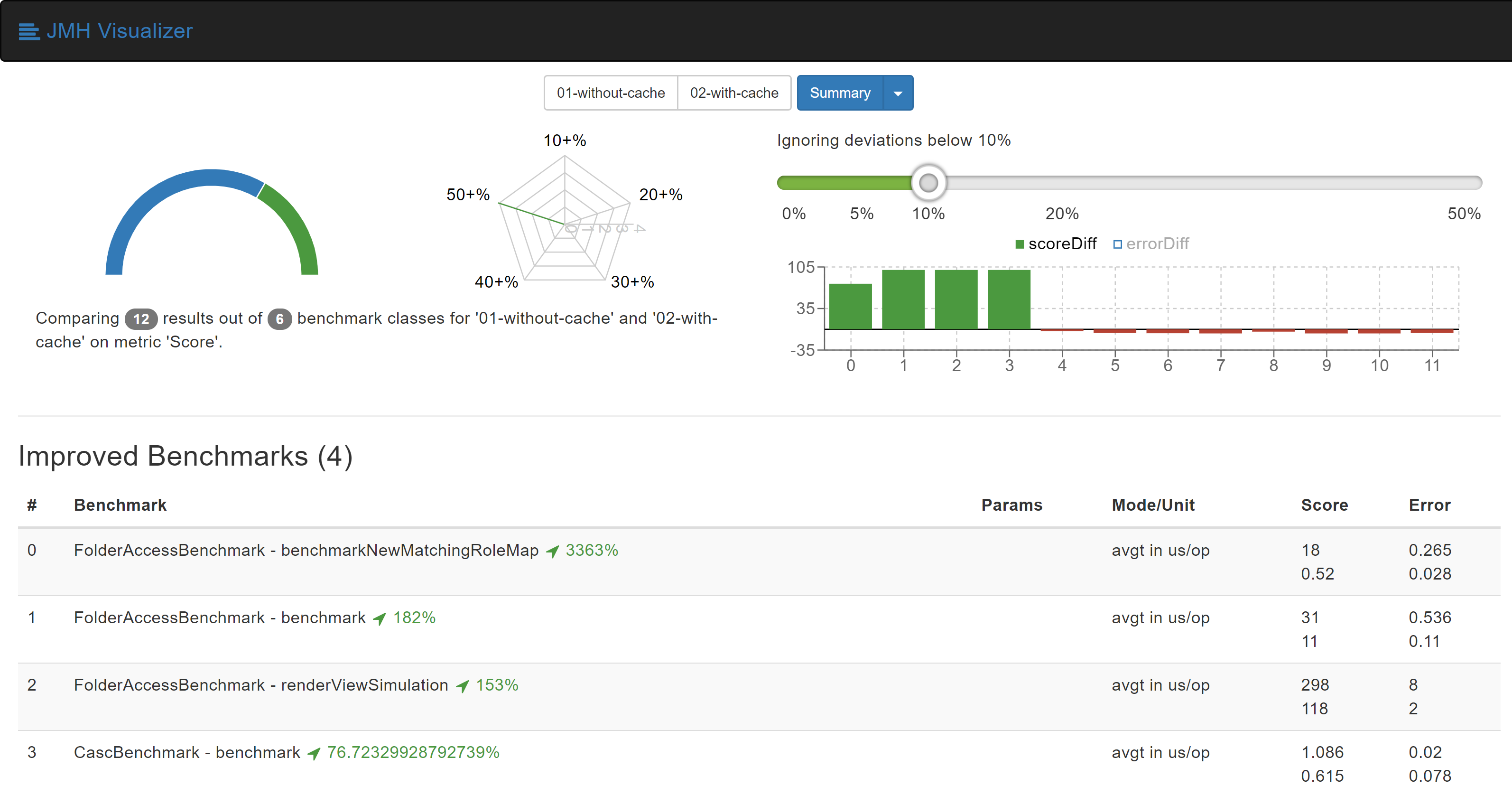
A couple of major changes were made to the Role Strategy Plugin to improve its performance. First, we started collection of roles that matched a given project name. The Role Strategy plugin before version 2.12 used to run over regular expressions for every role that it had for every permission checking request it got. Storing this produced set of roles in the memory provides us large improvements in performance and avoids repeated matching of project names with regular expressions. For keeping the plugin working securely, we invalidate the cache whenever any update is made to the roles.
After this change, we were able to observe performance improvements of up to 3300%. These improvements were visualized using JMH Visualizer.
More information is available at pull request on GitHub: https://github.com/jenkinsci/role-strategy-plugin/pull/81
Calculating Implying Permisions when plugin is loaded
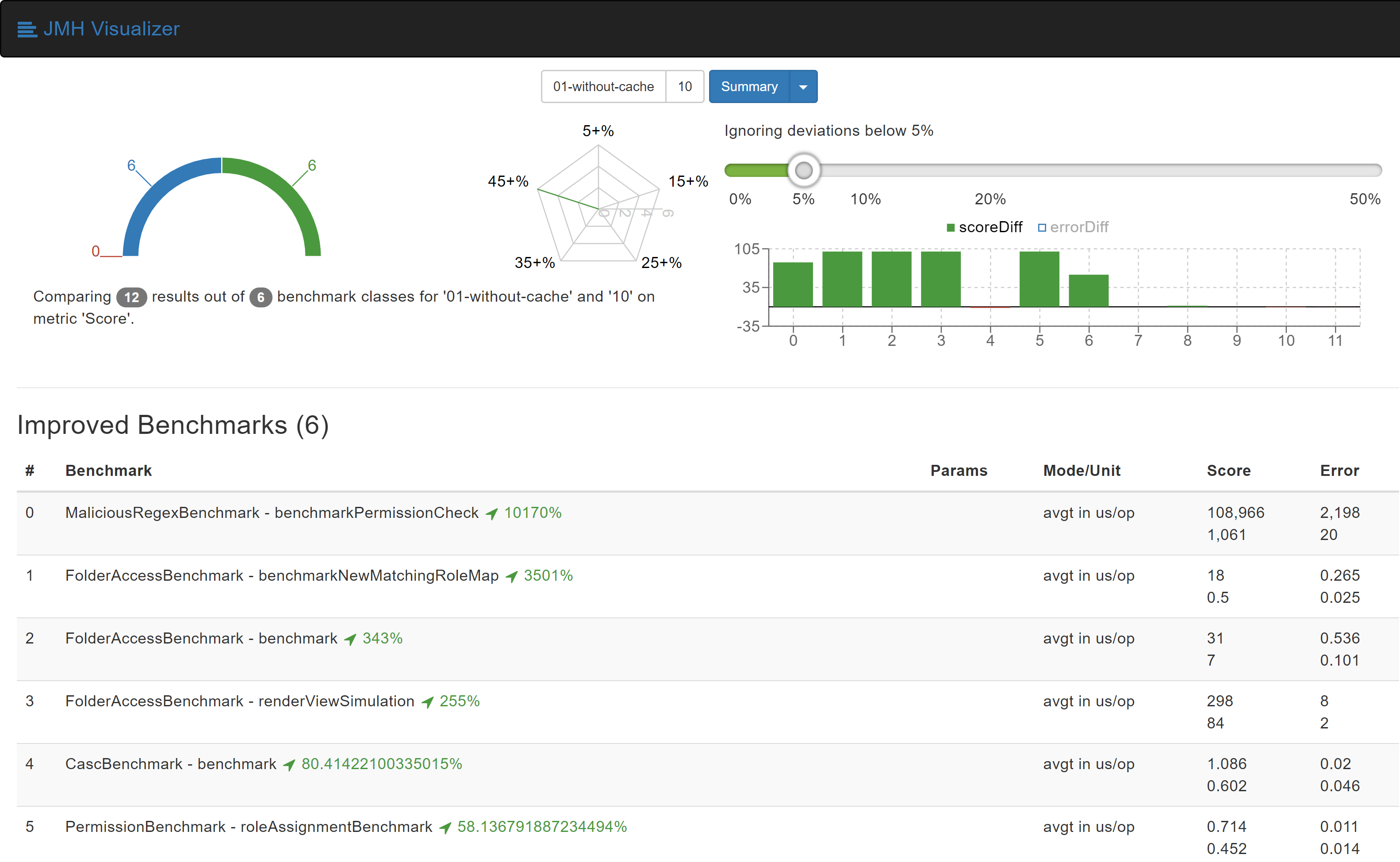
Jenkins' permission model allows one permissions to imply other permissions. When a permission check is made, we need to check if the user has any of permissions that would imply this permisison. For every permission checking request that that the Role Strategy, it used to calculate all the implying permissions. To avoid this, we now calculate and store implying permissions for every permission in the Jenkins system when the plugin gets loaded.
After both of these changes, we were able to experience improvements of up to 10000%. The benchmark results show it better:
More information about this change can be found at the GitHub pull request: https://github.com/jenkinsci/role-strategy-plugin/pull/83
Both of these changes were integrated into the Role Strategy Plugin and the improvements can be experienced starting with version 2.13.
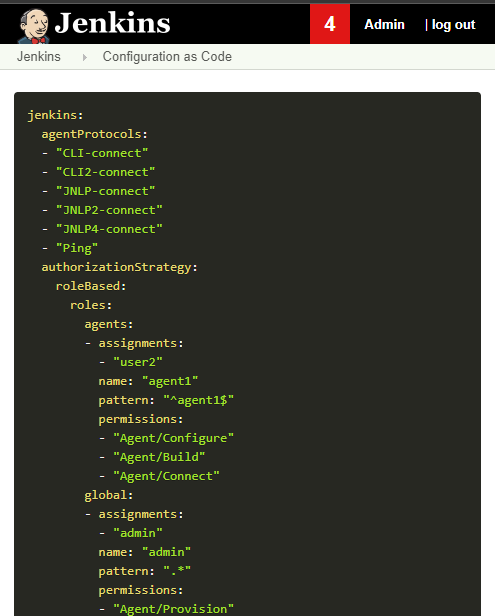
Bonus: Configuration-as-Code export now works for Role Strategy
With Configuration-as-Code plugin version 1.24 and above, export of your configuration as YAML now works!
As an alternative to Role Strategy Plugin, I also created the brand new Folder Authorization Plugin. You can check out the blog post for more information about the plugin.
Links and Feedback
I would love to hear your comments and suggestions. Please feel free to reach out to me through either the Role Strategy Plugin Gitter chat or through Jenkins Developer Mailing list.
Tech Mahindra rolls out latest version of artificial intelligence, machine learning platform
The latest version of the platform supports most of the commonly used AI and ML development frameworks and toolkits including Python, Sci-kit learn, H20-Java, R, Tensorflow and Keras.
Building Foot-Traffic Insights Dataset
Where should I build my next coffee shop?
Businesses want to understand both the physical world around them and how people interact with the physical world. Where should I build my next coffee shop? How far away are my 3 closest coffee competitors? How far are people traveling to get to my stores? Which other brands do people visit before and after they visit mine?
These questions are no-doubt interesting for urban planners, advertisers, hedge funds, and brick-and-mortar businesses. But they also hint at an interesting technical problem: machine learning at scale. Building a dataset to answer these questions comprehensively is a massively difficult computation problem because it requires heavy machine learning at a significant scale. And throughout this post, we’ll tell you exactly how we solved it.
What data do I need?
First, some context on SafeGraph. Our goal is to be the one-stop-shop for anyone seeking to understand the physical places around them — restaurants, airports, colleges, salons…the list goes on.
To serve this mission, we create datasets that represent the world around us. One such dataset is our Core Places product, which is a listing of 5MM+ businesses around the country, complete with rich information like category and open hours. This dataset is complemented by Geometry, a supplementary dataset that associates each place with a geofence to indicate the building’s physical footprint. Below are SafeGraph’s 3 main datasets, each of which tells a different store of the physical around. This post is about how we built Patterns, a dataset about the physical places around us and how humans interact with them.

Safegraph datasets
Patterns – how do humans interact with physical places?
Ultimately, we wanted Patterns to be keyed by safegraph_place_id, which is our canonical identifier for each place in our dataset. Each row would be a unique physical place, and we planned to compute a set of columns for each place which collectively described how people interacted with it. Some examples of columns we compute include the number of visitors, the hours throughout the day in which the place is most popular, and a list of other brands that people visited before or after visiting the place in question.

A few columns of our Patterns dataset, from shop.safegraph.com. Use the coupon code data4databricksers for $100 in free points-of-interest, building footprint, and foot-traffic insights data.
To build this mapping between places and visit statistics, we first needed to build an internal dataset which associated our anonymous, internal GPS feed to the physical places in Places using our dataset of geofences. Once we had a dataset which associated clusters of GPS points to our safegraph_place_id key (we call each association a visit), we could simply “roll-up” the data by our key to build Patterns. In many ways, the core technical challenge came down to building this dataset of visits.
We started with three core ingredients: (1) Places, a dataset of points of interest around the US, (2) Geometry, the physical building footprints for those places, and (3) a daily, anonymized feed of GPS data sourced from apps.

Because GPS data is inherently very noisy and is often only accurate to about 100m, we needed a machine learning model to elucidate signal from the noise and serve the predictions. On top of that, we needed data pipelines to ingest the GPS feed, cluster it, and build features out of the clusters and Places dataset. Below, we tell the (somewhat harrowing) story of how we did just that (And, if you’re curious about we developed the model itself, feel free to check out our visit attribution whitepaper here).
Building out the patterns architecture
We first decided to tackle this big-data project with small-data tools — namely, scikit-learn models developed locally on Jupyter notebooks — because those were what we were comfortable with. The only role Databricks played was when we used it to read in training data from S3 and sample to a fraction of a percent. We then coalesced the data into a single CSV and downloaded it onto a Macbook.
And, for the most part, we could indeed get a reasonable model up and running, but it was only able to train on 25 MB of data, and the moment we doubled that, the computer froze. It became clear only after we developed the initial model that this architecture wouldn’t take us very far. The grand lesson? If your Macbook Pro is a part of your data pipeline, you’ve gone too far. That is rarely the optimal way to build something production-ready.

Architecture #1: A reasonable first attempt from someone who typically just does small-data modeling.
We’d like to say we pivoted quickly to technologies that made developing a truly scalable solution trivial, but that didn’t happen just yet. We next provisioned an admittedly expensive EC2 box, retrained a model on 1% of our training data, and run a single day’s worth of production-ready inputs through the box. And the model seemed to be predicting as expected!
But “success” here wasn’t just prediction accuracy — it was also prediction time. And our setup took 12 hours to churn through a single day’s worth of input data. At that rate, the model wouldn’t compute in time to get into the customer’s hands.

Architecture #2: Just like Architecture #1, but replacing my Macbook Pro with an EC2 instance. Close, but not quite fast enough.
After two failed attempts, it came time to buckle down and bite the proverbial bullet with production-ready technologies that we were unfamiliar with but which we were confident would get the job done.
We started by scrapping our single-threaded models and training a fully distributed SparkML forest in a Databricks notebook. The UI mirrored what we had seen in Jupyter, and the time we lost in learning the ins-and-outs of SparkML was more than made up for in the reduced training time. Training a toy model on 1% of our training data had previously taken 45 minutes, but with Spark on Databricks, we were able to tune through (literally) hundreds of models before finding one which was significantly better (and, not to mention, faster) than what we had achieved on the EC2 box.
Once we had our feet wet, building the pre-model and post-model data pipeline became less intimidating. We wrote the data pipelines directly in Databricks notebooks, and, once we had confirmed they were correct, we migrated them to jars and uploaded to S3. We also saved our Spark model into a binary and uploaded to S3 as well, along with a simple Python wrapper over the model to actually serve predictions.
We just had to figure out how to get this thing running reliably. Luckily, SafeGraph had already spun up an Airflow Instance, so all we needed to do was create a new DAG and link the jars and Python egg together. We configured it to run every morning, and, just like that, we had a battle-tested, production-ready machine learning pipeline.

Architecture #3: Finally, a seriously robust model pipeline. Our training environment lives in a Databricks Python notebook and leverages PySpark, and our data pipeline consists of a series of Spark jobs, all of which are managed by Airflow and which link together through S3.
Once we had our pipeline set, generating Patterns became simple. This pipeline executes every morning before we wake up, and it writes its output to a directory in S3. At the end of each month, we run a simple Databricks job to read in every path that was generated throughout the previous 30 days and to perform a “roll-up” into Patterns. Once the roll-up is done, the data is published on shop.safegraph.com, where customers can download slices by location, category, or brand.
Big-data problems are not solved on laptops
If struggling through this pipeline has taught us anything, it’s that we should be using big-data tech — not small-data tech, like a 2017 Space Gray Macbook Pro — to solve big-data problems. Switching to Databricks, leveraging Spark ML, and managing our pipelines with Airflow took us from a 12-hour runtime to just under and hour — which is not only a huge time saving but also gives us jaw-dropping cost savings, too.
We began this project because we were tasked with building a dataset to allow people to understand how groups of people interact with the physical world around us. The Patterns dataset can help people answer lofty questions about society, and, in hindsight, it’s not surprising that building it requires just as lofty an approach.
Oh, and if you’re interested in checking out this data (or if you just don’t want our hard work to go to waste), head on over to shop.safegraph.com and use the coupon code data4databricksers for $100 in free points-of-interest, building footprint, and foot-traffic insights data.
--
Try Databricks for free. Get started today.
The post Building Foot-Traffic Insights Dataset appeared first on Databricks.
Subscribe to:
Posts (Atom)