Hop on just about any website these days, and you are bound to meet a chatbot before you interact with a live human. Patients can log into Sensely, the company that partners with the Mayo Clinic, and enter their symptoms to receive self-care advice or a referral to care services just by chatting with the bot. Doctors also benefit from similar tech, with platforms offering quick access to drug information and conditions that are sure to keep their knowledge base current.
Using AI tools like chatbots and other machine learning makes sense for diagnosis and treatment. The success of AI in healthcare has researchers curious if it could change the future of disease prevention as well. Big data has become a significant part of the future of medicine. It can help identify a patient’s risk of developing specific diseases and even enhance patient engagement.
So, what are the experts saying about the future of AI and predictive medicine? Here are a few areas of healthcare you need to watch to see AI’s role in disease prevention.
Preventing the Spread of STDs
Healthcare has been in a constant state of treatment for years. However, when you dive into statistics about some long-term or life-altering conditions, ...
Read More on Datafloq
Monday, 29 July 2019

What Is AI's Role in Disease Prevention?
Hop on just about any website these days, and you are bound to meet a chatbot before you interact with a live human. Patients can log into Sensely, the company that partners with the Mayo Clinic, and enter their symptoms to receive self-care advice or a referral to care services just by chatting with the bot. Doctors also benefit from similar tech, with platforms offering quick access to drug information and conditions that are sure to keep their knowledge base current.
Using AI tools like chatbots and other machine learning makes sense for diagnosis and treatment. The success of AI in healthcare has researchers curious if it could change the future of disease prevention as well. Big data has become a significant part of the future of medicine. It can help identify a patient’s risk of developing specific diseases and even enhance patient engagement.
So, what are the experts saying about the future of AI and predictive medicine? Here are a few areas of healthcare you need to watch to see AI’s role in disease prevention.
Preventing the Spread of STDs
Healthcare has been in a constant state of treatment for years. However, when you dive into statistics about some long-term or life-altering conditions, ...
Read More on Datafloq
Using AI tools like chatbots and other machine learning makes sense for diagnosis and treatment. The success of AI in healthcare has researchers curious if it could change the future of disease prevention as well. Big data has become a significant part of the future of medicine. It can help identify a patient’s risk of developing specific diseases and even enhance patient engagement.
So, what are the experts saying about the future of AI and predictive medicine? Here are a few areas of healthcare you need to watch to see AI’s role in disease prevention.
Preventing the Spread of STDs
Healthcare has been in a constant state of treatment for years. However, when you dive into statistics about some long-term or life-altering conditions, ...
Read More on Datafloq
Electric vehicles manufacturers to pass on tax benefits to customers
The rate reduction will reduce sticker prices of its scooters by Rs 8,000-Rs 10,000, Ather said, bringing down rates closer to that of petrol-run counterparts.
Friday, 26 July 2019
Psychology of the Connected World
It’s true that the surrounding technologies are changing not our lives but also our behavior and attitudes. They or, rather, their creators learn not only to help us, but also to manipulate us in new ways. Our over-trust to technologies might be underneath the new notion of “post-truth” where nothing is ever probable.
The recently emerged era of the connected world has produced new concerns about our behavior and psychology in the new settings. The connectivity of the world around us is changing our lives at home and at work. It gives us more opportunities but also shapes our identities.
At Home
Privacy
Does it still exist? We leave hundreds of digital footprints every day when we visit a webpage or pay with a credit card. In the connected world, where IoT devices will gain the ability to see and record all our moves, all of our notions of privacy will vanish. It is believed, that such constant surveillance violates the social and psychological foundation of humans, destroying our sense of privacy at every dimension.
We are told that this “ubiquitous surveillance” is emerging from our own voluntary choices because it is out choice to buy smart devices and accept cookies and privacy disclosure agreements ...
Read More on Datafloq
The recently emerged era of the connected world has produced new concerns about our behavior and psychology in the new settings. The connectivity of the world around us is changing our lives at home and at work. It gives us more opportunities but also shapes our identities.
At Home
Privacy
Does it still exist? We leave hundreds of digital footprints every day when we visit a webpage or pay with a credit card. In the connected world, where IoT devices will gain the ability to see and record all our moves, all of our notions of privacy will vanish. It is believed, that such constant surveillance violates the social and psychological foundation of humans, destroying our sense of privacy at every dimension.
We are told that this “ubiquitous surveillance” is emerging from our own voluntary choices because it is out choice to buy smart devices and accept cookies and privacy disclosure agreements ...
Read More on Datafloq
Why React Native is the Best Option for Most Startups
One of the most crucial decisions app-based startups will make is how to build their product. They have to decide if they will utilize the traditional platform-specific native approach or go with a cross-platform solution. If they elect to go with the cross-platform approach, they must then select from the dozens of available frameworks. This decision will impact the cost, timeline, functional limitations, and future maintainability of their product. Therefore, this is a decision that requires an in-depth evaluation and should not be taken lightly. Although it would be foolish to argue that there is a single best option for all startups, this article will explore why React Native is currently the best option for most startups.
React Native Vs. Traditional Native
Traditional native apps are still the gold standard in app development. Although other approaches can get extremely close in terms of performance, usability, and interactivity, platform-specific native apps still have the edge. With that being said, this typically marginal difference is rarely worth the significantly increased costs associated with this approach.
The traditional native method requires that iOS and Android apps are built independently. This means the cost to build, test, and maintain the app is nearly doubled. Additionally, it means ...
Read More on Datafloq
React Native Vs. Traditional Native
Traditional native apps are still the gold standard in app development. Although other approaches can get extremely close in terms of performance, usability, and interactivity, platform-specific native apps still have the edge. With that being said, this typically marginal difference is rarely worth the significantly increased costs associated with this approach.
The traditional native method requires that iOS and Android apps are built independently. This means the cost to build, test, and maintain the app is nearly doubled. Additionally, it means ...
Read More on Datafloq
Intelligent Reporting - How Big Data and AI Are Changing the Way We Create and Analyze Reports
Artificial intelligence is becoming the number one platform for decision-making processes. According to a report published by Deloitte, the main connection between making a decision on all business levels, and utilizing AI, lies in a partnership – humans having the final say on defining questions, issues, and answers while AI analyzing large volumes of data to provide a constructive basis.
There are a number of cases that prove how AI and humans work together: a startup in Denmark has developed an AI platform that helps in identifying signs of a heart attack during phone calls to emergency services. The finance industry can use AI to anticipate changes in the stock market and manage investments. Logistics use AI to guide robots on the assembly, packaging and shipping lines. Management uses AI to process data and handle administrative tasks, according to the University of Ohio.
These are just a number of cases where AI has shaped and redefined many of the industries and enabled smart analysis, accurate reporting, and reduced the time to make an effective (business) decision. Today, big data is creating challenges in reporting processes that businesses across the world are trying to tackle and find cost-effective, yet powerful solutions to generate ...
Read More on Datafloq
There are a number of cases that prove how AI and humans work together: a startup in Denmark has developed an AI platform that helps in identifying signs of a heart attack during phone calls to emergency services. The finance industry can use AI to anticipate changes in the stock market and manage investments. Logistics use AI to guide robots on the assembly, packaging and shipping lines. Management uses AI to process data and handle administrative tasks, according to the University of Ohio.
These are just a number of cases where AI has shaped and redefined many of the industries and enabled smart analysis, accurate reporting, and reduced the time to make an effective (business) decision. Today, big data is creating challenges in reporting processes that businesses across the world are trying to tackle and find cost-effective, yet powerful solutions to generate ...
Read More on Datafloq
Elon Musk’s Boring Co. raises $120 million in first outside investment
In May, Boring won its first commercial transportation contract, a $48.7 million mile-long project to shuttle visitors around the Las Vegas Convention Center.
Tesla may run on Indian roads in 2020: Elon Musk
Musk has blamed the govt's policies for giving up on India. He also blamed the FDI norms for the delay in the electric car makers' entry into the Indian market.
The countdown begins: Apple likely to launch credit card next month
People who own an iPhone will be able to sign up for the card via the Wallet app, which will have built-in Apple Card support as part of the latest iOS 12.4 update.
Apple buys Intel's smartphone modem unit for $1B in push for chip independence
Combined with its existing portfolio, Apple will have 17,000 wireless technology patents, ranging from cellular communication standards to modems
AGI Research into Strong AI a Future, While ANI Work in Weak AI is Here Now

By AI Trends Staff
Artificial general intelligence (AGI) systems promise to infer context and meaning from incoming information, and react in a similar way to human brains. Using AI, the AGI system could conceivably achieve superhuman levels of inferencing power.
Artificial narrow intelligence (ANI), what some call “weak AI” is at the other end of the spectrum, delivering on well-defined domains using AI, and it is available now.
Most AI researchers agree that AGIs are several decades away and may never be achieved. To help the research along, Microsoft recently reached an agreement to make a $1 billion investment in OpenAI, a nonprofit working to develop AGI computing systems.
According to an account in crunchbase, Microsoft CEO Satya Nadella said Microsoft will not invest the capital all at once. “It will be doled out over the course of a decade or more,” he said.
OpenAI agreed that Microsoft would become its sole provider for computational resources, such as with its Azure cloud platform, where Microsoft generated a third of its revenue in the last quarter.
A press release on this issued by OpenAI stated in part, “We want AGI to work with people to solve currently intractable multi-disciplinary problems, including global challenges such as climate change, affordable and high-quality healthcare, and personalized education. We think its impact should be to give everyone economic freedom to pursue what they find most fulfilling, creating new opportunities for all of our lives that are unimaginable today.”
Microsoft will now be the preferred partner for commercializing some of its pre-AGI technologies, the release said.
Artificial Narrow Intelligence (ANI) Less Ambitious and Here Now
Artificial Narrow Intelligence (ANI), which some call weak AI or simply narrow AI, is here now, according to an account in the Shi Blog, ANI is typically implemented for well-defined use cases in predictive analytics, text to speech, image recognition, human-like chatbots, machine vision, natural language processing or expert systems.
For example, using an ANI system at its core, the Port of Los Angeles is deploying driverless, automated straddle carrier that work with the Automated Stacking Crane system to managing loading and unloading of chips, and loading shipping containers onto rail cars – without human intervention.
The ANI system is coordinating thousands of magnets, lasers, sensors, safety triggers and differential GPS. Some 100 longshoreman, who average an annual salary of $200,000, are able to deploy into other jobs.
Most AI that surrounds us today is narrow AI, including Google Assistant and Siri, which are not close to having human intelligence. Siri for example understands spoken words, enters them into a search engine and returns results.
Narrow AI has relieved workers of boring, routine and mundane tasks, including sifting through huge volumes of data and analyzing it to produce results. The ANIs can be seen as building blocks of more intelligent AI we may see in the future.
Read the source articles in crunchbase and in the Shi Blog.
Two Views of AI Competition Between the US and China

By AI Trends Staff
Two recent reports show contrasting views of the AI competition between the US and China. A recent report in Politico suggests the US is losing, and another report in The Intercept questions what it is the US might be losing.
The former Soviet Union launched Sputnik in 1957, beating the US into space. The next year, the US launched the Defense Advanced Research Projects Agency, to focus on long-term research and potentially breakthrough technology. That has helped to spawn the internet, establish GPS, promote self-driving cars and seed artificial intelligence.
In 2018, DARPA announced it was investing $2 billion into AI-related research over five years. China has been putting billions into research, funding startups and adding AI to education programs from elementary schools to universities, Politico reports.
“The city of Tianjin alone plans to spend $16 billion on AI — and the US government investment still totals several billion and counting. That’s lower by an order of magnitude,” said Elsa Kania, an adjunct fellow with the Technology and National Security Program at the Center for a New American Security. She counts 26 AI sets of plans from 19 provinces and regions in China. “These tens of billions in local government spending far out shadows anything any city or state government in the US is doing,” she said.
What exactly is at risk for the US?, queries the writer of a piece in The Intercept. Different forces are at work in the US. Some cities are banning the use of AI facial recognition systems. The Chinese government has no such qualms, especially in Tianjin, where potentially every citizen is being watched with the aid of AI. Google backed out of the military’s Project Maven project using AI imaging on drones after a backlash from employees, dozens of whom resigned in protest.
Others are saying the US needs to compete. Palmer Luckey, the founder of Oculus VR, who later founded Anduril Industries, a defense technology company focused on autonomous drones and sensors, has suggested that US AI engineering talent should be helping the military. He recently called for an American AI program to have the same passion as the nuclear arms race. “If we had not been the leader, we would not have dictated the terms,” he told CNBC.
Perhaps the debate needs to be reframed as a technical competition and not a military arms race, Justin Sherman has written for New America, and perhaps instead of seeking national AI supremacy, we think about what getting to the finish line means.
Read the source articles in Politico, The Intercept and New America.
Exploiting Transducers To Break Into AI Systems: Security Issues For Autonomous Cars

By Lance Eliot, the AI Trends Insider
When I was an undergraduate majoring in computer science and electrical engineering, I used to spend a lot of my time in the computer center working on my systems projects. We had a mid-range computer system that was quite powerful for the time period and I often operated the system in addition to writing programs on it.
One day, I had my radio with me and was turning the radio channels when I noticed a pattern to the static on one of the otherwise unused channels. Listening more closely, I could definitely tell that it was not just pure random noise and that it was a pattern of some kind.
Was it finally a sign from the skies that outer space aliens were trying to communicate to us from far away planets?
No, turns out it wasn’t proof of aliens from outer space.
Instead, it was picking up the electromagnetic waves being emitted by the mid-range computer system.
I began to pay close attention to what the computer was doing and what I could hear on the radio. Though perhaps I should not admit this, I spent so much time there doing my projects that it seemed like I practically lived there (well, I did keep a sleeping bag there, for those late-night deadline crunches to get my projects done on time). Over time, I enjoyed being able to ascertain what the mid-range computer was doing via just listening to the beeps and dots of sound coming from the radio.
I would tell my friends that the computer was about to print something, and lo and behold seconds later the printer started. I would say that the computer is rebooting and it’s in the stage where it is loading up the core part of the operating system. Pretty much, I could after a while tell you relatively precisely what the computer was doing at any moment in time, simply by listening to the static radio channel. For those that didn’t know the source of my magic, they could hear the radio but it seemed to them that somebody had accidentally left it on a channel that wasn’t playing music and so they had no clue that I was secretly using it as my spy or co-conspirator, you’d say.
It then dawned on me that I could potentially get the computer to whistle a tune (so to speak), by writing a program that would use the memory and processor of the computer in such a fashion that it would produce certain patterns and tones on the radio channel.
Sure enough, after using (or wasting) a sunny weekend that I could have been at the beach, I proudly installed my program that would take as input any simple tune and would then get the radio to play it via the indirect means of the computer doing all sorts of memory shifting and processor calculations. Cool!
The sensors in the radio consisted of transducers, which officially is defined by the American National Standards Institute (ANSI) as a device that provides a usable output in response to a measurand.
For many years, transduction was considered the conversion of a physical measurand into mechanical energy, such as operating a kinematic control.
Once solid-state electronics came along, most of today’s transducers or sensors serve to transduce physical phenomena into electrical output.
About The Nature Of Transducers
To provide some clarity, let’s define a sensor element or transducer element as a transduction mechanism that will convert one form of energy into another form, while the actual sensor or transducer itself consists of its physical packaging and its external connections.
A sensor system consists of various sensors and transducers that are made-up of sensor elements and transducer elements, and ultimately serves some stated purpose. A digital camera for example is a type of sensor system, in a packaging that might include a lens and a housing, and this sensor system consists of various sensors and transducers that capture light and then translate those physical phenomena into electrical signals, and those signals become digital bits (we might assign the values zero and one to the bits).
For any kind of sensor or transducer system, we would want to consider what accuracy levels it provides, how it deals with noise, what its operating range is, the amount of distortion it produces, and so on. A passive sensor or transducer system is one that receives energy and self-generates outputs from the input it collects. An active sensor or transducer system, such as a radar unit, a LIDAR unit, an ultrasonic unit, emits energy to then get back energy that it uses to modulate or produce outputs.
When you use a digital camera, you are likely vaguely aware that it has certain operating parameters such as the resolution of the image and whether it can take good pictures in low lighting. Underneath the hood, there is a lot going on in terms of the nature of the sensing elements, the amplification that is occurring when taking a picture, the analog filtering, the data conversion, etc. Generally, most of the time we don’t really concern ourselves with what’s under-the-hood. It’s similar to driving a car, we just get into the car, turn the key, and drive. No need to worry about the pistons and the crankshaft and the myriad of other gears and gadgets that compose the engine. We just put our foot on the gas and go.
For modern day cars, we are increasingly adding complex sensor and transducer systems into the cars. We want our cars to be able to detect if there is a pedestrian standing next to the car and alert us so that when we make a turn we don’t accidently hit the person. We want a back-up camera that we can see what’s behind us as we put a car into reverse and back-up. More and more, our cars are becoming miracles of state-of-the-art sensors and transducers, being able to sense the world around us and then provide that information to us or otherwise alert us to something we should be considering.
Autonomous Cars And Transducer Vulnerabilities
What does this have to do with AI self-driving driverless autonomous cars?
At the Cybernetic Self-Driving Car Institute, we are analyzing the vulnerabilities of the sensors and transducers that AI self-driving cars are being outfitted with. We want to figure out how these systems can be tricked or fooled, either by intent or by happenstance, and find ways to prevent or mitigate those vulnerabilities.
You might be at first puzzled about the potential vulnerabilities.
Let’s take an easy one that used to be quite popular.
Cars for a long time used a physical key in the door and in the ignition, and then began to switch to using keyless entry systems. For those of you that remember when we first migrated over to keyless entry systems, there were some nefarious attempts to electronically fool a keyless entry system. An intruder would sit in the parking lot and wait for you to park your car. When you get out of your car, you would naturally use your keyless fob to lock the door of the car. The intruder would capture the radiated signal, and then wait for you to go into the grocery store. Once you were out of sight, the intruder would then emit that same signal to your keyless entry system and fool it into opening the door, and ultimately also fool the ignition too.
Various encryption techniques and token exchanges are used to defeat this kind of heinous act.
Determined thieves can still potentially used a man-in-the-middle (MITM) attack against keyless entry systems, but it’s pretty hard to do and not something that you’d see done day-to-day in just any neighborhood. The notion of exploiting the sensory or transduction system is referred to by many as a transduction attack.
A transduction attack leverages the physics of a transducer or sensor and tries to exploit its input or its output to the advantage of the attacker.
Famous Case Of The DolphinAttack
One of the most impressive general examples of this ploy was the DolphinAttack approach identified and used by researchers at Zhejiang University. They were interested in seeing whether they could trick a voice recognition system, especially the popular ones such as Alexa, Siri, Google Now, Cortana, and others. Part of the goal of such attacks is to not have to actually gain direct access to the sensory or transducer system per se, in other words, you don’t need to physically get it and somehow open it up. Instead, you use whatever method it already uses for input, and try to feed input into it in such a manner that you can trick it in some manner.
If this wasn’t a potentially dastardly thing to do, it certainly is an admirable trick. Let me emphasize that it’s better to have researchers get there first, and figure out these kinds of vulnerabilities, versus waiting for the bad guys to figure out these exploits. Putting our heads in the sand and pretending that these exploits don’t exist or cannot be found is not a prudent approach to security. We would want to alert the manufacturers and designers of these sensory systems to be aware of how to improve their designs and limit or eliminate the vulnerabilities.
Back to the DolphinAttack and what the researchers did.
They wanted to provide inaudible commands to the voice recognition systems, such that humans would not know that fake or unauthorized commands were being fed into the voice recognition systems. It’s like using a dog whistle that only a dog can hear and that humans cannot hear. The sensors and transducers of the voice recognition systems are allowing a wide range of audible sounds to be fed into the microphone (beyond the range that humans can hear), and so you can sneak an inaudible sound into that microphone. A human might say, “Alexa, tell me a joke,” and meanwhile you’ve fed at an inaudible range the command “Alexa, squeak like a duck,” which the human didn’t hear the command and would be surprised that all of a sudden Alexa started quacking.
The upper bound of human hearing is at about 20 kHz, while the voice recognition systems are generally allowing for a range that includes 44 kHz. Keep in mind that the microphone is a transducer that converts airborne acoustical waves into electrical signals. This is similar to earlier when I discussed how a digital camera takes in light waves and then converts this into electrical signals and ultimately bits and bytes of data. The voice recognition systems consist of the hardware and software that first captures sounds, then converts the sounds into bits, and feeds those bits into the speech recognition component, which then feeds this into the command interpretation and execution portion.
The researchers created transmitters to try out their approach. In one case, they used an everyday smartphone as the signal source and the vector signal generator. This showcases that you don’t necessarily need some highly specialized and bulky equipment to pull of this attack. It can be carried out via an ordinary smartphone, which is relatively small and unobtrusive. If you took out a smartphone that had been rigged for this attack, nobody would be the wiser.
They wanted to try so-called walk-by attacks, whereby if you could get close enough to the voice recognition system, you could try to feed it the inaudible commands. Types of commands they used for the experiment included: “Call 1234567890,” “FaceTime 1234567890,” “Open dolphinattack.com,” “Open the back door,” and other commands. These are commands that would produce untoward actions that the person owning the voice recognition system would likely not want to happen. For example, by using the command “Open dolphinattack.com” you could get the device to potentially execute a more involved attack and thus the inaudible command got you initially inside to then take even worse action. The devices attacked included iPhones, iPads, MacBooks, Windows PC’s, Amazon Echo, etc.
Generally, these attacks succeeded.
There were some complications about the background noise and whether it might impact the attack, and other factors, but overall these attacks were able to achieve their demonstration that such attacks are feasible. They were able to get the various voice recognition systems to visit a potentially malicious web site, they got the devices to spy on the owner of the device, and there are other impacts that could be achieved such as Denial of Service (DoS), injecting fake information, and the like.
In the mix of devices, they included the Audi Q3, which has a voice recognition system for operating the navigation of the car. Indeed, most of the current crop of new cars have voice recognition systems now included into their respective cars. For AI self-driving cars, the expectation is that the AI will conversationally interact with the human occupants and determine where to drive, how to drive there, and so on. Imagine the concern if an interloper or intruder can trick those voice recognition systems into doing inaudible commands, and the dangers that could arise because of it.
Dealing With Transducer Attacks Aimed At Self-Driving Cars
Others have shown that transducer attacks can happen on self-driving cars in other ways.
For example, an experiment showed that it was possible to spoof Tesla’s ultrasonic sensors and transducers into either incorrectly gauging the distance to an object or potentially not even realizing that an object was within the range of the sensor. Now, admittedly, most of these experiments have been relatively rigged and tend to require a rather artificially created situation to show that it can be done, but the point is that we all need to be aware of the dangers of these kinds of transducer attacks.
What can be done about these transducer attacks?
First, it is incumbent upon the makers of the AI self-driving cars that they carefully assess what sensory devices and transducer attacks can occur for their self-driving cars.
Some of the automakers and tech firms are just grabbing a particular sensory device and putting it into their self-driving cars, doing so for convenience sake, or due to low cost, or other aspects, and not with an eye towards the vulnerabilities of the device. Many of them aren’t even looking at the vulnerabilities because they are too busy just trying to make the sensors work with their AI and ensure that the self-driving car can do the everyday needed actions of driving the car.
Second, the makers of the sensory devices need to be on their guard about how their devices might have vulnerabilities.
That being said, some of the device makers will say that it’s up the auto maker or tech firm to ascertain in what way the device will be configured into their self-driving cars. In other words, the maker of the sensor waves their hands and says that it is up to the automaker to be wary. All the sensor maker does is make the sensor, and how it’s used and how its protected is not on their shoulders, they often say. This kind of argument is not likely to hold much water when the day comes that the particular sensor allowed a really terrible attack and at that point there will be a slew of finger pointing and a price to be paid, you can bet.
Third, we need to continue to have the so-called good guys “white hats” try to find these vulnerabilities, doing so before the bad guys “black hats” do so.
As mentioned earlier, some say that when these vulnerabilities are discovered, the discoverer should keep a lid on it. I think we would likely agree that at least the discoverer ought to inform the sensor maker and the automaker. Beyond that, I realize that you might be queasy that by announcing it to a wider audience that then the bad guys can exploit it. There is an ongoing debate about how to best make known security flaws. Either way, I’d advocate that at least we should be trying to find the flaws and not be pretending they don’t exist.
Conclusion
For some of these transduction attacks, there will be those that beforehand try to figure out the attack and determine when and where to use the attack. In other cases, the transduction attacks might be of an opportunistic nature.
This is like walking through a neighborhood and trying each front door to see if any happen to be unlocked. The crook might get “lucky” and randomly find one that is unlocked, and then exploit the situation at that moment.
Notice that the transduction attacks are a form of cyberphysical security attacks. It does not require loading any special software into the device. It does not require physically touching the device. Instead, it leverages how the device itself works, and exploits its own design. By improving the designs, we can hopefully remove the holes and therefore prevent entirely the chances of transduction attacks.
Copyright 2019 Dr. Lance Eliot
This content is originally posted on AI Trends.

Supply Chain Management Software Suppliers Using AI to Optimize

By AI Trends Staff
Global supply chains are the order of the day in the auto industry, pharmaceuticals and consumer electronics to name a few. A single product could have hundreds of thousands of suppliers. Delays can result in shortages, overstocking and poor customer experiences.
To procure raw materials, manage trading partners, plan sequences and execute tasks while processing huge volumes of data, is a large task, fit for data analytics using AI.
AI has been used since the early 2000s to forecast demand using historical shipping daa, according to an account in DisCo (short for Disruptive Competition Project). Procter & Gamble Co., for example, has used sophisticated models to understand demand signals from point-of-sale data, retailer warehouse and outlet inventory and retailer forecasts, for over a decade. P&G announced in 2018 it would globally adopt the demand planning tool by E2Open, an AI software prodiver for supply chains.
Advanced machine learning algorithms are being used to optimize demand plans, adjust stocking strategies and find optimal delivery routes, for Amazon, UPS, Walgreens and other Fortune 500 companies, in addition to P&G. Some retailers are now using competitive pricing data, store traffic and weather data to adjust demand forecasts.
Suppliers Offering AI for Procurement Emerging
Quite a few companies have emerged to sell AI products and services for supply chain management. Companies offering predictive analytics for demand forecasting, AI for warehouse management and chatbots for use in computing were highlighted in a recent account in Emerj.
For example, LLamasoft was founded in 2003 in Ann Arbor, Michigan and currently has over 500 employees. The company’s Demand Guru product for predictive demand modeling uses machine learning to identify patterns in historical demand data, to help companies cut costs and increase efficiency. The company offers Data Cubes, collections of weather and economic time-series data sets that can be used to start the platform’s learning capability.
Customer Schneider Electric uses the product to build a predictive model that could create the best routing options for the raw materials supply chain, from circuit breakers that can fit on a store shelf to transformers the size of a large room.
Through its acquisition of Reddworks in 2015, an early entrant into warehouse execution systems, Dematic has added to its automation software for supply chain management. The platform can be used to identify the most efficient picking density for warehouse robots, or to optimize the workflow of orders and releases. An American apparel manufacturer (unidentified) used the Dematic IQ WES product to support retail story fulfillment, using the product to develop a distribution center for supplying 3,900 retail stores. They were combining distribution of eight brands into one center. The project was successful in enabling replenishment of up to 600,000 pieces per day in their stores.
A chatbot supplied by Chyme, a startup out of Texas, seeks to open conversation interfaces between human operators and big software systems such as from SAP. A customer in the beverage industry used the chatbot, called Chymebot, to assist the procurement system. They can ask about order and shipment status, available stock stock prices, status of suppliers and details of contracts. Getting the system to work consistently well, is likely a long-term effort, the authors cautioned.
Managing Jenkins Artifacts with the Azure Artifact Manager Plugin
Jenkins stores all generated artifacts on the master server filesystem. This presents a couple of challenges especially when you try to run Jenkins in the cloud:
-
As the number of artifacts grow, your Jenkins master will run out of disk space. Eventually, performance can be impacted.
-
Frequent transfer of files between agents and master may cause load, CPU or network issues which are always hard to diagnose.
Several existing plugins allow you to manage your artifacts externally. To use these plugins, you need to know how they work and perform specific steps in your job’s configuration. And if you are new to Jenkins, you may find it hard to follow existing samples in Jenkins tutorial like Recording tests and artifacts.
So, if you are running Jenkins in Azure, you can consider automatically managing new artifacts on Azure Storage. The new Azure Artifact Management plugin allows you to store artifacts in Azure blob storage and simplify your existing Jenkins jobs that contain Jenkins general artifacts management steps. This approach will give you all the advantages of a cloud storage, with less effort on your part to maintain your Jenkins instance.
Configuration
Azure storage account
First, you need to have an Azure Storage account. You can skip this section if you already have one. Otherwise, create an Azure storage account for storing your artifacts. Follow this tutorial to quickly create one. Then navigate to Access keys in the Settings section to get the storage account name and one of its keys.

Existing Jenkins instance
For existing Jenkins instance, make sure you install the Azure Artifact Manager plugin. Then you can go to your Jenkins System Configuration page and locate the Artifact Management for Builds section. Select the Add button to configure an Azure Artifact Storage. Fill in the following parameters:
-
Storage Type: Azure storage supports several storage types like blob, file, queue etc. This plugin currently supports blob storage only.
-
Storage Credentials: Credentials used to authenticate with Azure storage. If you do not have an existing Azure storage credential in you Jenkins credential store, click the Add button and choose Microsoft Azure Storage kind to create one.
-
Azure Container Name: The container under which to keep your artifacts. If the container name does not exist in the blob, this plugin automatically creates one for you when artifacts are uploaded to the blob.
-
Base Prefix: Prefix added to your artifact paths stored in your container, a forward slash will be parsed as a folder. In the following screenshot, all your artifacts will be stored in the “staging” folder in the container “Jenkins”.

New Jenkins instance
If you need to create a new Jenkins master, follow this tutorial to quickly create an Jenkins instance on Azure. In the Integration Settings section, you can now set up Azure Artifact Manager directly. Note that you can change any of the configuration after your Jenkins instance is created. Azure storage account and credential, in this case, are still prerequisites.

Usage
Jenkins Pipeline
Here are a few commonly used artifact related steps in pipeline jobs; all are supported to push artifacts to the Azure Storage blob specified.
You can use archiveArtifacts step to archive target artifacts into Azure storage. For more details about archiveArtifacts step, see the Jenkins archiveArtifacts setp documentation.
node {
  //...
  stage('Archive') {

    archiveArtifacts "pattern"
  }

}
You can use the unarchive step to retrieve the artifacts from Azure storage. For more details about unarchive step, please see unarchive step documentation.
node {
  //...
  stage('Unarchive') {

    unarchive mapping: ["pattern": '.']
  }

}
To save a set of files so that you can use them later in the same build (generally on another node or workspace), you can use stash step to store files into Azure storage for later use. Stash step documentation can be found here.
node {
  //...
  stash name: 'name', includes: '*'
}
You can use unstash step to retrieve the files saved with stash step from Azure storage to the local workspace. Unstash documentation can be found here.
node {
  //...
  unstash 'name'
}
FreeStyle Job
For a FreeStyle Jenkins job, you can use Archive the artifacts step in Post-build Actions to upload the target artifacts into Azure storage.

This Azure Artifact Manager plugin is also compatible with some other popular management plugins, such as the Copy Artifact plugin. You can still use these plugins without changing anything.

Troubleshooting
If you have any problems or suggestions when using Azure Artifact Manager plugin, you can file a ticket on Jenkins JIRA for the azure-artifact-manager-plugin component.
Conclusion
The Azure Artifact Manager enables a more cloud-native Jenkins. This is the first step in the Cloud Native project. We have a long way to go to get Jenkins to run on cloud environments as a true “Cloud Native” application. We need help and welcome your participation and contributions to make Jenkins better. Please start contributing and/or give us feedback!
Thursday, 25 July 2019
How RFID and IIoT Address the Hurdles of Construction Asset Tracking
According to McKinsey, the productivity growth in the construction sector averaged a mere 1% a year over the past two decades. Among other reasons, the slowdown in the industry’s growth can be traced back to the inefficient management over the construction assets.
Currently, to track where assets are located and how they are utilized, construction workers make notes about assets’ locations and operations performed with them on paper and then enter the data into spreadsheets. Several rounds of manual data entry lead to 88% of spreadsheets being erroneous, not to mention the amount of time construction workers lose on tracking.
In this article, we’ll show how technologies can help construction companies optimize asset management.
The technology stack
To effectively track a variety of assets, which travel to and from numerous construction sites and storage facilities, construction companies can leverage asset tracking solutions based on RFID and IIoT.
RFID
The RFID technology is used to automatically identify and track assets labeled with RFID tags. Each RFID tag gets a unique ID that is stored in a data warehouse. An ID is correlated with the information about an asset carrying a tag.
RFID readers are used to fetching information from tags. Once a tag gets into the range of ...
Read More on Datafloq
Currently, to track where assets are located and how they are utilized, construction workers make notes about assets’ locations and operations performed with them on paper and then enter the data into spreadsheets. Several rounds of manual data entry lead to 88% of spreadsheets being erroneous, not to mention the amount of time construction workers lose on tracking.
In this article, we’ll show how technologies can help construction companies optimize asset management.
The technology stack
To effectively track a variety of assets, which travel to and from numerous construction sites and storage facilities, construction companies can leverage asset tracking solutions based on RFID and IIoT.
RFID
The RFID technology is used to automatically identify and track assets labeled with RFID tags. Each RFID tag gets a unique ID that is stored in a data warehouse. An ID is correlated with the information about an asset carrying a tag.
RFID readers are used to fetching information from tags. Once a tag gets into the range of ...
Read More on Datafloq
9 Formidable Big Data Analytics Tools for 2019
Typically big data is reckoned by its size, but experts also give credit to information technologies that are assisting analysts in analyzing huge clusters of unstructured data to make sense of data trends, patterns, and anomalies. Big Data is a crucial asset for Business Intelligence (BI) for industries ranging from manufacturing to banking, professional services to entertainment, including the federal government. International Data Corporation (IDC) has forecast that global spending on big data technologies will reach $260 billion by 2022.
So what technology tools are dominating the market in 2019? Below we discuss nine formidable big data analytics tools to help you amass data and reign industrial profit.
1. MongoDB
MongoDB is a flexible, principal NoSQL which is an open-source document database with cross-platform compatibility. It is popular among the users for its storage capacity and for the role it plays in MEAN software stack, .NET applications, the Java platform, and others. MongoDB stores document data in the binary form of JSON document instead of BSON type. Users also prefer MongoDB for its high scalability, obtainability, and presentation. Given the remarkability of its inbuilt structures, MongoDB is best suitable for driving decision-making and facilitating data-driven connections with its users. Its esteemed list of ...
Read More on Datafloq
So what technology tools are dominating the market in 2019? Below we discuss nine formidable big data analytics tools to help you amass data and reign industrial profit.
1. MongoDB
MongoDB is a flexible, principal NoSQL which is an open-source document database with cross-platform compatibility. It is popular among the users for its storage capacity and for the role it plays in MEAN software stack, .NET applications, the Java platform, and others. MongoDB stores document data in the binary form of JSON document instead of BSON type. Users also prefer MongoDB for its high scalability, obtainability, and presentation. Given the remarkability of its inbuilt structures, MongoDB is best suitable for driving decision-making and facilitating data-driven connections with its users. Its esteemed list of ...
Read More on Datafloq
Announcing Databricks Runtime 5.5 with Conda (Beta)
Databricks is pleased to announce the release of Databricks Runtime 5.5 with Conda (Beta). We introduced Databricks Runtime 5.4 with Conda (Beta), with the goal of making Python library and environment management very easy. This release includes several important improvements and bug fixes as noted in the latest release notes [Azure|AWS]. We recommend all users upgrade to take advantage of this new runtime release. This blog post gives a brief overview of some of the new features on Databricks Runtime 5.5 with Conda (Beta).
Major package upgrades
We upgraded a number of packages on Databricks Runtime with Conda (Beta) to match Anaconda Distribution 2019.03. Some of the major package upgrades include:
| Package | Updated Version |
| pandas | 0.24.2 |
| numpy | 1.16.2 |
| matplotlib | 3.0.3 |
| ipython | 7.4.0 |
To view a complete list of packages and their versions installed on Databricks Runtime with Conda, visit the release notes [Azure|AWS].
Improved UX and Performance
In this release, we also improved user experience and performance of Databricks Runtime with Conda (Beta).
In Databricks Runtime 5.4 with Conda (beta), you can use Databricks Library Utilities [Azure|AWS] to create a Python environment scoped to a notebook session. This popular feature allows you to easily create an isolated environment with required libraries on a shared cluster. In Databricks Runtime 5.5 with Conda (beta), we have improved the isolation among environments scoped to notebook sessions, further mitigating library conflicts.
We added support for YAML files when using Databricks Library Utilities to customize Python environments. Databricks Runtime 5.4 with Conda (Beta) provided a way of using a requirements.txt file [Azure|AWS] to install a list of packages, with each package’s version specified. This helps you customize the environment without needing to installing packages one by one. In Databricks Runtime 5.5 with Conda (Beta), we have added support for installing packages using YAML files, the declarative file format used by Conda. For more details on how to install packages using YAML files, refer to the User Guide for Databricks Library Utilities [Azure|AWS].
We have made it easier to use %sh conda install. When you use conda install to install new packages on the driver node, you no longer need to pass the easily-forgotten -y flag.
To improve environment isolation between notebooks, process isolation and credential passthrough [Azure] is now enabled in Databricks Runtime 5.5 with Conda (Beta). Note: Credential passthrough on AWS is in private preview.
Finally, we improved startup performance of notebook-scoped environments. Running the first command in a new notebook is now significantly faster.
--
Try Databricks for free. Get started today.
The post Announcing Databricks Runtime 5.5 with Conda (Beta) appeared first on Databricks.
Wednesday, 24 July 2019
Persistent Overworking Of AI Developers Endangers Crucial AI Systems: The Case Of Autonomous Cars

By Lance Eliot, the AI Trends Insider
You have your sleeping bag at the office for those overnight non-stop coding deadlines that require you to work on the AI system until you get the particular component working right.
Turns out, you’ve been using the sleeping bag quite a bit lately.
Furthermore, you often find yourself telling friends that you cannot spare time to go with them to an evening excursion at the local pubs, due to having to stay at work. The moment you get to work in the morning, you are bombarded with tons of very intense coding to be done, and of course eating lunch at your desk is the only means to try and keep your head above water (no time to go out and get food or heaven forbid sit at a restaurant and eat lunch there). It’s a do-or-die culture at the workplace and you are immersed in it up to your teeth.
Welcome to the typical workplace conditions for AI developers doing AI self-driving driverless autonomous car systems work.
Now, I’m not suggesting that there aren’t lots of other computer system developers in lots of other lines of work that aren’t doing the same. There are. In fact, if you were to go from building to building in a place like Silicon Valley, you are likely to find tons of developers all suffering the same fate. Non-stop work. Huge pressures. Deadlines, deadlines, deadlines. And generally, no hope that it will let up.
I think we’re all amenable somewhat to the notion that from time-to-time there is a need for “maximum effort” (Deadpool!) toward doing development work. Those temporary urgencies do arise.
Putting one’s personal life on-hold to handle something truly needed at work is part-and-parcel of being in our profession. In some sense, it can almost even be something that you can later on brag about, hey, I did an all-nighter and lived to tell the tale. Some might even claim that it can make the rest of the time seem sweeter, in the sense that if you pushed hard on something a couple of months or weeks ago, changing back to a more measured pace seems “leisurely” in comparison.
But, the question arises, does an excessive overworking workplace lend itself to properly developing AI-based autonomous cars?
Overworked AI Developers And AI Systems Development
Keep in mind that AI self-driving cars are life-or-death systems.
If we were to compare the normal everyday kind of system to the AI system of a self-driving car, I think it would be fair to claim that the self-driving car system has a somewhat higher onus in terms of being built for high reliability and safety.
Sure, that accounting system you are coding might also need reliability and safety, but if it gets the credits and debits mixed-up due to an error or bug, this seems not quite as catastrophic as an AI self-driving car that rams into a wall or a pedestrian due to an error or bug.
Some years ago, when I started-up a new company for AI oriented systems development, our first major client necessitated that we work night and day to develop the system they wanted. It was crucial that we delivered to this client, otherwise gossip would have spread in the grapevine that we weren’t good enough to be considered for other major engagements. In this case, it was an AI system that pushed the limits of AI at the time. This made it doubly tough since we were trying to invent new Machine Learning (ML) techniques while also figuring out how to apply them to the particular need of the client.
As the founder and head of the company, I was knee deep in helping do the development (it wasn’t until later on, once the company had grown that I was able to step back from the development efforts and take on the more all-encompassing role of leader and also rainmaker). The team that I had hired was surprised that I was sitting there cranking out code with them. They were more used to managers that would assign work to be done, rather than they themselves getting into the weeds. I was at that time willing to do anything and whatever it took to get our first big project delivered on-time and on-target to what was promised.
I felt bad about having my team have to work so hard and non-stop.
Some of them had just started a family and were sacrificing time toward their significant other and their newborn kids. Some of them were eager to do the work and excited about being on the ground floor of something new. There was a wide range of reactions to the crazy blitz of work. I had pledged that it wouldn’t last and that this was just being done to achieve a specific goal. Indeed, after we got the project completed successfully, I paid out a generous bonus to the team members and the next projects were less overwhelming in terms of work time.
Turns out that many companies today have taken the perspective that there is no end in sight for doing overwhelming work.
It is the work.
It is the standard practice at the company.
I know many high-tech CEOs that brazenly tell everyone that they intentionally work their people the hardest of any other company in town. It’s a source of pride to be able to say that you don’t allow your team members to take vacation. These CEO’s are proud to exclaim that they work their people to the bone.
Some even smirk that the appearance of providing perks at the office such as an in-house chef and ping pong tables is actually a “trick” to keep their employees working at the office, done under the guise of claiming to show regard for their people. The minimal cost to provide food at the office is well-worth the added productivity of the developers.
Keep those developers coding and doing so by throwing them a bone of one kind or another is easy enough to do, some sadly seem to think.
Plus, the advent of smartphones and the Internet has made things even “better” for those companies desiring to wring every ounce out of their developers. An employee that leaves the office is still on-the-hook for answering questions and remaining engaged in work activities, via the use of their smartphone and their tablets. Texts galore, phone calls, the use of productivity tools such as Slack, and so on, all of which allow for true 24×7 work activity. In one sense, it doesn’t matter if you are sitting at work or not per se (so-called “butts in seats”), since any moment that you are anywhere, the expectation can be that you’ll respond and keep up with the ongoing work streams.
One company had encouraged their team members to “take a break” by heading to Yosemite (a wilderness area in Northern California, which is about a 3 ½ hour drive from Silicon Valley). Wow, unbelievable that the Attila the Hun leadership would actually encourage the developers to take some time off. Had the world come to an end?
Well, turns out that the company had arranged for the team members to stay in lodges at a camp area that was outfitted with Internet access. Yes, you guessed right if you deduced that the team members ended-up spending most of the time “in the wild” by sitting at the campground and working on their laptops. Furthermore, the leadership went too, ostensibly to also enjoy the outdoors, but more so to make sure that the team members were working and not taking time to go sightseeing. Now that’s a quite a vacation!
So, is it sensible to go ahead and work your people non-stop or not?
Some would say that it has become the default practice.
If your firm doesn’t do this, other firms will, and those other firms will be able to get ahead of your firm. You can’t “afford” to not have a non-stop work environment. Not only will your firm fall behind, there’s the danger that your firm will become known for having slackers. Don’t go to work at that place, it’s the lazy developers that go there. Those wimps. They only produce a fraction of what other firms can get done in the same length of time.
There are many executives that believe utterly in the coding until-you-drop type of work environment. Furthermore, if you do drop, the viewpoint is that it shows your weakness. It shows that you aren’t suitable for the big time. In a Darwinian way, these executives want just the survivors to be at their workplace. Survival of the fittest. And how to determine who is the fittest? Work, work, work. The ones left standing are the fittest. The ones that cannot stand it, they are out. Drop them like a brick. It’s as easy as that.
Sometimes these same executives will momentarily seemingly open their eyes to the situation and maybe, just maybe, concede that things are a bit over-the-top in terms of the workplace demands. Sadly, some of those will then do the Yosemite kind of trips under the false belief it will “refuel, recharge, and reconnect” their developers. They are either deluded into believing that a working “vacation” gets the trick done, or they know it won’t but want to at least seem to be doing something about workplace complaints or qualms by those being overworked.
Overwork Impacts On Development Of Autonomous Cars
What does this have to do with AI-based autonomous cars?
At the Cybernetic AI Self-Driving Car Institute, we are developing AI systems for self-driving cars, and, as such, we keep tabs on what other like firms are doing, and we’ve had many of their AI developers that have eyed coming to us, based on the excessive overwork taking place at those other firms and the more measured tone that we take.
This brings up some important points about excessive overwork.
Though at first glance it might seem “wise” to overwork your AI developers, since it would appear to gain you some kind of efficiency and productivity gains, the surface level perspective can differ from the reality of what actually turns out.
Let’s consider some of the downsides of the excessive overwork situation.
First, let’s agree that people can get burned out at work. I’ve seen this happen many times at the numerous companies that I’ve worked at over the years. For AI developers, you can pretty quickly see them become less productive. They become more irritable and less collaborative. Since many computer people are already a bit cynical, you start to burn out one and I assure the cynicism goes through the roof. This can have a very negative result on their coding and development efforts, including the fostering of an “I could care less” attitude of whether some AI component works right or not.
This is a dangerous thing to ferment when you are developing AI software for self-driving cars.
I challenge you to demonstrate that a burnt-out AI developer is somehow highly efficient and productive, which is what the excessive overwork pundits might claim. Sure, you are getting those developers to work longer hours than someone in a less obsessed work-hours environment, but going toe-to-toe, does the additional hours really translate into being more efficient and productive. I’d say it does not.
For my article about burning out AI developers, see: https://aitrends.com/selfdrivingcars/developer-burnout-and-ai-self-driving-cars/
For my framework about AI self-driving cars, see: https://aitrends.com/selfdrivingcars/framework-ai-self-driving-driverless-cars-big-picture/
See if you follow this kind of thinking. Suppose I have a worker that can produce 10 widgets per hour. Let’s assume that after some number of hours Q, their productivity falls to 8 widgets per hour due to fatigue and other factors. Then, after some number of hours S, it falls to 4 widgets per hour. And so on. Also, after an accumulated number of hours T, the normal productivity of 10 widgets per hour falls to an ongoing lower level since the burn-out is having a sustaining and permanent productivity drain.
You can calculate out the aspect that over some length of time of being in an excessive overwork situation, the worker is eventually going to drop their productivity levels such that they become ultimately less productive than the not-so-overworked worker.
That’s what some of these excessive overwork pundits fail to see. They think that the productivity remains high, regardless of whether you work one hour, 40 hours, 60 hours, or 80 hours. There’s not much credence for such a belief. If you were working on an assembly line in a manufacturing plant, maybe this could be shown to somehow workout, but when you are doing sophisticated work like AI development, it’s not the same as an assembly line (though at times it feels as merciless!).
Burnout Consequences And Churn Too
So, the first principle here is that by working your AI developers toward excessive overwork you are burning them out, which will undermine productivity. Thus, you are falsely believing that by your people working more hours than other firms that you are somehow getting ahead of those other firms. It’s a myth.
Second, the odds are pretty high that you’ll have those AI developers seeking to leave your firm, doing so in hopes of finding a work environment of a more measured nature. This seems especially true for the millennial generation that is aiming to have a more balanced work/life portfolio. It’s not that they aren’t willing to work, it’s that they are desirous of having work that can allow for life outside work too. One might claim that the prior generation(s) were taught to do whatever was needed for work, no questions asked, though this was also in a work climate of having companies that were more determined to provide career-long opportunities. This doesn’t seem to be the case anymore. It’s a mercenary work world nowadays, for both employers and employees.
I realize you might be thinking that having AI developers leave due to excessive overwork is just fine because they were the “weak” ones anyway. You might want to reconsider that belief. There’s lots of really good AI talent that knows they can command what the market will bear. There is a low supply of such talent. There is very high demand for such talent. Indeed, they are likely the first to leave since they know they can get something better elsewhere. If anything, it could be that the ones that stay are the “weaker” ones – though, I shun this whole idea of the weak versus the strong and don’t want to get mired in that debate herein.
Third, if you have a high churn rate on your AI team, it will definitely adversely impact the systems being developed for an AI self-driving car.
Each time you have one of your AI developers leave, the odds are that whatever portion they were working on will now suffer falling behind or have other maladies. Plus, whomever you hire has to initially go up a learning curve of whatever is being worked on. Therefore, you are going to take a big productivity hit during the time that the AI developer was gone after leaving the firm, and until the new hire gets fully up-to-speed.
These could be significant chunks of time. From the moment that an AI developer leaves your team, until the time that you’ve found a suitable replacement, and brought that replacement on-board, and given them a reasonable amount of time to figure out what the predecessor was working on, I’d dare say it could be many weeks and in some cases months to do so.
You also need to consider the impact to the AI development team. The odds are that you’ll use some of them to aid in the interviewing process. Count that as lost productivity towards their AI development tasks. Once you hire the replacement, the odds are that other members of the team will need to aid bringing that person up-to-speed. More lost productivity for them. Imagine too if the replacement turns out to not be conducive to the rest of the team, and so it could be that you might have harmed the overall productivity of the entire team for a long time.
Error Rates And Higher Likelihood Of Shortchanging Validations
Another factor of excessive overwork involves error rates and can severely undermine the safety and reliability of the AI self-driving car systems.
Suppose I can produce 100 lines of code per hour. A colleague, Joe, let’s say he also produces 100 lines of code per hour. We seem to have the same productivity rate. Imagine that my code is completely error free (yay!). Imagine that Joe has 1 error per every 20 lines of code. To deal with the errors, there will be time needed to find them and correct them. And, that presumes you can even find the errors.
This is illustrating that you need to consider the error rates and other such factors and not fall into the trap of relying upon some other simplistic measure of however you count productivity. AI self-driving cars need to have highly reliable systems. There needs to be overt and ongoing and insistent efforts toward making the AI system be as reliable and safe as feasible. Not doing so will likely produce AI systems that are more so error prone, leading to a possibly disastrous result for all.
For my article about software neglect, see: https://aitrends.com/selfdrivingcars/software-neglect-will-impede-ai-self-driving-cars/
For my article about norm deviance dangers, see: https://aitrends.com/selfdrivingcars/normalization-of-deviance-endangers-ai-self-driving-cars/
I’d like to also toss into the excessive overwork scenario that it can lead to bad decisions about crucial design elements of an AI system. It can cause the members of the team to become so stressed that they make take out their frustrations by purposely undermining the AI system, maybe even seeding something dastardly into it. Some at times have turned to drugs to try and maintain the non-stop work efforts, which then can lead to an undermining of their lives both inside and outside of work. Etc.
For my article about security backdoors, see: https://aitrends.com/selfdrivingcars/ai-deep-learning-backdoor-security-holes-self-driving-cars-detection-prevention/
For the dangers of co-opting sleep, see: https://aitrends.com/selfdrivingcars/sleeping-ai-mechanism-self-driving-cars/
Dilbert-Like Reaction Can Be Faking Overwork
Here’s another sometimes shocking surprise to those leaders that think they are doing the right thing by promoting a company culture of excessive overwork, namely the fake work approach.
An AI developer can be clever enough to appear to be making progress when they are really just doing fake work. If you come to me and ask me for an estimate of how long it will take to setup that ML portion for a particular component, I might sandbag you by giving you a super high estimate. I do so to protect myself secretly from the overwork. This seems sensible to the worker because they feel that if the firm is being unfair to them, why not be unfair in return.
I am guessing that some of you might be thinking that this discussion about excessive overwork is a plea to go toward being underworked. Lance, are you saying that my people should lounge near the pool during the workday, drinking margaritas, and having a good old time, and punch the clock once and a while. No, I’m not saying that. If that’s what you think I’m saying, please take off those rose-colored glasses about the fantastic advantages of excessive overwork that you seemed to believe in. Time to smell the coffee and wake-up to what’s really happening by your approach.
Notice that I’ve tried to carefully phrase the nature of the overwork as “excessive” in the sense that I am saying taking overwork to an extreme is the problem.
Conclusion
As I earlier mentioned, doing overwork is often a needed element when facing particular deadlines. This though is typically temporary in nature and the AI developers can stretch to cope with it, knowing that they will not be mired in it permanently.
For some high-tech leaders that romanticize excessive overwork, I think if they really looked closely at the impact it is having on their teams, they might reconsider whether their high-level perspective matches with reality. Others in the firm will often act as “yes men” to go along with the excessive overwork philosophy, since the top leader won’t consider anything else but it. For those firms headed by the “excessive overwork” demanding take-no-prisoners leader, it’s hard to get those kinds of personalities to see anything other than the advantages of insisting on excessive overwork.
Let’s just hope that the AI self-driving cars under their tutelage don’t come back to harm us all if those AI systems are “wimpy” in comparison to the stronger and safer such systems developed in a more measured work environment.
Copyright 2019 Dr. Lance Eliot
This content is originally posted on AI Trends.
Best Practices for Using Endpoint Security to Protect Your Data
What Is Endpoint Security?
Endpoint security is the protection and monitoring of end-user devices, such as smartphones, laptops, desktop PCs and POS devices, and network access paths, such as open ports or website logins. It goes beyond antivirus tools and includes the use of security software, like Endpoint Detection and Response (EDR) tools, on central servers as well as tools on the device itself, such as ad blockers.
Tools used for endpoint protection typically include features for the detection of intrusions, such as bypassed firewalls, and behavior analysis, such as login attempts by multiple users from the same IP address. EDR security is vital to the protection of a company’s data as it secures the entry points that attackers might exploit to gain access to valuable information.
Types of Endpoint Threats
Endpoints are subject to many of the same threats that systems on a whole are because they act as an entry point for those threats.
Data Loss
Loss or leakage of data is the biggest threat that a business can face, as data is the most valuable resource in the modern business world. Endpoints are typically used as gateways to access larger stores of data kept on central servers but they can contain valuable information ...
Read More on Datafloq
Endpoint security is the protection and monitoring of end-user devices, such as smartphones, laptops, desktop PCs and POS devices, and network access paths, such as open ports or website logins. It goes beyond antivirus tools and includes the use of security software, like Endpoint Detection and Response (EDR) tools, on central servers as well as tools on the device itself, such as ad blockers.
Tools used for endpoint protection typically include features for the detection of intrusions, such as bypassed firewalls, and behavior analysis, such as login attempts by multiple users from the same IP address. EDR security is vital to the protection of a company’s data as it secures the entry points that attackers might exploit to gain access to valuable information.
Types of Endpoint Threats
Endpoints are subject to many of the same threats that systems on a whole are because they act as an entry point for those threats.
Data Loss
Loss or leakage of data is the biggest threat that a business can face, as data is the most valuable resource in the modern business world. Endpoints are typically used as gateways to access larger stores of data kept on central servers but they can contain valuable information ...
Read More on Datafloq
How AI Technology Is Transforming the Health Industry
Nearly everyone in America has seen the Terminator movies, a film series starring Arnold Schwarzenegger where machines learn and grow beyond the control of mankind. Surprisingly, this reality is closer than you might think – sans world domination by a self-aware species of artificial intelligence (AI).
Today, an advanced form of artificial intelligence technology called machine learning – as its name implies – empowers machines to learn. AI can radically transform the way that healthcare providers deliver care. The technology is the next natural progression in the deployment and utilization of complex big data analysis.
The Road Ahead for Healthcare Is Paved With AI Technology and Data
Now, data scientists use artificial intelligence to analyze massive amounts of patient information. In fact, United States healthcare organizations have invested more than $32 billion in eHealth technology to date.
Care provider organizations can make use of an enormous amount of information now that they are enabled to effectively analyze it using automated systems. The outcomes of data analysis using artificial intelligence have resulted in improved clinical research, patient management, pharmaceutical discoveries and robotic surgery outcomes. Organizations that use artificial intelligence to analyze data are participating in an industrywide transformation that makes caregiving more effective and efficient.
Furthermore, ...
Read More on Datafloq
Today, an advanced form of artificial intelligence technology called machine learning – as its name implies – empowers machines to learn. AI can radically transform the way that healthcare providers deliver care. The technology is the next natural progression in the deployment and utilization of complex big data analysis.
The Road Ahead for Healthcare Is Paved With AI Technology and Data
Now, data scientists use artificial intelligence to analyze massive amounts of patient information. In fact, United States healthcare organizations have invested more than $32 billion in eHealth technology to date.
Care provider organizations can make use of an enormous amount of information now that they are enabled to effectively analyze it using automated systems. The outcomes of data analysis using artificial intelligence have resulted in improved clinical research, patient management, pharmaceutical discoveries and robotic surgery outcomes. Organizations that use artificial intelligence to analyze data are participating in an industrywide transformation that makes caregiving more effective and efficient.
Furthermore, ...
Read More on Datafloq
Tuesday, 23 July 2019
Fast Parallel Testing at Databricks with Bazel
The Databricks Developer Tools team recently completed a project to greatly speed up the pull-request (PR) validation workflows for many of our engineers: by massively parallelizing our tests, validation runs that previously took ~3 hours now complete in ~40 minutes. This blog post will dive into how we leveraged the Bazel build tool to achieve such a drastic speed up of the workflows many of our engineers go through day-to-day.
Backstory
The Databricks codebase is split roughly into two large codebases:
- The Runtime codebase: our cloud optimized compute engine based on Apache Spark and Delta Lake, with additional scalability, reliability, and performance enhancements.
- The Universe codebase, which contains all our services, UI, deployment config, automation: everything necessary to turn the core compute engine into a Unified Analytics Platform.
For historical reasons, the two codebases were very different: different build tools, differenttest infrastructure, different engineers working on each. While they both started off as mostly
Scala built using SBT, that too has diverged:
- Universe swapped over to using Bazel back in 2016, removing the SBT build entirely
- Runtime remained a mix of SBT and some peripheral tools (written in Python) to support testing the non-Scala portions of the codebase
From 2016 to 2019, the time taken to run the Runtime validation suite has hovered around the 2-3 hour mark. At Databricks we have all our historical CI data in a Delta Lake, making it very easy to analyze this data using Databricks notebooks:
SELECT
   build_id,
   AVG(duration_seconds) / 60 AS sbt_wall_minutes,
   SUM(duration_ms) / 1000 / 60 AS test_cpu_minutes,
   DATE_TRUNC("WEEK", FIRST(date)) AS date
FROM tahoe.`/home/jenkins/test_results_joined`
WHERE name = "runtime-sbt-build"
GROUP BY build_id
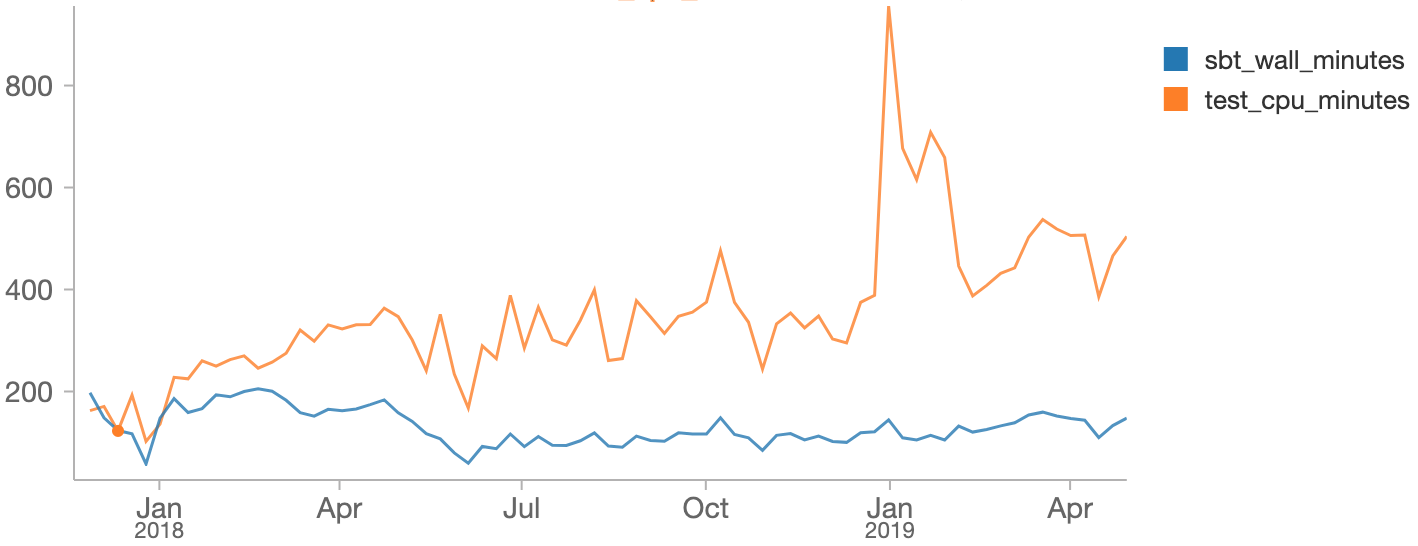
As you can see, we managed to hold the total time taken for a validation run (build_duration , blue) to around 2-3 hours, even as the total time taken to run the tests themselves (test_duration , orange) had grown. This discrepency is from running multiple suites in parallel, which means each validation run takes only 1/4 as long as it would have if we had run the tests serially.
In comparison, the Universe codebase built and tested using Bazel, of comparable size and complexity, has its validation suite run in the 30-60 minute range. The glacial slowness of the Runtime validation suite has been a constant thorn in the side of Databricks’ engineers. It came up repeatedly in our regular developer productivity surveys, year after year after year:
Waiting for Jenkins to test Runtime PR takes a long time. It would be great if this could be at least partially parallelizable.
- 2017
Testing PRs, the tests don’t run in parallel, and it’s very slow.
- 2018
It sucks having to wait 3 hours for Jenkins to test my PR to runtime, only for a flaky test to ruin things in the end.
- 2019
In that 24 month period, at least a solid 6 months of engineer-time by a variety of individuals had been spent just holding the line. We were by this point running tests around 3-4 ways parallel, stopping the PR validation runs from ballooning to 10+ hours, but nevertheless were unable to make much headway against the 3-hour-long waits.
Problems Parallelizing Runtime Tests
The fundamental reason we couldn’t make more progress was the lack of test isolation. Many of the tests were written at a time where the test suite was run serially, and made assumptions that made them difficult to run in parallel:
- Accidental interference: some tests shared caches or scratch-folders.
When run in parallel they would conflict with each other, messing with
each others files. - Accidental dependencies: Some tests implicitly relied on other tests
having left caches or scratch-folders on disk. When run in the wrong
order the pre-requisite files would be missing.
We had existing efforts to mitigate these problems – forking separate processes, running suites in separate working directories and assigning them separate scratch folders – but the non-deterministic nature of the failures made tracking them down and fixing them impossible.
We had made some attempts to configure the SBT build tool to run tests inside containers, but the SBT internals are complex and did not seem amenable to such a change.
Bazel
While the Runtime validation suite was giving us issues, we had long ago moved the Universe codebase and validation suite over from SBT to Bazel, and were very happy with it. Bazel basically gives you three main things:
- Parallelism: any build steps that do not depend on each other are performed in parallel
- Caching: if the inputs to a build step do not change, the output is re-used. This cache can even be shared across machines
- Isolation: each build step is run in an isolated “Sandbox” environment by default, with access only to the files you explicitly give it
These three benefits apply equally to compiling your code and running tests. While the first two properties had given us very fast build times in the Universe codebase, the last property was just as important:
- Tests that accidentally shared the working directory would be given separate folders to work within, would no longer conflict, and succeed
- Tests that accidentally shared other filesystem contents – things outside their working directory – would fail reliably 100% of the time
Effectively, Bazel turns these build-related non-deterministic failures into either guaranteed successes or guaranteed failures. Both of these are a lot easier to deal with than nondeterministic heisenbugs!
Bazelifying Runtime
We decided to set up a Bazel build for the Runtime codebase and migrate our test suites over to it.
As this took some amount of time, we kept the Bazel test suites live side-by-side with theexisting SBT test suites. We moved tests from the SBT suite to the Bazel suite one-by-one as the completeness of the Bazel build increased. Tweaking SBT to skip the tests that Bazel knew about was just a matter of shelling out to bazel query .
All the machinery for compiling/running/testing Scala code, dealing with Protobuf, JVM classpaths, etc. was all inherited directly from our Universe’s Bazel configuration.
The first ~1200/1800 test suites we ported to Bazel passed out of the box. This left a long tail of 600 various failures. The major themes were:
- Broken tests, which were passing entirely-by-accident due to some property of the SBT build (e.g. one test only passed when run in the Pacific timezone, another test failed if the working directory path had too few characters)
- Different resolution of third-party dependencies from Maven Central between Bazel and SBT, resulting in different jars on the classpath
- Implicit file dependencies: Bazel’s isolation means you have to give it an exhaustive list of any-and-all files that your test requires, and won’t let you reach all over the filesystem to grab things unless you declare them in advance
- Conflicts over shared folders like the
~/.ivy2/cache - Bugs in our Bazel config: sometimes we simply got the list of inter-module dependencies wrong, missed environment variables, JVM flags, etc.
- Bugs in Bazel itself: it turns out Bazel very much does not like you calling a folder
external/ , but that was easily solved by renaming it to something else!
Some of these issues were tricky to debug, causing mysterious failures deep inside unfamiliar parts of a massive codebase. But the fact that the failures were reproducible meant fixing them was actually possible! It was just a matter of putting in the time.
Here’s the graph showing the number of tests in each of the old/SBT and new/Bazel PRvalidation suites, where we can clearly see the tests being moved from one to the other:
WITH successes AS (
   SELECT DATE_TRUNC("WEEK", date), count(distinct(class_name)) AS num
   FROM tahoe.`/home/jenkins/test_results_joined`
   GROUP BY date
),
bazel AS (SELECT * FROM successes WHERE name = "runtime-bazel-build"),
sbt AS (SELECT * FROM successes WHERE name = "runtime-sbt-build")
SELECT sbt.num AS sbt_num, bazel.num AS bazel_num, sbt.date AS date
FROM bazel
FULL OUTER JOIN sbt
ON sbt.date = bazel.date
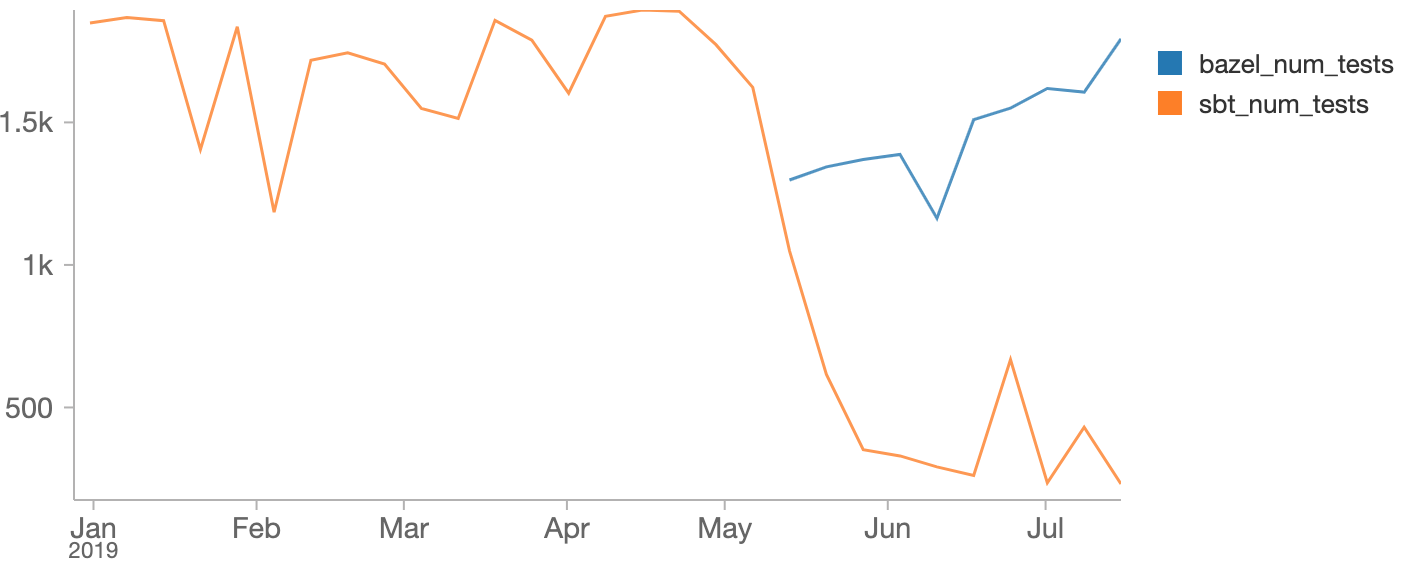
All in all, it took about 2 months to burn down the 600 failures.
Performance Numbers
As we moved tests from SBT to Bazel we could we could see SBT test time drop and Bazel test time grow. Here’s those numbers in a Databricks notebook:
WITH successes AS (
   SELECT DATE_TRUNC("WEEK", timestamp) AS day, name, AVG(duration_seconds) / 60 AS dur
   FROM tahoe.`/home/jenkins/build_results`
   GROUP BY DATE_TRUNC("WEEK", timestamp), name
),
bazel AS (SELECT day, dur FROM successes WHERE name = "runtime-bazel-build"),
sbt AS (SELECT day, dur FROM successes WHERE name = "runtime-sbt-build")
SELECT sbt.dur AS sbt_wall_minutes, bazel.dur AS bazel_wall_minutes, sbt.day AS day
FROM bazel
FULL OUTER JOIN sbt
ON sbt.day = bazel.day
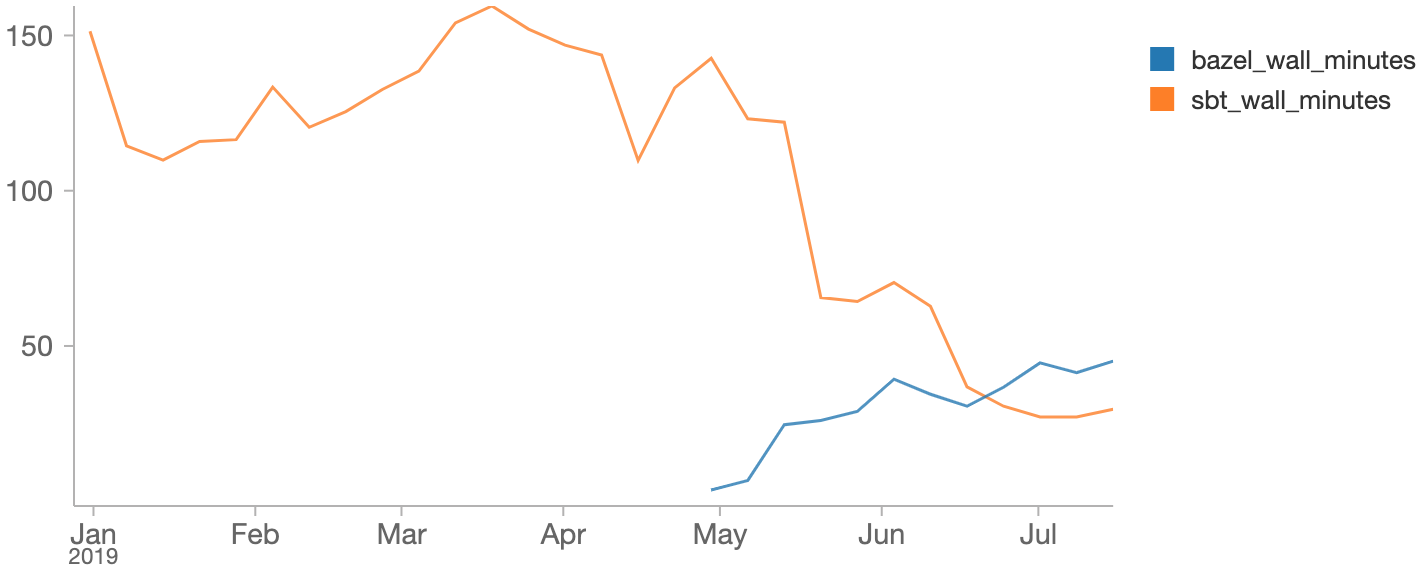
Overall, SBT validation suite times dropped from ~180 minutes to ~30 minutes over the course of the project: after transferring all the tests, the only things left in that build were a full compile, and some miscellaneous lint rules that happen to be tied to the SBT build tool.
At the same time, we saw the Bazel build grow from 0 to end up taking about 40 minutes. Given that the first ~10 or so minutes is just compilation (which didn’t change between Bazel and SBT), we’re looking at about a 6x increase in parallelism, with ~150 minutes worth of SBT testing being compressed into ~20 minutes worth of testing under Bazel.
In order to best make use of Bazel’s increased ability for parallelism, we run the Bazel test suites on powerful 96-core machines on EC2 ( m5.24xlarge ). While these machines areexpensive to keep running all the time (~40,000US$ a year, each!), the 40 minute duration of each test run gives us a per-run cost of 2-3$ each: a pretty reasonable monetary cost!
Conclusion
The last two years of Runtime validation suite performance can be visualized via the following (somewhat long) Spark SQL query:
%sql
WITH data_per_build as (
   SELECT
      build_id,
      AVG(duration_seconds) / 60 AS build_duration,
      SUM(duration_ms) / 1000 / 60 AS test_duration,
      DATE_TRUNC("WEEK", FIRST(date)) AS date,
   FIRST(name) AS name
   FROM tahoe.`/home/helfer/jenkins/test_results_joined`
   WHERE build_result_status = "SUCCESS"
   AND pull_request_target_branch = "master"
   GROUP BY build_id
),
grouped AS (
   SELECT
      date,
      AVG(build_duration) as build_duration,
      AVG(test_duration) as test_duration,
      name
   FROM data_per_build
   GROUP BY date, name
)
SELECT
   sbt.build_duration AS sbt_wall_minutes,
   bazel.build_duration AS bazel_wall_minutes,
   COALESCE(sbt.test_duration, 0) + COALESCE(bazel.test_duration, 0) AS test_cpu_minutes,
sbt.date AS date
FROM (SELECT * from grouped WHERE name = "runtime-bazel-build") AS bazel
FULL OUTER JOIN (SELECT * from grouped WHERE name = "runtime-sbt-build") AS sbt
ON sbt.date = bazel.date
ORDER BY sbt.date
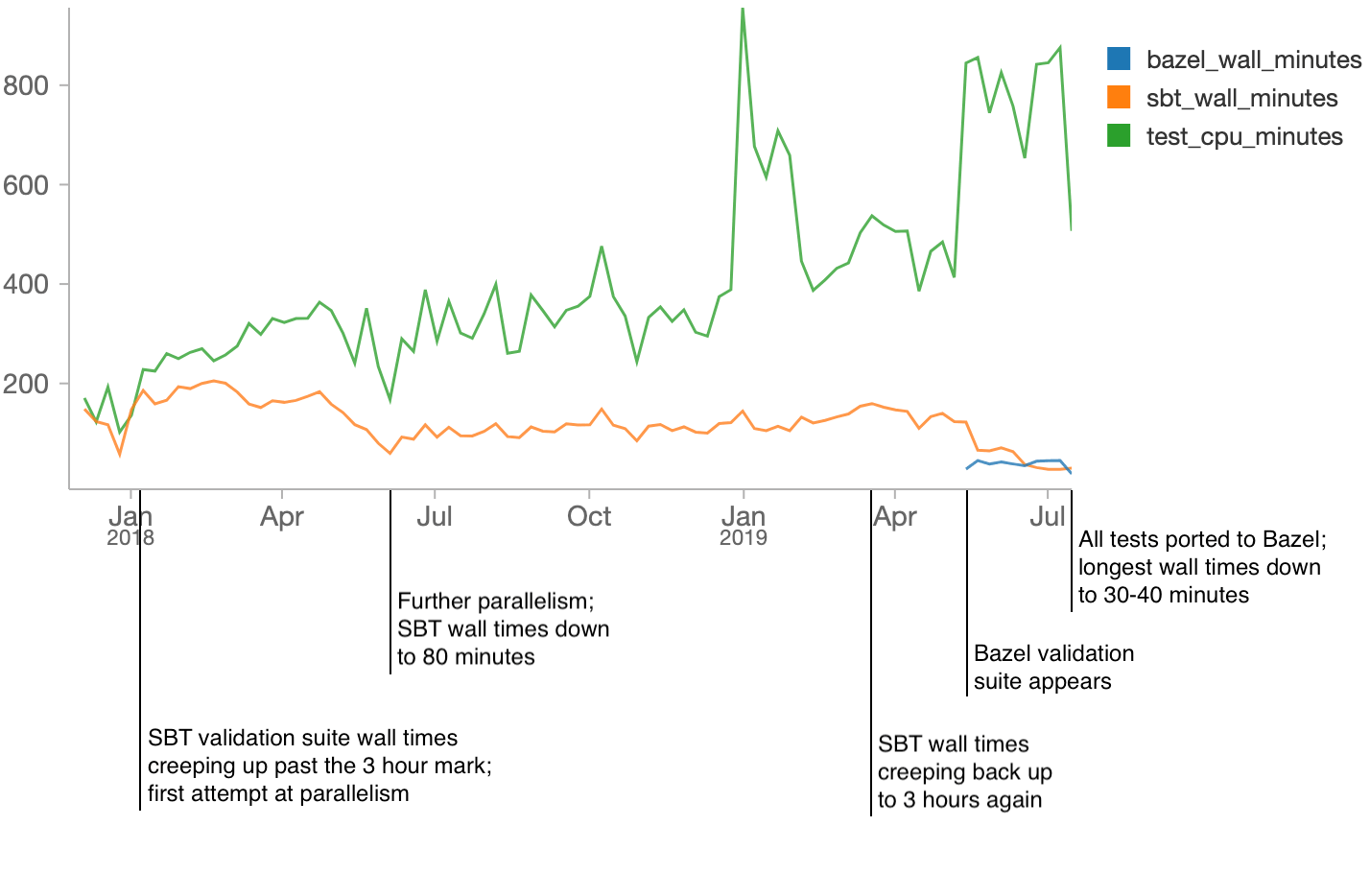
Moving our Runtime validation suite from SBT to Bazel was a huge performance win. While previously an engineer would have to wait hours to see if their pull request was green (and even longer if it had a flaky failure!) now they only wait tens of minutes.
After spending literally years fighting SBT test performance, with only limited success, the dramatic improvement in the last 2 months makes us confident that Bazel will give us a stronger foundation to build upon in future. While the Bazel validation suite will inevitably grow in duration and need to be sped up, it should be much easier than trying to speed up the old SBT suites.
The Runtime Bazel build is also significantly more ergonomic than the old SBT + Pythonscripts setup: manual workflows no longer take more than a single step, e.g. sbt package needing to be run every time before bin/shell , or “Install R packages” before you run R/run-tests . With Bazel, you just run the command you want, and everything that needs to happen will happen automatically.
There’s also the benefit of homogenizing our tooling:
- Engineers working on the two different codebases no longer have two different sets of build tools, local workflows, etc.
- Runtime engineers get to enjoy all the features and polish that the Universe engineers have had for a while: both Bazel features (Parallel builds, local caching, strong isolation) as well as Databricks-specific niceties (IDE integration, remote caching, selective testing, etc.)
- Any improvements our DevTools team makes to the Bazel build system now benefit twice as many engineers. For example, Bazel has support for running tests on a distributed execution cluster rather than a single machine, and this will let us take advantage of that in both our repositories.
If you’re interested in working with these best-in-class developer tools, or want to join Databricks’ DevTools team in pushing the frontiers of developer experience forward, we are hiring!
--
Try Databricks for free. Get started today.
The post Fast Parallel Testing at Databricks with Bazel appeared first on Databricks.
Subscribe to:
Posts (Atom)