
What Was The Most Expensive Computer Of All Time? |
|
Think you know the answer? |
|

What Was The Most Expensive Computer Of All Time? |
|
Think you know the answer? |
|

Browsing the web on an iPhone is a great way to kill a few minutes, and it’s still the best mobile browsing experience around. If you’ve collected a bunch of open tabs, here’s an easy way to close just the ones you want.
There are, in fact, a couple of different ways to close tabs in Safari on iPhone. Whether you want to close all of the open tabs or just a select few, we’ve got your back. If you’re anything like us you have tabs upon tabs open right now and swiping across them all one by one is crazy making. Thankfully, the folks at Apple thought up a couple of ways to save our sanity.
To close specific tabs at once, first, open Safari and then tap the Tabs button.

Next, scroll to the top of your collection of open tabs and search for the tabs you want to close. An example may be all tabs that have Twitter open, or maybe all tabs from the Apple Store.

When the tabs are selected, press and hold “Cancel.” You’ll be shown an option to close tabs matching the search you just entered. Tap it.


This year’s Mobile World Conference is flooded with foldable phones and weird connectible phones. Sony wants to give you extra screen real estate too, but in a more practical manner.
Today, Sony announced the Xperia 1, the Xperia 10, and the Xperia 10 Plus. There are a few differences between these phones, but they share one key quality: they all have a 21:9 aspect ratio. For reference, most phones and home TV’s have a 16:9 aspect ratio.
What does this mean? Well, Sony’s new Xperia line is ultra-wide (or ultra-tall, depending on how you look at it). A 21:9 aspect ratio is perfect for watching films, and Sony suggests that the Xperia can even be used to record and edit films.
The Xperia 1 is the flagship of the new Xperia line. As you can imagine, it’s built for movie lovers. It has a 6.5″ 4K OLED display, a USB-C charging slot, and a side-mounted fingerprint scanner. Inside of the Xperia 1 sits 6 GB of RAM, a new Snapdragon 855 processor, and 128 GB of storage with an expansion slot.
It also has three 12 MP cameras (telephoto, wide, and super wide) that are capable of filming 4K video at 24 FPS. Sony suggests that it’s the perfect device for watching movies, shooting and editing video, or taking high-resolution photos.
The Xperia 10 (6.0-inches) and the Xperia 10 Plus (6.5-inches) are only slightly less impressive than the Xperia 1. They don’t have 4K OLED screens, but they can still record 4K video, even though their cameras are more in the 8 MP range. They have less RAM at 3 GB and 4 GB respectively, slightly slower processors with the Qualcomm Snapdragon 630 and 636, and only 64 GB of internal storage, but they still have MicroSD expansion slots.
The Xperia 10 and 10 Plus will be released on March 18th, and they cost $380 and $480 respectively. But the Xperia 1 will come out sometime this Spring, and Sony hasn’t announced a price point yet.

You’ve long been able to log in to mobile apps like banking and credit institutions using biometric verifications, but with FIDO2 certifications, this same convenience is coming to the web on over half of all Android devices.
You know the scenario: once you log in to a specific app—like your bank, for example—it gives you the option to log in using your fingerprint in future instances. If you enable it, you only need to touch your phone’s fingerprint reader to log in from that point forward, which is great.
This isn’t just nice for convenience—it’s also a lot more secure. Since the fingerprint information is stored locally on your device and not in the cloud, there’s virtually zero chance of it ever being compromised. Now, this same functionality is coming to the web on Android devices running Android 7.0 and above.
It will require a Google Play Service update on all supported devices, which will roll out through the Play Store. On top of that, web developers will need to also enable the feature, so don’t expect it to work out of the gate on all sites that you log into. Baby steps, you know?
If your device doesn’t have a fingerprint scanner, this will also work with other forms of secure logins—like PIN or pattern inputs. And because it’s all on the web, users will be able to set up password-less logins from an app and have it also work on the web (and vice versa).
We’re getting closer and closer to a true password-less future every day. I can’t wait.
Big data practitioners grapple with data quality issues and data pipeline complexities—it’s the bane of their existence. Whether you are chartered with advanced analytics, developing new machine learning models, providing operational reporting or managing the data infrastructure, the concern with data quality is a common theme. Data engineers, in particular, strive to design and deploy robust data pipelines that serve reliable data in a performant manner so that their organizations can make the most of their valuable corporate data assets.

Recognizing the importance of data engineering, this year the Spark + AI Summit includes a new track dedicated to data engineering where presenters will be talking about data engineering and sharing their experience with Apache Spark as applied to their use cases.
In the talk Lessons Learned Using Apache Spark for Self-Service Data Prep in SaaS World, Pavel Hardak and Jianneng Li of Workday will describe their journey in building Workday’s new analytics product, Workday Prism Analytics sharing the challenges faced along with real-life war stories caused by customers stretching product boundaries.
Apache Spark is held by many to now be the defacto big data processing engine. In his talk Migrating to Apache Spark at Netflix, Ryan Blue from Netflix will talk about the mass migration to Spark from Pig and other MR engines.
Data governance is a must today. With an eye towards that, in his talk Apache Spark Data Governance Best Practices—Lessons Learned from Centers for Medicare and Medicaid Services, Donghwa Kim from NewWave (a technology partner for Centers for Medicare and Medicaid Services which serves nearly 90 million American) will cover best data governance practices including data security, data stewardship and data quality management.
Concern about production at scale is never far from a data engineer’s heart. In their talk Scaling Apache Spark on Kubernetes at Lyft, Li Gao and Rohit Menon from Lyft will discuss challenges the Lyft team faced and solutions they developed to support Apache Spark on Kubernetes in production and at scale.
Matthew Powers from Prognos will address another key concern: performance. In his talk Optimizing Delta/Parquet Data Lakes for Apache Spark he will outline data lake design patterns that can yield massive performance gains.
Apache Spark is a living and thriving project which can present opportunities for upgrading as new versions are released so that newer capabilities can be used. Hao Wan and Liyin Tang in their talk Apache Spark at Airbnb, share their major production use cases including both streaming and batch applications, the lessons learned and tips for migrating to 2.x.
Making decisions fast and accurately is key to success for a data-driven company like Zalando, Europe’s biggest online fashion retailer. In their talk, Continuous Applications at Scale of 100 Teams with Databricks Delta and Structured Streaming, Viacheslav Inozemtsev and Max Schultze describe the use of a data lake to hold company data and share their experience in productionizing and operating Databricks at scale and in making data-driven continuous applications feasible out of the box.
And the last talk that I want to highlight here is Understanding Query Plans and Spark UIs, by Xiao Li Apache Spark Committer and PMC member at Databricks. His talk will address how to read and tune the query plans for enhanced performance. It will also cover the major related features in the recent and upcoming releases of Apache Spark.
If you are someone who learns best by doing, don’t forget to consider the Building Robust Production Data Pipelines with Databricks Delta tutorial, a 90-minute session with an expert-led talk designed to introduce the next-generation unified analytics engine, followed by hands-on exercises allowing attendees to learn by doing.
In a related vein, you should consider the valuable Apache Spark Programming + Delta and as well as the several other training courses being offered on Tuesday, April 23, the day before the conference.
You can also peruse and pick sessions from the schedule, too.
If you have not registered yet, use the code JulesPicks and get 15% discount.
--
Try Databricks for free. Get started today.
The post A Guide to Data Engineering Talks at Spark + AI Summit 2019 appeared first on Databricks.

Want to watch your favorite movies and media without wires? Whether you want multi-room video or just want to avoid running wires across your living room, a wireless HDMI transmitter can help.
Wireless HDMI has been around for awhile, but it hasn’t really gained popularity. It’s a bit of a shame, because the HDMI cables that we’ve been using for over a decade have some drawbacks. They create a lot of clutter, and they restrict your TV shows and video games to a single room of the house.
How does Wireless HDMI work? Unlike screen mirroring applications like Apple AirPlay, Wireless HDMI doesn’t require a Wi-Fi connection. A transmitter that plugs into your video source sends out a frequency that’s picked up by a receiver that you plug into a display. And some Wireless HDMI products even have built-in IR transmitters, so you can use a remote control in your bedroom to control a video source in your living room.
But there are a lot of things that you should think about before buying a Wireless HDMI product. What are you going to use it for, and how far is your video source from your TV? Sadly, you can’t just buy the longest-range Wireless HDMI product and go to town. You have to strike a balance between distance and latency. Wireless HDMI products with a long range usually have a high latency, and while they’re fine for TV, they aren’t great for video games. Here are our favorites for each situation.

If you want a powerful Wireless HDMI setup that can beam signals through walls and ceilings, then you should check out the J-Tech Digital HDbitT. It’s one of the most powerful Wireless HDMI products on the market, and it can transmit a lossless 1080p signal up to 660 feet.
This J-Tech product supports up to two receivers, so you could potentially send a video signal from a single BluRay player or streaming stick into multiple rooms. And since this Wireless HDMI setup has built-in IR transmission technology, you can use a remote in your basement to control a cable box in your living room.
Of course, there are a few drawbacks to the J-Tech’s 660-foot range. This device has a latency of 0.3-0.5 seconds, so it isn’t great for video games or interactive media. But a few seconds of delay time isn’t going to hurt your TV watching experience.

If you missed out on some Valentine’s Day deals earlier this month, now’s your chance to snag a new iPad (the latest-generation models, at that) at a fairly decent discount.
The newest 12.9-inch iPad Pro can be had for as little as $899 for the 64GB model. That’s good for $100 off the retail price. The 512GB model, however, can be bought for $150 off, at $1,199.
If you don’t need quite that much screen, the newer 11-inch iPad Pro is selling for $699 ($100 off) if you go for the 64GB variant, and higher storage models also see the same discount.
If you just want the basic 9.7-inch iPad, the latest model is at its lowest price that we’ve seen (matching the Black Friday deals) at $249 for the 32GB model. You can also get the 128GB model for $389.
So if you just couldn’t quite bite the bullet on Black Friday, but are now fully committed, here’s your chance to grab a really solid deal on some new iPads.
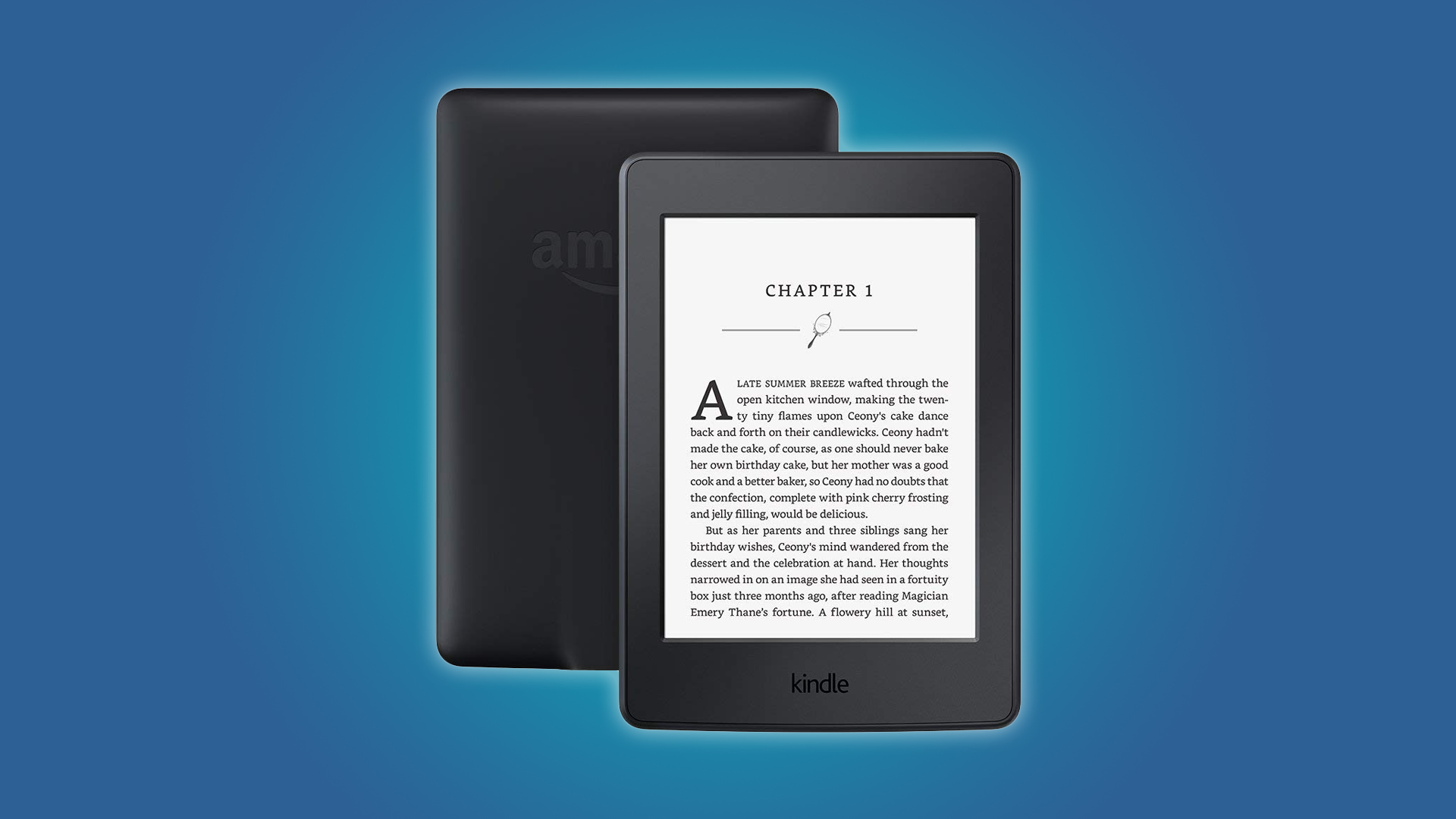
There are a lot of tablets on the market, but the Kindle Paperwhite is still the king of e-readers. Luckily, Paperwhites are pretty inexpensive, and Woot has refurbished units at a discount.
Right now, you can buy a refurbished 7th generation Kindle Paperwhite from Woot for just $55. That’s a $45 discount. These Paperwhites have a 6″ display, and 4 GB of internal storage (which is plenty of storage for e-books). They also have special offers on the lock screen, and they’re Wi-Fi only.
Now, this is actually the previous generation of Kindle Paperwhites — that’s part of why they’re so inexpensive. But don’t worry, you’re only missing out on a waterproof display and some extra internal storage.
These are refurbished units, but Kindle Paperwhites are known to be pretty sturdy. Plus, Woot offers a 90-day warranty on products, so there isn’t much to worry about. Just don’t sleep on this deal, it’s going to disappear by the end of the day.

You can use Excel to calculate the percentage of change between two values quickly. In our simple example, we show you what you need to know to be able to calculate things like how much the price of gas changed overnight or the percentage of a stock price’s rise or fall.
The percentage of change between an original and a new value is defined as the difference between the original value and the new value, divided by the original value.
(new_value - original_value)/(original_value)
For example, if the price of a gallon of gasoline was $2.999 yesterday on your drive home and it rose to $3.199 this morning when you filled your tank, you could calculate the percentage of change by plugging those values into the formula.
($3.199 - $2.999)/($2.999) = 0.067 = 6.7%
For our simple example, we will look at a list of hypothetical prices and determine the percentage of change between an original price and a new price.
Here is our sample data containing three columns: “Original Price,” “New Price,” and “Percentage of Change.” We have formatted the first two columns as dollar amounts.

Start by selecting the first cell in the “Percentage of Change” column.

The progress made in the field of machine learning and AI over the past several years has been tremendous. We’ve moved from science projects and edge use cases, to core businesses and competitive advantages, with more companies across various industries looking for opportunities to tap into their data and leverage AI.
In 2018, we saw the interest in AI across industries explode, yet still very difficult to harness and put into production. Although a recent survey by CIO.com stated that 80% of companies are considering new AI projects and nearly 90% plan to invest in AI-related technology, only 17% of these companies have moved these projects into production.
We’ve highlighted in the past certain challenges nearly all companies face when trying to implement AI — leading to what we call the 1% problem. Meaning, only about 1% of companies are succeeding with AI. There’s this wide gap where the rest, the 99%, are struggling with these problems.
In this second installment of our blog series focused on the most impactful trends and innovations in 2018 and what we should be excited about in 2019, we ask leading companies who have embarked on their AI journey how they see the rate and scale of adoption shifting in 2019 and what trends they think will provide real, tangible value to the business.
“Generally I see that up to now AI has been inspiring in showing what’s possible. There are numerous examples spanning sectors of how AI can be truly transformative. Now there are the continuing business realities and internal scaling and process challenges. So I see the need for a lot of innovations around the less sexy stuff: Cost optimization tools, automated accounting, and administration of big data/analytics platforms.”
More Focus on Streaming
“Streaming in and of itself is not really brand new. But Rue Gilt Groupe is planning to leverage it on the Databricks Unified Analytics Platform for significant innovations in 2019, like real-time recommendations based on up-to-the-minute data from our order management, click tracking, and other systems. This is especially important for us because we’re a flash sale retail site, with products and online browsing and purchase behaviors changing by the minute. This will be fully compatible and complementary to current data science projects like Associations Rules and other personalized recommendations.”
Machine Learning for All
“I see ML becoming far focused on rapid development frameworks or products that make it faster to build and deliver ML solutions with more products that are based 100% off ML behind the scenes.”
Better Data = Better AI
“We are already seeing significant progress in the tech and science of Machine Learning and AI. However, ML/AI technology is as good (or not) as the data behind it. The next wave of innovation will be driven by better data that can activate the full potential of AI.”
Deep Learning Will Make AI Better
“Building off of 2018, deep learning will continue to improve core AI and ML algorithms. There will also be a lot of focus on computer vision using deep learning to make more accurate ML models. From a product standpoint, I think pageless content will only continue to become more relevant. At Overstock, we have the benefit of having nearly two decades of data that help us create personalized content in real-time, but not all organizations have that same benefit. As important as pageless content will become, the speed at which pageless happens will have to also need to accelerate in order for customers to have the best experience.”
The promise of what AI can deliver is now coming to fruition. Companies are realizing that to overcome the barriers of entry, a new approach is needed. In fact, 79% of organizations cite that they highly value the notion of Unified Analytics as the answer to achieving AI success. With more companies moving towards this unified approach, we fully expect this year to be a significant year in terms of AI being a foundational asset to help scale and drive the business. But we’re not done tapping into the minds of today’s leading technologists to understand what they think is the next big innovation in big data, machine learning, and AI.
In the 3rd installment of this blog series, we will dig into the challenges most companies still face when trying to harness the power of AI and putting it into production, and how those challenges will change in 2019.
--
Try Databricks for free. Get started today.
The post The Biggest AI Trends from 2019 appeared first on Databricks.

If you own a GoPro or a Nintendo Switch, then there’s no such thing as a MicroSD card too large. SanDisk and Micron are both stepping up to the plate with humungous 1 TB microSD cards.
Mobile World Congress is in full swing and taking a break from phones that fold, Sandisk and Micron have both stepped forward to announce microSD cards. But these aren’t just any old microSD cards; they’re 1 TB microSD cards. That’s handy because some systems like the Nintendo Switch need expanded storage. Zelda: Breath of the Wild started at 13 GBs before DLC, which means it used up 40% of the Switch’s internal storage.
Games are only growing more massive, and camera needs are growing too. Every update to an action camera or smartphone leads to ever-expanding picture sizes. More and more smartphones support raw storage for photos, which take up more space than jpegs but provides more information to work with for editing.
1 TB microSD cards should take of the problem, but it will come at a cost. Micron hasn’t announced pricing yet, but Sandisk’s card will cost an eye-watering $450, the same price as a Switch, Mario Oddysey, and Zelda: Breath of the Wild, plus one year of Nintendo Switch Online.
Which company you go with also depends on your preferences for read or write speeds. SanDisk is calling its card the “World’s fastest” and boats a read speed of 160 MB/s. Sandisk claims at that speed, you could theoretically “transfer 1000 high-resolution photos and 30 minutes of 4K video (24GB) in less than 3 minutes.”
Micron may not have the edge in read speeds, but it does bost a faster write speed, albeit just barely. Sandisk write speeds top out at 90 MB/S, while Micros boats 95 MB/S. It may be worth waiting to see Micron’s pricing as well. If it’s lower than $450, that could be a selling point worth considering.
If you can settle for a step-down, SanDisk also announced a 512 GB microSD card, for a more palatable $200. You’ll get the same read and write speeds, half the storage at less than half the cost.

There may not be a whole lot of reasons to take screenshots of the login screen on your Chromebook. If you ever need to, however, it’s a needlessly lengthy process. Here’s how to do it.
First off, you need to know how to take a screenshot, which is surprisingly easy: press the Ctrl and []]] keys at the same time. (The “[]]]” key is located above the 6 key on your keyboard’s number row.) Boom, screenshot taken. This part works anywhere—even on the login screen.
The problem comes when you try to retrieve said screenshot because you won’t find it in the default location on your account. Since you’re not logged in when you take the screenshot, the system can’t associate it with an account on the Chromebook.
So where does it store it? In a temporary directory. The screenshot(s) will stay here even after you log in—you just need to know how to copy it over to your account, which will require some time in the Chrome OS shell.
That may sound intimidating, but I promise it’s pretty simple—you just have to type a few commands, and you’ll be rockin’ and rollin’.
So, go ahead and fire up Crosh by pressing Ctrl+Alt+T. Here, type shell and hit enter.

In the shell, navigate to the tmp directory by typing the following: cd /tmp/

You’ve probably heard the terms “post-production,” “post-processing,” or simply “post” about movies but they also apply—and are equally important—to photography. Let’s break down what they mean.
The three terms—post-production, post-processing, and post—are, short of Hollywood movies, basically interchangeable. The “production” is what happens on set or location; it’s what you’re doing when you’re wandering around with your camera in your hand shooting photos or video. “Post-production,” then, is everything that happens after you’ve finished shooting, “post-processing” is all the processing that’s done after you’ve finished shooting, and “post” is an abbreviation for the two.
So, we’ve established above that post is everything that happens after a shoot, but what does that entail? In most cases, it involves some (or all) of the following:
How much post-processing is involved and how long it takes utterly depends on the project. A professionally shot short film will spend months in post-production with each step being done multiple times, on the other hand, I can process a few dozen photos in an hour—as long as I’m not doing any major retouching.
Here’s an example of an image I’ve taken through the steps above in about 20 minutes. Here’s what it looked like straight out of the camera (I also had another few similar photos that I rejected in post).

And here’s what it looks like after.


If you’ve ever built a computer and purchased a Windows license, you probably don’t want to buy another license for your next one. With the slmgr command, it’s possible to deactivate your old PC and then activate a new one.
Windows licenses are expensive. At $100 to $200, an official product key from Microsoft costs about the same as a 1 TB solid-state drive, 16 GB of RAM, or a motherboard. And it’s not a good idea to buy cheap keys from sketchy websites. So paying for another license when you want to decommission an old computer in favor of a new one isn’t a great option. The good news is, it’s possible to deactivate a PC you no longer intend to use, then transfer that license to a new computer.
The slmgr command makes this reasonably straightforward, but you’ll want to keep in mind a few limitations. This won’t work for OEM keys, which are keys that came with a computer you bought in a store. Manufacturers embed these keys to the hardware on which they originated, and transferring them to new devices won’t work. And while slmgr can deactivate any retail key (a key you purchased separately), it will only activate a key that matches the installed operating system.
Windows 7 and 8 keys will still activate Windows 10, but only through the standard activation process and not through slmgr . If you enter a “Pro” key on a “Home” install, that too will fail with slmgr . To keep things as simple as possible, transfer a Windows 10 Home key to a Windows 10 Home device, and a Windows 10 Pro key to a Windows 10 Pro device. Otherwise, you’ll have to take some extra steps.
Before you get started, make sure you have your Windows Key saved somewhere. If you have a product box or digital receipt, grab it from there. Otherwise, there are some ways you can recover the product key from your old PC, including using Nirsoft’s Produkey.
To deactivate your old PC, you’ll need to open an elevated Command Prompt. Having an administrator account isn’t enough. You will need to click the start button and type “cmd” (without quotes) into the search box. Then click on the “Run as administrator” option to the right.
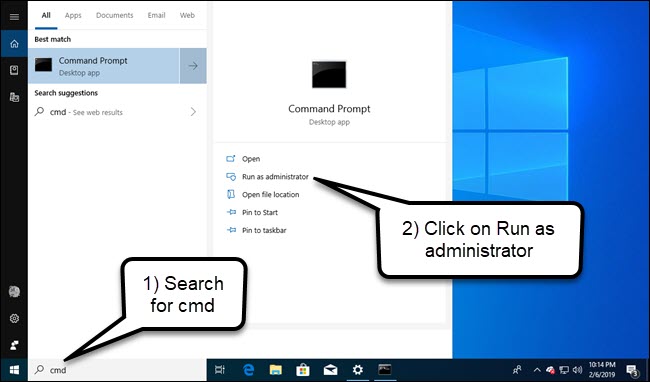
In the command prompt that appears, run the following command and then restart your computer:
slmgr.vbs /upk
Which PC Game Was The First to Be Flown Into Space? |
|
Think you know the answer? |
|
A Military Strike On A Korean Airliner Prompted Public Access To What? |
|
Think you know the answer? |
|

Headphone jack-less phones are old news—it was a little over two years ago that Apple announced the iPhone wouldn’t have one anymore. But if you’re new to the experience, here are some handy products to help you survive without.

If you use headphones a lot, Bluetooth is the way to go when you don’t have a headphone jack (but if you absolutely need wired headphones, read further down).
There are a ton of great Bluetooth headphones to choose from as well, so even if you’re limited to only Bluetooth, you’ll still most likely find a pair that you like. We have a buying guide that discusses the best picks for all types of styles, including over-the-ear and “truly wireless” models.
Personally, my favorite Bluetooth headphones are Anker’s Soundcore Liberty Air ($79), which sort of resemble AirPods, but are half the price and create a tight seal in your ear canal, which is a necessity for me.

If you absolutely must keep your beloved wired headphones, you’re not completely out of luck—you can get a headphone jack adapter that plugs into your phone’s charging port.
Apple makes a Lightning to headphone jack adapter that works with iPhones, and Google makes a USB-C to headphone adapter for their Pixel devices (or any other device without a headphone jack that uses USB-C). Simply just plug them into the charging port and you’ve got your headphone jack.

Console controllers don’t always work as soon as you plug them into a Windows PC or Mac. We’ve compiled a list of guides so you can learn how to make your favorite controller work with your computer.
Most controllers intended to be used on PCs, like USB Logitech controllers, will be HID-compliant devices and support the XInput or DirectInput protocol, which you can use in most games. Some may work out of the box and others may need a custom driver. For console controllers, especially older ones, you may need a hardware adapter if it doesn’t plug into USB, as Bluetooth support is hit or miss.
This guide covers Windows and macOS, but most HID controllers will work on Linux, too. It’ll just take a little configuration, with which Linux users are probably familiar.

Windows supports Sony PS4 controllers without additional software as long as you plug them in via USB. You’ll need a hardware adapter to use the controller wirelessly.
Macs also support Sony’s latest controllers by default, even with a wireless connection. Unfortunately, these controllers show up as a generic input device, which may not work in all games.
Windows needs a custom driver for PS3 controllers, and it’s a bit complicated to set up.
Macs support these controllers without any extra software. Just wirelessly connect via Bluetooth or plug it in with a USB cable.
Which Television Show Contains An Entire Movie Hidden Within It? |
|
Think you know the answer? |
|
