Tuesday, 3 December 2019

New Databricks Integration for Jupyter Bridges Local and Remote Workflows

Introduction

For many years now, data scientists have developed specific workflows on premises using local filesystem hierarchies, source code revision systems and CI/CD processes.

On the other side, the available data is growing exponentially and new capabilities for data analysis and modeling are needed, for example, easily scalable storage, distributed computing systems or special hardware for new technologies like GPUs for Deep Learning.

These capabilities are hard to provide on premises in a flexible way. So companies more and more leverage solutions in the cloud and data scientists have the challenge to combine their existing local workflows with these new cloud based capabilities.

The project JupyterLab Integration, published in Databricks Labs, was built to bridge these two worlds. Data scientists can use their familiar local environments with JupyterLab and work with remote data and remote clusters simply by selecting a kernel.

Example scenarios enabled by JupyterLab Integration from your local Jupyterlab:

  • Execute single node data science Jupyter notebooks on remote clusters managed by Databricks with access to the remote Data Lake.
  • Run deep learning code on Databricks GPU clusters.
  • Run remote Spark jobs with an integrated user experience (progress bars, DBFS browser, …).
  • Easily follow deep learning tutorials where the setup is based on Jupyter or JupyterLab and run the code on a Databricks cluster.
  • Mirror a remote cluster environment locally (python and library versions) and switch seamlessly between local and remote execution by just selecting Jupyter kernels.

This blog post starts with a quick overview how using a remote Databricks cluster from your local Jupyterlab would look like. It then provides an end to end example of working with JupyterLab Integration followed by explaining the differences to Databricks Connect. If you want to try it yourself, the last section explains the installation.

Using a remote cluster from a local Jupyterlab

JupyterLab Integration follows the standard approach of Jupyter/JupyterLab and allows you to create Jupyter kernels for remote Databricks clusters (this is explained in the next section). To work with JupyterLab Integration you start JupyterLab with the standard command:

$ jupyter lab

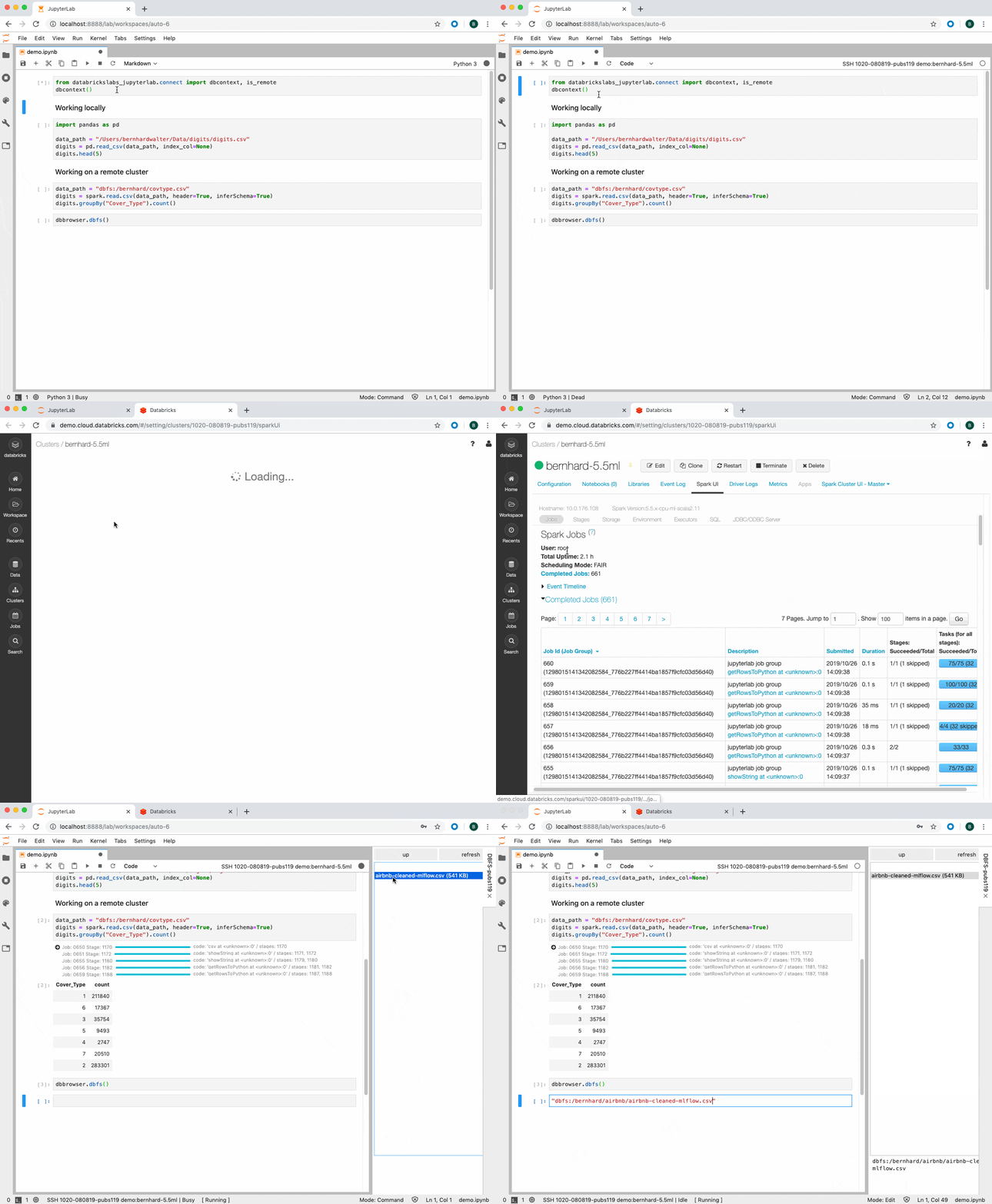
In the notebook, select the remote kernel from the menu to connect to the remote Databricks cluster and get a Spark session with the following Python code:

from databrickslabs_jupyterlab.connect import dbcontext
dbcontext()

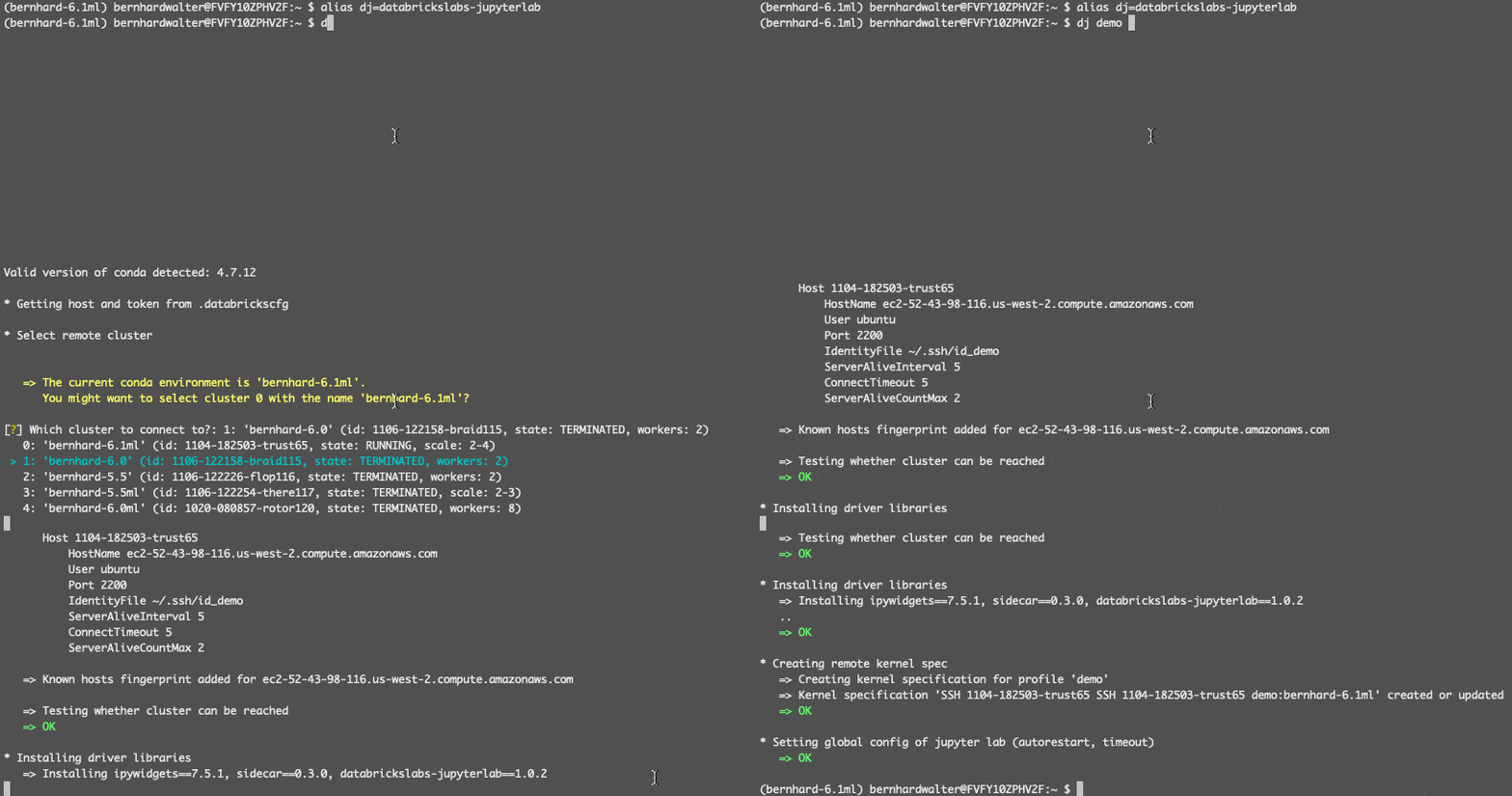
The image below shows this process and some of the features of JupyterLab Integration.

The Databricks Jupyter - JupyterLab Integration follows the standard approach of Jupyter/JupyterLab and allows you to create Jupyter kernels for remote Databricks clusters.

Databricks-JupyterLab Integration — An end to end example

Before configuring a Databricks cluster for JupyterLab Integration, let’s understand how it will be identified: A Databricks clusters runs in cloud in a Databricks Data Science Workspace. These workspaces can be maintained from a local terminal with the Databricks CLI. The Databricks CLI stores the URL and personal access token for a workspace in a local configuration file under a selectable profile name. JupyterLab Integration uses this profile name to reference Databricks Workspaces, e.g demo for the workspace demo.cloud.databricks.com.

Configuring a remote kernel for JupyterLab

Let’s assume the JupyterLab Integration is already installed and configured to mirror a remote cluster named bernhard-5.5ml (details about installation at the end of this blog post).

The first step is to create a Jupyter kernel specification for a remote cluster, e.g. in the workspace with profile name demo:

(bernhard-6.1ml)$ alias dj=databrickslabs-jupyterlab
(bernhard-6.1ml)$ dj demo -k

The following wizard lets you select the remote cluster in workspace demo, stores its driver IP address in the local ssh configuration file and installs some necessary runtime libraries on the remote driver:

The Databrick-JupyterLab Integration wizard lets you select the remote cluster in workspace demo, stores its driver IP address in the local ssh configuration file and installs some necessary runtime libraries on the remote driver.

At the end, a new kernel SSH 1104-182503-trust65 demo:bernhard-6.1ml will be available in JupyterLab (the name is a combination of the remote cluster id 1104-182503-trust65, the Databricks CLI profile name demo, the remote cluster name bernhard-6.1ml and optionally the local conda environment name).

Starting JupyterLab with the Databricks integration

Now we have two choices to start JupyterLab, first the usual way:

(bernhard-6.1ml)$ jupyter lab

This will work perfectly, when the remote cluster is already up and running and its local configuration is up to date. However, the preferred way to start JupyterLab for JupyterLab Integration is

(bernhard-6.1ml)$ dj demo -l -c

This command automatically starts the remote cluster (if terminated), installs the runtime libraries “ipykernel” and “ipywidgets” on the driver and saves the remote IP address of the driver locally. As a nice side effect, with flag -c the personal access token is automatically copied to the clipboard. You will need the token in the next step in the notebook to authenticate against the remote cluster. It is important to note that the personal access token will not be stored on the remote cluster.

Getting a Spark Context in the Jupyter Notebook

To create a Spark session in a Jupyter Notebook that is connected to this remote kernel, enter the following two lines into a notebook cell:

from databrickslabs_jupyterlab.connect import dbcontext, is_remote
dbcontext()

This will request to enter the personal access token (the one that was copied to the clipboard above) and then connect the notebook to the remote Spark Context.

Running hyperparameter tuning locally and remotely

The following code will run on both a local Python kernel and a remote Databricks kernel. Running locally, it will use GridSearchCV from scikit-learn with a small hyperparameter space. Running on the remote Databricks kernel, it will leverage spark-sklearn to distribute the hyperparameter optimization across Spark executors. For different settings on local and remote environment (e.g. paths to data), the function is_remote() from JupyterLab Integration can be used.

  1. Define the data locations both locally and remotely and load GridSearchCV
    if is_remote():
        from functools import partial
        from spark_sklearn import GridSearchCV
        GridSearchCV = partial(GridSearchCV, sc)  # add Spark context
        data_path = "/dbfs/bernhard/digits.csv"
    else:
        from sklearn.model_selection import GridSearchCV
        data_path = ("/Users/bernhardwalter/Data/digits/digits.csv")
    
  2. Load the data
    import pandas as pd
    
    digits = pd.read_csv(data_path, index_col=None)
    X, y = digits.iloc[:,1:-1], digits.iloc[:,-1]
    
  3. Define the different hyperparameter spaces for local and remote execution
    from sklearn.ensemble import RandomForestClassifier
    
    if is_remote():
        param_grid = {
            "max_depth": [3, 5, 10, 15],
            "max_features": ["auto", "sqrt", "log2", None],
            "min_samples_split": [2, 5, 10],
            "min_samples_leaf": [1, 3, 10],
            "n_estimators": [10, 15, 25, 50, 75, 100]
        }  # 864 options
    else:
        param_grid = {
            "max_depth": [3, None],
            "max_features": [1, 3],
            "min_samples_split": [2, 10],
            "min_samples_leaf": [1, 10],
            "n_estimators": [10, 20]
        }  # 32 options
    
    cv = GridSearchCV(RandomForestClassifier(), param_grid, cv=3)
    cv.fit(X,y)
    
  4. Finally, evaluate the model
    best = cv.best_index_
    cv_results = cv.cv_results_
    print("mean_test_score", cv_results["mean_test_score"][best], 
          "std_test_score", cv_results["std_test_score"][best]) 
    cv_results["params"][best]
    

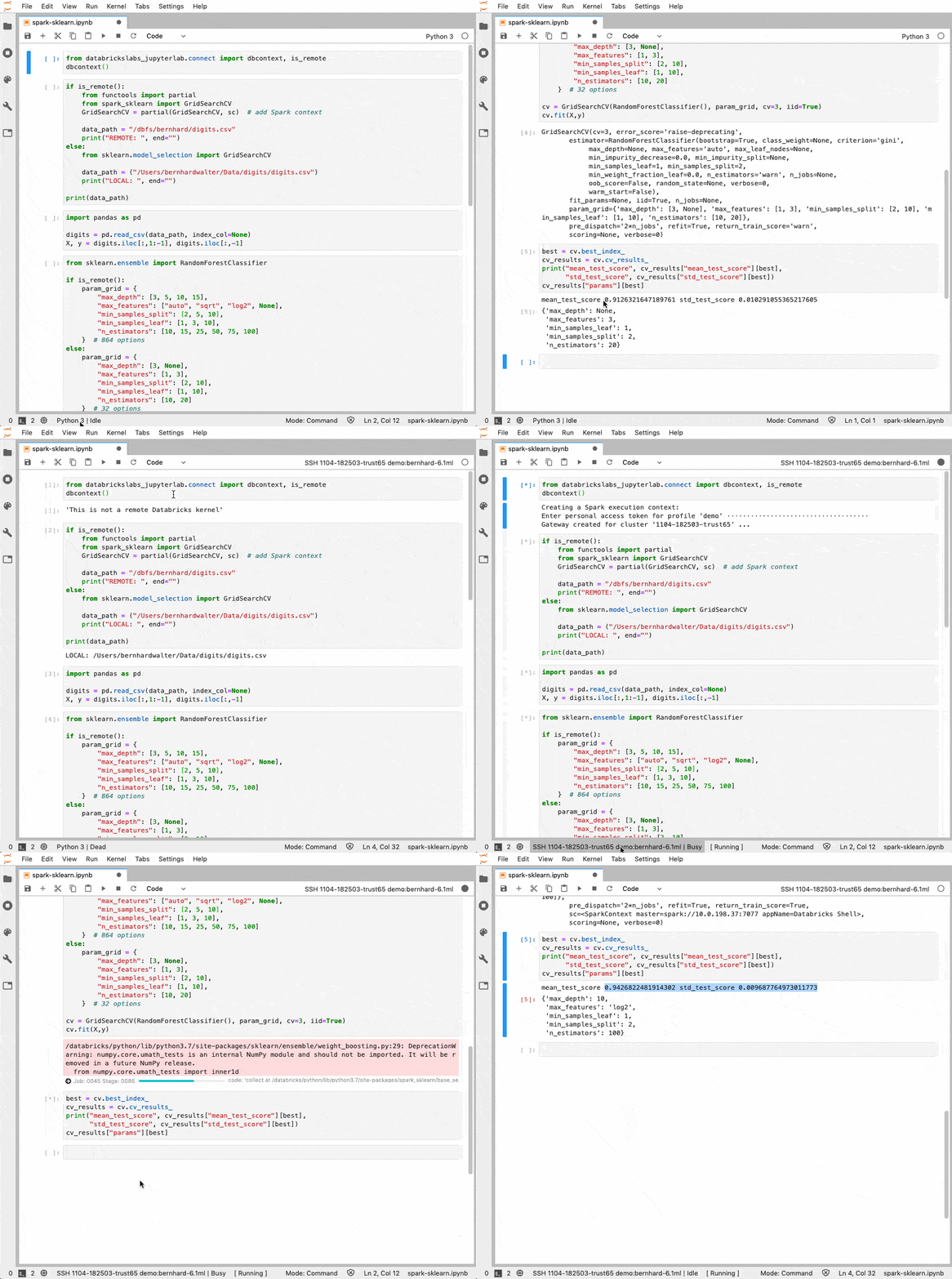
Below is an animated demo for both a local and a remote run:

Running hyperparameter tuning locally and remotely

JupyterLab Integration and Databricks Connect

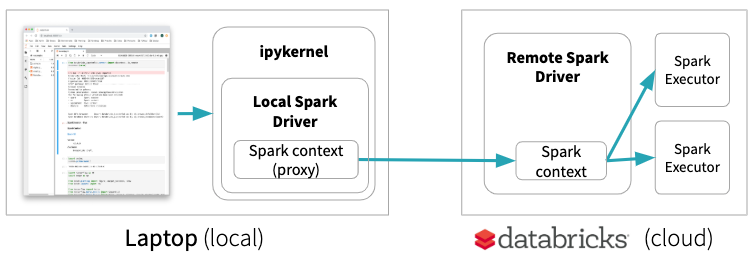
Databricks Connect allows you to connect your favorite IDE, notebook server, and other custom applications to Databricks clusters. It provides a special local Spark Context which is basically a proxy to the remote Spark Context. Only Spark code will be executed on the remote cluster. This means, for example, if you start a GPU node in Databricks for some Deep Learning experiments, with Databricks Connect your code will run on the laptop and will not leverage the GPU of the remote machine:

Databricks Connect allows you to connect your favorite IDE, notebook server, and other custom applications to Databricks clusters.

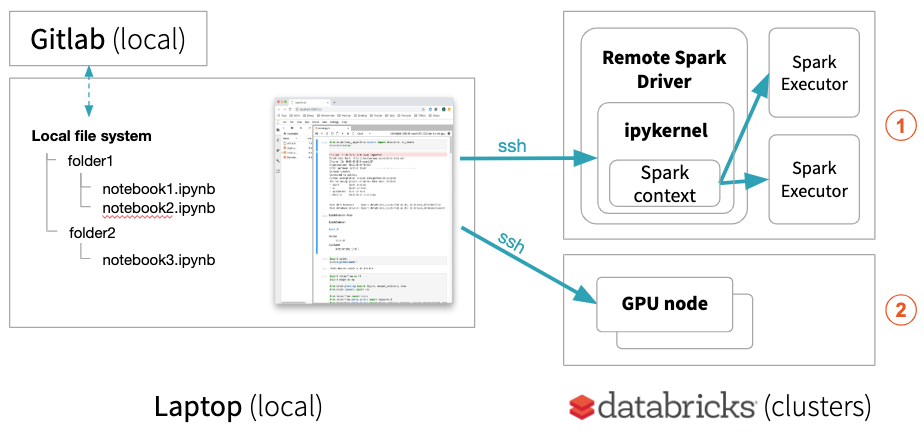
JupyterLab Integration, on the other hand, keeps notebooks locally but runs all code on the remote cluster if a remote kernel is selected. This enables your local JupyterLab to run single node data science notebooks (using pandas, scikit-learn, etc.) on a remote environment managed by Databricks or to run your deep learning code on a remote Databricks GPU machine .
Your local JupyterLab can also execute distributed Spark jobs on Databricks clusters with progress bars providing the status of the Spark job.

JupyterLab Integration allows you to run single node data science notebooks on a Databricks remote environment managed or to run deep learning code on a remote Databricks GPU machine.

Furthermore, you can set up a local conda environment that mirrors a remote cluster. You can start building out your experiment locally, where you have full control over your environment, processes and easy access to all log files. When the code is stable, you can use the remote cluster to apply it to the full remote data set or do distributed hyperparameter optimization on a remote cluster without uploading data with every run.

Note: If a notebook is connected to a remote cluster, its Python kernel runs on the remote cluster and neither local config files nor local data can be accessed with Python and Spark. To exchange files between the local laptop and DBFS on the remote cluster, use Databricks CLI to copy data back and forth:

$ databricks --profile $PROFILE fs cp /DATA/abc.csv dbfs:/data

Since e.g. Pandas cannot access files in DBFS via dbfs:/, there is a mount point /dbfs/ that allows to access the data in DBFS (like /dbfs/data/abc.csv) with standard libraries of Python.

JupyterLab Integration Installation

After we have seen how JupyterLab Integration works, let’s have a look at how to install it.

Prerequisites

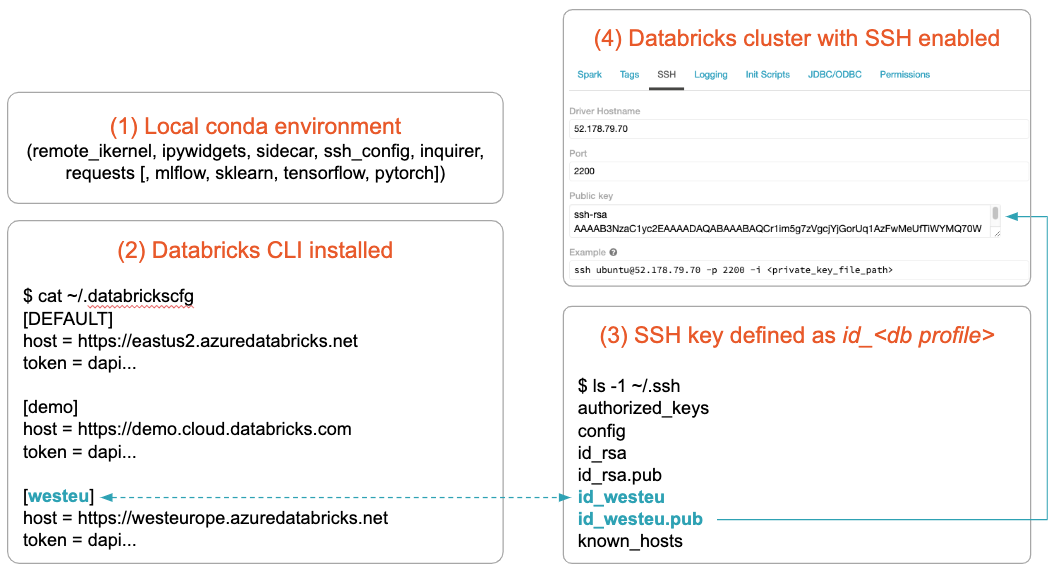
JupyterLab Integration will run for Databricks on both AWS and Azure Databricks. The setup is based on the Databricks CLI configuration and assumes:

  1. Anaconda is installed (the libraries for the JupyterLab Integration will be installed later)
  2. Databricks CLI is installed and configured for the workspace you want to use
  3. An SSH key pair is created for the cluster you want to use
  4. The cluster you want to use is SSH enabled and has the public key from 3 installed

Note: It currently only runs on MacOS and Linux and tested with Databricks Runtime 5.5, 6.0 and 6.1 (Standard and ML).

Required setup for running JupyterLab Integration on either AWS or Azure Databricks, based on the Databricks CLI configuration.

The convention is that the SSH key pair is named after the name of the Databricks CLI profile name. For more details on prerequisites, please see the “prerequisites” section of the documentation.

Installation

  1. Create a local conda environment and install JupyterLab Integration:
    (base)$ conda create -n db-jlab python=3.6
    (base)$ conda activate db-jlab
    (db-jlab)$ pip install --upgrade databrickslabs-jupyterlab
    

    The prefix (db-jlab)$ for the command examples in this blog post shows that the conda environment db-jlab is activated.

    The terminal command name databrickslabs-jupyterlab is quite long, so let’s create an alias

    (db-jlab)$ alias dj=databrickslabs-jupyterlab
    
  2. Bootstrap JupyterLab Integration:

    This will Install the necessary libraries and extensions (using the alias from above):
    (db-jlab)$ dj -b
    
  3. Optionally, if you want to run the same notebook locally and remotely (mirroring):
    This will ask for the name of a cluster to be mirrored and install all its data science related libraries in a local conda environment matching all versions.
    (db-jlab)$ dj $PROFILE -m     
    

    For more details see the “mirror” section of the documentation.

Get started with JupyterLab Integration

In this blog post we have shown how JupyterLab Integration integrates remote Databricks clusters into locally established workflows by running Python kernels on the Databricks clusters via ssh. This allows data scientists to work in their familiar local environments with JupyterLab and access remote data and remote clusters in a consistent way. We have shown that JupyterLab Integration follows a different approach to Databricks Connect by using ssh. Compared to Databricks Data Science Workspaces and Databricks Connect, this enables a set of additional use cases.

https://github.com/databrickslabs/Jupyterlab-Integration

Related Resources

--

Try Databricks for free. Get started today.

The post New Databricks Integration for Jupyter Bridges Local and Remote Workflows appeared first on Databricks.

Bicyclists and AI Autonomous Cars

By Lance Eliot, the AI Trends Insider

Are you living in Biketown or in Bikelash?

Let’s start with Biketown, which is any locale that welcomes bicycling.

Bicyclists, some would say, are wonderful because they are green, meaning they are good for society by using a non-polluting form of transportation.

Many cities have opted to increase the number of bike lanes that they provide.

Some cities even have specially painted traditional car lanes to indicate that those lanes are intended for bicyclists to ride in.

A few cities have even removed selected car lanes entirely, going on a road diet (that’s the “in” term), and opted to transform those lanes into bicycle lanes, plus sometimes also adding a bit of greenery such as immovable planters.

Dockless bike-sharing services are now emerging as one of the hottest trends.

The concept is that you can rent a bike, at any time, at any location, by simply seeing one within reach and being able to electronically unlock it, ride it wherever you want to go, and then park it wherever you want (the bike then electronically locks again and waits for another rider to rent it). No more having to keep a bike in a bike rack with a heavy steel lock on it. No more needing to own your bike. No more needing to go to a particular location where bikes are housed. Instead, bikes are like free ranging cattle.  Via a mobile app, you can look to see where a bike is parked and then go there to start your ride.

It’s considered the “last mile” of ridesharing (you use a car-based rideshare to get near to a desired location, and then bike the remainder of the way rather than walking).

It’s not all roses though in the biking world.

Bikelash Exists Too

Let’s consider Bikelash, consisting of those that have serious qualms about bicyclists and bike riding.

According to published statistics, there are an estimated 45,000 bicyclists injured each year in reported roadway accidents (that’s the reported number, while the true full number including unreported incidents is likely much higher).

The number of bicyclists deaths seems to range anywhere from 800 to 1,000 per year, and some numbers suggest that it really is more like 3,000-4,000 if you also include severe injuries that leave the bicyclist maimed for life.

In short, anytime you get onto a bike, you’ve just increased your odds of injury or possibly death. Don’t want to be sour on bike riding, and I’m just trying to emphasize that it’s a dangerous “sport” and we often take it for granted.

As a quick note, the federal government prefers to call them pedal cyclists, which consists of riders of two wheeled non-motorized vehicles, tricycles, and unicycles that are all powered solely by pedals. I hope it’s OK with you if I just refer to them overall as bicyclists.

Here are some fascinating numbers:

  • 70% of bicyclist deaths occurred in urban areas versus rural areas (makes sense, density of traffic plays a role).
  • 61% of the bicyclist deaths occurred at non-intersections (makes sense, usually drivers and bicyclists are a bit more alert while at intersections and watching for potential crashes).
  • About half the fatalities were at night and about half during the day (you might find this at first glance surprising and might have assumed there should be more fatalities at nighttime, but it is probably reasonable to assume that there are many more bicyclists during daylight hours and less of a percentage that get killed, and probably though less numbers of nighttime bike riders they likely have a higher percent that gets killed).
  • 96% of the bicyclists are killed in single-vehicle crashes (makes sense, all it takes is one car and one bicyclist to collide and the car is most likely going to survive while the rider does not).
  • 84% of the fatalities involved the bicyclist getting hit by the front of the vehicle (makes sense, if a bicyclist rams into the back of a car they probably will be injured but not killed, while if the car rams into the bicyclist and likely doing so at a notable speed it’s going to be bad times for the bike rider).

Who’s at fault here?

Most of the bicyclists that I know would readily exclaim that it’s the fault of the car driver. If the car driver had been paying attention, the car could not have struck the bicyclist. End of story. Their view is that no matter what the bicyclist was doing, there is no justification for the car hitting the bike rider. A car can always come to a halt, or swerve to avoid the bicyclist, or otherwise prevent the collision from occurring.

I don’t want an army of bike riders to get mad at me, but I think this notion that it’s all on the shoulders of the car driver is a bit over-the-top.

I daily see bike riders that flout every known safety tip for bike riding. I say to myself, such-and-such is just asking to get hit. And even though, yes, a bike rider is legally considered a vehicle, I’ve said a million times that a bike is not the same as a car. Bike riders that think they are a car, are going to put themselves into dicey situations, and fault or no, the bike rider is going to lose this game of cat and mouse.

What Bicyclists Are Supposed To Do

Bicyclists are supposed to abide by the same rights and responsibilities as car drivers.

We often times begin to think that bicyclists can just go where they may.

In California, it’s the law that bicyclists do these things:

  • Obey all traffic signs
  • Obey all traffic lights
  • Ride in the same direction as traffic
  • Signal when turning
  • Signal when changing lanes
  • Wear a helmet if under the age of 18
  • Allow faster traffic to pass when safe
  • Stay visible and not weave between parked cars
  • Ride as near to the right curb as practical
  • Do not ride on the sidewalk unless legal exceptions allowed
  • Make left turns in the same way cars do
  • Make right turns in the same way cars do
  • At nighttime must have a front lamp
  • Must have a rear red reflector or equivalent
  • Reflectors on each pedal
  • Etc.

When my children were first learning to ride a bike, I informed them about these above legal rules.

Guess how long it took for them and their friends to abandon most of those rules?

Not long.

Should we arrest every bike rider that does not obey the laws?

Imagine how many arrests you’d need to make. The jails would be filled with bike riders. It would probably be the most prevalent crime committed. The number of police needed to catch and arrest all these scofflaws would mean we’d need to maybe double or triple the number of street cops. I suppose you’d have high school students with prison records going back to their days of kindergarten.

We can probably agree that we’re not going to be arresting all of these unlawful bike riders.

Can we get them to voluntarily be more lawful?

There are attempts to achieve this goal, including some wonderful bike riding classes and local campaigns that tout being safe as a bike rider.

Regrettably, these programs tend to change behavior only momentarily and then the bike riders revert back to their wild ways.

It’s hard to change behavior permanently in this sense, and it requires continual reminders.

Unlawful Acts By Bike Riders

What kinds of unlawful acts am I referring to, you might ask, well consider these:

  • Tend to ignore traffic signs and blow through stop signs
  • Treat traffic lights as a game that regardless of light color try to get through unscathed
  • Ride in the opposite direction of traffic (quite popular!)
  • Never signal when turning
  • Never signal when changing lanes
  • Be nearly invisible and weave between parked cars
  • Ride sometimes near the right curb but really wherever judgement suggests
  • Ride on the sidewalk (often done to avoid wayward cars)
  • Etc.

I have to admit that riding in the opposite direction of traffic is very tempting.

By doing so, you can see the cars coming at you. You have maybe a fighting chance of avoiding one hitting you. The problem with riding with the direction of traffic is that you can’t see the car coming up behind you that is going to knock you off your bike and possibly kill you. I’m not going to argue here that we should change the laws about this, and I realize that driving facing traffic can be jarring for both the cars and the bicyclist. Just explaining why some people ride in the opposite direction of the cars.

A savvy bike rider is constantly watching how the cars are driving.

Is that driver aware that a bike rider is nearby?

Does the driver even car that a bike rider is nearby?

Is that car weaving and maybe the driver is drunk?

Is there a chance that one car will cut-off another car and the car so cut-off will weave into the bike lane?

It seems like most car drivers consider “inconveniencing” a bike rider to be a small price to pay, and that it’s better than possibly hitting another car or having another car hit them.

Unfortunately, not all bike riders are savvy bike riders. Also, some bike riders become complacent and after a while figure if they are still alive then they must be riding a bike correctly. Some bike riders don’t know or don’t remember what the rules of being on a bike are. There are also those bike riders that are determined intentionally to do unlawful acts and know they are doing so. It’s their way of getting back at the man. This though seems shortsighted since if they get hit and killed, I’m not sure that they won over the man, so to speak.

Car Driver Issues And Bike Riders

I’d like to next shift focus to the car drivers in the equation of bike riders on-the-road and mixing with cars.

There are some car drivers that outright hate bike riders. I’ve seen some car drivers that purposely swerve their car towards a bicyclist. In other cases, they give the finger to bicyclist or roll down the window and yell at them. Get out of my way, they say.

These drivers believe that bicycles should be banned, or at least forced to only be used in say parks or at the beach, in places where no car traffic is allowed anyway.

Recently, here in Southern California, when a local city decided to reduce the number of lanes in a particular stretch of road by making some of the lanes into bicycle lanes, the outrage became deafening once the change had been made. Drivers reported that they were now stuck in slow traffic. The nearby neighborhoods had cars roving through them, since the car drivers were desperate to get around the now constrained traffic. Shop owners said that less people drove to where their stores were located because the car drivers knew that the street was now choked with traffic.

That generated a true bikelash.

Does this imply that all car drivers are angry at bike riders?

No, certainly not.

There are many drivers that are happy to share the world’s roadways with bike riders.

Unfortunately, what often happens is a few bike riders cause a problem, and the car drivers take this out on all bike riders. Likewise, the few car drivers that are especially mean to bike riders, cause many bike riders to become wary of all car drivers. It doesn’t take much of a spark to cause car drivers to get fired up, and the same is true for bike riders. The rest of us are likely somewhere in-between. Nonetheless, us reasonable car drivers are surrounded by car drivers that want to rid the planet of bike riders and we must contend with their antics.

Sadly, there are also car drivers that seem to be living in their own bubble and rarely contemplate the plight of the bike rider.

For these blind-deaf-dumb car drivers, they don’t look for bike riders. They don’t anticipate what a bike rider might do. They simply drive their car, straight ahead, and when a bike rider appears, it doesn’t register in their minds, unless the bike rider happens to do something extraordinary. Often, at that point, it’s too late for the driver to do anything to avoid a collision. The daydreaming car driver can be just as dangerous to bike riders as the will-get-them-at-any-cost car drivers.

Speaking of costs, here’s something else to consider. A car driver is typically wary of hitting another car. They are wary because they know that they themselves could get injured or killed. Subliminally, the average car driver does not think there’s much of a consequence to hitting a bike rider. Yes, it would be bad. Yes, it might injure the bike rider. But, this is a lot less “serious” since the car driver is unlikely to themselves get injured or killed. The threat to bodily harm of a car-contacts-car is exponential in comparison to car-contacts-bike. Also, these drivers also figure that if they strike a bike, the bike rider is simply going to take a spill onto the road, and maybe the bike gets a little bent up. No real damage involved. Car-to-car contact involves often significant repair bills to the car and a rise in car insurance.

That being said, any car driver that’s ever been in an actual collision with a bike rider knows that this aforementioned concept is not what really tends to happen. The car driver can be injured or killed if in the nature of the collision they ram into something else in addition to the bike. For any driver with a conscience, the hitting of the bike rider will haunt them the rest of their lives. The injury to the bike rider can be severe and life limiting. The car driver can be charged with a crime. They can be sued to cover the damages. Thus, the “idealized” belief that hitting a bike is not that bad a thing, it’s a whole different story once it happens.

AI Autonomous Cars And Bikes

What does this all have to do with AI self-driving driverless autonomous cars?

At the Cybernetic Self-Driving Car Institute, we are developing AI systems for self-driving cars and included is the development of specialized software related to bicyclists, which by some of the automakers and tech firms is considered an “edge” problem.

An edge problem is one that is outside the core of the overall problem being solved.

Getting a self-driving car to properly drive down a road, being able to stay within the lanes of traffic, make turns legally, and otherwise drive like a regular car is supposed to drive – that’s considered the core problem to be solved for AI self-driving cars. Having to deal with things like pedestrians, or things like bikes and bicyclists, well those are second fiddle and usually considered an edge problem. Definitely want to eventually solve an edge problem, but it’s not the highest priority.

We believe that solving the self-driving car aspects of detecting and avoiding hitting bicyclists is a crucial aspect of being on the public roadways.

A self-driving car that does not have provision for especially watching out for bike riders is about the same as the human driver that does not pay attention to bike riders. The head-in-the-sand approach will only last so long. Ultimately, inexorably, an AI self-driving car is going to hit a bike rider if there’s no particular capability in the AI to avoid doing so.

I’ve seen some of the existing self-driving cars being tested on public roadways that don’t have any bike riders present at all.

We don’t know for sure that those self-driving cars can handle dealing with bike riders.

In other cases, there are bike riders present, but by a stroke of luck the bike riders are dutifully abiding by the proper bike riding rules of the road. As such, once again the AI self-driving car can pretty much ignore them. The rule-of-thumb seems to be that don’t bother me, I won’t bother you. In other words, the AI self-driving car won’t do anything to mess up the bike rider deliberately, and the AI self-driving car is hoping and betting that the bike rider will do likewise.

This does not take into account the bike riders that whirl and dance and go wherever they darned well please.

The question arises as to what the AI will do with those bike riders.

Some AI developers tell me that it’s easily solved. If an object appears in front of the self-driving car, regardless of whether it is a bike rider or maybe a spaceship from Mars, all the AI has to do is detect the object and bring the car to a halt. It doesn’t matter that it’s a bike rider. The AI shouldn’t need to care. Any object, the rule is, don’t hit it.

Okay, I say, let’s follow that logic along. A child is riding their bike. It’s a school zone. The AI self-driving car is going the speed limit. We’ll say it’s going at 25 miles per hour (which is about 37 feet per second). The child, not paying attention to the car traffic, suddenly swerves in front of the self-driving car. The self-driving car needs to react. Can it come to a halt, having been going at 37 feet per second, in time to avoid the child that has nearly immediately appeared in front of the self-driving car? Answer, probably not.

Furthermore, maybe the self-driving car could have swerved to avoid hitting the bike.

Or, maybe the AI should have been anticipating that a child on a bike might make an erratic action, and so have gone slower, maybe decreased speed to 5 miles per hour, as a precaution.

Or changed lanes to give a wide berth for the bike rider.

Incorporating Bike Riding Elements Into The AI

A bike rider has certain characteristics that can be modeled and possibly predicted.

The bike and bike rider are not just any object.

They are not the same as a light pole or a fire hydrant.

They are usually a moving object, though can be at rest or stationary at times too.

They have a particular kind of profile.

We know that this moving object is intended to go in certain ways, and we also know that it can substantially decide to do something untoward.

Let’s consider my framework for AI self-driving cars, see: https://aitrends.com/selfdrivingcars/framework-ai-self-driving-driverless-cars-big-picture/

In addition, consider the maneuverability aspects of AI self-driving cars:  https://aitrends.com/selfdrivingcars/maneuverability-ai-self-driving-cars/

I’ll walk you through the main elements of:

  • Sensors
  • Sensor Fusion
  • Virtual World Model
  • AI Action Plan
  • Car Controls Command

The first aspect to consider is the sensor of the self-driving car.

The hope is to be able to detect the presence of the bike rider.

This can be potentially done via the visual sensors of the cameras. Imagine a picture of a street scene and you need to find the bike rider somewhere in the picture. This can be easy, if the bike rider is fully visible. This can be hard, if the bike rider is partially obscured by being behind another car or other objects. The visual aspects should be triangulated with the use of radar, sonar, and LIDAR (light and radar, if available on the self-driving car). Any of these sensors might catch a glimpse of a bike rider. The bike rider can appear and seemingly disappear, but hopefully at least one or more of the sensors is able to detect them.

Next is the sensor fusion.

This involves bringing together the sensory data and trying to reconcile it. The bike rider might be detected by the LIDAR, but the camera can’t spot him or her. Should the LIDAR be trusted or it is a false indication of a bike rider? The sensor fusion should be assessing which of the sensors is right or wrong, or at least potentially right or wrong. By combining together the bits and pieces from the multiple sensors, it possibly provides a strong indication of where the bike rider is.

During the virtual world model update, the AI should be tracking the bike rider.

Where did the bike rider initially get detected? How fast is the bike rider moving? Is the bike rider riding smoothly or erratically? Does the bike rider seem to be a child or an adult? Does the bike rider pose a threat to the self-driving car? Does the self-driving car pose a threat to the bike rider? What can be done to reduce the risks of colliding with the bike rider? And so on.

From the updates of the virtual world model, the AI action plan needs to get updated. Maybe the self-driving car should slow down, and so the AI will be instructing the car to do so. Or, maybe alert the bike rider that the car is nearby and a danger is ensuing, this could involve honking the horn or taking some other conspicuous action. Or, speed-up. Or change lanes. Etc.

For more about AI self-driving car conspicuity, see my article: https://aitrends.com/selfdrivingcars/conspicuity-self-driving-cars-overlooked-crucial-capability/

Finally, the AI then needs to issue commands to the controls of the car.

This will then take time to be enacted. The AI will need to detect once the actual physical car has taken the action deemed needed, and then cycle back through each of these steps accordingly. In some cases, this will need to happen in split seconds and so the timing of detecting the bike rider, predicting their actions, updating the model, updating the AI action plan, and issuing the car control commands can be crucial to avoiding a collision.

See my article about the cognitive timing of AI self-driving car aspects: https://aitrends.com/selfdrivingcars/cognitive-timing-for-ai-self-driving-cars/

Multiple Bikes At The Same Time

So far, the above highlights the acts of a solo bike rider.

In real life, the odds are that wherever there is one bike rider, there will likely be more.

It could be a school is nearby and a bunch of kids are riding their bikes to school. It could be a bike club and a gaggle of bike riders are out for their exercise. The point being that even though it seems like a hard problem to track and predict one bike rider, the odds are that this is a much more difficult problem because there are bound to be many bike riders all at once.

It becomes an interesting problem too to keep track of the various bike riders as though they are individuals.

Allow me to explain.

One approach is to just treat every bike rider as just another bike rider and happens to be here or there at a particular point in time. On the other hand, we human drivers often notice that say three bike riders are all riding smoothly, and there’s a fourth one that seems to be veering outside the bike lane. Probably wise to keep an eye especially on the one that weaves outside the bike lane, we say to ourselves. Likewise, the AI should be virtually tagging the bike riders and trying to trace them over time. This is significant with regard to making predictions about their likely behavior.

There are moments at which the AI self-driving car needs to be acutely aware of the presence of bike riders.

When getting ready to make a right turn, one of the more common mistakes is that a bike rider comes from the right of the car and the car turns directly into the path of the bike rider. I’m sure you’ve had this happen to you. You might complain that it was the “stupid” bike rider that caused this. Well, it would be better to try and have the AI self-driving car avoid hitting even a “stupid” bike rider, and so by being alert the AI can be anticipating it might happen and take steps to avoid a collision.

Another factor to consider is daylight and nighttime.

Nighttime is going to be harder for the visual sensors of the self-driving car to detect a bike rider. Many bike riders do not have lights. This is a recipe for disaster. Inclement weather will also have an impact on the ability of the sensors to detect the bike rider. In short, the AI system cannot be programmed to simply assume that it will be nice and sunny, and that the profile of the bike rider will be one hundred percent noticeable.

There are also the use cases of a bike rider that is not actually riding their bike.

Perhaps the bike rider is walking their bike.

You might say this is then a pedestrian and no longer a bike rider.

I’d suggest that it is more of a grey area.

The walking person can suddenly hop onto the bike and start riding it.

The AI self-driving car should be anticipating this possibility.

The profile of a person riding a bike is also different looking than when riding a bike.

I mention the profile aspects because many of the AI self-driving cars use Machine Learning (ML) such as artificial neural networks for purposes of finding objects in visual images that are captured. The neural network is typically trained on thousands of pictures of people riding bikes. This then allows for the neural network to inspect a new image and try to gauge whether there is a bike rider in there. Suppose that the only pictures used to train the neural network consisted of riding bike riders. A walking bike rider then might not be detected as being a bike accompanied person.

For those of you further interested in this aspect of detecting a bike and someone walking the bike, you might want to read about my forensic analysis of the Uber self-driving car death in Arizona that involved a pedestrian walking a bike:  https://aitrends.com/selfdrivingcars/initial-forensic-analysis/

Conclusion

Biketown versus bikelash.

Bicyclists, love them or hate them.

The AI self-driving car has to know about bicyclists since they exist and they are on the roadways. This edge problem is vital to becoming part of the capabilities of any proficient AI self-driving car. You could potentially have a Level 5 self-driving car that had no ability to detect and deal with bike riders (a Level 5 is considered the top of the scale and means that it is AI that can drive the car as a human can), but I would assert that such a lack in capability is not only a significant omission but I dare say not what we all would want a true self-driving car to be able to handle.

With a proficient AI self-driving car, there’s a fighting chance to reduce the 45,000 annual biker injuries and the 1,000 or so annual deaths.

Hold your breath for a moment when I say that if the AI isn’t good enough, we might actually end-up with more injured bike riders and more human bike rider deaths.

We cannot just assume that the AI self-driving car will magically eliminate those injuries and deaths.

Bikelash will become AI-lash, if AI self-driving cars start hitting bike riders.

Mark my words.

Copyright 2019 Dr. Lance Eliot

This content is originally posted on AI Trends.

[Ed. Note: For reader’s interested in Dr. Eliot’s ongoing business analyses about the advent of self-driving cars, see his online Forbes column: https://forbes.com/sites/lanceeliot/]

How IoT and Machine Learning Can Make Our Roads Safer

The transportation industry is ripe for some major technological transformations, especially motorcycle accidents on the rise. The transportation industry comes along with injuries, high maintenance costs, loss of lives, and disaster. Up to 4.4million people were injured, and 38,300 lost their lives on U.S roads alone in 2015 according to the National Safety Council.

Generally, hundreds of thousands of people across the world were killed as a result of road accidents, car accidents, and especially motorcycle accidents every year. These accidents bring outrageous costs including property damage, medical expenses, wage, and productivity losses. Costs estimated at $152billion every year. This estimated cost does not even include repairs for damaged roads and highway systems or general maintenance. And even with all the money being spent every year, it is still underfunded.

However, the situation is most likely to get better in the hands of technology, specifically the Internet of Things (IoT) and Machine Learning, the two cutting edge technologies that will undoubtedly become a very important part of every aspect of our lives in the years to come. With a touch of IoT technologies in our transportation industry, we can be able to achieve cost reduction, prevent damage, and mitigate risks. The implementation ...


Read More on Datafloq

IIT placement season sees record salary offers

The current placement season at IITs is witnessing record salary offers from the likes of Google, JP Morgan, Goldman Sachs. Annual pay packages of Rs. 30 lakh and more-going up to Rs. 1 crore and beyond- are more numerous than ever before.

Monday, 2 December 2019

5 industries that are using Artificial Intelligence the most

Ever since the Industrial Revolution (IR) 4.0 has kicked in, it’s been like a rain fire of emerging technologies and surprisingly most of them are interconnected and work in tandem with each other. Like AI (Artificial Intelligence) complements ML (Machine Learning) and IoT (Internet of Things) partners with Big Data that makes way for further analysis which helps the organization to meet their long-term goals.

What used to be buzzwords in the world of tech even a few years back is now the most sought after elements so much so that mammoths like Google, Facebook, etc have put on their weight behind AI and ML before everything else.

According to research firm Tractica, the global AI software market should reach $ 118.6 billion in annual worldwide revenue by 2025. It further says that more than 300 AI use cases will contribute significantly to the market growth. 

With the help of AI application development partners, almost every industry is leveraging the benefit of technology but let’s enumerate and look at the top 5 industries that have the highest potential for AI/ML applications. 

1. Healthcare

This is one area that tops the list when it comes to the extent of AI application. AI in healthcare is used in ...


Read More on Datafloq

From Diversity in the Workplace to Health Monitoring: 5 Surprising Ways Big Data Permeates Our Lives

Computer science professionals make a huge difference in the lives of everyday people – and most don’t even realize that big data is what’s making things better.

Technology is evolving so fast that it's nearly impossible to keep up with all the fantastic innovations created by medical researchers. What's more, data is everywhere. As an example, consumers can now effortlessly share health information with their doctors using nonintrusive wearable devices without so much as making a phone call.

The following highlights five more ways that big data permeates our lives.

1. Patient-Centered Healthcare

Many healthcare institutions are leveraging big data systems to improve the patient experience. As more organizations make use of electronic health records (EHRs), healthcare insiders hope that information sharing will become more common.

Innovations such as artificial intelligence and machine learning help physicians make more accurate diagnoses. Furthermore, big data technologies enable clinicians to conduct research using a much more comprehensive set of statistics. Soon, big data technology will enable them to establish health criteria and prescribe personalized interventions based on the wealth of digital information generated by each patient.

2. A Safer World for Everyone

Some service providers are leveraging big data technology to develop interventions for high-risk groups. For instance, the United ...


Read More on Datafloq

Matrix building in scripted pipeline

With the recent announcement about matrix building you can perform Matrix builds with declarative pipeline. However, if you must use scripted pipeline, then I’m going to cover how to matrix build platforms and tools using scripted pipeline. The examples in this post are modeled after the declarative pipeline matrix examples.

Matrix building with scripted pipeline

The following Jenkins scripted pipeline will build combinations across two matrix axes. However, adding more axes to the matrix is just as easy as adding another entry to the Map matrix_axes.

Jenkinsfile
// you can add more axes and this will still work
Map matrix_axes = [
    PLATFORM: ['linux', 'windows', 'mac'],
    BROWSER: ['firefox', 'chrome', 'safari', 'edge']
]

@NonCPS
List getMatrixAxes(Map matrix_axes) {
    List axes = []
    matrix_axes.each { axis, values ->
        List axisList = []
        values.each { value ->
            axisList << [(axis): value]
        }
        axes << axisList
    }
    // calculate cartesian product
    axes.combinations()*.sum()
}

// filter the matrix axes since
// Safari is not available on Linux and
// Edge is only available on Windows
List axes = getMatrixAxes(matrix_axes).findAll { axis ->
    !(axis['BROWSER'] == 'safari' && axis['PLATFORM'] == 'linux') &&
    !(axis['BROWSER'] == 'edge' && axis['PLATFORM'] != 'windows')
}

// parallel task map
Map tasks = [failFast: false]

for(int i = 0; i < axes.size(); i++) {
    // convert the Axis into valid values for withEnv step
    Map axis = axes[i]
    List axisEnv = axis.collect { k, v ->
        "${k}=${v}"
    }
    // let's say you have diverse agents among Windows, Mac and Linux all of
    // which have proper labels for their platform and what browsers are
    // available on those agents.
    String nodeLabel = "os:${axis['PLATFORM']} && browser:${axis['BROWSER']}"
    tasks[axisEnv.join(', ')] = { ->
        node(nodeLabel) {
            withEnv(axisEnv) {
                stage("Build") {
                    echo nodeLabel
                    sh 'echo Do Build for ${PLATFORM} - ${BROWSER}'
                }
                stage("Test") {
                    echo nodeLabel
                    sh 'echo Do Build for ${PLATFORM} - ${BROWSER}'
                }
            }
        }
    }
}

stage("Matrix builds") {
    parallel(tasks)
}

Matrix axes contain the following combinations:

[PLATFORM=linux, BROWSER=firefox]
[PLATFORM=windows, BROWSER=firefox]
[PLATFORM=mac, BROWSER=firefox]
[PLATFORM=linux, BROWSER=chrome]
[PLATFORM=windows, BROWSER=chrome]
[PLATFORM=mac, BROWSER=chrome]
[PLATFORM=windows, BROWSER=safari]
[PLATFORM=mac, BROWSER=safari]
[PLATFORM=windows, BROWSER=edge]

It is worth noting that Jenkins agent labels can contain a colon (:). So os:linux and browser:firefox are both valid agent labels. The node expression os:linux && browser:firefox will search for Jenkins agents which have both labels.

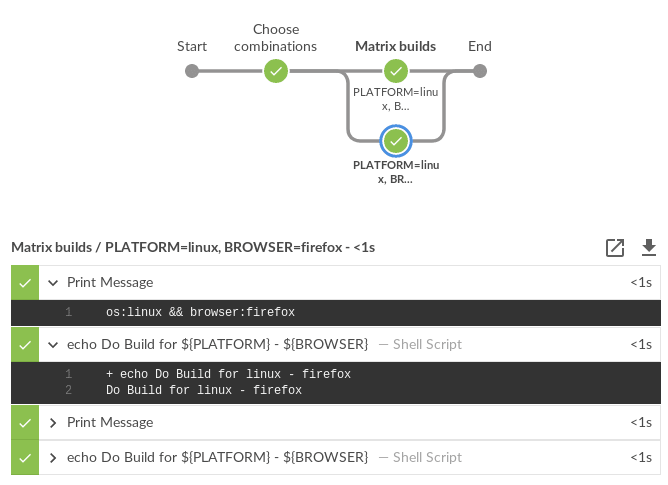
Screenshot of matrix pipeline

The following is a screenshot of the pipeline code above running in a sandbox Jenkins environment.

Screenshot of matrix pipeline

Adding static choices

It is useful for users to be able to customize building matrices when a build is triggered. Adding static choices requires only a few changes to the above script. Static choices as in we hard code the question and matrix filters.

Jenkinsfile
Map response = [:]
stage("Choose combinations") {
    response = input(
        id: 'Platform',
        message: 'Customize your matrix build.',
        parameters: [
            choice(
                choices: ['all', 'linux', 'mac', 'windows'],
                description: 'Choose a single platform or all platforms to run tests.',
                name: 'PLATFORM'),
            choice(
                choices: ['all', 'chrome', 'edge', 'firefox', 'safari'],
                description: 'Choose a single browser or all browsers to run tests.',
                name: 'BROWSER')
        ])
}

// filter the matrix axes since
// Safari is not available on Linux and
// Edge is only available on Windows
List axes = getMatrixAxes(matrix_axes).findAll { axis ->
    (response['PLATFORM'] == 'all' || response['PLATFORM'] == axis['PLATFORM']) &&
    (response['BROWSER'] == 'all' || response['BROWSER'] == axis['BROWSER']) &&
    !(axis['BROWSER'] == 'safari' && axis['PLATFORM'] == 'linux') &&
    !(axis['BROWSER'] == 'edge' && axis['PLATFORM'] != 'windows')
}

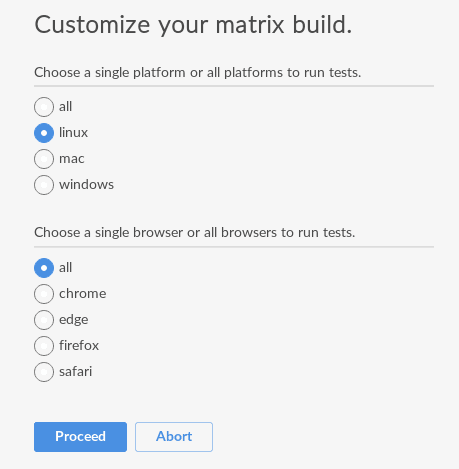
The pipeline code then renders the following choice dialog.

Screenshot of a dialog asking a question to customize matrix build

When a user chooses the customized options, the pipeline reacts to the requested options.

Screenshot of pipeline running requested user customizations

Adding dynamic choices

Dynamic choices means the choice dialog for users to customize the build is generated from the Map matrix_axes rather than being something a pipeline developer hard codes.

For user experience (UX), you’ll want your choices to automatically reflect the matrix axis options you have available. For example, let’s say you want to add a new dimension for Java to the matrix.

// you can add more axes and this will still work
Map matrix_axes = [
    PLATFORM: ['linux', 'windows', 'mac'],
    JAVA: ['openjdk8', 'openjdk10', 'openjdk11'],
    BROWSER: ['firefox', 'chrome', 'safari', 'edge']
]

To support dynamic choices, your choice and matrix axis filter needs to be updated to the following.

Map response = [:]
stage("Choose combinations") {
    response = input(
        id: 'Platform',
        message: 'Customize your matrix build.',
        parameters: matrix_axes.collect { key, options ->
            choice(
                choices: ['all'] + options.sort(),
                description: "Choose a single ${key.toLowerCase()} or all to run tests.",
                name: key)
        })
}

// filter the matrix axes since
// Safari is not available on Linux and
// Edge is only available on Windows
List axes = getMatrixAxes(matrix_axes).findAll { axis ->
    response.every { key, choice ->
        choice == 'all' || choice == axis[key]
    } &&
    !(axis['BROWSER'] == 'safari' && axis['PLATFORM'] == 'linux') &&
    !(axis['BROWSER'] == 'edge' && axis['PLATFORM'] != 'windows')
}

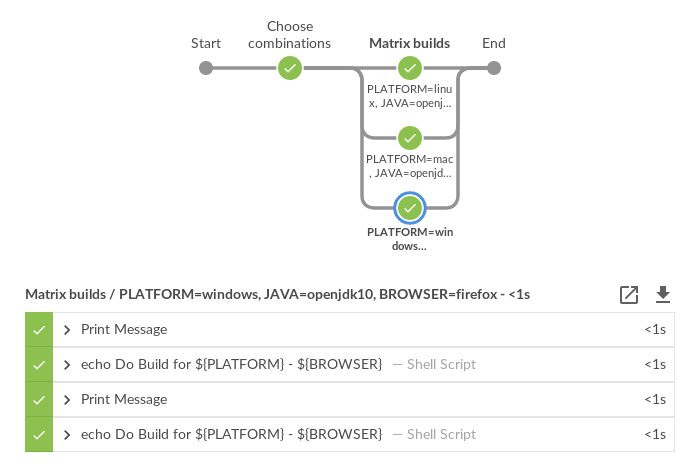
It will dynamically generate choices based on available matrix axes and will automatically filter if users customize it. Here’s an example dialog and rendered choice when the pipeline executes.

Screenshot of dynamically generated dialog for user to customize choices of matrix build

Screenshot of pipeline running user choices in a matrix

Full pipeline example with dynamic choices

The following script is the full pipeline example which contains dynamic choices.

// you can add more axes and this will still work
Map matrix_axes = [
    PLATFORM: ['linux', 'windows', 'mac'],
    JAVA: ['openjdk8', 'openjdk10', 'openjdk11'],
    BROWSER: ['firefox', 'chrome', 'safari', 'edge']
]

@NonCPS
List getMatrixAxes(Map matrix_axes) {
    List axes = []
    matrix_axes.each { axis, values ->
        List axisList = []
        values.each { value ->
            axisList << [(axis): value]
        }
        axes << axisList
    }
    // calculate cartesian product
    axes.combinations()*.sum()
}

Map response = [:]
stage("Choose combinations") {
    response = input(
        id: 'Platform',
        message: 'Customize your matrix build.',
        parameters: matrix_axes.collect { key, options ->
            choice(
                choices: ['all'] + options.sort(),
                description: "Choose a single ${key.toLowerCase()} or all to run tests.",
                name: key)
        })
}

// filter the matrix axes since
// Safari is not available on Linux and
// Edge is only available on Windows
List axes = getMatrixAxes(matrix_axes).findAll { axis ->
    response.every { key, choice ->
        choice == 'all' || choice == axis[key]
    } &&
    !(axis['BROWSER'] == 'safari' && axis['PLATFORM'] == 'linux') &&
    !(axis['BROWSER'] == 'edge' && axis['PLATFORM'] != 'windows')
}

// parallel task map
Map tasks = [failFast: false]

for(int i = 0; i < axes.size(); i++) {
    // convert the Axis into valid values for withEnv step
    Map axis = axes[i]
    List axisEnv = axis.collect { k, v ->
        "${k}=${v}"
    }
    // let's say you have diverse agents among Windows, Mac and Linux all of
    // which have proper labels for their platform and what browsers are
    // available on those agents.
    String nodeLabel = "os:${axis['PLATFORM']} && browser:${axis['BROWSER']}"
    tasks[axisEnv.join(', ')] = { ->
        node(nodeLabel) {
            withEnv(axisEnv) {
                stage("Build") {
                    echo nodeLabel
                    sh 'echo Do Build for ${PLATFORM} - ${BROWSER}'
                }
                stage("Test") {
                    echo nodeLabel
                    sh 'echo Do Build for ${PLATFORM} - ${BROWSER}'
                }
            }
        }
    }
}

stage("Matrix builds") {
    parallel(tasks)
}

Background: How does it work?

The trick is in axes.combinations()*.sum(). Groovy combinations are a quick and easy way to perform a cartesian product.

Here’s a simpler example of how cartesian product works. Take two simple lists and create combinations.

List a = ['a', 'b', 'c']
List b = [1, 2, 3]

[a, b].combinations()

The result of [a, b].combinations() is the following.

[
    ['a', 1],
    ['b', 1],
    ['c', 1],
    ['a', 2],
    ['b', 2],
    ['c', 2],
    ['a', 3],
    ['b', 3],
    ['c', 3]
]

Instead of a, b, c and 1, 2, 3 let’s do the same example again but instead using matrix maps.

List java = [[java: 8], [java: 10]]
List os = [[os: 'linux'], [os: 'freebsd']]

[java, os].combinations()

The result of [java, os].combinations() is the following.

[
    [ [java:8],  [os:linux]   ],
    [ [java:10], [os:linux]   ],
    [ [java:8],  [os:freebsd] ],
    [ [java:10], [os:freebsd] ]
]

In order for us to easily use this as a single map we must add the maps together to create a single map. For example, adding [java: 8] + [os: 'linux'] will render a single hashmap [java: 8, os: 'linux']. This means we need our list of lists of maps to become a simple list of maps so that we can use them effectively in pipelines.

To accomplish this we make use of the Groovy spread operator (*. in axes.combinations()*.sum()).

Let’s see the same java/os example again but with the spread operator being used.

List java = [[java: 8], [java: 10]]
List os = [[os: 'linux'], [os: 'freebsd']]

[java, os].combinations()*.sum()

The result is the following.

[
    [ java: 8,  os: 'linux'],
    [ java: 10, os: 'linux'],
    [ java: 8,  os: 'freebsd'],
    [ java: 10, os: 'freebsd']
]

With the spread operator the end result of a list of maps which we can effectively use as matrix axes. It also allows us to do neat matrix filtering with the findAll {} Groovy List method.

Exposing a shared library pipeline step

The best user experience is to expose the above code as a shared library pipeline step. As an example, I have added vars/getMatrixAxes.groovy to Jervis. This provides a flexible shared library step which you can copy into your own shared pipeline libraries.

The step becomes easy to use in the following way with a simple one dimension matrix.

Jenkinsfile
Map matrix_axes = [
    PLATFORM: ['linux', 'windows', 'mac'],
]

List axes = getMatrixAxes(matrix_axes)

// alternately with a user prompt
//List axes = getMatrixAxes(matrix_axes, user_prompt: true)

Here’s a more complex example using a two dimensional matrix with filtering.

Jenkinsfile
Map matrix_axes = [
    PLATFORM: ['linux', 'windows', 'mac'],
    BROWSER: ['firefox', 'chrome', 'safari', 'edge']
]

List axes = getMatrixAxes(matrix_axes) { Map axis ->
    !(axis['BROWSER'] == 'safari' && axis['PLATFORM'] == 'linux') &&
    !(axis['BROWSER'] == 'edge' && axis['PLATFORM'] != 'windows')
}

And again with a three dimensional matrix with filtering and prompting for user input.

Jenkinsfile
Map matrix_axes = [
    PLATFORM: ['linux', 'windows', 'mac'],
    JAVA: ['openjdk8', 'openjdk10', 'openjdk11'],
    BROWSER: ['firefox', 'chrome', 'safari', 'edge']
]

List axes = getMatrixAxes(matrix_axes, user_prompt: true) { Map axis ->
    !(axis['BROWSER'] == 'safari' && axis['PLATFORM'] == 'linux') &&
    !(axis['BROWSER'] == 'edge' && axis['PLATFORM'] != 'windows')
}

The script approval is not necessary for Shared Libraries.

If you don’t want to provide a shared step. In order to expose matrix building to end-users, you must allow the following method approval in the script approval configuration.

Script approval
staticMethod org.codehaus.groovy.runtime.DefaultGroovyMethods combinations java.util.Collection

Summary

We covered how to perform matrix builds using scripted pipeline as well as how to prompt users for customizing the matrix build. Additionally, an example was provided where we exposed getting buildable matrix axes to users as an easy to use Shared Library step via vars/getMatrixAxes.groovy. Using a shared library step is definitely the recommended way for admins to support users rather than trying to whitelist groovy methods.

Jervis shared pipeline library has supported matrix building since 2017 in Jenkins scripted pipelines. (see here and here for an example).

Biocon Biologics to reduce the cost of human insulin and cancer drugs

The Biocon subsidiary will chart a path that ensures high volumes and lowcosts, unlike competitors, Christiane Hamacher, chief executive of Biocon Biologics told ET.