
For years the benchmark for smartphone cameras was megapixels—years of single lenses with increasingly powerful sensors behind them.
For years the benchmark for smartphone cameras was megapixels—years of single lenses with increasingly powerful sensors behind them.

Your car’s electric system runs on DC. Your laptop charger craves AC. What do you do?
Jenkins API tokens are an authentication mechanism that allows a tool (script, application, etc.) to impersonate a user without providing the actual password for use with the Jenkins API or CLI. This is especially useful when your security realm is based on a central directory, like Active Directory or LDAP, and you don’t want to store your password in scripts. Recent versions of Jenkins also make it easier to use the remote API when using API tokens to authenticate, as no CSRF tokens need to be provided even with CSRF protection enabled. API tokens are not meant to — and cannot — replace the regular password for the Jenkins UI.
We addressed two major problems with the existing API token system in Jenkins 2.129:
First, reported in JENKINS-32442, user accounts in Jenkins have an automatically generated API token by default. As these tokens can be used to authenticate as a given user, they increase the attack surface of Jenkins.
The second problem was reported in JENKINS-32776: The tokens were previously stored on disk in an encrypted form. This meant that they could be decrypted by unauthorized users by leveraging another security vulnerability, or obtained, for example, from improperly secured backups, and used to impersonate other users.
The main objective of this new system is to provide API tokens that are stored in a unidirectional way on the disk, i.e. using a hashing algorithm (in this particular case SHA-256).
While this means that you will not be able to see the actual API tokens anymore after you’ve created them, several features were added to mitigate this potential problem:
You can have multiple active API tokens at the same time. If you don’t remember an API token’s value anymore, just revoke it.
You can name your tokens to know where they are used (and rename them after creation if desired). We recommend that tokens use a name that indicates where (for example the application, script, or host) where it will be used.
You can track the usage of your tokens. Every token keeps a record of the number of uses and the date of the last use. This will allow you to better know which tokens are really used and which are no longer actively required. Jenkins also encourages users to rotate old API tokens by highlighting their creation date in orange after six months, and in red after twelve months. The goal is to remind the user that tokens are more secure when you regenerate them often: The longer a token is around, perhaps passed around in script files and stored on shared drives, the greater the chance it’s going to be accessed by someone not authorized to use it.
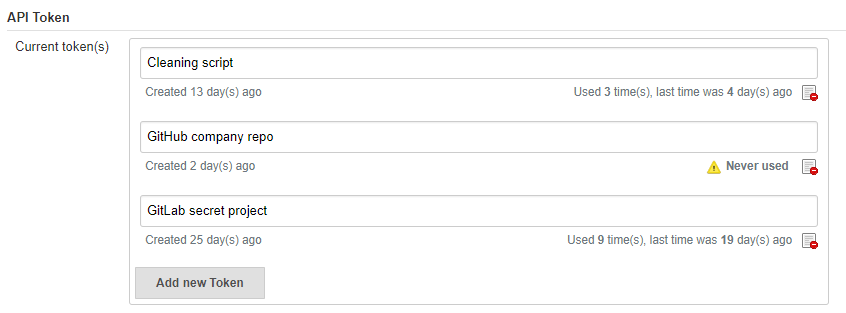
You can revoke API tokens. When you know that you are not using a given token anymore, you can revoke it to reduce the risk of it getting used by unauthorized users. Since you can have multiple API tokens, this allows fine-grained control over which scripts, hosts, or applications are allowed to use Jenkins as a given user.
To help administrators migrate their instances progressively, the legacy behavior is still available, while new system is also usable.
On the user configuration page, the legacy token is highlighted with a warning sign, explaining that users should revoke it and generate a new one (if needed) to increase security.
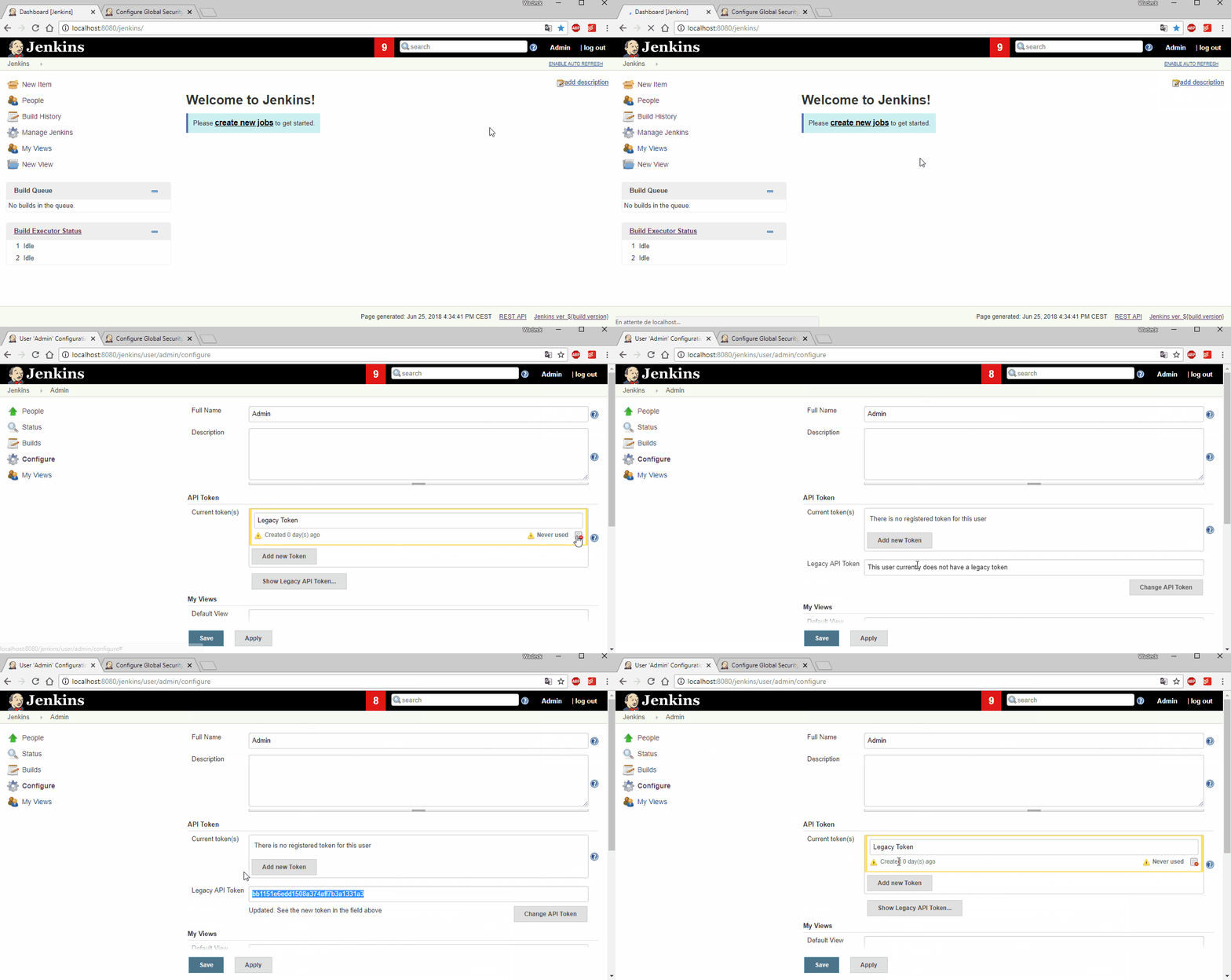
In order to let administrators control the pace of migration to the new API token system, we added two global configuration options in the "Configure Global Security" page in the brand new "API Token" section:
An option to disable the creation of legacy API tokens on user creation.
An option to disable the recreation of legacy API tokens by users, forcing them to only use the new, unrecoverable API tokens.
Both options are disabled by default for new installations (the safe default), while they’re enabled when Jenkins is upgraded from before 2.129.

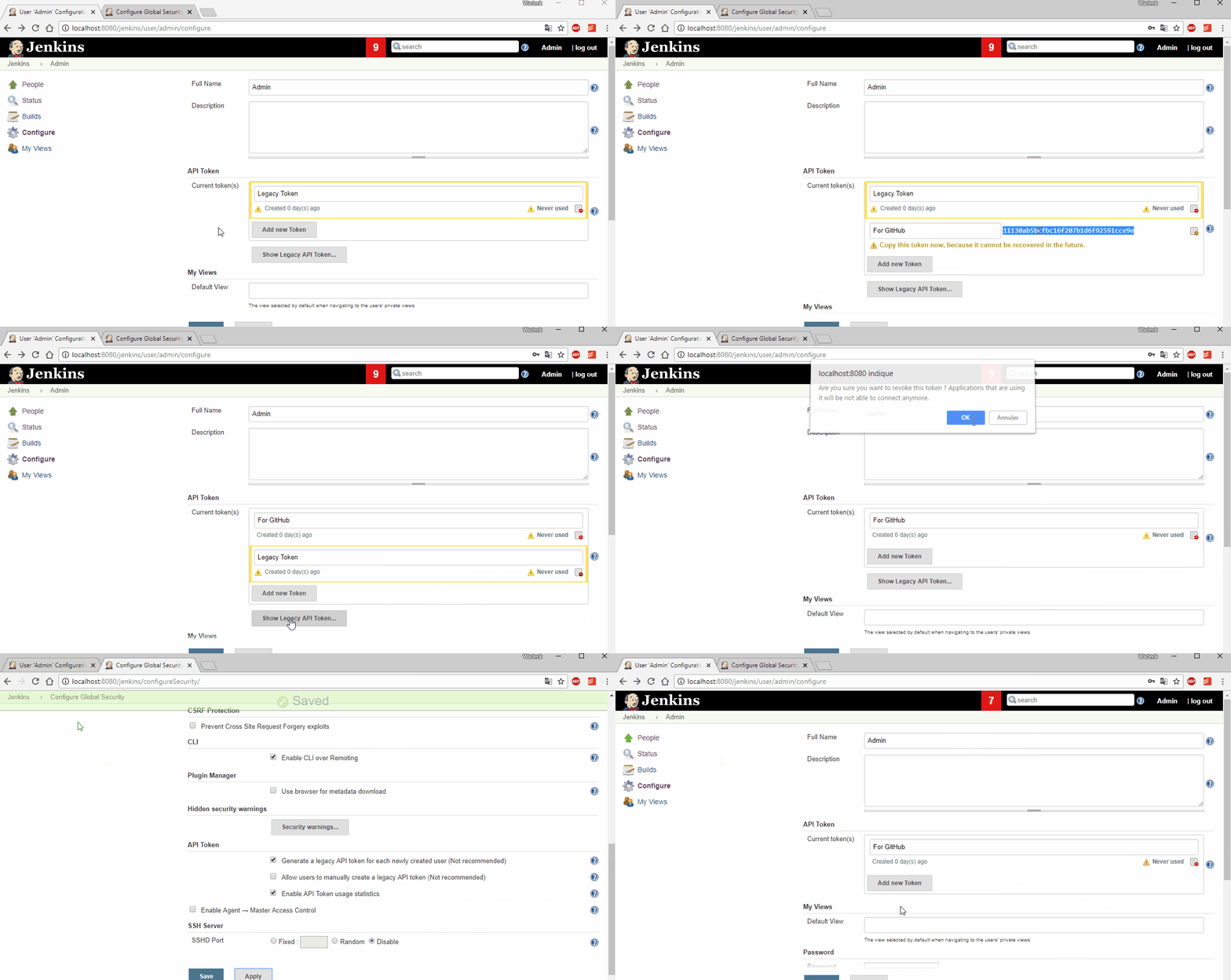
When upgrading to Jenkins 2.129, an administrative monitor informs admins about the new options described above, and recommend disabling them.
Another administrative warnings shows up if at least one user still has a legacy API token. It provides central control over legacy tokens still configured in the Jenkins instance, and allows revoking them all.
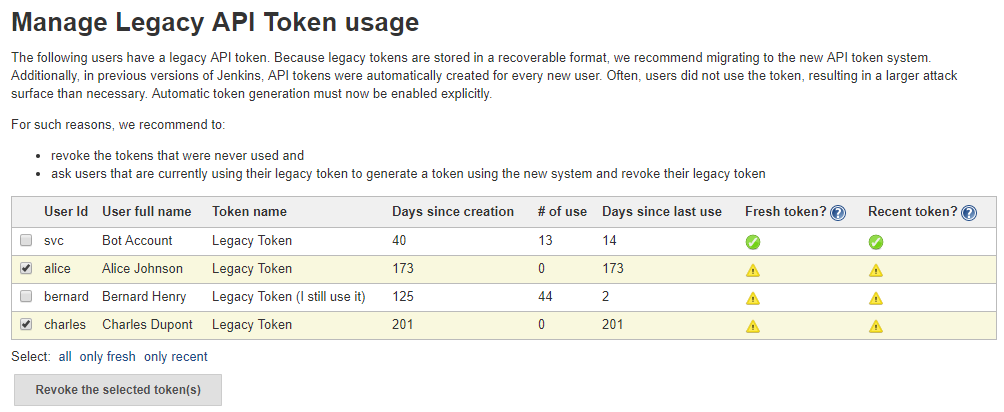
Jenkins API tokens are now much more flexible: They allow and even encourage better security practices. We recommend you revoke legacy API tokens as soon as you can, and only use the newly introduced API tokens.
We recently released version 1.3 of Declarative Pipelines, which includes a couple significant new features. We’re going to cover these features in separate blog posts. The next post will show the new ability to restart a completed Pipeline run starting from a stage partway through the Pipeline, but first, let’s look at the new sequential stages feature.
In Declarative 1.2, we added the ability to define stages to run in parallel as part of the Declarative syntax. Now in Declarative 1.3, we’ve added another way to specify stages nested within other stages, which we’re calling "sequential stages".
One common use case is running build and tests on multiple platforms. You could already do that with parallel stages, but now you can run multiple stages in each parallel branch giving you more visibility into the progress of your Pipeline without having to check the logs to see exactly which step is currently running where, etc.

You can also use stage directives, including post, when, agent, and all the others covered in the Pipeline Syntax reference in your sequential stages, letting you control behavior for different parts of each parallel branch.
In the example below, we are running builds on both Windows and Linux, but only want to deploy if we’re on the master branch.
pipeline {
    agent none

    stages {
        stage("build and deploy on Windows and Linux") {
            parallel {
                stage("windows") {
                    agent {
                        label "windows"
                    }
                    stages {
                        stage("build") {
                            steps {
                                bat "run-build.bat"
                            }
                        }
                        stage("deploy") {
                            when {
                                branch "master"
                            }
                            steps {
                                bat "run-deploy.bat"
                            }
                        }
                    }
                }

                stage("linux") {
                    agent {
                        label "linux"
                    }
                    stages {
                        stage("build") {
                            steps {
                                sh "./run-build.sh"
                            }
                        }
                        stage("deploy") {
                             when {
                                 branch "master"
                             }
                             steps {
                                sh "./run-deploy.sh"
                            }
                        }
                    }
                }
            }
        }
    }
}
agent, or environment, or optionsWhile the sequential stages feature was originally driven by users wanting to have multiple stages in parallel branches, we’ve found that being able to group multiple stages together with the same agent, environment, when, etc has a lot of other uses. For example, if you are using multiple agents in your Pipeline, but would like to be sure that stages using the same agent use the same workspace, you can use a parent stage with an agent directive on it, and then all the stages inside its stages directive will run on the same executor, in the same workspace. Another example is that until now, you could only set a timeout for the entire Pipeline or an individual stage. But by using a parent stage with nested stages, you can define a timeout in the parent’s options directive, and that timeout will be applied for the execution of the parent, including its nested stages. You may also want to conditionally control the execution of multiple stages. For example, your deployment process may be spread across multiple stages, and you don’t want to run any of those stages unless you’re on a certain branch or some other criteria is satisified. Now you can group all those related stages together in a parent stage, within its stages directive, and have a single when condition on that parent, rather than having to copy an identical when condition to each of the relevant stages.
One of my favorite use cases is shown in the example below. In Declarative 1.2.6, we added the input directive for stages. This will pause the execution of the Pipeline until a user confirms that the Pipeline should continue, using the Scripted Pipeline input step. The input directive is evaluated before the stage enters its agent, if it has one specified, and before the stage’s when condition, if specified, is evaluated. But if you’re using a top-level agent for most of your stages, you’re still going to be using that agent’s executor while waiting for input, which can be a waste of resources. With sequential stages, you can instead use agent none at the top-level of the Pipeline, and group the stages using a common agent and running before the stage with the input directive together under a parent stage with the required agent specified. Then, when your Pipeline reaches the stage with input, it will no longer be using an agent’s executor.
pipeline {
    agent none

    stages {
        stage("build and test the project") {
            agent {
                docker "our-build-tools-image"
            }
            stages {
               stage("build") {
                   steps {
                       sh "./build.sh"
                   }
               }
               stage("test") {
                   steps {
                       sh "./test.sh"
                   }
               }
            }
            post {
                success {
                    stash name: "artifacts", includes: "artifacts/**/*"
                }
            }
        }

        stage("deploy the artifacts if a user confirms") {
            input {
                message "Should we deploy the project?"
            }
            agent {
                docker "our-deploy-tools-image"
            }
            steps {
                sh "./deploy.sh"
            }
        }
    }
}
These are just a few example of the power of the new sequential stages feature in Declarative 1.3. This new feature adds another set of significant use cases that can be handled smoothly using Declarative Pipeline. In my next post, I’ll show the another highly requested feature - the new ability to restart a Pipeline run from any stage in that Pipeline.

In times past, if you wanted a portable game machine, you just bought the latest incarnation of the Game Boy.
How to build an end-to-end data pipeline with Structured Streaming
Try this notebook in Databricks
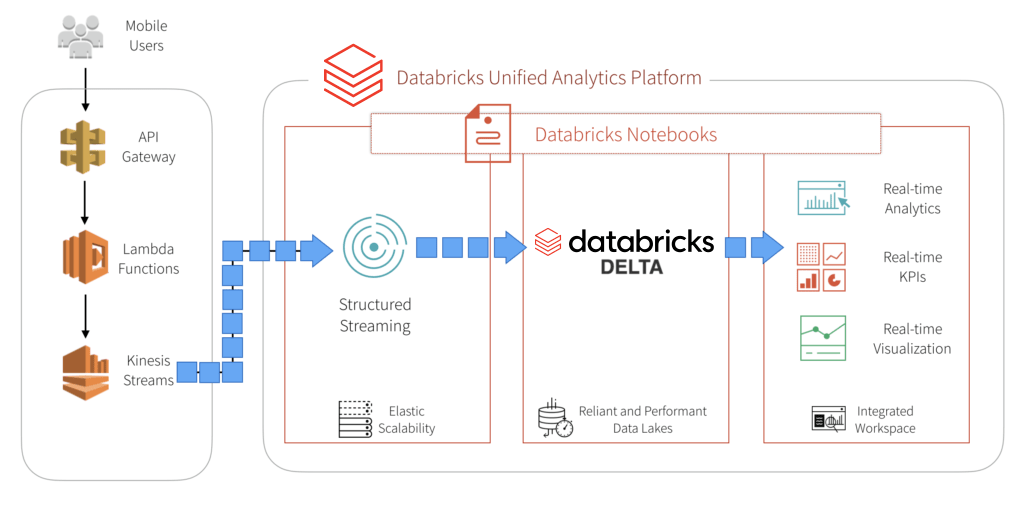
The world of mobile gaming is fast paced and requires the ability to scale quickly. With millions of users around the world generating millions of events per second by means of game play, you will need to calculate key metrics (score adjustments, in-game purchases, in-game actions, etc.) in real-time. Just as important, a popular game launch or feature will increase event traffics by orders of magnitude and you will need infrastructure to handle this rapid scale.
With complexities of low-latency insights and rapidly scalable infrastructure, building data pipelines for high volume streaming use cases like mobile game analytics can be complex and confusing. Developers who are tasked with this endeavor will encounter a number architectural questions.
Ultimately, they will need to build an end-to-end data pipeline comprises of these three functional components: data ingestion/streaming; data transformation (ETL); and data analytics and visualization.
One approach to address these questions is by selecting a unified platform that offers these capabilities. Databricks provides a Unified Analytics Platform that brings together big data and AI and allows the different personas of your organization to come together and collaborate in a single workspace.
In this blog, we will explore how to:
Building mobile gaming data pipelines is complicated by the fact that you need rapidly scalable infrastructure to handle millions of events by millions of users and gain actionable insights in real-time. That’s where the beauty of building a data pipeline with AWS and Databricks comes into play. Kinesis shards can be dynamically re-provisioned to handle increased loads, and Databricks automatically scales out your cluster to handle the increase in data.
In our example, we simulate game play events from mobile users with an event generator. These events are pushed to a REST endpoint and follow our data pipeline through ingestion into our Databricks Delta table. The code for this event generator can be found here.
For this example, we build a REST endpoint using Amazon API Gateway. Events that arrive at this endpoint automatically trigger a serverless lambda function, which pipes these events into a Kinesis stream for our consumption. You will want to setup lambda integration with your endpoint to automatically trigger, and invoke a function that will write these events to kinesis.

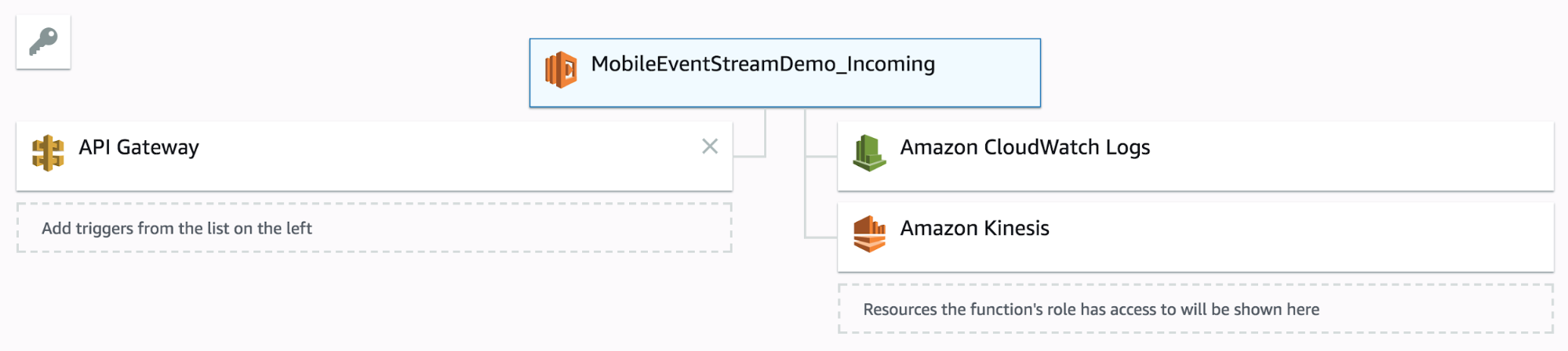
Setup a Python lambda function like so:
import json
import boto3
import random
import base64
import time

def lambda_handler(event, context):
    print "Received event: {}".format(event)
    stream_name = 'streamdemo_incoming'
    record = json.loads(event['body'])
    record['eventTime'] = int(time.time())
    event['body'] = record
    client = boto3.client('kinesis')
    client.put_record(StreamName = stream_name, Data = json.dumps(event), PartitionKey = str(random.randint(1,100)))
    return None
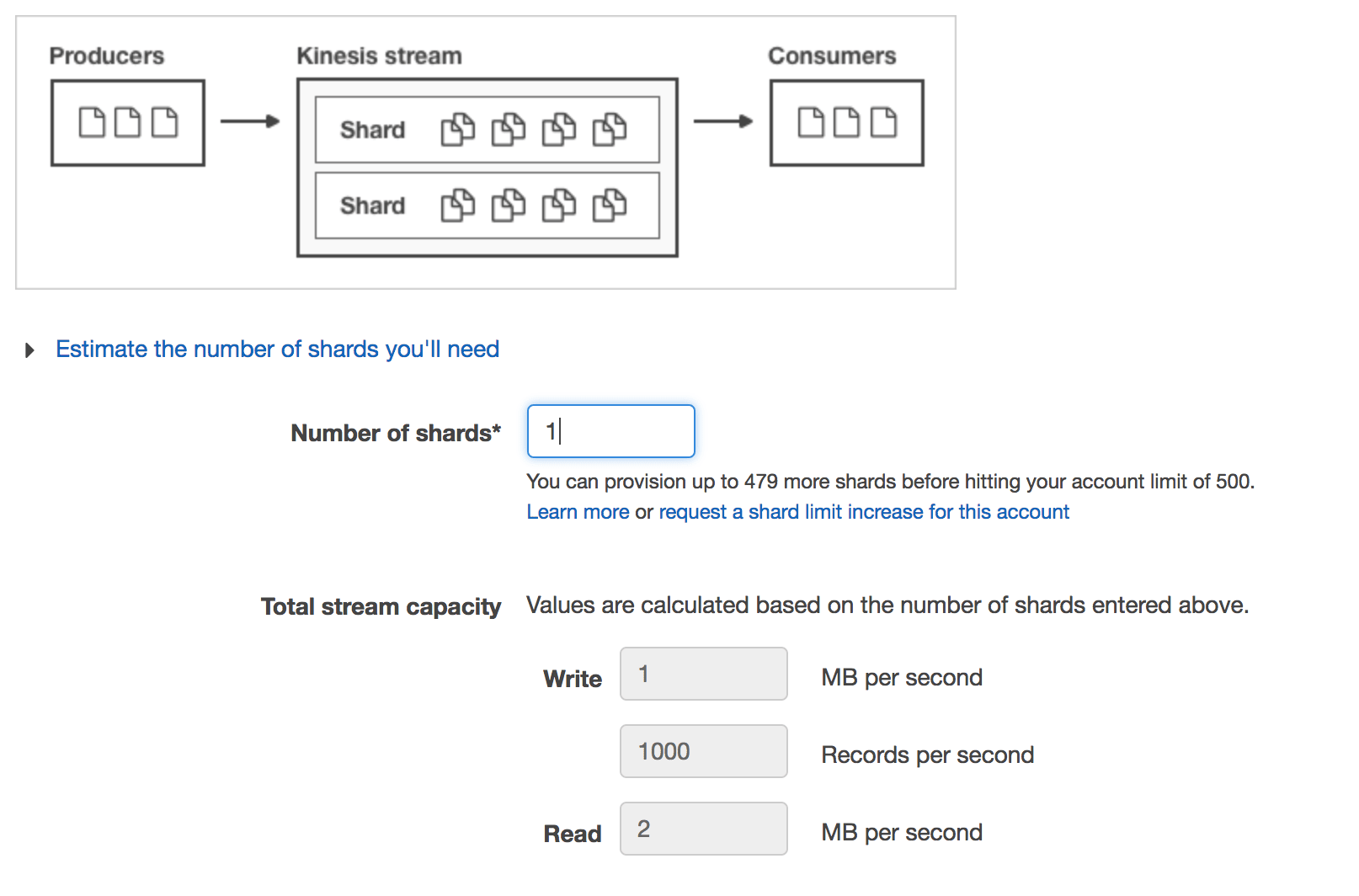
Kinesis streams are provisioned by throughput, so you can provision as many shards as necessary to handle your expected data throughput. Each shard provides a throughput of 1 MB/sec for writes and 2MB/sec for reads, or up to 1000 records per second. For more information regarding Kinesis streams throughput, check out the documentation. Random PartitionKeys are important for even distribution if you have more than one shard.
Ingesting data from a Kinesis stream is straight forward. In a production environment, you will want to setup the appropriate IAM role policies to make sure your cluster has access to your Kinesis Stream. The minimum permissions for this look like this:
{
    "Version": "2012-10-17",
    "Statement": [
        {
            "Effect": "Allow",
            "Action": [
                "kinesis:DescribeStream",
                "kinesis:GetRecords",
                "kinesis:GetShardIterator"
            ],
            "Resource": "ARN_FOR_YOUR_STREAM"
        }
    ]
}
Alternatively, you can also use AWS access keys and pass them in as options, however, IAM roles are best practice method for production use cases. In this example, let’s assume the cluster has the appropriate IAM role setup.
Start by creating a DataFrame like this:
kinesisDataFrame = spark \
.readStream \
.format('kinesis') \
.option('streamName','MY_KINESIS_STREAM_NAME') \
.option('initialPosition','STREAM_POSITION') \
.option('region','KINESIS_REGION') \
.load()
You’ll want to also define the schema of your incoming data. Kinesis data gets wrapped like so:
kinesisSchema = StructType() \
            .add('body', StringType()) \
            .add('resource', StringType()) \
            .add('requestContext',StringType()) \
            .add('queryStringParameters', StringType()) \
            .add('httpMethod', StringType()) \
            .add('pathParameters', StringType()) \
            .add('headers', StringType()) \
            .add('stageVariables', StringType()) \
            .add('path', StringType()) \
            .add('isBase64Encoded', StringType())

eventSchema = StructType().add('eventName', StringType()) \
              .add('eventTime', TimestampType()) \
              .add('eventParams', StructType() \
                   .add('game_keyword', StringType()) \
                   .add('app_name', StringType()) \
                   .add('scoreAdjustment', IntegerType()) \
                   .add('platform', StringType()) \
                   .add('app_version', StringType()) \
                   .add('device_id', StringType()) \
                   .add('client_event_time', TimestampType()) \
                   .add('amount', DoubleType())
                  )
For this demo, we’re really only interested in the body of the kinesisSchema, which will contain data that we describe in our eventSchema.
someEventDF = kinesisDataFrame.selectExpr("cast (data as STRING) jsonData") \
.select(from_json('jsonData',kinesisSchema).alias('requestBody'))\
.select(from_json('requestBody.body', eventSchema).alias('body'))\
.select('body.attr1', 'body.attr2', 'body.etc')
Now that we have our streaming dataframe defined, let’s go ahead and do some simple transformations. Event data is usually time-series based, so it’s best to partition on something like an event date. Our incoming stream does not have an event date parameter, however, so we’ll make our own by transforming the eventTime column. We’ll also throw in a check to make sure the eventTime is not null:
base_path = '/path/to/mobile_events_stream/'
eventsStream = gamingEventDF.filter(gamingEventDF.eventTime.isNotNull()).withColumn("eventDate", to_date(gamingEventDF.eventTime)) \
  .writeStream \
  .partitionBy('eventDate') \
  .format('delta') \
  .option('checkpointLocation', base_path + '/_checkpoint') \
  .start(base_path)
Let’s also take this opportunity to define our table location.
CREATE TABLE
IF NOT EXISTS mobile_events_delta_raw
USING DELTA
location '/path/to/mobile_events_stream/';
Now that we have data streaming live into our Databricks Delta table, we can go ahead and look at some KPIs. Traditionally, companies would only look at these on a daily basis, but with Structured Streaming and Databricks Delta, you have the capability to visualize these in real time all within your Databricks notebooks.
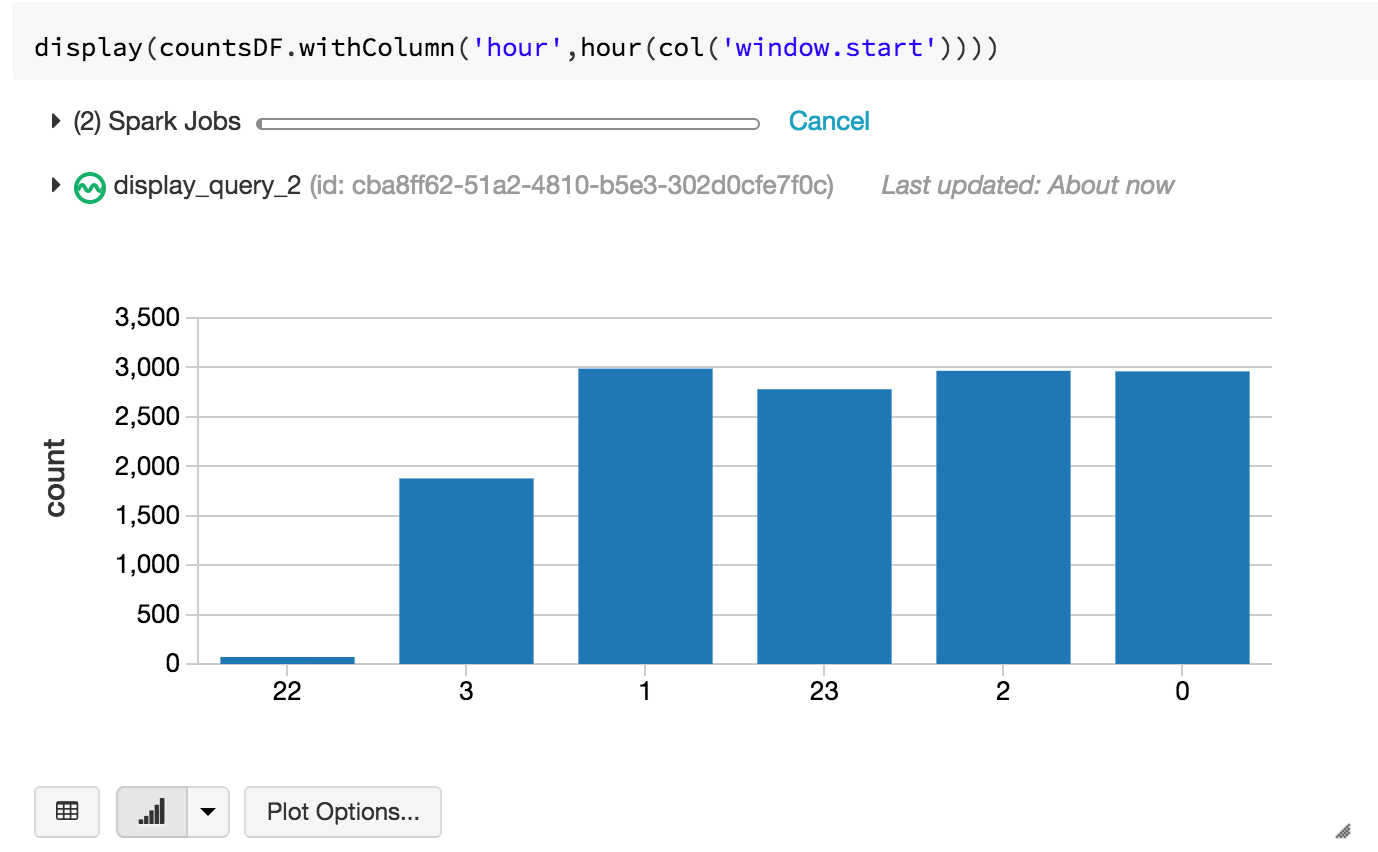
Let’s start with a simple one. How many events have I seen in the last hour?
countsDF = gamingEventDF.withWatermark("eventTime", "180 minutes").groupBy(window("eventTime", "60 minute")).count()
countsQuery = countsDF.writeStream \
  .format('memory') \
  .queryName('incoming_events_counts') \
  .start()
We can then visualize this in our notebook as say, a bar graph:
Maybe we can make things a little more interesting. How much money have I made in the last hour? Let’s examine bookings. Understanding bookings per hour is an important metric because it can be indicative of how our application/production systems are doing. If there was a sudden drop in bookings right after a new game patch was deployed, for example, we immediately know something is wrong.
We can take the same dataframe, but filter on all purchaseEvents, grouping by a window of 60 minutes.
bookingsDF = gamingEventDF.withWatermark("eventTime", "180 minutes").filter(gamingEventDF.eventName == 'purchaseEvent').groupBy(window("eventTime", "60 minute")).sum("eventParams.amount")
bookingsQuery = bookingsDF.writeStream \
  .format('memory') \
  .queryName('incoming_events_bookings') \
  .start()
Let’s pick a line graph to visualize this one:
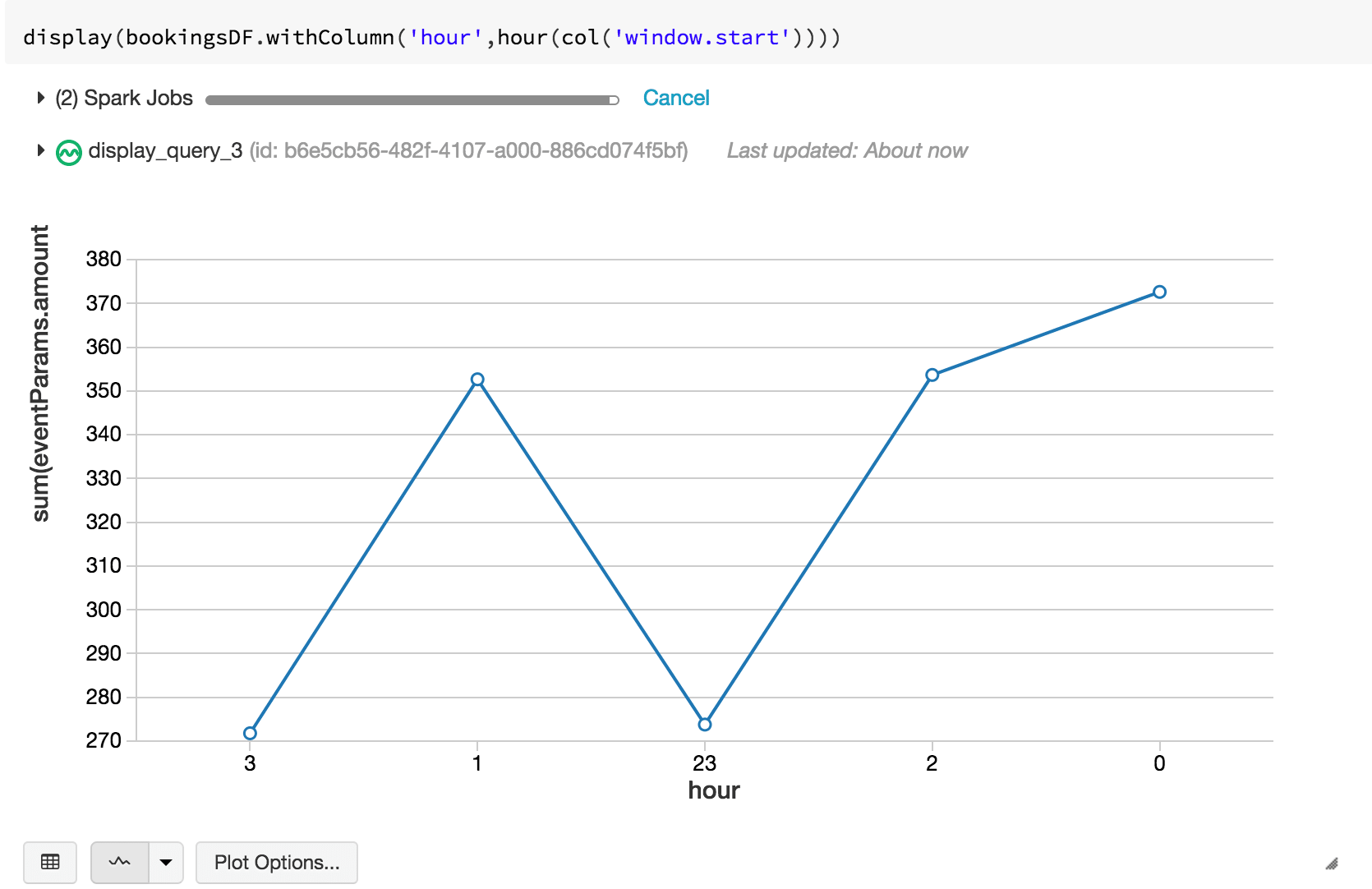
For the SQL enthusiasts, you can query the Databricks Delta table directly. Let’s take a look at a simple query to show the current daily active users (DAU). I know we’re actually looking at device id because our sample set doesn’t contain a user id, so for the sake of example, let’s assume that there is a 1-1 mapping between users and devices (although, in the real world, this is not always the case).
select count (distinct eventParams.device_id) as DAU from mobile_events_delta_raw where to_date(eventTime) = current_date;
A common challenge that many face with streaming is the classic “small files” problem. Depending on how frequently your writes are being triggered and the volume of the traffic that you are ingesting, you may end up with a lot of files that are of varying sizes, many of them too small to be operationally efficient.

Databricks Delta solves this issue by introducing the OPTIMIZE command. This command effectively performs compaction on these files so that you have larger (up to 1GiB) files.
OPTIMIZE '/path/to/mobile_events_stream/'
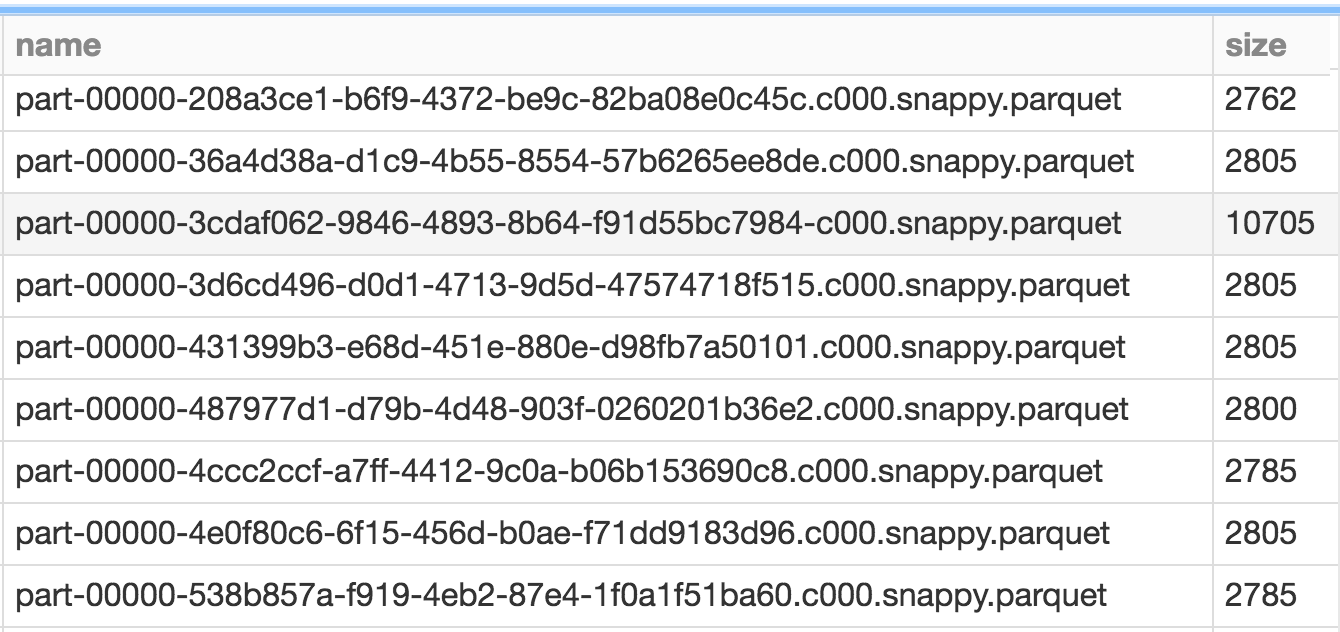
You’ll notice, however, that there are still a bunch of small files. That’s because Databricks Delta manages transactions. You might have queries or longer running processes that are still accessing your older files, after your compaction completes. Any new queries or jobs submitted at this time end up accessing the newer, larger files, but any existing jobs would still query the older files.
You can clean these up periodically by calling the VACUUM command.
VACUUM '/mnt/syu/mobile_events_stream/';
Which results simply with:

By default VACUUM removes files that are older than 7 days. But you can manually set your own retention by specifying a RETENTION clause like so:
VACUUM '/path/to/mobile_events_stream/' RETAIN 12 HOURS;
It’s highly recommended that you do not set the retention to zero hours, unless you are absolutely certain that no other processes are writing to or reading from your table.
In closing, we demonstrated how to build a data pipeline’s three functional components using the Databricks Unified Analytics Platform: Spark Structured Streaming, and Databricks Delta, and Databricks Notebooks. We’ve illustrated different ways that you can extrapolate key performance metrics from this real-time streaming data, as well as solve issues that are traditionally associated with streaming. The combination of Spark Structured Streaming and Databricks Delta reduces the overall end-to-end latency and availability of data, enabling data engineering, data analytics, and data science teams to respond quickly to events like a sudden drop in bookings, or an increased error-message events, that have direct impact on revenue. Additionally, by removing the data engineering complexities commonly associated with such pipelines with the Databricks Unified Analytics Platform, this enables data engineering teams to focus on higher-value projects.
To understand more about this specific example, I’ve included some resources below, as well as a notebook for you to try on your own.
For more information on Databricks Delta, Structured Streaming, and notebooks, read these sources
--
Try Databricks for free. Get started today.
The post Build a Mobile Gaming Events Data Pipeline with Databricks Delta appeared first on Databricks.

If you’re a fan of Nintendo’s compact NES Classic but not such a fan of returning to the land of corded controllers, the new 8BitDo…
Guest Blog by Sahithi Gunna, Senior Solutions Engineer, BlueData Running unmodified open source distributed computing frameworks on Docker containers has long been one of BlueData’s core value propositions. With that in mind, Hortonworks was one of BlueData’s first partners in the Apache Hadoop and Big Data ecosystem; the BlueData EPIC software platform was first certified for the Hortonworks Data […]
The post Hortonworks Certification: HDP on Docker Containers with BlueData appeared first on Hortonworks.

Ding dong! Someone’s at the door. But who? With a video doorbell, you can see who it is right from your phone.

The easiest way to make travelling more fun is to get rid of the little annoyances like searching for a place to charge your phone or getting…

