In the modern world, nothing stays the same for long. We live in a state of constant change; new technologies, new trends and new risks. Yet it’s a commonly held belief that people don’t like change. Which led me to wonder, why do we persist in calling change management initiatives “change management” if people don’t like change.
In my experience, I have not found this maxim to be true. Actually, nobody minds change, we evolve and adapt naturally but what we do not like is being forced to change. As such, when we make a choice to change, it is often easy, fast and permanent.
To put that into context, change is an external force imposed upon you. For example, if I tell you I want you to change your attitude, you are expected to adapt your patterns of behaviour to comply with my idea of your ‘new and improved attitude’. This is difficult to maintain and conflicts with your innate human need to exercise your own free-will. However, if I ask you to choose your attitude, this places you in control of your own patterns of behaviour. You can assess the situation and decide the appropriate attitude you will adopt. This ...
Read More on Datafloq
Saturday, 29 June 2019
Multi-branch Pipeline Jobs Support for GitLab SCM
This is one of the Jenkins project in GSoC 2019. We are working on adding support for Multi-branch Pipeline Jobs and Folder Organisation in GitLab. The plan is to create the following plugins:
-
GitLab API Plugin - Wraps GitLab Java APIs.
-
GitLab Branch Source Plugin - Contains two packages:
-
io.jenkins.plugins.gitlabserverconfig- Manages server configuration and web hooks management. Ideally should reside inside another plugin with nameGitLab Plugin. In future, this package should be moved into a new plugin. -
io.jenkins.plugins.gitlabbranchsource- Adds GitLab Branch Source for Multi-branch Pipeline Jobs (including Merge Requests) and Folder organisation.
-
Present State
-
FreeStyle Job and Pipeline(Single Branch) Job are fully supported.
-
Multi-branch Pipeline Job is partially supported (no MRs detection).
-
GitLab Folder Organisation is not supported.
Goals of this project
-
Implement a lightweight GitLab Plugin that depends on GitLab API Plugin.
-
Follow convention of 3 separate plugins i.e.
GitLab Plugin,GitLab API Plugin,GitLab Branch Source Plugin. -
Implement GitLab Branch Source Plugin with support for Multi-branch Pipeline Jobs.
-
Support new Jenkins features such as Jenkins Code as Configuration (JCasC), Incremental Tools.
-
Clear & Efficient design.
-
Support new SCM Trait APIs.
-
Support Java 8 and above.
Building the plugin
No binaries are available for this plugin as the plugin is in the very early alpha stage, and not ready for the general public quite yet. If you want to jump in early, you can try building it yourself from source.
Installation:
-
Checkout out source code to your local machine:
git clone https://github.com/baymac/gitlab-branch-source-plugin.git

cd gitlab-branch-source-plugin
-
Install the plugin:
mvn clean install

mvn clean install -DskipTests # to skip tests
-
Run the plugin:
mvn hpi:run # runs a Jenkins instance at localhost:8080

mvn hpi:run -Djetty.port=<port> # to run on your desired port number
If you want to test it with your Jenkins server, after mvn clean install follow these steps in your Jenkins instance:
-
Select
Manage Jenkins -
Select
Manage Plugins -
Select
Advancedtab -
In
Upload Pluginsection, selectChoose file -
Select
$<root_dir>/target/gitlab-branch-source.hpi -
Select
Upload -
Select
Install without restart
Usage
Assuming plugin installation has done been already.
Setting up GitLab Server Configuration on Jenkins
-
On jenkins, select
Manage Jenkins -
Select
Configure System -
Scroll down to find the
GitLabsection
-
Select
Add GitLab Server| SelectGitLab Server -
Now you will now see the GitLab Server Configuration options.

There are 4 fields that needs to be configured:
-
Name- Plugin automatically generates an unique server name for you. User may want to configure this field to suit their needs but should make sure it is sufficiently unique. We recommend to keep it as it is. -
Server URL- Contains the URL to your GitLab Server. By default it is set to "https://gitlab.com". User can modify it to enter their GitLab Server URL e.g. https://gitlab.gnome.org/, http://gitlab.example.com:7990. etc. -
Credentials- Contains a list of credentials entries that are of type GitLab Personal Access Token. When no credential has been added it shows "-none-". User can add a credential by clicking "Add" button. -
Web Hook- This field is a checkbox. If you want the plugin to setup a webhook on your GitLab project(s) related jobs, check this box. The plugin listens to a URL for the concerned GitLab project(s) and when an event occurs in the GitLab Server, the server sends an event trigger to the URL where the web hook is setup. If you want continuous integration (or continuous delivery) on your GitLab project then you may want to automatically set it up.
-
-
Adding a Personal Access Token Credentials (To automatically generate Personal Access Token see next section):
-
User is required to add a
GitLab Personal Access Tokentype credentials entry to securely persist the token inside Jenkins. -
Generate a
Personal Access Tokenon your GitLab Server:-
Select profile dropdown menu from top-right corner
-
Select
Settings -
Select
Access Tokenfrom left column -
Enter a name | Set Scope to
api,read_user,read_repository -
Select
Create Personal Access Token -
Copy the token generated
-
-
Return to Jenkins | Select
Addin Credentials field | SelectJenkins -
Set
Kindto GitLab Personal Access Token -
Enter
Token -
Enter a unique id in
ID -
Enter a human readable description
-
Select
Add
-
-
Testing connection:
-
Select your desired token in the
Credentialsdropdown -
Select
Test Connection -
It should return something like
Credentials verified for user <username>
-
-
Select
Apply(at the bottom) -
GitLab Server is now setup on Jenkins
Creating Personal Access Token within Jenkins
Alternatively, users can generate a GitLab Personal Access Token within Jenkins itself and automatically add the GitLab Personal Access Token credentials to Jenkins server credentials.
-
Select
Advancedat the bottom ofGitLabSection -
Select
Manage Additional GitLab Actions -
Select
Convert login and password to token -
Set the
GitLab Server URL -
There are 2 options to generate token;
-
From credentials- To select an already persisting Username Password Credentials or add an Username Password credential to persist it. -
From login and password- If this is a one time thing then you can directly enter you credentials to the text boxes and the username/password credential is not persisted.
-
-
After setting your username/password credential, select
Create token credentials. -
The token creator will create a Personal Access Token in your GitLab Server for the given user with the required scope and also create a credentials for the same inside Jenkins server. You can go back to the GitLab Server Configuration to select the new credentials generated (select "-none-" first then new credentials will appear). For security reasons this token is not revealed as plain text rather returns an
id. It is a 128-bit long UUID-4 string (36 characters).
Configuration as Code
No need for messing around in the UI. Jenkins Configuration as Code (JCasC) or simply Configuration as Code Plugin allows you to configure Jenkins via a yaml file. If you are a first time user, you can learn more about JCasC here.
Add configuration YAML:
There are multiple ways to load JCasC yaml file to configure Jenkins:
-
JCasC by default searches for a file with the name
jenkins.yamlin$JENKINS_ROOT. -
The JCasC looks for an environment variable
CASC_JENKINS_CONFIGwhich contains the path for the configurationyamlfile.-
A path to a folder containing a set of config files e.g.
/var/jenkins_home/casc_configs. -
A full path to a single file e.g.
/var/jenkins_home/casc_configs/jenkins.yaml. -
A URL pointing to a file served on the web e.g.
https://<your-domain>/jenkins.yaml.
-
-
You can also set the configuration yaml path in the UI. Go to
<your-jenkins-domain>/configuration-as-code. Enter path or URL tojenkins.yamland selectApply New Configuration.
An example of configuring GitLab server via jenkins.yaml:
credentials:
  system:
    domainCredentials:
      - credentials:
          - gitlabPersonalAccessToken:
              scope: SYSTEM
              id: "i<3GitLab"
              token: "XfsqZvVtAx5YCph5bq3r" # gitlab personal access token

unclassified:
  gitLabServers:
    servers:
      - credentialsId: "i<3GitLab"
        manageHooks: true
        name: "gitlab.com"
        serverUrl: "https://gitlab.com"
For better security, see handling secrets section in JCasC documentation.
Future Scope of work
The second phase of GSoC will be utilized to develop GitLab Branch Source. The new feature is a work in progress, but the codebase is unstable and requires lot of bugfixes. Some features like Multibranch Pipeline Jobs are functioning properly. More about it at the end of second phase.
Issue Tracking
This project uses Jenkins JIRA to track issues. You can file issues under gitlab-branch-source-plugin component.
Acknowledgements
This plugin is built and maintained by the Google Summer of Code (GSoC) Team for Multi-branch Pipeline Support for GitLab. A lot of inspiration was drawn from GitLab Plugin, Gitea Plugin and GitHub Plugin.
Also thanks to entire Jenkins community for contributing with technical expertise and inspiration.
Getting Data Ready for Data Science: On-Demand Webinar and Q&A Now Available
On June 25th, our team hosted a live webinar — Getting Data Ready for Data Science — with Prakash Chockalingam, Product Manager at Databricks.

Successful data science relies on solid data engineering to furnish reliable data. Data lakes are a key element of modern data architectures. Although data lakes afford significant flexibility, they also face various data reliability challenges. Delta Lake is an open source storage layer that brings reliability to data lakes allowing you to provide reliable data for data science and analytics. Delta Lake is deployed at nearly a thousand customers and was recently open sourced by Databricks.
The webinar covered modern data engineering in the context of the data science lifecycle and how the use of Delta Lake can help enable your data science initiatives. Topics areas covered included:
- The data science lifecycle
- The importance of data engineering to successful data science
- Key tenets of modern data engineering
- How Delta Lake can help make reliable data ready for analytics
- The ease of adopting Delta Lake for powering your data lake
- How to incorporate Delta Lake within your data infrastructure to enable Data Science
If you are interested in learning more technical detail we encourage you to also check out the webinar “Delta Lake: Open Source Reliability for Data Lakes” by Michael Armbrust, Principal Engineer responsible for Delta Lake. You can access the Delta Lake code and documentation at the Delta Lake hub.
Toward the end of the webinar, there was time for Q&A. Here are some of the questions and answers.
Q: Is Delta Lake available on Docker?
A: You can download and package Delta Lake as part of your Docker container. We are aware of some users employing this approach. The Databricks platform also has support for containers. If you use Delta Lake on the Databricks platform then you will not require extra steps since Delta Lake is packaged as part of the platform. If you have custom libraries, you can package them as docker containers and use them to launch clusters.
Q: Is Delta architecture good for both reads and writes?
A: Yes, the architecture is good for both reads and writes. It is optimized for throughput for both reads and writes.
Q: Is MERGE available on Delta Lake without Databricks i.e. in the open source version?
A: While not currently available as part of the open source version MERGE is on the roadmap and planned for the next release in July. Its tracked in Github milestones here.
Q: Can you discuss about creating feature engineering pipeline using Delta Lake.
A: Delta Lake can play an important role in your feature engineering pipeline with schema on write helping ensure that the feature store is of high quality. We are also working on a new feature called Expectations that will further help with managing how tightly constraints are applied to features.
Q: Is there a way to bulk move the data from databases into Delta Lake without creating and managing a message queue?
A: Yes, you can dump the change data to ADLS or S3 directly using connectors like GoldenGate. You can then stream from cloud storage. This eliminates the burden of managing a message queue.
Q: Can you discuss the Bronze, Silver, Gold concept as applied to tables.
A: The Bronze, Silver, Gold approach (covered in more detail in an upcoming blog) is a common pattern that we see in our customers where raw data is ingested and refined successively to different degrees and for different purposes until eventually one has the most refined “Gold” tables.
Q: Does versioning operate at a file or table or partition level?
A: Versioning operates at a file level so whenever there are updates Delta Lake identifies which files are changed and maintains appropriate information to facilitate Time Travel.
Interested in the open source Delta Lake?
Visit the Delta Lake online hub to learn more, download the latest code and join the Delta Lake community.
Visit the Delta Lake online hub to learn more, download the latest code and join the Delta Lake community.
--
Try Databricks for free. Get started today.
The post Getting Data Ready for Data Science: On-Demand Webinar and Q&A Now Available appeared first on Databricks.
Friday, 28 June 2019
Steve Jobs' confidant to leave Apple and start own firm
Ive spent nearly three decades at Apple, playing a leading role in the design of the candy-colored iMacs that helped Apple re-emerge from near death in the 1990s to the iPhone era.
Anomaly Detection — Another Challenge for Artificial Intelligence
It is true that the Industrial Internet of Things will change the world someday. So far, it is the abundance of data that makes the world spin faster. Piled in sometimes unmanageable datasets, big data turned from the Holy Grail into a problem pushing businesses and organizations to make faster decisions in real-time. One way to process data faster and more efficiently is to detect abnormal events, changes or shifts in datasets. Thus, anomaly detection, a technology that relies on Artificial Intelligence to identify abnormal behavior within the pool of collected data, has become one of the main objectives of the Industrial IoT.
Anomaly detection refers to the identification of items or events that do not conform to an expected pattern or to other items in a dataset that are usually undetectable by a human expert. Such anomalies can usually be translated into problems such as structural defects, errors or frauds.
Examples of potential anomalies
A leaking connection pipe that leads to the shutting down of the entire production line;
Multiple failed login attempts indicating the possibility of fishy cyber activity;
Fraud detection in financial transactions.
Why is it important?
Modern businesses are beginning to understand the importance of interconnected operations to get the full picture of their ...
Read More on Datafloq
Anomaly detection refers to the identification of items or events that do not conform to an expected pattern or to other items in a dataset that are usually undetectable by a human expert. Such anomalies can usually be translated into problems such as structural defects, errors or frauds.
Examples of potential anomalies
A leaking connection pipe that leads to the shutting down of the entire production line;
Multiple failed login attempts indicating the possibility of fishy cyber activity;
Fraud detection in financial transactions.
Why is it important?
Modern businesses are beginning to understand the importance of interconnected operations to get the full picture of their ...
Read More on Datafloq
View: RBI needs to overcome its fear of legitimate cryptocurrency usage
RBI has been vacillating between under-estimation of crypto's potential and its fear of ‘bad-actor’ use cases.
Leveraging Idle Moments in Real-Time AI Systems: Use Case of Autonomous Cars

By Lance Eliot, the AI Trends Insider
Do you allow your mind to sometimes wander afield of a task at hand?
I’m sure you’ve done so, particularly if your are stopped or otherwise waiting for something or someone to re-instigate your temporarily suspended or on-hold task back into operation or gear. We often find ourselves faced with idle moments that can be used for additional purposes, even if there’s not much else directly that we are supposed to be doing during those moments.
Perhaps you might turn that idle moment into a grand opportunity to discover some new flash of insight about the world, maybe even becoming famous for having thought of the next new equation that solves intractable mathematical problems or you might via an unexpected flash of genius realize how to solve world hunger.
It could happen.
Or, you could refrain from utilizing idle moments and remain, well, idle. You don’t necessarily have to always be on-the-go and your mind might actually relish the idle time as purely being idle, a sense of non-thinking and being just there.
When developing real-time systems, especially AI-based ones, there are likely going to be times during which the system overall is going to come to a temporarily “halt” or waiting period, finding itself going into an idle mode or idle moment. The easiest thing to do when programming or developing such a system is to simply have the entire system on-hold, doing nothing in particular, merely awaiting its next activation.
On the other hand, let’s assume that there are precious unused hardware computer cycles that could be used for something, even if the software is nonetheless forced into an “idling” as it awaits a prompt or other input to continue processing.
In those idle moments, it might be useful to have the AI system undertaking some kind of specialized efforts, ones that are intentionally designed to occur during idle moments.
It should be something presumably useful to do, and not just figuring out Fibonacci numbers for no reason (or, if have it doing cryptocurrency blockchain mining, which though admittedly might be enriching, just make sure it doesn’t become distracting of the core focus of the system). It also should be an effort that can handle being priority interrupted due to the mainstay task getting underway again. This implies that the idle moment processing needs to be fluid and flexible, capable of getting some bursts of time, and yet not requiring one extensive uninterrupted continuous length of time to perform.
You would also want to likely refrain from having the idle moment effort be undertaking anything crucial to the overall operation of the AI system, since the notion is that the idle-time processing is going to be hit-and-miss. It might occur, it might not if there isn’t any idle time that perchance arises.
Or, it might occur, but for only scant split seconds and so the idle moment processing won’t especially guarantee that the processing taking place will be able to complete during any single burst.
Of course, if this idle moment processing is going to potentially have unintended adverse consequences, such as causing freeze-up and hanging the rest of the AI system, you’d be shooting yourself in the foot by trying to leverage those idle moments. The idle moments are considered a bonus time, and it would be untoward to turn the bonus into an actual failure mode opportunity instead of an advantage to the system. If you can’t be sure that the idle moment processing will be relatively safe and sound, you’d probably be wiser to forego trying to use it, rather than mucking up the AI by a non-required effort.
Let’s consider this notion of idle moments in the context of driving a car.
Driving and Experiencing Idle Moments
Have you ever been sitting at a red light and your mind goes into idle, perhaps daydreaming about that vacation to Hawaii that you’d like to take, but meanwhile you are there in your car and heading to work once again.
I’m sure all of us have “zoned out” from time-to-time while driving our cars. It’s obviously not an advisable thing to do. In theory, your mind should always be on alert while you are sitting in the driver’s seat.
Some of my colleagues that drive for hours each day due to their jobs are apt to say that you cannot really be on full-alert for every moment of your driving. They insist that a bit of a mental escape from the driving task is perfectly fine, assuming that you do so when the car is otherwise not doing something active. Sitting at a red light is usually a rather idle task for the car and the car driver. You need to keep your foot on the brake pedal and be ready to switch over to the gas pedal once the light goes green. Seems like that’s about it.
In such a case, as long as you are steadfast in keeping your foot on the brake pedal while at the red light, presumably your mind can wander to other matters. You might be thinking about what you are going to have for dinner that night. You might be calculating how much you owe on your mortgage and trying to ascertain when you’ll have it entirely paid off. You might be thinking about that movie you saw last week and how the plot and the actors were really good. In essence, your mind might be on just about anything – and it is likely anything other than the car and driving of the car at that moment in time.
Some of you might claim that even if your mind has drifted from the driving task, it’s never really that far away. You earnestly believe that in a split second you could be mentally utterly engaged in the driving task, if there was a need to do so. My colleagues say that they believe that when driving and in-motion they are devoting maybe 90% of the minds to the driving task (the other 10% is used for daydreaming or other non-car driving mental pondering). Meanwhile, when at a red light, they are using maybe 10% of their mind to the driving task and the rest can be used for more idle thoughts. To them, the 10% is sufficient. They are sure that they can ramp-up from the sitting still 10% to the 90% active-driver mentally and do so to handle whatever might arise.
We can likely all agree that while at a red light there is still a chance of something going amiss. Yes, most of the time you just sit still, and your car is not moving. The other cars directly around you might also be in a similar posture. You might have cars to your left, and to your right, and ahead of you, and behind you, all of whom are sitting still and also waiting for the red light to turn green. You are so boxed in that even if you wanted to take some kind action with your car, you don’t have much room to move. You are landlocked.
Those that do not allow their thoughts to go toward more idle mental chitchat are perhaps either obsessive drivers or maybe don’t have much else they want to be thinking about. There is the category of drivers that find themselves mentally taxed by the driving task overall. For example, teenage novice drivers are often completely consumed by the arduous nature of the driving task. Even if they wanted to think about their baseball practice or that homework that’s due tonight, they are often so new to the driver’s seat and so worried about getting into an accident that they put every inch of their being towards driving the car. Especially when it’s their parent’s car.
By-and-large, I’d be willing to bet that most of the seasoned drivers out there are prone to mental doodling whenever the car comes to a situation permitting it. Sitting at a red light is one of the most obvious examples. Another would be waiting in a long line of cars, such as trying to get into a crowded parking lot and all of the cars are stopped momentarily, waiting for some other driver to park their car and thus allow traffic to flow again. We have lots of car driving moments wherein the car is at a standstill and there’s not much to do but wait for the car ahead of you to get moving.
Variety of Idle Moments Can Arise
Many drivers also stretch the idling car mental freedom moments and include circumstances whereby the car is crawling forward, albeit at a low speed. Presumably, you should not be thinking about anything other than the driving task, and though maybe there might be a carve out for when the car is completely motionless, it’s another aspect altogether to be doing idle thinking when the car is actually in motion. I was inching my way up an on-ramp onto the freeway this morning, and all of the cars were going turtle speeds while dealing with the excessive number of cars that all were trying to use the same on-ramp. We definitely were not motionless. It was a very slow crawl.
I noticed that the car ahead of me seemed to not be flowing at the same inching along speed as the rest of us. The car would come almost to a complete halt, and then with the few inches now between it and the car ahead, it would jerk forward to cover the ground. It happened repeatedly. This was a not very smooth way to inch along. My guess was that the driver was distracted by something else, maybe listening to a radio station or computing Fibonacci numbers mentally, and so was doing a staggered approach to the on-ramp traffic situation.
At least twice, the driver nearly bumped into the car that was ahead of it. This happened because the driver was doing this seemingly idiotic stop-and-go approach, rather than doing what the rest of us were doing, namely an even and gradual crawling forward motion. The car ahead of that driver seemed to realize too that they were almost getting bumped from behind. Several times, the car ahead put on their brake lights, as though trying to warn the other driver to watch out and not hit them. In theory, nobody had to be touching their brakes, since we all could have been crawling at the same speed and kept our respective distances from each other.
I hope you would agree that if indeed the driver was mentally distracted, they were doing so in a dicey situation. Once cars are in-motion, the odds of something going astray tend to increase. In fact, you might even say that the odds increase exponentially. The car that’s motionless, assuming it’s in a situation that normally has motionless involved, likely can allow more latitude for that mentally distracted driver.
Notice that I mentioned the motionless car in the context of motionlessness being expected. If you are driving down a busy street and suddenly jam on the brakes and come to a halt, in spite of your now being motionless, it would seem that your danger factor is going to be quite high. Sure, your car is motionless, but it happened in a time and place that was unexpected to other drivers. As such, those other drivers are bound to ram into your car. Imagine someone that just mentally discovered the secret to those finger licking good herbs and spices, and they were so taken by their own thoughts that they arbitrarily hit the brakes of their car and out-of-the-blue came to a stop on the freeway. Not a good idea.
So far, we’ve covered the aspect that when your car is motionless in an expected situation of motionless that you are apt to let your mind wander and turn towards idle thoughts, doing so while the car itself is presumably idling. We’ll acknowledge that something untoward can still happen, and there’s a need to remain involved in the driving task. Some people maybe reduce their mental driving consumption a bit lower than we might all want, and there’s a danger that the person is not at all ready for a sudden and unexpected disruption to the motionless.
Idle Moments and AI Autonomous Cars
What does all of this have to do with AI self-driving driverless autonomous cars?
At the Cybernetic AI Self-Driving Car Institute, we are developing AI systems for self-driving cars. As part of that effort, we also are considering how to best utilize the AI and the processors on-board a self-driving car during so-called idle moments.
Allow me to elaborate.
Your AI self-driving car comes up to a red light. It stops. It is boxed in by other surrounding cars that have also come to a normal stop at the red light. This is similar to a human driver car and the situation that I was using earlier as an example of idle moments. Nothing unusual about this. You might not even realize that the car next to you is an AI self-driving car. It is just patiently motionless, like the other nearby cars, and presumably waiting for that green light to appear.
Here’s a good question for you – what should the AI being doing at that moment in time?
I think we can all agree that at least the AI should be observing what’s going on around the self-driving car and be anticipating the green light. Sure, that would be standard operating procedure (SOP). A human would (should) be doing the same. Got it.
Suppose though that this effort to be looking around and anticipating the green light was able to be done without using up fully the available set of computational resources available to the AI system that’s on-board the self-driving car. You might liken this to a human driver that believes they are only using a fraction of their mental capacity for driving purposes when sitting at a red light. The human assumes that they can use some remainder of their underutilized mental prowess during these idle moments.
For many of the auto makers and tech firms, they right now are not seeking to leverage these idle moments for other purposes. To them, this is considered an “edge” problem. An edge problem in computer science is one that is considered at the periphery or edge of what you are otherwise trying to solve. The auto makers and tech firms are focused on the core right now of having an AI self-driving car that can drive a car down a road, stop at a red light, and proceed when the light is green.
For my article about the AI self-driving car as a moonshot, see: https://aitrends.com/selfdrivingcars/self-driving-car-mother-ai-projects-moonshot/
For aspects about edge problems, see my article: https://aitrends.com/selfdrivingcars/edge-problems-core-true-self-driving-cars-achieving-last-mile/
For my overall framework about AI self-driving cars, see: https://aitrends.com/selfdrivingcars/framework-ai-self-driving-driverless-cars-big-picture/
If there are untapped or “wasted” computational cycles that could have been used during an “idle” moment, so be it. No harm, no foul, with respect to the core aspects of the driving task. Might it be “nice” to leverage those computational resources when they are available? Sure, but it isn’t considered a necessity. Some would argue that you don’t need to be going full-blast computationally all of the time and why push things anyway.
When I’ve brought up this notion of potentially unused capacity, I’ve had some AI developers make a loud sigh and say that they already have enough on their plates about getting an AI self-driving car to properly drive a car. Forget about doing anything during idle moments other than what’s absolutely needed to be done.
For my article about burnout among AI developers, see: https://aitrends.com/selfdrivingcars/developer-burnout-and-ai-self-driving-cars/
For my article about the importance of defensive driving by AI self-driving cars, see: https://aitrends.com/selfdrivingcars/art-defensive-driving-key-self-driving-car-success/
For the foibles of human drivers, see my article: https://aitrends.com/selfdrivingcars/ten-human-driving-foibles-self-driving-car-deep-learning-counter-tactics/
They even often will try tossing up some reasons why not to try and use this available time. The easiest retort is that it might distract the AI from the core task of driving the car. To this, we say that it’s pretty stupid of anyone considering using the computational excess resources if they are also going to put the core driving task at a disadvantage.
Allow me therefore to immediately and loudly point out that yes, of course, the use of any excess capacity during idle moments is to be done only at the subservient measure to the core driving task. Whatever else the AI is going to do, it must be something that can immediately be stopped or interrupted. Furthermore, it cannot be anything that somehow slows down or stops or interrupts the core aspects of the driving task.
This is what we would expect of a human driver, certainly. A human driver that uses idle moments to think about their desired Hawaiian vacation, would be wrong in doing so if it also meant they were ill-prepared to handle the driving task. I realize that many humans that think they can handle multi-tasking are actually unable to do so, and thus we are all in danger whenever we get on the road. Those drivers that become distracted by other thoughts that are non-driving ones are putting us all at a higher risk of a driving incident. I’d assert that my example of the driver ahead of me on the on-ramp was one such example.
In short, the use of any of the excess available computational resources of an AI self-driving car, during an idle moment, must be only undertaken when it is clear cut that there is such available excess and that it also must not in any manner usurp the core driving task that the AI is expected to undertake.
Difficulties Of Leveraging Idle Driving Moments
This can admittedly be trickier than it might seem.
How does the system “know” that the AI effort — while during an idle moment — does not need the “excess” computational resources?
This is something that per my overall AI self-driving car framework is an important part of the “self-awareness” of the AI system for a self-driving car. This self-awareness capability is right now not being given much due by the auto makers and tech firms developing AI systems for self-driving cars, and as such, it correspondingly provides a reason that trying to use the “excess” is not an easy aspect for their self-driving cars (due to lacking an AI self-awareness to even know when such excess might exist).
For my article about self-awareness of AI, see: https://aitrends.com/selfdrivingcars/self-awareness-self-driving-cars-know-thyself/
For the cognition timing aspects of AI self-driving cars, see my article: https://aitrends.com/selfdrivingcars/cognitive-timing-for-ai-self-driving-cars/
The AI of a self-driving car is a real-time system that must continually be aware of time. If the self-driving car is going 75 miles per hour and there’s a car up ahead that seems to have lost a tire, how much time does the AI have to figure out what to do? Perhaps there’s a component of the AI that can figure out what action to take in this time-critical situation, but suppose the time required for the AI to workout a solution will take longer than is the time available to avoid hitting that car up ahead? There needs to be a self-awareness component of the AI system that is helping to keep track of the time it takes to do things and the time available to get things done.
I’m also focusing my remarks herein toward what are considered true AI self-driving cars, which are ones at a Level 5. A self-driving car of a Level 5 is considered one that the AI is able to drive without any human driver intervention needed and nor expected. The AI must be able to drive the car entirely without human assistance. Indeed, most of the Level 5 self-driving cars are omitting a brake pedal and gas pedal and steering wheel, since those contraptions are for a human driver.
Self-driving cars at a less than Level 5 are considered to co-share the driving task between the human and the AI. In essence, there must be a human driver on-board the self-driving car for a less than Level 5. I’ve commented many times that this notion of co-sharing the driving task is raft with issues, many of which can lead to confusion and the self-driving car getting into untoward situations. It’s not going to be pretty when we have increasingly foul car incidents and in spite of the belief that you can just say the human driver was responsible, I think this will wear thin.
For responsibility about AI self-driving cars, see my article: https://aitrends.com/selfdrivingcars/responsibility-and-ai-self-driving-cars/
For my article about the dangers of co-sharing the driving task, see: https://aitrends.com/selfdrivingcars/human-back-up-drivers-for-ai-self-driving-cars/
For the ethical aspects of AI for self-driving cars, see my article: https://aitrends.com/selfdrivingcars/ethically-ambiguous-self-driving-cars/
For the levels of AI self-driving cars, see my article: https://aitrends.com/selfdrivingcars/richter-scale-levels-self-driving-cars/
Go along with my indication that there will be a type of firewall between the use of computational resources for the core driving task and those computational resources that might be “excess” and available, and that at any time and without hesitation the core driving task can grab those excess resources.
Some of you that are real-time developers will say that there’s overhead for the AI to try and grab the excess resources and thus it would introduce some kind of delay, even if only minuscule. But that any delay, even if minuscule, could make the difference between the core making a life-or-death driving decision.
The counter-argument is that if those excess resources were otherwise sitting entirely idle, it would nonetheless also require overhead to activate those resources. As such, a well-optimized system should not particularly introduce any added delay between the effort to provide unused resources to the core versus resources that were momentarily and temporarily being used. That’s a key design aspect.
The next objection from some AI developers is that they offer a cynical remark about how the excess resources might be used. Are you going to use it to calculate pi to the nth degree? Are you going to use it to calculate whether aliens from Mars are beaming messages to us?
This attempt to ridicule the utilization of the excess resources is a bit hollow.
In theory, sure, it could be used to calculate pi and it could be used to detect Martians, since presumably it has no adverse impact on the core driving task. It is similar to the human that’s thinking about their Hawaiian vacation, which is presumably acceptable to do as long as it doesn’t undermine their driving (which, again, I do agree can undermine their driving, and so the same kind of potential danger could hamper the AI system but we’re saying that by design of the AI system that this is being avoided, while with humans it is something essentially unavoidable unless you can redesign the human mind).
How then might we productively use the excess resources when the AI and the core driving task is otherwise at an idle juncture?
Let’s consider some salient ways.
Useful AI Processing During Idle Moments
One aspect would be to do a double-check of the core driving task. Let’s say that the AI is doing a usual sweep of the surroundings, doing so while sitting amongst a bunch of cars that are bunched up at a red light. It’s doing this, over and over, wanting to detect anything out of the ordinary. It could be that with the core task there has already been a pre-determined depth of analysis for the AI.
It’s like playing a game of chess and trying to decide how many ply or levels to think ahead. You might normally be fine with thinking at four ply and don’t have the time or inclination to go much deeper. During the idle moment at a red light, the excess resources might do a kind of double-check and be willing to go to say six ply deep.
The core driving task wasn’t expecting the deeper analysis, and nor did it need it per se. On the other hand, a little bit of extra icing on the cake is likely to be potentially helpful. Perhaps the pedestrians that are standing at the corner appear to be standing still and pose no particular “threat” to the AI self-driving car. A deeper analysis might reveal that two of the pedestrians appear poised to move into the street and might do so once the green light occurs. This added analysis could be helpful to the core driving task.
If the excess computational cycles are used for such a purpose and if they don’t end-up with enough time to find anything notable, it’s nothing lost when you presumably dump it out and continue to use those resources for the core driving task. On the other hand, if perchance there was something found in time, it could be added to the core task awareness and be of potential value.
Another potential use of the excess resource might be to do further planning of the self-driving car journey that is underway.
Perhaps the self-driving car has done an overall path planning for how to get to the destination designated by a human occupant. Suppose the human had said to the self-driving car, get me to Carnegie Hall. At the start of the journey, the AI might have done some preliminary analysis to figure out how to get to the location. This also might be updated during the journey such as if traffic conditions are changing and the AI system becomes informed thereof.
During an otherwise idle moment, there could be more computational effort put towards examining the journey path. This might also involve personalization. Suppose that the human occupant goes this way quite frequently. Perhaps the human has from time-to-time asked the AI to vary the path, maybe due to wanting to stop at a Starbuck s on the way, or maybe due to wanting to see a particular art statute that’s on a particular corner along the way. The excess resources might be used to ascertain whether the journey might be taken along a different path.
This also brings up another aspect about the idle moments. If you were in a cab or similar and came to a red light, invariably the human driver is likely to engage you in conversation. How about that football team of ours? Can you believe it’s raining again? This is the usual kind of idle conversation. Presumably, the AI could undertake a similar kind of idle conversation with the human occupants of the self-driving car.
Doing this kind of conversation could be fruitful in that it might reveal something else too that the AI self-driving car can assist with. If the human occupant were to say that they are hungering for some coffee, the AI could suggest that the route go in the path that includes a Starbucks. Or, the human occupant might say that they will be returning home that night at 6:00 p.m., and for which the AI might ask then whether the human occupant wants the AI self-driving car to come and pick them up around that time.
For conversational aspects of AI self-driving cars, see my article: https://aitrends.com/features/socio-behavioral-computing-for-ai-self-driving-cars/
For further aspects about natural language processing and AI, see my article: https://aitrends.com/selfdrivingcars/car-voice-commands-nlp-self-driving-cars/
There are some that wonder whether the excess resources might be used for other “internal” purposes that might benefit the AI overall of the self-driving car. This could include doing memory-based garbage collection, possibly freeing up space that would otherwise be unavailable during the driving journey (this kind of memory clean-up typically happens after a journey is completed, rather than during a journey). This is a possibility, but it also begins to increase the difficulty of being able to stop it or interrupt it as needed, when so needed.
Likewise, another thought expressed has been to do the OTA (Over The Air) updates during these idle moments. The OTA is used to allow the AI self-driving car to transmit data up to a cloud capability established by the auto maker or tech firm, along with the cloud being able to push down into the AI self-driving car updates and such. The OTA is usually done when the self-driving car is fully motionless, parked, and otherwise not involved in the driving task.
We have to keep in mind that the AI self-driving car during the idle moments being considered herein is still actively on the roadway. It is driving the car. Given today’s OTA capabilities, it is likely ill-advised to try and carry out the OTA during such idle moments. This might well change though in the future, depending upon improvements in electronic communications such as 5G, and the advent of edge computing.
For my article about OTA and AI self-driving cars, see: https://aitrends.com/selfdrivingcars/air-ota-updating-ai-self-driving-cars/
For my article about edge computing and AI self-driving cars, see: https://aitrends.com/selfdrivingcars/edge-computing-ai-self-driving-cars/
Another possibility of the use of the excess resources might be to do some additional Machine Learning during those idle moments. Machine Learning is an essential element of AI self-driving cars and involves the AI system itself being improved over time via a “learning” type of process. For many of the existing AI self-driving cars, the Machine Learning is often relegated to efforts in the cloud by the auto maker or tech firm, and then downloaded into the AI of the self-driving car. This then avoids utilizing the scarce resources of the on-board systems and can leverage the much vaster resources that presumably can be had in the cloud.
If the excess resources during idle moments were used for Machine Learning, it once again increases the dicey nature of using those moments. Can you cut-off the Machine Learning if needed? What aspects of Machine Learning would best be considered for the use of the excess resources. This and a slew of other questions arise. It’s not that it isn’t feasible, it’s just that you’d need to be more mindful about whether this makes sense to have undertaken.
Conclusion
As a few final comments on this topic for now, it is assumed herein that there are excess computational resources during idle moments. This is not necessarily always the case, and indeed on a particular journey it might never be the case. It is quite possible that the AI core driving task will consume all of the resources, regardless of whether at idle or not. As such, if there isn’t any excess to be had, there’s no need to try and figure out how to make use of it.
On the other hand, the computational effort usually for an AI self-driving car does go upward as the driving situation gets more and more complicated. The AI “cognitive” workload for a self-driving car that’s in the middle of a busy downtown city street, involving dozens of pedestrians, a smattering of bicycle riders, human driven cars that are swooping here and there, and the self-driving car is navigating this at a fast clip, along with maybe not having ever traversed this road before, and so on, it’s quite a chore to be keeping track of all of that.
The AI self-driving car was presumably outfitted with sufficient computational resources to handle the upper peak loads (it better be!). At the less than peak loads, and at the least workload times, there is usually computational resources that are not being used particularly. It’s those “available” resources that we’re saying could be used. As stated earlier, it’s not a must have. At the same time, as the case was made herein, it certainly could be some pretty handy icing on the cake.
The next time that you find yourself sitting at a red light and thinking about the weekend BBQ coming up, please make sure to keep a sufficient amount of mental resources aimed at the driving task. I don’t want to be the person that gets bumped into by you, simply because you had grilled burgers and hot dogs floating in your mind.
Copyright 2019 Dr. Lance Eliot
This content is originally posted on AI Trends.

White House Releases Update to National Artificial Intelligence R&D Strategic Plan

By AI Trends Staff
The White House Office of Science and Technology Policy on June 21 released the National Artificial Intelligence Research and Development Strategic Plan: 2019 Update. The updated R&D Plan defines the eight key priority areas for Federal investments in AI R&D. The 2016 R&D Plan laid a critical foundation for U.S. R&D priorities in artificial intelligence, and this latest version refreshes those priorities for the fast-changing AI landscape. Agencies will use this Plan to guide their R&D activities in AI, consistent with their agencies’ missions.
“The first pillar of our national AI strategy, the American AI Initiative, is the prioritization of AI research and development. Today, we will ensure America’s continued leadership in cutting-edge AI R&D by releasing the 2019 update to the National AI R&D Strategic Plan,” said Michael Kratsios, Deputy Assistant to the President for Technology Policy, in a press release. “This coordinated Federal strategy for AI R&D will encourage advances in AI that will grow our economy, increase our national security, and improve the quality of life. With the addition of public-private partnerships as a key area for Federal R&D investment, our update underscores the Administration’s commitment to leverage the full strength of America’s innovation ecosystem.”
The following eight strategic priorities are identified in the 2019 update:
Strategy 1: Make long-term investments in AI research.
Strategy 2: Develop effective methods for human-AI collaboration.
Strategy 3: Understand and address the ethical, legal, and societal implications of AI.
Strategy 4: Ensure the safety and security of AI systems.
Strategy 5: Develop shared public datasets and environments for AI training and testing.
Strategy 6: Measure and evaluate AI technologies through standards and benchmarks.
Strategy 7: Better understand the national AI R&D workforce needs.
Strategy 8: Expand public-private partnerships to accelerate advances in AI.
The original strategic plan was issued by the Obama administration in 2016, with President Trump calling for an update through a February 2019 executive order, reported Nextgov. The administration asked for public comment last year, and heard from 58 stakeholders.
“The common theme we saw in the responses included increased interest in the translational applications of AI technology, the importance of developing trustworthy AI systems, workforce considerations and, of course, public-private partnerships for furthering AI R&D,” said Lynne Parker, assistant director for AI in the White House Office of Science and Technology Policy.
Parker cited ongoing examples already in play in government, including the Defense Innovation Unit, Health and Human Services Department’s Health Tech Sprint Initiative and the National Science Foundation’s recent partnership with Amazon promoting fairness in AI development.
Going forward, Parker said the strategy will push for agencies and the private sector—including industry, non-profit and academia—to share resources, including research data, facilities and access to education.
In an account in fedscoop, Rep. Will Hurd, R-Texas, praised the release of the updated R&D Strategic Plan. “The United States is in a race to master the transformational technology of our time: artificial intelligence,” he said in an emailed statement. “Research and development funding by the federal government to augment existing efforts by the private sector is essential to ensure continued American leadership in AI and other critical emerging technologies.”
See the Strategic Plan Update and AI.gov for more Administration activities on AI; read the source articles at Nextgov and at fedscoop.
Thursday, 27 June 2019
Akshay Kumar invests undisclosed amount in GOQii
The actor has invested an undisclosed amount in GoQii, as part of the home-grown wearable devices maker’s ongoing Series C funding round.
Flipkart is moving its last-mile delivery fleet to electric vehicles
The company is also setting up charging infrastructure at its hubs, and expects these initiatives to cut carbon emissions by over 50%.
Uber buys AI firm to advance push on autonomous cars
Mighty AI specialises in computer vision, a field within artificial intelligence that is used to better understand or "label" the surroundings of vehicles that will be deployed autonomously.
TechM eyes big deals from Banking, Communication firms
The BFSI vertical contributes over a third of revenue for the software industry. For Tech Mahindra, communications is the biggest vertical.
New Space Bill to have cover for mishaps
India’s space policy currently does not cover liabilities for damage to third party space assets although the country is a signatory to the UN Treaties on Outer Space activity.
Best Libraries and Platforms for Data Visualization
In one of our previous posts, we discussed data visualization and the techniques used both in regular projects and in Big Data analysis.
However, knowing the plot does not let you go beyond a theoretical understanding of what toll to apply for certain data. With the abundance of techniques, the data visualization world can overwhelm the newcomer. Here we have collected some best data visualization libraries and platforms.
Data visualization libraries
Though all of the most popular languages in Data Science have built-in functions to create standard plots, building a custom plot usually requires more efforts. To address the necessity to plot versatile formats and types of data. Some of the most effective libraries for popular Data Science languages include the following:
R
The R language provides numerous opportunities for data visualization — and around 12,500 packages in the CRAN repository of R packages. This means there are packages for practically any data visualization task regardless of the discipline. However, if we choose several that suit most of the task, we’d select the following:
ggplot2
ggplot2 is based on The Grammar of Graphics, a system for understanding graphics as composed of various layers that together create a complete plot. Its powerful model of graphics simplifies building complex multi-layered graphics. ...
Read More on Datafloq
However, knowing the plot does not let you go beyond a theoretical understanding of what toll to apply for certain data. With the abundance of techniques, the data visualization world can overwhelm the newcomer. Here we have collected some best data visualization libraries and platforms.
Data visualization libraries
Though all of the most popular languages in Data Science have built-in functions to create standard plots, building a custom plot usually requires more efforts. To address the necessity to plot versatile formats and types of data. Some of the most effective libraries for popular Data Science languages include the following:
R
The R language provides numerous opportunities for data visualization — and around 12,500 packages in the CRAN repository of R packages. This means there are packages for practically any data visualization task regardless of the discipline. However, if we choose several that suit most of the task, we’d select the following:
ggplot2
ggplot2 is based on The Grammar of Graphics, a system for understanding graphics as composed of various layers that together create a complete plot. Its powerful model of graphics simplifies building complex multi-layered graphics. ...
Read More on Datafloq
The Top 7 Best Practices for a Successful DLP Implementation
Data loss prevention (DLP) software helps protect organizations against the loss, breach, or misuse of sensitive data. In April 2019 alone, 1.34 billion records were breached, which shows how common data breaches are.
DLP tools are part of a wider approach that encompasses tools, policies, and processes to protect important information. DLP solutions work by classifying sensitive data, monitoring data at rest, in motion, and in use, and enforcing remediation based on policy violations.
Read on to find out why DLP tools are important and seven best practices for implementing DLP at your organization.
Why Use DLP Software?
The main reasons for using DLP software are to:
Help achieve compliance with industry-specific regulations protecting sensitive information, including GDPR, HIPPA, and PCI DSS
Protect company secrets, intellectual property, and other intangible assets belonging to your organization
Secure data residing on cloud systems
Improve visibility over data, including where the data exists, who is using it, and what reasons is it being used for
Boost data security in organizations that have work from home or bring your own device options for employees.
The data loss prevention market is forecasted to grow by 23.59 percent from 2019 to 2014. Driving this growth are increased incidence of serious data breaches worldwide, the extension of ...
Read More on Datafloq
DLP tools are part of a wider approach that encompasses tools, policies, and processes to protect important information. DLP solutions work by classifying sensitive data, monitoring data at rest, in motion, and in use, and enforcing remediation based on policy violations.
Read on to find out why DLP tools are important and seven best practices for implementing DLP at your organization.
Why Use DLP Software?
The main reasons for using DLP software are to:
Help achieve compliance with industry-specific regulations protecting sensitive information, including GDPR, HIPPA, and PCI DSS
Protect company secrets, intellectual property, and other intangible assets belonging to your organization
Secure data residing on cloud systems
Improve visibility over data, including where the data exists, who is using it, and what reasons is it being used for
Boost data security in organizations that have work from home or bring your own device options for employees.
The data loss prevention market is forecasted to grow by 23.59 percent from 2019 to 2014. Driving this growth are increased incidence of serious data breaches worldwide, the extension of ...
Read More on Datafloq
What’s new with MLflow? On-Demand Webinar and FAQs now available!
On June 6th, our team hosted a live webinar—Managing the Complete Machine Learning Lifecycle: What’s new with MLflow—with Clemens Mewald, Director of Product Management at Databricks.

Machine learning development brings many new complexities beyond the traditional software development lifecycle. Unlike in traditional software development, ML developers want to try multiple algorithms, tools and parameters to get the best results, and they need to track this information to reproduce work. In addition, developers need to use many distinct systems to productionize models.
To solve for these challenges, last June, we unveiled MLflow, an open source platform to manage the complete machine learning lifecycle. Most recently, we announced the General Availability of Managed MLflow on Databricks and the MLflow 1.0 Release.
In this webinar, we reviewed new and existing MLflow capabilities that allow you to:
- Keep track of experiments runs and results across frameworks.
- Execute projects remotely on to a Databricks cluster, and quickly reproduce your runs.
- Quickly productionize models using Databricks production jobs, Docker containers, Azure ML, or Amazon SageMaker
We demonstrated these concepts using notebooks and tutorials from our public documentation so that you can practice at your own pace. If you’d like free access Databricks Unified Analytics Platform and try our notebooks on it, you can access a free trial here.
Toward the end, we held a Q&A and below are the questions and answers.
Q: Apart from having the trouble of all the set-up, is there any missing features/disadvantages of using MLflow on-premises rather than in the cloud on Databricks?
Databricks is very committed to the open source community. Our founders are the original creators of Apache SparkTM – a widely adopted open source unified analytics engine – and our company still actively maintains and contributes to the open source Spark code. Similarly, for both Delta Lake and MLflow, we’re equally committed to help the open source community benefit from these products, as well as provide an out-of-the-box managed version of these products.
When we think about features to provide on the open source or the managed version of Delta Lake or MLflow, we don’t think about whether we should hold back a feature on a version or another. We think about what additional features we can provide that only make sense in a hosted and managed version for enterprise users. Therefore, all the benefits you get from managed MLflow on Databricks are that you don’t need to worry about the setup, managing the servers, and all these integrations with the Databricks Unified Analytics Platform that makes it seamlessly work with the rest of the workflow. Visit http://databricks.com/mlflow to learn more.
Q: Does MLflow 1.0 supports Windows?
Yes, we added support to run the MLflow client on windows. Please see our release notes here.
Q: Is MLflow complements or competes with TensorFlow?
It’s a perfect complement. You can train TensorFlow models and log the metrics and models with MLflow.
Q: How many different metrics can we track using MLflow? Are there any restrictions imposed on it?
MLflow doesn’t impose any limits on the number of metrics you can track. The only limitations are in the backend that is used to store those metrics.
Q: How to parallelize models training with MLflow?
MLflow is agnostic to the ML framework you use to train the model. If you use TensorFlow or PyTorch you can distribute your training jobs with for example HorovodRunner and use MLflow to log your experiments, runs, and models.
Q: Is there a way to bulk extract the MLflow info to perform operational analytics (e.g. how many training runs were there in the last quarter. How many people are training models etc.)?
We are working on a way to more easily extract the MLflow tracking metadata into a format that you can do data science with, e.g. into a pandas dataframe.
Q: Is it possible to train and build a MLflow model using a platform (e.g. like Databricks using TensorFlow with PySpark) and then reuse that MLflow model in another platform (for example in R using RStudio) to score any input?
The MLflow Model format and abstraction allows using any MLflow model from anywhere you can load them. E.g., you can use the python function flavor to call the model from any Python library, or the r function flavor to call it as an R function. MLflow doesn’t rewrite the models into a new format, but you can always expose an MLflow model as a REST endpoint and then call it in a language agnostic way.
Q: To serve a model, what are the options to deploy outside of databricks, eg. Sagemaker. Do you have any plans to deploy as AWS Lambdas?
We provide several ways you can deploy MLflow models, including Amazon SageMaker, Microsoft Azure ML, Docker Containers, Spark UDF and more… See this page for a list. To give one example of how to use MLflow models with AWS Lambda, you can use the python function flavor which enables you to call the model from anywhere you can call a Python function.
Q: Can MLflow be used with python programs outside of Databricks?
Yes, MLflow is an open source product and can be found on GitHub and PyPi.
Q: What is the pricing model for Databricks?
Please see https://databricks.com/product/pricing
Q: Hi how do you see MLflow evolving in relation to Airflow?
We are looking into ways to support multi-step workflows. One way we could do this is by using Airflow. We haven’t made these decisions yet.
Q: Suggestions for deploying multi-step models for example ensemble of several base models.
Right now you can deploy those as MLflow models by writing code to ensemble other models. E.g. similar to how the multi-step workflow example is implemented.
Q: Does MLflow provide a framework to do feature engineering on data?
Not specifically, but you can use any other framework together with MLflow.
To get started with MLflow, follow the instructions at mlflow.org or check out the alpha release code on Github. We’ve also recently created a Slack channel for MLflow as well for real time questions, and you can follow @MLflowOrg on Twitter. We are excited to hear your feedback!
--
Try Databricks for free. Get started today.
The post What’s new with MLflow? On-Demand Webinar and FAQs now available! appeared first on Databricks.
Wednesday, 26 June 2019
Brickster Spotlight: Meet Alexandra
At Databricks, we build platforms to enable data teams to solve the world’s toughest problems and we couldn’t do that without our wonderful Databricks Team. “Teamwork makes the dreamwork” is not only a central function of our product but it is also central to our culture. Learn more about Alexandra Cong, one of our Software Engineers, and what drew her to Databricks!


Tell us a little bit about yourself.
I’m a software engineer on the Identity and Access Management team. I joined Databricks almost 3 years ago after graduating from Caltech, and I’ve been here ever since!
What were you looking for in your next opportunity, and why did you choose Databricks?
Coming out of college, I was looking for a smaller company where I could not only learn and grow, but make an impact. As a math major, I didn’t have all of the software engineering basics, but interviewing at Databricks reassured me that as long as I was willing and excited to learn from the unknown, I could be successful. Being able to help solve a wide scope of challenges sounded really exciting, as opposed to being at a more established company, where they may have already solved a lot of their big problems. Finally, every person I met during my interviews at Databricks was not only extremely smart, but more importantly, humble and nice – which made me really excited to join the team!
What gets you excited to come to work every day?
It’s really important to me to be always learning and developing new skills. At Databricks, each team owns their services end-to-end and covers such a wide breadth that this is always the case. It’s an additional bonus that any feature you work on is mission-critical and will have a big impact – we don’t have the bandwidth to work on anything that isn’t!
One of our core values at Databricks is to be an owner. What is your most memorable experience at Databricks when you owned it?
I’m part of our diversity committee because I’m passionate about creating an inclusive and welcoming environment for everyone here. We recently sponsored an organization at UC Berkeley that runs a hackathon for under-resourced high school students. Databricks provided mentorship, sponsored prizes, and I got to teach students how to use Databricks to do their data analysis. It was really rewarding to give back to the community, see high school students get excited about coding and data, and be able to encourage even just a handful of students to study Computer Science.
What has been the biggest challenge you’ve faced, and what is a lesson you learned from it?
The biggest challenge I’ve faced so far has been overcoming the mental hurdles growing into a senior software engineer role. Upon first understanding the expectations, I felt overwhelmed and the challenges seemed insurmountable, to the point where I became unmotivated and unhappy. Slowly I came to terms that I would have to take on uncomfortable tasks that would challenge me, and that I would inevitably make mistakes in the process. However, it was a necessary part of my growth and I would just have to tackle these challenges one at a time. This was difficult for me because I hate failing and would rather only do things when I know I will be successful. However, through this process, I’ve learned that I’ll grow so much more if I’m willing to make mistakes and learn from them.
Databricks has grown tremendously in the last few years. How do you see the future of Databricks evolving and what are you most excited to see us accomplish?
I see Databricks being used more and more by companies across many different domains. In an ideal world, Databricks will become the standard for doing data analysis. It might even be a qualification that data analysts list on their resumes! Of course, we have a lot of work to do if we want to get to that point, but I think the market opportunity is huge and I hope that we’ll be able to execute well enough to see that become a reality.
What advice would you give to women in tech who are starting their careers?
Advocate for yourself. This comes in various forms – negotiations, promotions, mentorship, leading projects, or even just talking with your manager about furthering your career growth. At times, I fell into the trap of assuming that my work would speak for itself, and that I didn’t need to do anything on top of that. I’ve since learned that even if it feels outside my comfort zone, I need to actively ask for more if and when I think I deserve it, because no one will be a better advocate for me than myself.
Want to work with Alexandra? Check out our Careers Page.
--
Try Databricks for free. Get started today.
The post Brickster Spotlight: Meet Alexandra appeared first on Databricks.
Scaling Genomic Workflows with Spark SQL BGEN and VCF Readers
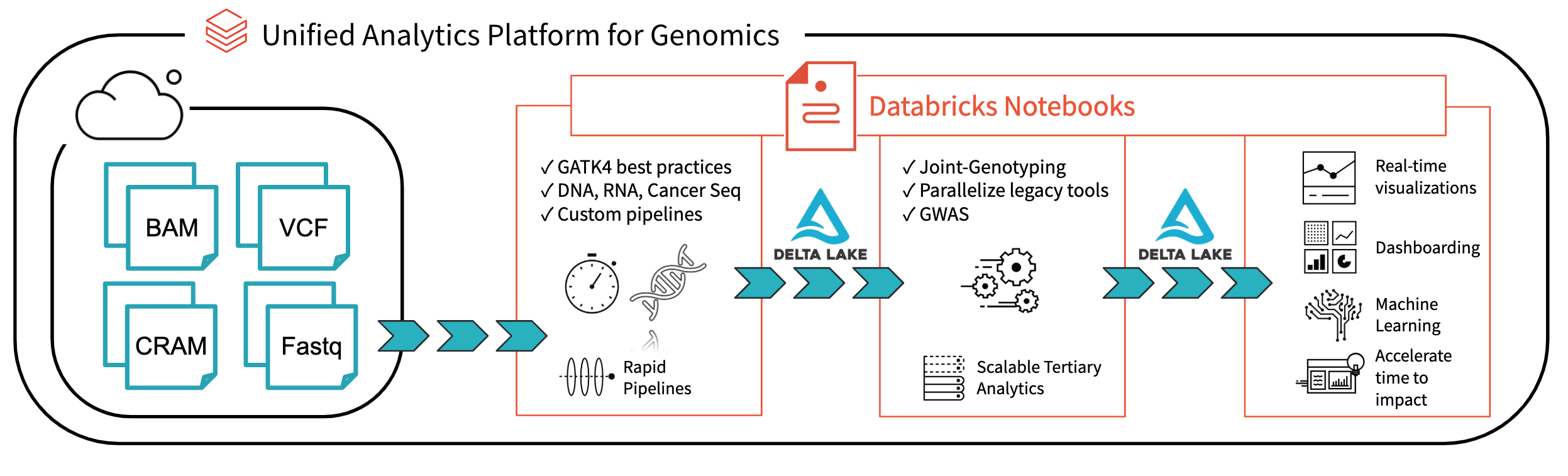
In the past decade, the amount of available genomic data has exploded as the price of genome sequencing has dropped. Researchers are now able to scan for associations between genetic variation and diseases across cohorts of hundreds of thousands of individuals from projects such as the UK Biobank. These analyses will lead to a deeper understanding of the root causes of disease that will lead to treatments for some of today’s most important health problems. However, the tools to analyze these data sets have not kept pace with the growth in data.
Many users are accustomed to using command line tools like plink or single-node Python and R scripts to work with genomic data. However, single node tools will not suffice at terabyte scale and beyond. The Hail project from the Broad Institute builds on top of Spark to distribute computation to multiple nodes, but it requires users to learn a new API in addition to Spark and encourages that data to be stored in a Hail-specific file format. Since genomic data holds value not in isolation but as one input to analyses that combine disparate sources such as medical records, insurance claims, and medical images, a separate system can cause serious complications.
We believe that Spark SQL, which has become the de facto standard for working with massive datasets of all different flavors, represents the most direct path to simple, scalable genomic workflows. Spark SQL is used for extracting, transforming, and loading (ETL) big data in a distributed fashion. ETL is 90% of the effort involved in bioinformatics, from extracting mutations, annotating them with external data sources, to preparing them for downstream statistical and machine learning analysis. Spark SQL contains high-level APIs in languages such as Python or R that are simple to learn and result in code that is easier to read and maintain than more traditional bioinformatics approaches. In this post, we will introduce the readers and writers that provide a robust, flexible connection between genomic data and Spark SQL.
Reading data
Our readers are implemented as Spark SQL data sources, so VCF and BGEN can be read into a Spark DataFrame as simply as any other file type. In Python, reading a directory of VCF files looks like this:
spark.read\
  .format("com.databricks.vcf")\
  .option("includeSampleIds", True)\
  .option("flattenInfoFields", True)\
  .load("/databricks-datasets/genomics/1kg-vcfs")
The data types defined in the VCF header are translated to a schema for the output DataFrame. The VCF files in this example contain a number of annotations that become queryable fields:
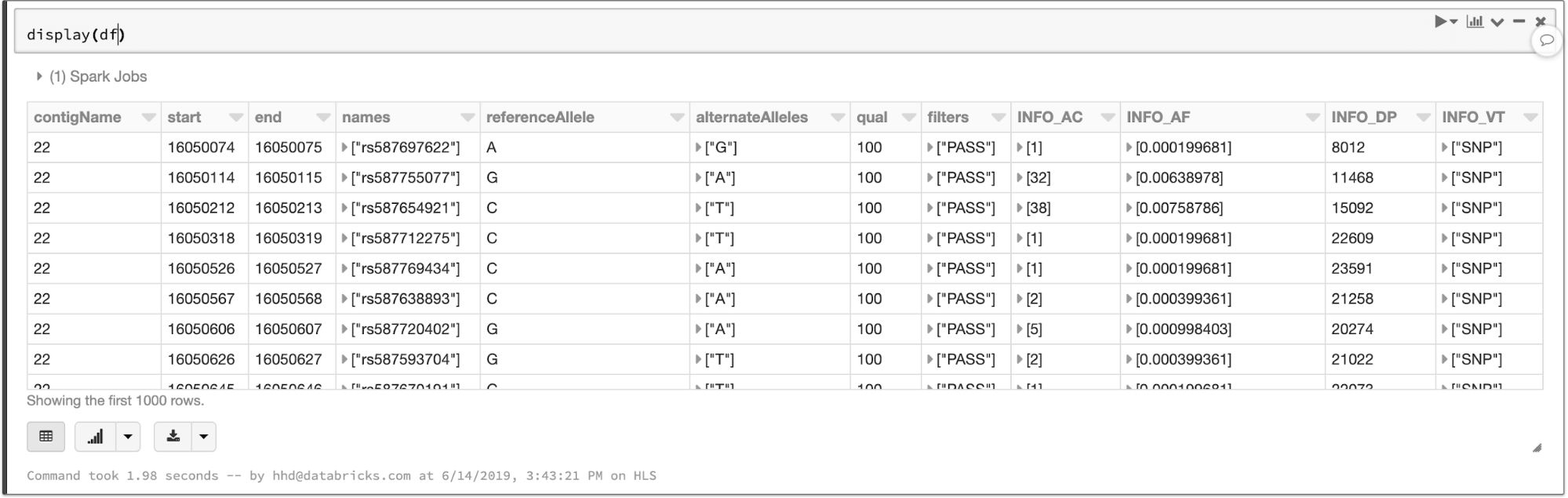
The contents of a VCF file in a Spark SQL DataFrame
Fields that apply to each sample in a cohort—like the called genotype—are stored in an array, which enables fast aggregation for all samples at each site.
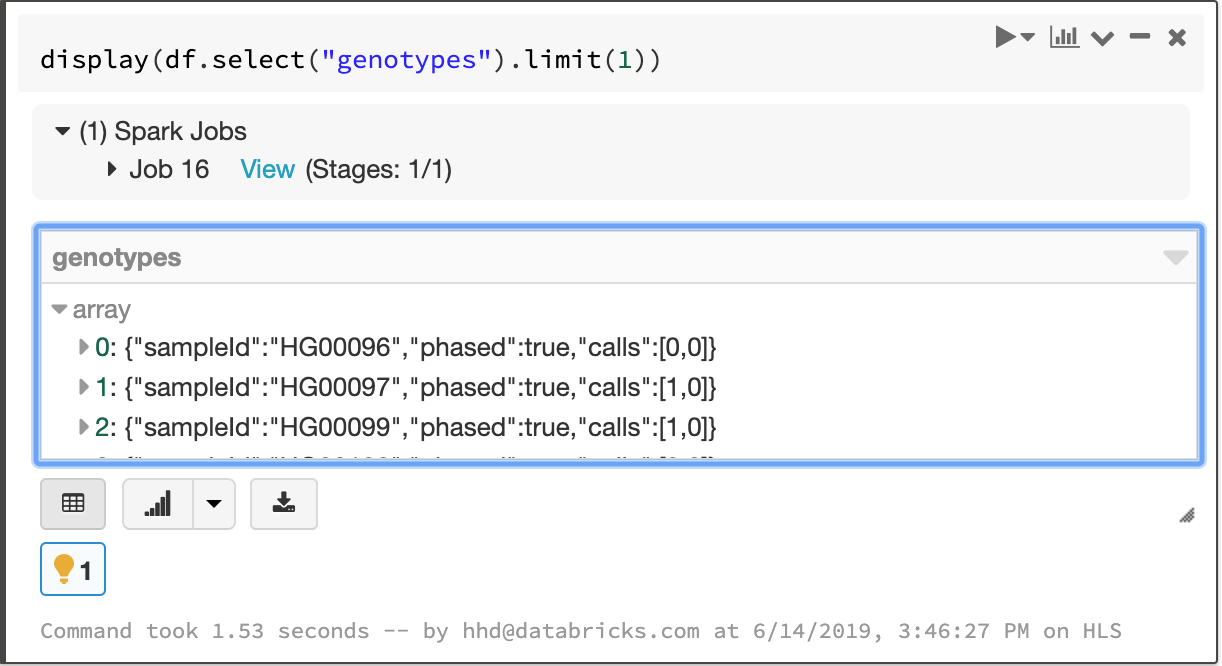
The array of per-sample genotype fields
As those who work with VCF files know all too well, the VCF specification leaves room for ambiguity in data formatting that can cause tools to fail in unexpected ways. We aimed to create a robust solution that was by default accepting of malformed records and then allow our users to choose filtering criteria. For instance, one of our customers used our reader to ingest problematic files where some probability values were stored as “nan” instead of “NaN”, which most Java-based tools require. Handling these simple issues automatically allows our users to focus on understanding what their data mean, not whether they are properly formatted. To verify the robustness of our reader, we have tested it against VCF files generated by common tools such as GATK and Edico Genomics as well as files from data sharing initiatives.
BGEN files such as those distributed by the UK Biobank initiative can be handled similarly. The code to read a BGEN file looks nearly identical to our VCF example:
spark.read.format("com.databricks.bgen").load(bgen_path)
These file readers produce compatible schemas that allow users to write pipelines that work for different sources of variation data and enable merging of different genomic datasets. For instance, the VCF reader can take a directory of files with differing INFO fields and return a single DataFrame that contains the common fields. The following commands read in data from BGEN and VCF files and merge them to create a single dataset:
vcf_df = spark.read.format(“com.databricks.vcf”).load(vcf_path)
bgen_df = spark.read.format(“com.databricks.bgen”)\
   .schema(vcf_df.schema).load(bgen_path)
big_df = vcf_df.union(bgen_df) # All my genotypes!!
Since our file readers return vanilla Spark SQL DataFrames, you can ingest variant data using any of the programming languages supported by Spark, like Python, R, Scala, Java, or pure SQL. Specialized frontend APIs such as Koalas, which implements the pandas dataframe API on Apache Spark, and sparklyr work seamlessly as well.
Manipulating genomic data
Since each variant-level annotation (the INFO fields in a VCF) corresponds to a DataFrame column, queries can easily access these values. For example, we can count the number of biallelic variants with minor allele frequency less than 0.05:

Spark 2.4 introduced higher-order functions that simplify queries over array data. We can take advantage of this feature to manipulate the array of genotypes. To filter the genotypes array so that it only contains samples with at least one variant allele, we can write a query like this:

Manipulating the genotypes array with higher order functions
If you have tabix indexes for your VCF files, our data source will push filters on genomic locus to the index and minimize I/O costs. Even as datasets grow beyond the size that a single machine can support, simple queries still complete at interactive speeds.
As we mentioned when we discussed ingesting variation data, any language that Spark supports can be used to write queries. The above statements can be combined into a single SQL query:
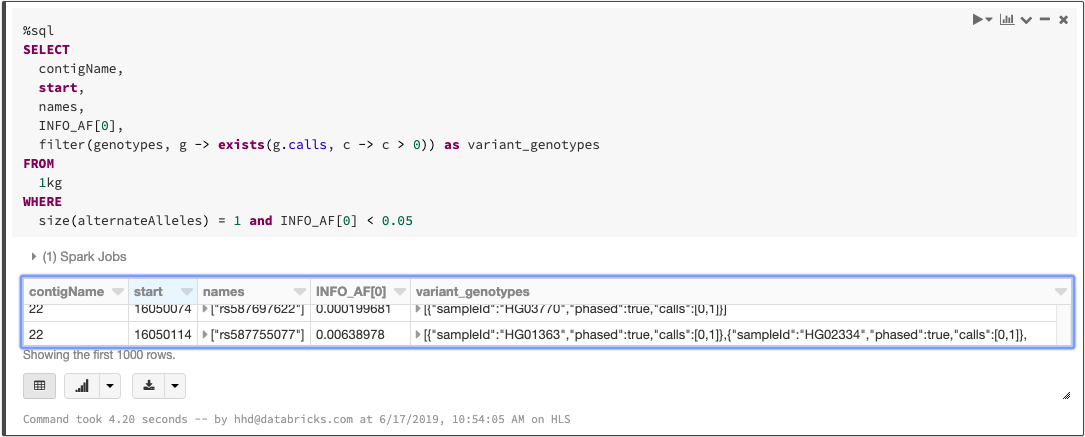
Querying a VCF file with SQL
Exporting data
We believe that in the near future, organizations will store and manage their genomic data just as they do with other data types, using technologies like Delta Lake. However, we understand that it’s important to have backward compatibility with familiar file formats for sharing with collaborators or working with legacy tools.
We can build on our filtering example to create a block gzipped VCF file that contains all variants with allele frequency less than 5%:
df.where(fx.expr("INFO_AF[0] < 0.05"))\
    .orderBy(“contigName”, “start”)\
    .write.format(“com.databricks.bigvcf”)\
    .save(“output.vcf.bgz”)
This command sorts, serializes, and uploads each segment of the output VCF in parallel, so you can safely output cohort-scale VCFs. It’s also possible to export one VCF per chromosome or on even smaller granularities.
Saving the same data to a BGEN file requires only one small modification to the code:
df.where(fx.expr("INFO_AF[0] < 0.05"))\
    .orderBy(“contigName”, “start”)\
    .write.format(“com.databricks.bigbgen”)\
    .save(“output.bgen”)
What’s next
Ingesting data into Spark is the first step of most big data pipelines, but it’s hardly the end of the journey. In the next few weeks, we’ll have more blog posts that demonstrate how features built on top of these readers and writers can scale and simplify genomic workloads. Stay tuned!
Try it!
Our Spark SQL readers make it easy to ingest large variation datasets with a small amount of code (Azure | AWS). Learn more about our genomics solutions in the Databricks Unified Analytics for Genomics and try out a preview today.
--
Try Databricks for free. Get started today.
The post Scaling Genomic Workflows with Spark SQL BGEN and VCF Readers appeared first on Databricks.