Saturday, 31 March 2018
Geek Trivia: Long Before Modern In-Car GPS Systems, Motorists Used Automated Directions Provided By?

Don’t Trade in Your Phone, Sell It for More Money
Introducing Click: The Command Line Interactive Controller for Kubernetes
Click is an open-source tool that lets you quickly and easily run commands against Kubernetes resources, without copy/pasting all the time, and that easily integrates into your existing command line workflows.
At Databricks we use Kubernetes, a lot. We deploy our services (of which there are many) in unique namespaces, across multiple clouds, in multiple regions. Each of those (service, namespace, cloud, region) needs to be specified to target a particular Kubernetes cluster and object. That means that crafting the correct kubectl command line can become a feat in and of itself. A slow, error prone feat.
Because it is difficult to target the right Kubernetes resource with kubectl, it hampers our ability to deploy, debug, and fix problems. This is enough of a pain point that almost all our engineers who regularly interact with Kubernetes have hacked up some form of shell alias to inject parameters into their kubectl commands to alleviate parts of this.
`
After many tedious revisions of our developers’ personal aliases, we felt like there had to be a better way. Out of this requirement, Click was born.
Motivation
Click remembers the current Kubernetes “thing” (a “resource” in Kubernetes terms), making it easier for the operator to interact with that resource. This was motivated by a common pattern we noticed using, something like:
kubectl get pods- copy the name of the pod
kubectl logs [pasted pod]- ohh right forgot the container
kubectl logs -c [container] [pasted pod]- Then we want the events from the pod too, and so we have to paste again
- Rinse, repeat
Note that these different actions are often applied to the same object (be it a pod, service, deployment, etc). We often want to inspect the logs, then check what version is deployed, or view associated events. This idea of a “current object”, inspired us to start writing Click.
Another major motivation was the recognition that the command line was already excellent tool for most of what we were trying to do. Something like “count how many log lines mention a particular alert” is elegantly expressible via a kubectl -> grep -> wc pipeline. We felt that encouraging developers to move to something like the Kubernetes dashboard (or some other gui tool) would be a major downgrade in our ability to quickly drill down on the plethora of information available through kubectl (or really, through the Kubernetes API).
A caveat: Click isn’t intended to be used in a scripting context. kubectl is already excellent in that space, and we saw little value in trying to replace any of its functionality there. Click therefore doesn’t have a “run one command and exit” mode, but rather always functions as a REPL.
Overview of Click
Note first that Click is organized like a REPL. When you run it, you’re dropped into the “Click shell” where you start running Click commands. So, enough prelude, what does click actually look like? Below is a short clip showing Click in action.

Click commands
Firstly, Click has comprehensive help built right in. You can just type help for a list and brief description of all the commands you can run. From within a Click shell, you can run any specific command with -h to get a full description of its usage. From experience, once the “REPL” model of interaction is understood, most users discover how to do what they want without too much trouble.
Click commands can be divided into four categories, so each command does one of the following:
- Set the current context or namespace (the combination of which I’ll call a “scope”)
- Search the current scope for a resource
- Select a resource returned from the search
- Operate on the selected resource
The ctx command sets the current context, and the ns command the current namespace. Click remembers these settings and reflects them in your prompt.
To search for a resource, there are commands like pods or nodes. These return a list of all the resources that match in the currently set scope. Selecting an object is done by simply specifying its number in the returned list. Again, Click will reflect this selection in its prompt.
Once a resource is selected, we can run more active commands against that resource. For instance, the logs command will fetch logs from the selected pod, or the describe command will return an output similar to kubectl describe.
Click can pass any output to the shell via standard shell operators like |, >, or >>. This enables the above log line counting command to be issued as: logs -c container | grep alertName | wc -c, much as one would in your favorite shell.
Quick Iteration
The above model allows for quick iteration on a particular Kubernetes resource. You can quickly find the resource you care about, and then issue multiple commands against it. For instance, from the current scope, you could select a pod, get its description, see any recent events related to the pod, pull the logs from the foo container to a file, and then delete the pod as follows:
pods// search for pods in the current context and namespace2// select the second pod returned (assuming it’s the one you want)describe// this will output a description of the podevents// see recent eventslogs -c foo > /tmp/podfoo.log// save logs to specified filedelete // delete the pod(this is ask for confirmation)
Screencast
In the spirit of pictures being worth more than words, here is a screencast that shows off a few (but by no means all) of clicks features.
Getting Click
Click is open source! You can get the code here: https://github.com/databricks/click
You can install click via Rust’s package manager tool cargo by running cargo install click. To get cargo if you don’t have it, check out (rustup)
Technical Details
This sections covers some of the details regarding Click’s implementation. You can safely skip it if you’re mostly just interested in using Click.
Rust
Click is implemented in Rust. This was partly because the author just likes writing code in Rust, but also because Click is designed to stay running for a long time and leaking memory would be unacceptable. I also wanted a fast (read instant) start-up time, so people wouldn’t be tempted to reach for kubectl to “just run one quick command”. Finally, I wanted Click to crash as little as possible. To that end, Rust is a pretty good choice.
The allure of unwrap
There’s been an effort made to remove as many references to unwrap from the Click codebase as possible (or to notate why it’s okay when we do use it). This is because unwrap can cause your Rust program to panic and exit in a rather user-unfriendly manner.
Rust without unwrap leads to code that has to explicitly handle most error cases, and in turn leads to a system that doesn’t die unexpectedly and that generally reports errors in a clean way to the user. Click is not perfect in this regard, but it’s quite good, and will continue to get better.
Communicating with Kubernetes
For most operations Click talks directly to the Kubernetes API server using the api. The port-forward and exec commands currently leverage kubectl, as that functionality has not been replicated in Click. These commands may at some point become self contained, but so far there hasn’t been a strong motivation to do so.
Future
Click is in beta, and as such it’s experimental. Over time, with community contributions and feedback, we will continue to improve it and make it more robust. Additionally, at Databricks we use it on a daily basis, and continually fix any issues. Features we plan to add include:
- The ability to apply commands to sets of resources all at once. This would make it trivial, for instance, to pull the logs for all pods in a particular deployment all at once.
- Auto-complete for lots more commands
- Support for all types of Kubernetes resources, including Custom resources
- Support for patching and applying to modify your deployed resources
- The ability to specify what colors click uses, or to turn of color completely.
- Upgrading to the latest version of Hyper (or possibly switching to Reqwest).
Conclusion
We are excited to release this tool to Kubernetes community and hope many of you find it useful. Please file issues at https://github.com/databricks/click/issues and make a PR request for your future feature. We are eager to see Click grow and improve based on community feedback.
--
Try Databricks for free. Get started today.
The post Introducing Click: The Command Line Interactive Controller for Kubernetes appeared first on Databricks.
Backups vs. Redundancy: What’s the Difference?
Friday, 30 March 2018
Blindfold Hides All Retweets, Makes Twitter Seem Less Angry
Geek Trivia: Prior To 1968, Telephones Didn’t Have?
macOS Now Officially Supports External GPUs
Your MyFitnessPal Account Was Almost Certainly Hacked, Change Your Password Now
How To Indent Paragraphs In Google Docs
WinX DVD Ripper V8.8.0 Raises the Bar on DVD Ripping Speed | Chance to Get Full License [Sponsored]
The Best Hearing Protection for Kids

It’s never too early to start protecting your kids hearing (and instill in them the good habit of wearing ear p…
Click Here to Continue Reading
Stupid Geek Tricks: How to Fake a Web Page Screenshot (without Photoshop)
What’s the Best Online Backup Service?
Timestamps Shares Twitter Videos Starting at a Certain Time
Up Next Shows Your Calendar Appointments in the macOS Menu Bar
How to Remotely Access Your Synology NAS Using QuickConnect
Thursday, 29 March 2018
6 Great Apps to Build New Habits

To develop a new habit (and have it stick) you need to persist with it day after day.
Click Here to Continue Reading
Geek Trivia: The Legal Concept Of “Ad Coelum” Gave People Ownership Of?
How to Disable Notifications on Your iPhone or iPad

How Tech Companies Use ‘Dark Patterns’ To Trick You
TV Ad Spending Is Down Because of Cord Cutting
How to Pair a Bluetooth Speaker with Google Home
HAVIT Mechanical Keyboard Review: Low Profile, Colorful, and Fun to Type On

If you’re looking for a mechanical keyboard that offers slim keys, a short keystroke, and color customization, all while…
Click Here to Continue Reading
How to Use Apple Music on Your Sonos
What is Firmware or Microcode, and How Can I Update My Hardware?
2007 Article: Will MySpace Ever Lose Its Monopoly?
Find Out If Your Boss Can Download Your Slack DMs
How to Disable Plex News
Wednesday, 28 March 2018
Geek Trivia: Highlighting Missing Children On Milk Cartons Gained Traction After The Abduction Of Two?
PopSocket Review: A Stick-On Phone Grip with Style

PopSockets are a small stick-on phone accessories that are one part stand, one part grip, with a dash of fidget cube mixed in.
Click Here to Continue Reading
Third-Party Nintendo Switch Dock Accidentally Bricks Some Consoles

If you have Nyko’s third-party Switch dock, be wary of the latest 5.0 update to your console.
Click Here to Continue Reading
Simpler Facebook Privacy Settings Are On The Way
Should You Use a PCI, USB, or Network-Based TV Tuner For Your HTPC?
You Can’t Buy the $50 Logitech Crayon Unless You’re a School
How to Disable Notifications on Android
6 Great Apps For Tracking Your Receipts and Expenses On The Go

Expense tracking isn’t particularly fun but with the right tool it can be virtually painless.
Click Here to Continue Reading
How to Record and Edit Slow Motion Videos on Your iPhone
What is the System32 Directory? (and Why You Shouldn’t Delete It)
Facebook’s Settings Include Privacy Buttons That Do Absolutely Nothing
How-To Geek is Looking for New Writers
How to Install and Set Up the Lutron Caseta Plug-In Lamp Dimmer
Tuesday, 27 March 2018
Will Schools Buy $300 iPads Over $200 Chromebooks?
Everything You Need to Know About Apple’s New iPad

Today, at Apple’s “Let’s Take a Field Trip” Education event, the company announced a newer, cheaper iPad…
Click Here to Continue Reading
Geek Trivia: Yale’s Rare Book & Manuscript Library Has “Windows” Made Of?
Facebook Container Isolates Facebook From The Rest of Your Firefox Browsing
How To Upgrade Or Replace Your PC’s Wireless Card
6 Great iOS Apps to Track and Improve Your Sleep

Sleep is an essential part of life, but it’s something that many of us struggle to get the right amount of.
Click Here to Continue Reading
Samsung’s Bixby Sucks. Here’s How to Turn it Off.
How to Use Spotify on Your Sonos Speaker
Sundar Pichai sings China's praises in AI, pledges bigger team
How Hotels.com Migrates Big Datasets to the Cloud
We’re less than two months away from DataWorks Summit Berlin (April 16-19)! We have a number of impressive keynote and breakout speakers lined up. Two of these speakers are Adrian Woodhead, Principal Engineer and Elliot West, Senior Engineer, at Hotels.com within the Data Processing and Warehousing track. Hotels.com is an affiliate of Expedia Inc. and is a website for […]
The post How Hotels.com Migrates Big Datasets to the Cloud appeared first on Hortonworks.
What Should You Do with All Your Smarthome Gear When You Move?
Monday, 26 March 2018
Shepherd Tricks You Into Reading Something Instead Of Scrolling Though Facebook
Geek Trivia: The Bagheera Kiplingi Spider Is Unique Among Spiders Because Of Its?
Using Amazon Locker Is Super Easy, and Can Save You Time and Money

Amazon doesn’t just want to sell you more stuff, it wants to deliver that stuff to you in new and innovative ways to ensure everyone who…
Click Here to Continue Reading
This Card-Based Google Home Jukebox Gives Way Too Much Power To Your Party Guests
Sure, your voice assistant can play just about any music you can ask for, but there’s a tactile pl…
Click Here to Continue Reading
An Intentionally Stupid Cow Clicker Game Collected Facebook Data From 180,000 Users
Vegas Casino routinely tracked patron’s every move by monitoring their phones
What Is Ray Tracing?

How to Take a Selfie Using Siri
Flying drones, just a hobby till now, takes off as a career
7 Best Places to Download Free Music (Legally)
How to Install Custom Themes and Visual Styles in Windows
Sunday, 25 March 2018
Geek Trivia: The First Sitting U.S. President To Receive A Speeding Ticket Was?
If You Used Android, Facebook Probably Has Years of Your Phone Call and Text History
7 Reasons Cord Cutting Might Not Work For You
Saturday, 24 March 2018
Geek Trivia: Which Of These Animals Has Natural Ear Plugs To Protect It From Its Own Loud Vocalizations?
What to Do if Your Facebook Account Gets “Hacked”
Google working on its own blockchain technology
How to Get Rid of Vibration and Noise in Your NAS
Friday, 23 March 2018
Geek Trivia: Which Of These Birds Teaches Their Offspring A Secret Password While They Are Incubating?
You Can Now Try Android Games Without Downloading Them
Voice Assistants Still Feel Like Prototypes

How to Turn Off Annoying Mac Notifications
Best Budget Bluetooth Earbuds for the Gym

There’s a time and place for incredibly high-end headphones, but maybe running in a busy…
Click Here to Continue Reading
How to Open HEIC Files on Windows (or Convert Them to JPEG)
How to Quickly Delete Lots of Old Facebook Posts
Windows on ARM Doesn’t Make Any Sense (Yet)
What Is Alexa’s Brief Mode and How Do I Turn It On (or Off)?
Thursday, 22 March 2018
The Best eBook Reader for Every Budget

Reading is a pleasure for many, whether it’s the latest thriller from your favorite author or an informative piece of non-fiction.
Click Here to Continue Reading
Geek Trivia: Informally Called “Hole-In-One” Insurance, The Formal Name For This Insurance Is?
Azure Databricks, industry-leading analytics platform powered by Apache Spark™
The confluence of cloud, data, and AI is driving unprecedented change. The ability to utilize data and turn it into breakthrough insights is foundational to innovation today. Our goal is to empower organizations to unleash the power of data and reimagine possibilities that will improve our world.
To enable this journey, we are excited to announce the general availability of Azure Databricks, a fast, easy, and collaborative Apache® Spark™-based analytics platform optimized for Azure.
Fast, easy, and collaborative
Over the past five years, Apache Spark has emerged as the open source standard for advanced analytics, machine learning, and AI on Big Data. With a massive community of over 1,000 contributors and rapid adoption by enterprises, we see Spark’s popularity continue to rise.
Azure Databricks is designed in collaboration with Databricks whose founders started the Spark research project at UC Berkeley, which later became Apache Spark. Our goal with Azure Databricks is to help customers accelerate innovation and simplify the process of building Big Data & AI solutions by combining the best of Databricks and Azure.
To meet this goal, we developed Azure Databricks with three design principles.
First, enhance user productivity in developing Big Data applications and analytics pipelines. Azure Databricks’ interactive notebooks enable data science teams to collaborate using popular languages such as R, Python, Scala, and SQL and create powerful machine learning models by working on all their data, not just a sample data set. Native integration with Azure services further simplifies the creation of end-to-end solutions. These capabilities have enabled companies such as renewables.AI to boost the productivity of their data science teams by over 50 percent.
“Instead of one data scientist writing AI code and being the only person who understands it, everybody uses Azure Databricks to share code and develop together.”
– Andy Cross, Director, renewables.AI
Second, enable our customers to scale globally without limits by working on big data with a fully managed, cloud-native service that automatically scales to meet their needs, without high cost or complexity. Azure Databricks not only provides an optimized Spark platform, which is much faster than vanilla Spark, but it also simplifies the process of building batch and streaming data pipelines and deploying machine learning models at scale. This makes the analytics process faster for customers such as E.ON and Lennox International enabling them to accelerate innovation.
“Every day, we analyze nearly a terabyte of wind turbine data to optimize our data models. Before, that took several hours. With Microsoft Azure Databricks, it takes a few minutes. This opens a whole range of possible new applications.”
– Sam Julian, Product Owner, Data Services, E.ON
“At Lennox International, we have 1000’s of devices streaming data back into our IoT environment. With Azure Databricks, we moved from 60% accuracy to 94% accuracy on detecting equipment failures. Using Azure Databricks has opened the flood gates to all kinds of new use cases and innovations. In our previous process, 15 devices, which created 2 million records, took 6 hours to process. With Azure Databricks, we are able to process 25,000 devices – 10 billion records – in under 14 minutes.”
– Sunil Bondalapati, Director of Information Technology, Lennox International
Third, ensure that we provide our customers with the enterprise security and compliance they have come to expect from Azure. Azure Databricks protects customer data with enterprise-grade SLAs, simplified security and identity, and role-based access controls with Azure Active Directory integration. As a result, organizations can safeguard their data without compromising productivity of their users.
Azure is the best place for Big Data & AI
We are excited to add Azure Databricks to the Azure portfolio of data services and have taken great care to integrate it with other Azure services to unlock key customers scenarios.
High-performance connectivity to Azure SQL Data Warehouse, a petabyte scale, and elastic cloud data warehouse allows organizations to build Modern Data Warehouses to load and process any type of data at scale for enterprise reporting and visualization with Power BI. It also enables data science teams working in Azure Databricks notebooks to easily access high-value data from the warehouse to develop models.
Integration with Azure IoT Hub, Azure Event Hubs, and Azure HDInsight Kafka clusters enables enterprises to build scalable streaming solutions for real-time analytics scenarios such as recommendation engines, fraud detection, predictive maintenance, and many others.
Integration with Azure Blob Storage, Azure Data Lake Store, Azure SQL Data Warehouse, and Azure Cosmos DB allows organizations to use Azure Databricks to clean, join, and aggregate data no matter where it sits.
We are committed to making Azure the best place for organizations to unlock the insights hidden in their data to accelerate innovation. With Azure Databricks and its native integration with other services, Azure is the one-stop destination to easily unlock powerful new analytics, machine learning, and AI scenarios.

Get started today!
We are excited for you to try Azure Databricks! Get started today and let us know your feedback.
- Get started with Azure Databricks
- Watch how to get started with Apache Spark on Azure Databricks video
- Read the Technical Overview of Azure Databricks
- Watch AI and Azure Databricks Webinar
- Download the Three practical use cases with Azure Databricks eBook
- Learn how you can use Azure Databricks and Azure SQL Data Warehouse together
The post Azure Databricks, industry-leading analytics platform powered by Apache Spark™ appeared first on Databricks.
YouTube on Apple TV Sucks Now Because Google Is Pushing One Interface on Every Platform
How to Clone Your Raspberry Pi SD Card for Foolproof Backup
iFixit Pro Tech Toolkit Review: The Last Gadget Repair Kit You’ll Ever Need

Getting your first toolkit is a rite of passage when you become an adult.
Click Here to Continue Reading
How to Stop Facebook Giving Your Data to Third Parties
How Bad Are the AMD Ryzen and Epyc CPU Flaws?
Introducing Low-latency Continuous Processing Mode in Structured Streaming in Apache Spark 2.3.0
Structured Streaming in Apache Spark 2.0 decoupled micro-batch processing from its high-level APIs for a couple of reasons. First, it made developer’s experience with the APIs simpler: the APIs did not have to account for micro-batches. Second, it allowed developers to treat a stream as an infinite table to which they could issue queries as they would a static table.
To take advantage of this, we worked to introduce a new millisecond low-latency mode of streaming called continuous mode in Apache Spark 2.3, now available in Databricks Runtime 4.0 as part of Databricks Unified Analytics Platform.
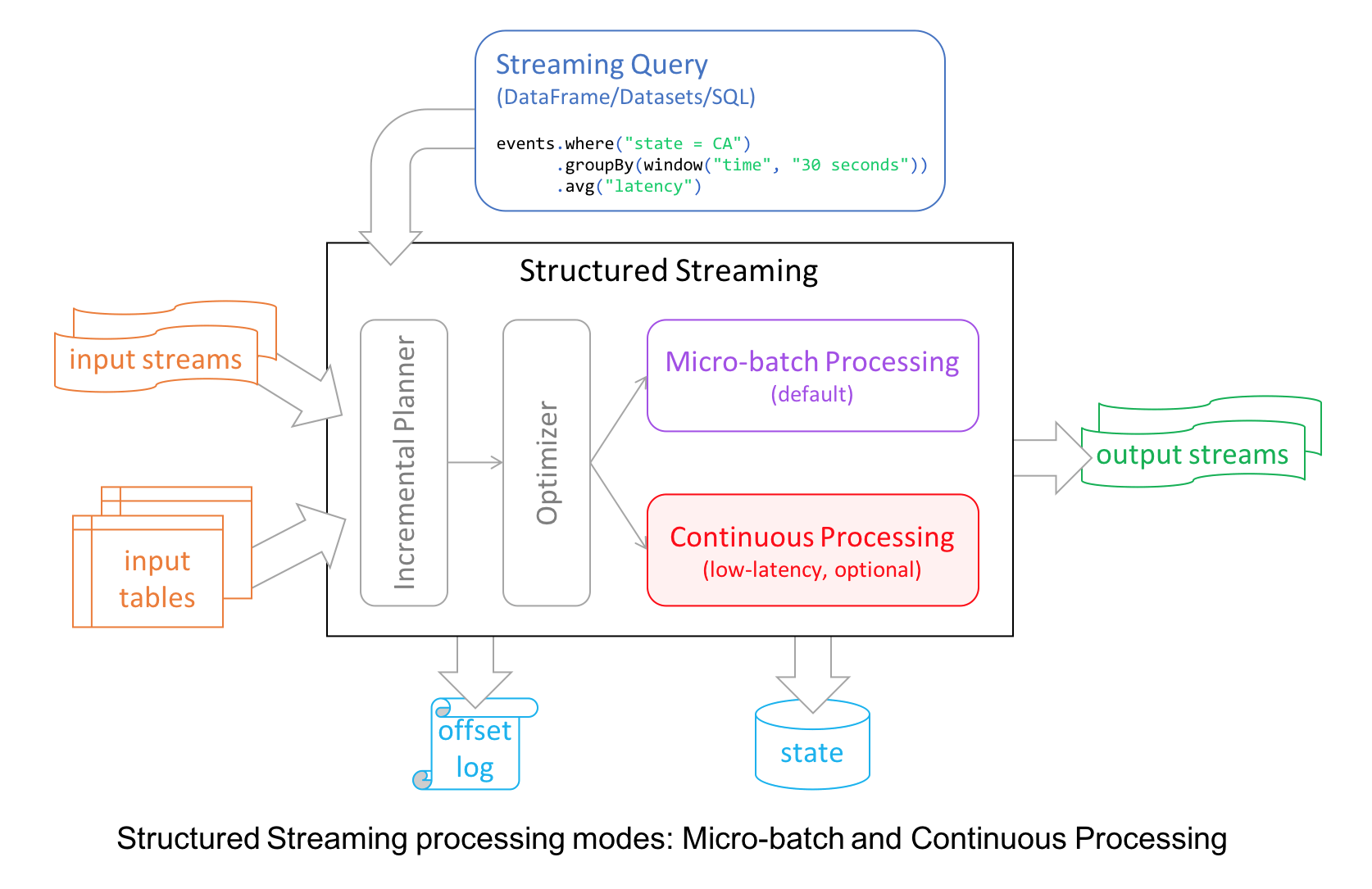
In this blog, we are going to illustrate the use of continuous processing mode, its merits, and how developers can use it to write continuous streaming applications with millisecond low-latency requirements. Let’s start with a motivating scenario.
Low-latency Scenario
Suppose we want to build a real-time pipeline to flag fraudulent credit card transactions. Ideally, we want to identify and deny a fraudulent transaction as soon as the culprit has swiped his/her credit card. However, we don’t want to delay legitimate transactions as that would annoy customers. This leads to a strict upper bound on the end-to-end processing latency of our pipeline. Given that there are other delays in transit, the pipeline must process each transaction within 10-20 ms.
Let’s try to build this pipeline in Structured Streaming. Assume that we have a user-defined function “isPaymentFlagged” that can identify the fraudulent transactions. To minimize the latency, we’ll use a 0 second processing time trigger indicating that Spark should start each micro batch as fast as it can with no delays. At a high level, the query looks like this.
payments \
  .filter("isPaymentFlagged(paymentId)") \
  .writeStream \
   {...}
  .trigger(processingTime = "0 seconds") \
  .start()
You can see the complete code by downloading and importing this example notebook to your Databricks workspace (use a Databricks Community Edition). Let’s see what end-to-end latency we get.
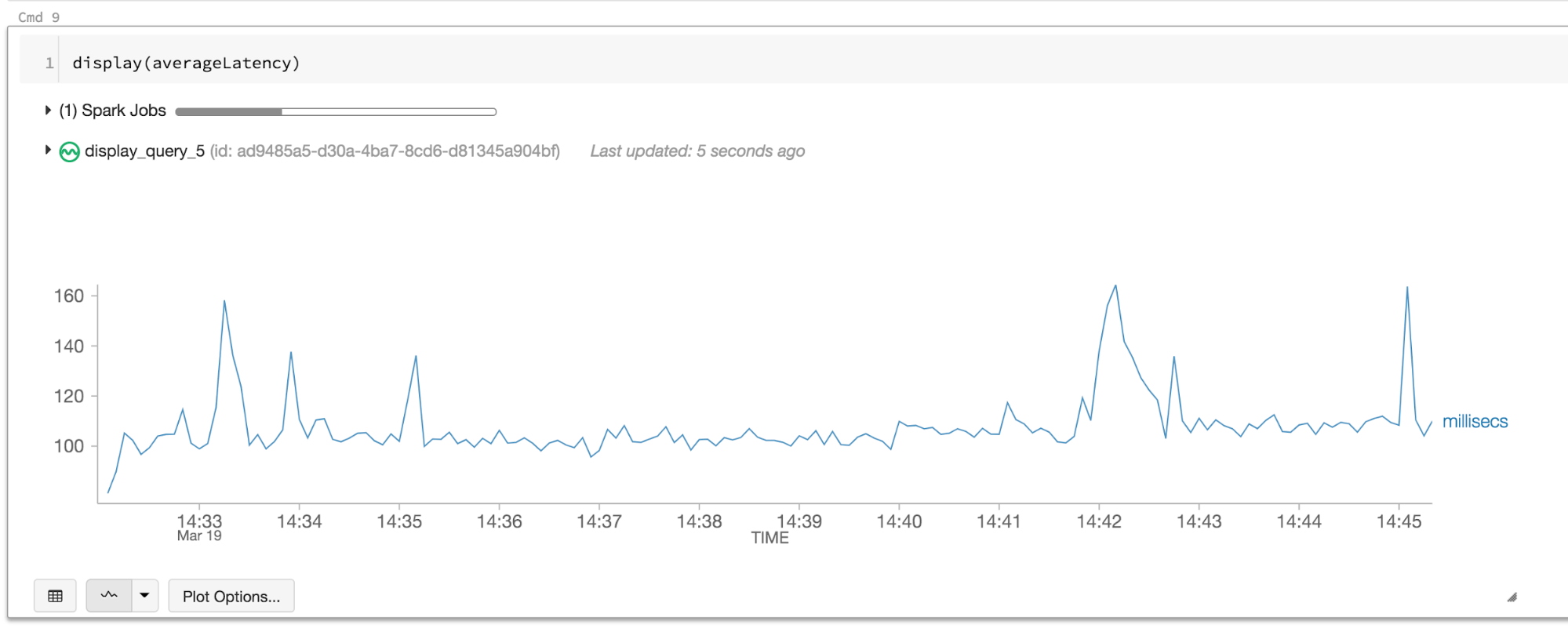
The records are taking more than 100 ms to flow through Spark! While this is fine for many streaming pipelines, this is insufficient for this use case. Can our new Continuous Processing mode help us out?
payments \
  .filter("isPaymentFlagged(paymentId)") \
  .writeStream \
   {...}
  .trigger(continuous = "5 seconds") \
  .start
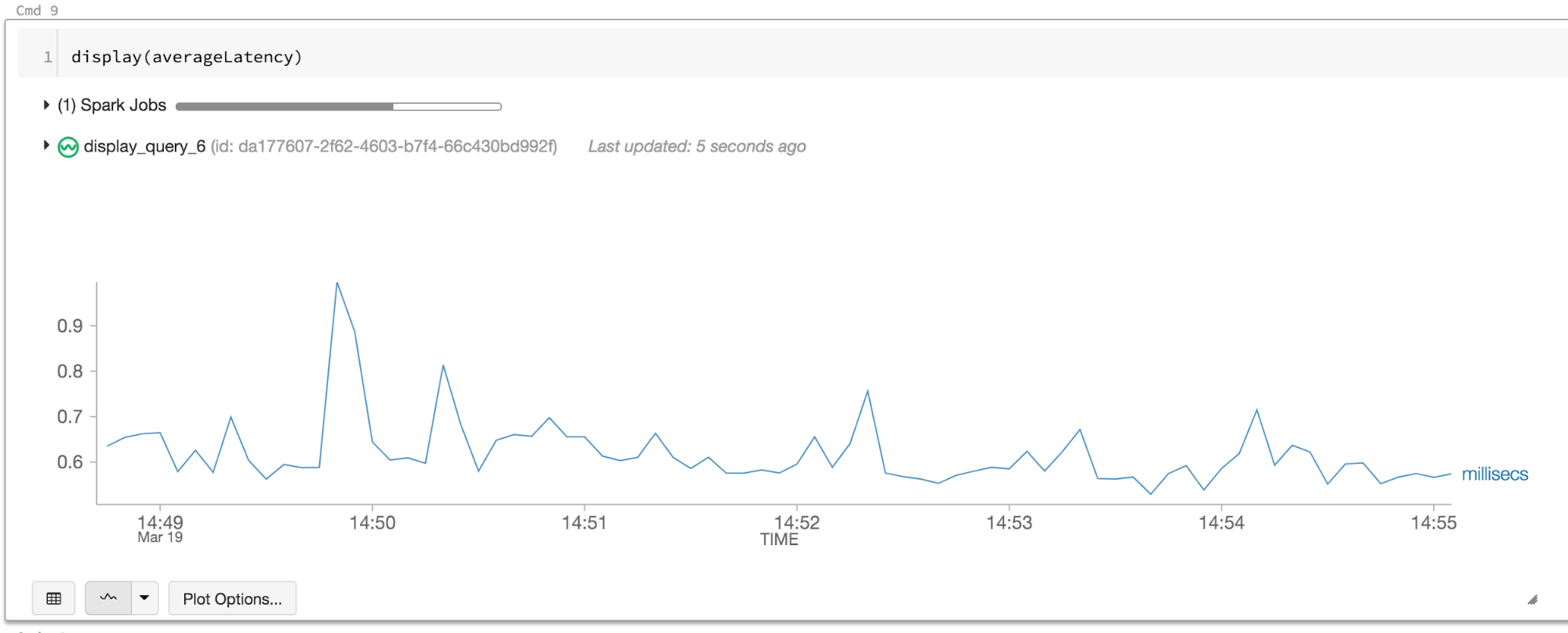
Now we are getting less 1 ms latency — more than two orders of magnitude improvement and well below our target latency! To understand why this latency was so high with micro-batch processing, and how continuous processing helped, we’ll have to dig into the details of the Structured Streaming engine.
Micro-Batch Processing
Structured Streaming by default uses a micro-batch execution model. This means that the Spark streaming engine periodically checks the streaming source, and runs a batch query on new data that has arrived since the last batch ended. At a high-level, it looks like this.
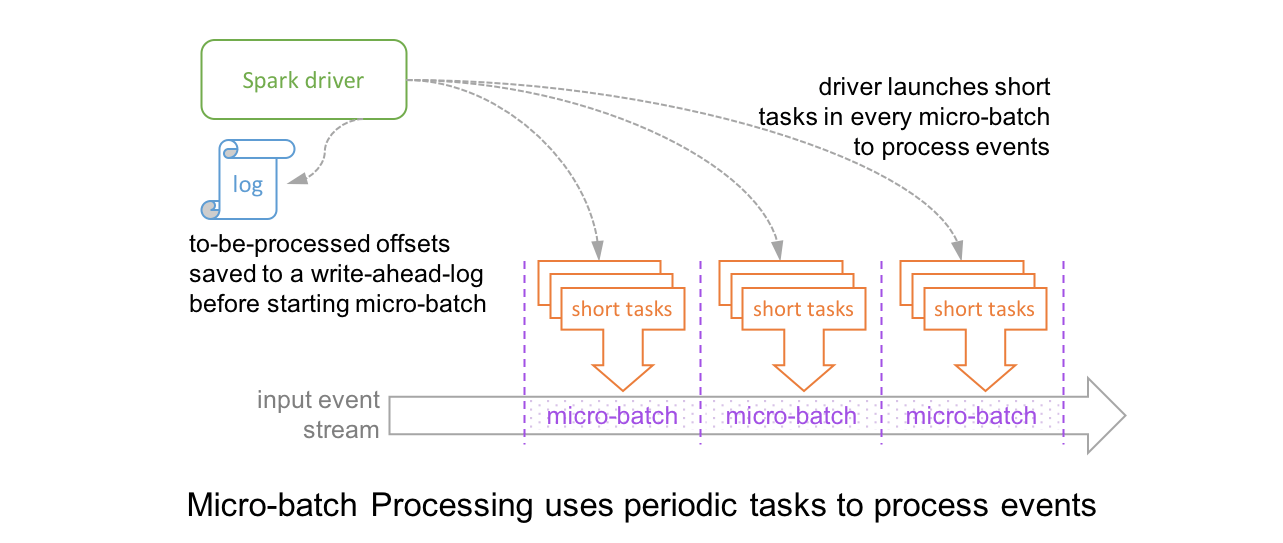
In this architecture, the driver checkpoints the progress by saving the records offsets to a write-ahead-log, which may be then used to restart the query. Note that the range offsets to be processed in the next micro-batch is saved to the log before the micro-batch has started in order to get deterministic re-executions and end-to-end semantics. As a result, a record that is available at the source may have to wait for the current micro-batch to be completed before its offset is logged and the next micro-batch processes it. At the record level, the timeline looks like this.
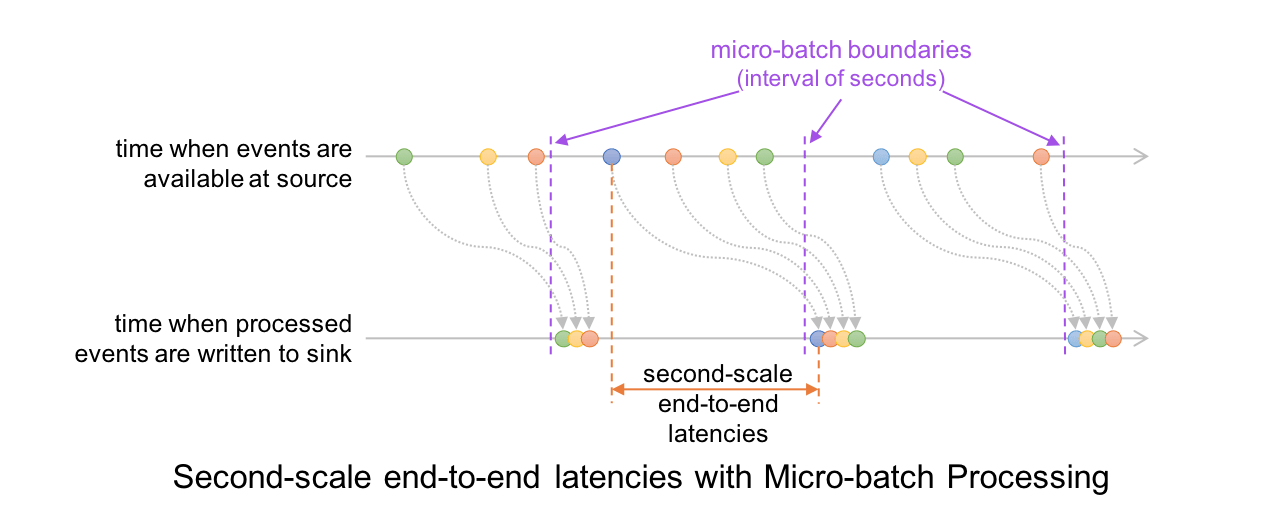
This results in latencies of 100s of milliseconds at best, between the time an event is available at the source and when the output is written to the sink.
We originally built Structured Streaming with this micro-batch engine to easily leverage existing batch processing engine in Spark SQL which had already been optimized for performance (see our past blogs on code generation and Project Tungsten). This allowed us to achieve high throughput with latencies as low as 100 ms. Over the past few years, while working with thousands of developers and hundreds of different use cases, we have found that second-scale latencies are sufficient for most practical streaming workloads such as ETL and real-time monitoring. However, some workloads (e.g., the aforementioned fraud detection use case) do benefit from even lower latencies and that motivated us to build the Continuous Processing mode. Let us understand how this works.
Continuous Processing
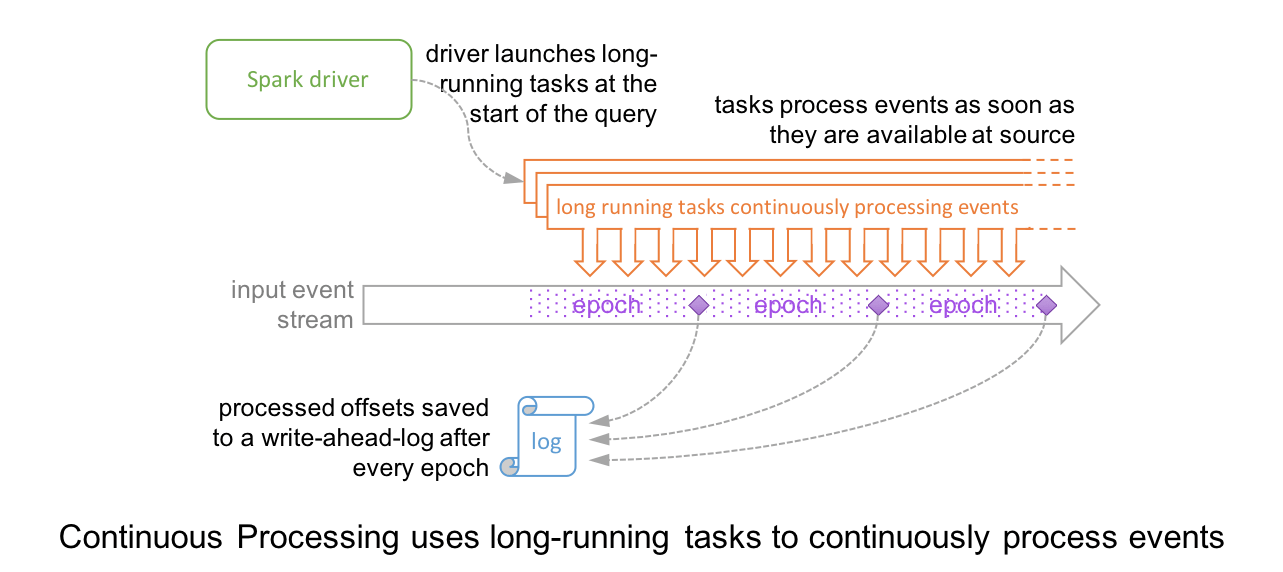
In Continuous Processing mode, instead of launching periodic tasks, Spark launches a set of long-running tasks that continuously read, process and write data. At a high level, the setup and the record-level timeline looks like these (contrast them with the above diagrams of micro-batch execution).
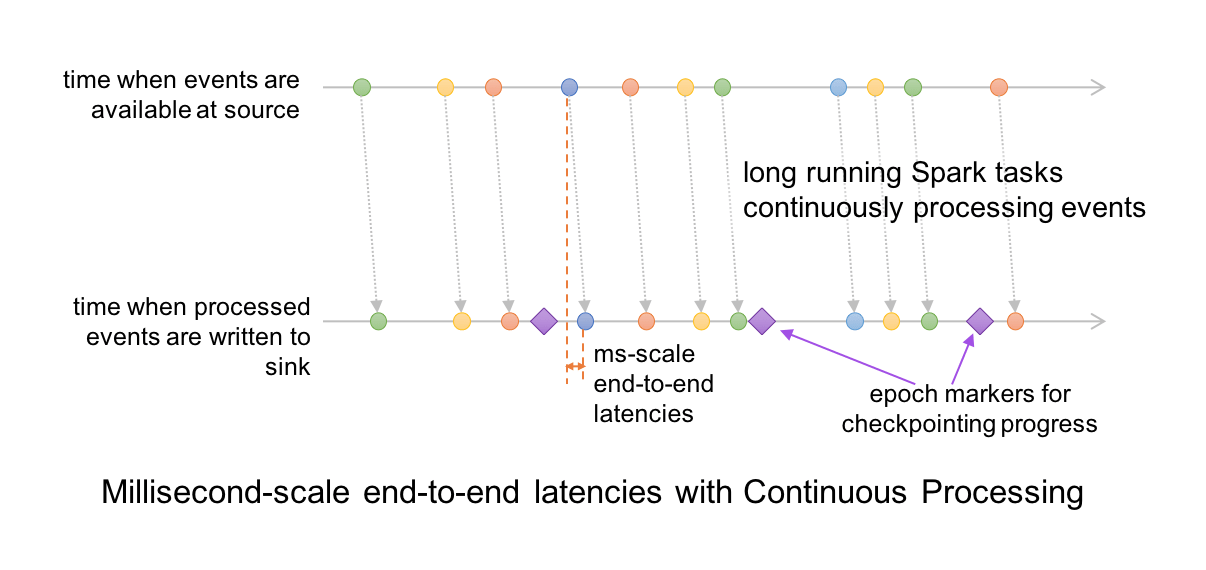
Since events are processed and written to sink as soon as they are available in the source, the end-to-end latency is a few milliseconds.
Furthermore, the query progress is checkpointed by an adaptation of the well-known Chandy-Lamport algorithm. Special marker records are injected into the input data stream of every task; we call them “epoch markers” and the gap between them as “epochs.” When a marker is encountered by a task, the task asynchronously reports the last offset processed to the driver. Once the driver receives the offsets from all the tasks writing to the sink, it writes them to the aforementioned write-ahead-log. Since the checkpointing is completely asynchronous, the tasks can continue uninterrupted and provide consistent millisecond-level latencies.
Experimental Release in Apache Spark 2.3.0
In the Apache Spark 2.3.0, the Continuous Processing mode is an experimental feature and a subset of the Structured Streaming sources and DataFrame/Dataset/SQL operations are supported in this mode. Specifically, you can set the optional Continuous Trigger in queries that satisfy the following conditions:
- Read from supported sources like Kafka and write to supported sinks like Kafka, memory, console (memory and console are good for debugging).
- Has only map-like operations (i.e., selections and projections like select, where, map, flatMap, filter,)
- Has any SQL function other than aggregate functions, and current-time-based functions like
current_timestamp()andcurrent_date().
For more information, refer to the following:
- Structured Streaming programming guide for more details on the current implementation and restrictions.
- Spark Summit Keynote Demo showcasing model predictions at millisecond latencies.
Closing Thoughts
With the release of Apache Spark 2.3, developers have a choice of using either streaming mode—continuous or micro-batching—depending on their latency requirements. While the default Structure Streaming mode (micro-batching) does offer acceptable latencies for most real-time streaming applications, for your millisecond-scale latency requirements, you can now elect for the continuous mode.
Import this Continuous Processing mode notebook in Databricks see it for yourself.
--
Try Databricks for free. Get started today.
The post Introducing Low-latency Continuous Processing Mode in Structured Streaming in Apache Spark 2.3.0 appeared first on Databricks.
How to Buy and Sell Stocks on Your Smartphone
Wednesday, 21 March 2018
The Best iPhone and Apple Watch Combination Charging Stands

Just because you’re deep into the Apple ecosystem with an iPhone, Apple Watch, and–maybe–even some AirPods, that doesn’…
Click Here to Continue Reading
Geek Trivia: The Average Color Of The Universe Is Referred To As?
Facebook Messenger Now Has Admin Tools to Manage Your Unwieldy Group Chats

Facebook Messenger is a convenient way to message a group of people, but it can be difficult to manage large groups.
Click Here to Continue Reading
Consolidate Movie Collections in Kodi with Movie Sets
Current Challenges in Healthcare
Guest blog written by Bendi Sowjanya, a microbiologist and technologist at B3DS Health issues affect all populations globally but the treatment and prevention of these issues varies widely depending on geographic location. The effectiveness of health care is limited due to different socio-economic and environmental conditions as well as the ability to provide education for […]
The post Current Challenges in Healthcare appeared first on Hortonworks.
How 802.11mc Wi-Fi Will Be Used to Track Your Location Indoors
SmartCat Ultimate Scratching Post Review: It’s The Best Scratching Post You’ll Ever Buy

If you’re a cat owner in search of a scratching post that’s inexpensive, stable, tall, and so durable it lasts for years, then we
Ever Wonder How Much Facebook Knows About You? Here’s How to See
What Is an API?
Dear Companies: Stop Putting Voice Control In Everything
Tuesday, 20 March 2018
Geek Trivia: The First Toy Advertised On Television Was?
Evolving Mission of Jenkins
Lately, perhaps subtle but exciting changes are starting to happen in the Jenkins project.
The past few weeks have seen the birth of two new initiatives in Jenkins: Jenkins Essentials and Jenkins X. Each is exciting in its own right, and I encourage interested parties to take a look at their goals and missions and participate in them. But in this post, I want to discuss why together these two dots form an important arc, which actually started in the introduction of Jenkins 2 and continued with Blue Ocean.
In Jenkins 2, we changed Jenkins so that it starts with richer functionality and more sensible security setup, among other things. This was the first step in a new direction for Jenkins. We changed our focus from “we’ll write plugins and you figure out the rest” to “we’ll write plugins, we’ll assemble them, and we’ll help you be more productive.”
Blue Ocean was another step on this journey. We focused on important continuous delivery use cases in Jenkins, and aimed to provide a great user-experience for those use cases. Aside from obvious productivity boost for users, it also decidedly blended together feature areas that are internally provided by a whole bunch of different plugins, but users see much less seam between them.
Jenkins Essentials, which R Tyler Croy proposed in recent weeks, is another step forward. That project aims to take an even bigger responsibility in keeping people’s Jenkins instances up and running. Like Blue Ocean, Jenkins Essentials focuses on delivering a comprehensive Jenkins user experience rather than a collection unrelated of plugins which users have to figure out how to wire together. It also creates an exciting vehicle for contributors, in which we can develop and deliver features quite differently, and more rapidly, than how we deliver them today.
Jenkins X, which was proposed by James Strachan a few weeks after Jenkins Essentials, is the latest point on this same arc. Jenkins X brings a different aspect to building a solution — it focuses on a specific vertical area, namely Kubernetes application development, and drastically simplifies the software development in that domain by bringing together Jenkins, a whole bunch of plugins, and an opinionated best practice of how one should use Kubernetes.
Collectively, the arc that these efforts form aims to solve the most important and consistent concerns for Jenkins users — ease of use, plugin complexity, fear of upgrade, etc.
In the early days of Jenkins, it was up to each and every Jenkins admin to find the right way to assemble pieces into a solution for their organizations, but this hard work remained largely private. Now, these newer projects are bringing this back into the community. They are making Jenkins more valuable to existing users, and more approachable and useful to a whole new set of users who are not currently using Jenkins.
From that perspective, I hope more projects like them will follow, pushing us beyond “just writing plugins”, taking even bigger steps to make users productive. This is a little bit like how I watched Eclipse evolve from just a Java IDE to an umbrella of projects.
Exciting times!
FlexiSpot Standing Desk Review: Sit, Stand, or Even Cycle

We’ve put a FlexiSpot standing desk through an extended test and we’re happy to report that if you’re in the market for a rea…
Click Here to Continue Reading
The Internet Archive Just Uploaded a Bunch of Playable, Classic Handheld Games

Before the Switch, before the PS Vita, and yet some time after the advent of the Game Boy, stores carried a slew of handheld games–not c…
Click Here to Continue Reading
How To Upgrade and Install a New Hard Drive or SSD in Your PC
How to Transfer Photos from Android to Your Windows PC

Can You See Who Viewed Your Twitter Profile?
Windows Spectre Patches Are Here, But You Might Want to Wait
How Is The HTC Vive Pro Better Than The Original Vive?
Monday, 19 March 2018
Introducing Jenkins X: a CI/CD solution for modern cloud applications on Kubernetes
We are excited to share and invite the community to join us on a project we’ve been thinking about over the last few months called Jenkins X which extends the Jenkins ecosystem to solve the problem of automating CI/CD in the cloud.
Background
The last few years have seen massive changes in the software industry:
-
use of immutable container images for distributing software which are smaller, easier to work with and lead to cheaper infrastructure costs than VMs alone (approx 20% less on average)
-
Kubernetes has become the defacto way of installing, upgrading, operating and managing containers at scale on any public or hybrid cloud
-
2018 is the year all the major public clouds, operating system vendors and PaaS offerings support Kubernetes natively
-
we now have an open source industry standard for distributing, installing and managing applications on any cloud!
-
-
increased adoption of microservices and cloud native applications leading to massive increase in the number of components which require CI/CD along with increased release frequency
-
improvements in DevOps practices coming from the community such as the State of DevOps Report which show the approach of high performing teams
-
increasingly many businesses now realise that to compete you have to deliver value quickly via software
-
teams need to become high performing if the business is to succeed
-
All of this adds up to an increased demand for teams to have a solution for cloud native CI/CD with lots of automation!
Introducing Jenkins X
Jenkins X is a project which rethinks how developers should interact with CI/CD in the cloud with a focus on making development teams productive through automation, tooling and DevOps best practices.
Jenkins X is open source and we invite you to give us feedback and to contribute to the project.

Whats the big deal?
For many years Jenkins has been capable of doing pretty much anything in the CI/CD space; the challenge has always been figuring out how to get the right plugins, configuration and code to work together in your Jenkinsfile.
For me the big deal about Jenkins X is as a developer you can type one command jx create or jx import and get your source code, git repository and application created, automatically built and deployed to Kubernetes on each Pull Request or git push with full CI/CD complete with Environments and Promotion via GitOps!
Developers and teams don’t have to spend time figuring out how to package software as docker images, create the Kubernetes YAML to run their application on kubernetes, create Preview environments or even learn how to implement CI/CD pipelines with declarative pipeline-as-code Jenkinsfiles. It’s all automated for you out of the box! So you can focus instead on delivering value!
At the same time, Jenkins X doesn’t hide anything. If you do want to hack the Dockerfile, Jenkinsfile or Helm charts for your apps or their environments then go right ahead - those are all available versioned in git with the rest of your source code with full CI/CD on it all. GitOps FTW!
Jenkins X automates CI/CD and DevOps best practices for you - so you can become a faster performing team! Let your butler do more work for you!
Jenkins X Features
Now lets walk through the features of Jenkins X that we showed in the demo:
Automated CI/CD Pipelines
Create new Spring Boot projects, new quickstarts or import existing source code quickly into Jenkins X via the jx command line tool and:
-
get a Pipeline automatically setup for you that implements best practice CI/CD features:
-
creates a
Jenkinsfilefor defining the CI/CD pipelines through declarative pipeline-as-code -
creates a
Dockerfilefor packaging the application up as an immutable container image (for applications which generate images) -
creates a Helm chart for deploying and running your application on Kubernetes
-
-
ensures your code is in a git repository (e.g. GitHub) with the necessary webhooks to trigger the Jenkins CI/CD pipelines on push events
-
triggers the first release pipeline to promote your application to your teams Staging Environment
Then on each Pull Request:
-
a CI pipeline is triggered to build your application and run all the tests ensuring you keep the master branch in a ready to release state
-
your Pull Request is deployed to a Preview Environment (more on this later)
When a Pull Request is merged to the master branch the Release pipeline is triggered to create a new release:
-
a new semantic version number is generated
-
the source code is modified for the new version (e.g. pom.xml files get their <version> elements modified) and then tagged in git
-
new versioned artifacts are published including:
-
docker image, helm chart and any language specific artifacts (e.g. pom.xml and jar files for Java, npm packages for node or binaries for go etc)
-
-
the new version is promoted to Environments (more on this later)
Environment Promotion via GitOps
In Jenkins X each team gets their own environments. The default environments are Staging and Production but teams can create as many environments as they wish and call them whatever they prefer.
An Environment is a place to deploy code and each Environment maps to a separate namespace in Kubernetes so they are isolated from each other and can be managed independently.
We use something called GitOps to manage environments and perform promotion. This means that:
-
Each environment gets its own git repository to store all the environment specific configuration together with a list of all the applications and their version and configuration.
-
Promotion of new versions of applications to an environment results in:
-
a Pull Request is created for the configuration change that triggers the CI pipeline tests on the Environment along with code review and approval
-
once the Pull Request is merged the release pipeline for the environment which updates the applications running in that environment by applying the helm chart metadata from the git repository.
-
Environments can be configured to either promote automatically as part of a release pipeline or they can use manual promotion.
The defaults today are for the Staging environment to use automatic promotion; so all merges to master are automatically promoted to Staging. Then the Production environment is configured to use manual promotion; so you choose when do promote.
However it is easy to change the configuration of how many environments you need and how they are configured via the jx create environment and jx edit environment commands
Preview Environments
Jenkins X lets you create Preview Environments for Pull Requests. Typically this happens automatically in the Pull Request Pipelines when a Pull Request is submitted but you can also perform this manually yourself via the jx preview command.
The following happens when a Preview Environment is created:
-
a new Environment of kind
Previewis created along with a kubernetes namespace which show up the jx get environments command along with the jx environment and jx namespace commands so you can see which preview environments are active and switch into them to look around -
the Pull Request is built as a preview docker image and chart and deployed into the preview environment
-
a comment is added to the Pull Request to let your team know the preview application is ready for testing with a link to open the application. So in one click your team members can try out the preview!

This is particularly useful if you are working on a web application or REST endpoint; it lets your team interact with the running Pull Request to help folks approve changes.
Feedback
If the commit comments reference issues (e.g. via the text fixes #123) then Jenkins X pipelines will generate release notes like those of the jx releases.
Also, as the version associated with those new commits is promoted to Staging or Production, you will get automated comments on each fixed issue that the issue is now available for review in the corresponding environment along with a link to the release notes and a link to the app running in that environment. e.g.

Getting started
Hopefully you now want to give Jenkins X a try. One of the great features of Jenkins is that it’s super easy to get started: install Java, download a war and run via java -jar jenkins.war.
With Jenkins X we’ve tried to follow a similarly simple experience. One complication is that Jenkins X has more moving pieces than a single JVM; it also needs a Kubernetes cluster :)
First you need to download and install the jx command line tool so its on your PATH.
Then you need to run a single command to create a new Kubernetes cluster and install Jenkins X (in this example, on GKE).
jx create cluster gke
Today we support creating Kubernetes clusters and installing Jenkins X on Amazon (AWS), Google (GKE), Microsoft Azure, and even locally using minikube. We plan to support AWS EKS soon.
At the time of this writing the easiest cloud to get started with is Google’s GKE so we recommend you start there unless you already use AWS or Azure. Amazon and Microsoft are working hard to make Kubernetes clusters as easy to create and manage as they are on GKE.
All the public clouds have a free tier so you should be able to spin up a Kubernetes cluster and install Jenkins X for a few hours then tear it down and it should be cheaper than a cup of coffee (probably free!). Just remember to tear down the cluster when you are done!
If you really don’t want to use the public cloud, you can install Jenkins X on an existing kubernetes cluster (if it has RBAC enabled!). Or, if you can install and run minikube, then you should be able to install Jenkins X on it as well.
Relationship between Jenkins and Jenkins X
Jenkins is the core CI/CD engine within Jenkins X. So Jenkins X is built on the massive shoulders of Jenkins and its awesome community.
We are proposing Jenkins X as a sub project within the Jenkins foundation as Jenkins X has a different focus: automating CI/CD for the cloud using Jenkins plus other open source tools like Kubernetes, Helm, Git, Nexus/Artifactory etc.
Over time we are hoping Jenkins X can help drive some changes in Jenkins itself to become more cloud native, which will benefit the wider Jenkins community in addition to Jenkins X.
Please join us!
So I hope the above has given you a feel for the vision of where we are heading with Jenkins X and to show where we are today. The project is still very young, we have lots to do and we are looking for more input on where to go next and what to focus on. We’re also working on high level roadmap.
To make Jenkins X a success we’d love you to get involved, try it out and give us feedback in the community! We love contributions whether its email, chat, issues or even better Pull Requests ;).
If you’re thinking of contributing here’s some ideas:
-
Give us feedback. What could we improve? Anything you don’t like or you think is missing?
-
Help improve the documentation so its more clear how to get started and use Jenkins X
-
Add your own quickstarts so the Jenkins X community can easily bootstrap new projects using your quickstart. If you work on an open source project is there a good quickstart we could add to Jenkins X?
-
If you’d like to contribute to the code then try browse the current issues.
-
we have marked issues help wanted or good first issue to save you hunting around too much
-
in particular we would love help on getting Jenkins X working well on windows or the integrations with cloud services, git providers and issues trackers
-
for more long term goals we’ve the roadmap
-
we could always use more test cases and to improve test coverage!
-
To help get faster feedback we are using Jenkins X as the CI/CD platform to develop Jenkins X itself. For example Jenkins X creates all the releases and release notes. We’ll talk more about UpdateBot in a future blog post but you can see all the automated pull requests generated in the various Jenkins X pipelines via UpdateBot pushing version changes from upstream dependencies into downstream repositories.
Note that the Jenkins community tends to use IRC for chat and the Kubernetes community uses Slack, so Jenkins X has rooms for both IRC and slack depending on which chat technology you prefer - as the Jenkins X community will be working closely with both the Jenkins community and the various Kubernetes communities (Kubernetes, Helm, Skaffold, Istio et al).
One of the most rewarding things about open source is being able to learn from others in the community. So I’m hoping that even if you are not yet ready to use Kubernetes in your day job or are not yet interested in automating your Continuous Delivery - that you’ll at least consider taking a look at Jenkins X, if for no other reason than to help you learn more about all these new ideas, technologies and approaches!
Thanks for listening and I’m looking forward to seeing you in the community.
The 7 Best Laptop Desks for Comfortable Work and Play

You may have bought a laptop to get away from working at a desk but that doesn’t mean you should just plop your laptop on…
Click Here to Continue Reading
Google Maps Is Tentatively Rolling Out the Most Useful Shortcuts Yet

For all its problems, Google Maps is still one of the most useful free apps that comes on your Android phone.
Click Here to Continue Reading
Geek Trivia: The Floppy Disk Icon As A Save Button On Modern Software Is An Example Of A Design Element Called A?
Jenkins community account password audit
Last year, news of compromised passwords being used for accounts able to distribute NPM packages made the rounds.
Their system looks similar to how publishing of plugins works in the Jenkins project:
-
Accounts are protected by passwords chosen by users.
-
Individual contributors have permission to release the components they maintain.
-
The components they release are used by millions of developers around the world to deliver their software.
In other words, weak passwords are a problem for us just as much as for NPM, and what happened to them could happen to us.
To address this problem, the Jenkins security and infra teams have recently collaborated on a password audit. The audit covered all accounts with permissions to upload plugins and components, and on accounts with other levels of privileged infrastructure access. We ran brute force tools on salted password hashes of those accounts looking for "weak" passwords — passwords present in a set of publicly available password lists we chose for this audit.
We checked the password of every qualifying account for every unsafe password rather than trying to match them to any previous password leaks' email/password pairs. Users with weak account passwords were notified via email a few weeks ago and were asked to change their password to something stronger.
We performed the same checks over the previous weekend, but this time we only checked the passwords of accounts whose passwords were deemed weak during our first check. We then invalidated the password of any account whose password was still not considered "strong" (i.e. their password was unchanged or had been changed to another weak password). Users of those accounts will need to request a password reset before signing in again.
We plan to implement further safeguards, including improving the account management app at https://account.jenkins.io to reject weak passwords. If you’re interested in helping the security team make Jenkins more secure, let us know on the jenkinsci-dev mailing list, or request to join the security team.
What Is cfprefsd, and Why Is It Running on my Mac?
Enabling Mission-Critical Data to Feed Clinical Decisions in Healthcare
We’re excited to announce that we’ll be hosting an upcoming webinar with Clearsense LLC on March 29th! Clearsense is a smart data organization based in Jacksonville, Florida that is re-imagining and simplifying data analytics to help healthcare organizations realize measurable value from their data. They have developed a secure, cloud-based healthcare data ecosystem that rapidly consumes […]
The post Enabling Mission-Critical Data to Feed Clinical Decisions in Healthcare appeared first on Hortonworks.
4 Ways to Look Better On Conference Calls and Streaming Video

Whether you have to video conference call for work or you’re film YouTube videos for fun (and profit?) we increasingly find ourselves in…
Click Here to Continue Reading
How to Get Started with Android’s Home Screens
Hortonworks Operational Services: Embark on Your Big Data Journey with Confidence
Aaron Wiebe contributed to this blog. Data-driven insights have been hailed as a differentiator, one that may render companies obsolete if they are unable to take advantage of this trend. With this realization, business and IT leaders are keen to get started quickly in order to exploit the capabilities of big data as a competitive […]
The post Hortonworks Operational Services: Embark on Your Big Data Journey with Confidence appeared first on Hortonworks.
How to Download Your Photos from Facebook
What’s the Difference Between Cloud File Syncing and Cloud Backup?
Sunday, 18 March 2018
Geek Trivia: What Off-The-Shelf Addition Did NASA Scientists Add To The Voyager Probes At The Last Minute?
Smart meters to rationalise electricity consumption in India
How to View (and Monitor) Your Credit Report For Free
Saturday, 17 March 2018
How to Get Started Listening to Podcasts
Geek Trivia: The 1956 Centurion, A Buick Concept Car, Had Which Of These Modern Features In It?
How to Make Siri Understand You Better
Friday, 16 March 2018
Geek Trivia: Historically, Valuable Library Books Were Protected With?
Manufacturing Industry Use Cases, Challenges, and Strategies for Dealing with Huge Data Volumes
Last month, we held the most recent Manufacturing and Transportation Customer Community call. These calls occur a couple times per quarter and act as an opportunity for leaders in both the manufacturing and transportation industries to have a roundtable discussion regarding use cases, business challenges, and best practices. Industry communities are collaborative, industry-focused communities that […]
The post Manufacturing Industry Use Cases, Challenges, and Strategies for Dealing with Huge Data Volumes appeared first on Hortonworks.
Amazon’s Is Rolling Out “Brief Mode” For Some Echo Users to Make Alexa Less Talkative

Amazon’s Alexa is a useful voice assistant, but sometimes it can talk a little too much.
Click Here to Continue Reading
What is cloudd, and Why Is It Running on my Mac?
What Is Fuchsia, Google’s New Operating System?
IBM and Hortonworks Partnership Highlighted at IBM THINK 2018!
Hortonworks and IBM’s partnership has brought multiple joint solutions for Global Data Management to the market. From HDP on Power Systems and Spectrum Scale Storage which provides customers fast access to data and a cost-effective platform for running their big data workloads; to building joint solutions for data scientists and business leaders with HDP and […]
The post IBM and Hortonworks Partnership Highlighted at IBM THINK 2018! appeared first on Hortonworks.
How to Set Up and Use “Routines” in Google Assistant
Best Humidifiers for Your Dry Home or Office

Dry weather isn’t just rough on your skin, it’s rough on your general health and even on your home.
Click Here to Continue Reading
How to Make Facebook Less Annoying
How to Get Refunds for Apps and Games
How to Use a Dark Theme in Windows 10
IT Decision-Makers Must Focus on the Importance of Big Data Staffing
The importance of big data staffing will only increase as technologies such as artificial intelligence and machine learning grow rapidly.
The post IT Decision-Makers Must Focus on the Importance of Big Data Staffing appeared first on Hortonworks.
Selected Sessions to Watch for at Spark + AI Summit 2018
Early last month, we announced our agenda for Spark + AI Summit 2018, with over 180 selected talks with 11 tracks and training courses. For this summit, we have added four new tracks to expand its scope to include Deep Learning Frameworks, AI, Productionizing Machine Learning, Hardware in the Cloud, and Python and Advanced Analytics.

For want of worthy experience—whether picking a restaurant to dine, electing a book to read, or choosing a talk to attend at a conference—often a nudge guides, a nod affirms, and a review confirms. Rebecca Knight suggests in Harvard Business Review “How to Get Most Out of a Conference” by listening to what experts have to say, being strategic with your time, and choosing the right sessions.
As the program chair of the summit, and to help you choose some sessions, a few talks from each of these new tracks caught my attention: All seem prominent in their promise, possibility, and practicality, and I wish to share them with you:
AI Use Cases and New Opportunities:
- From Genomics to NLP – One Algorithm to Rule Them All
- Deep Learning and Pest Management in Cranberry Farming – How we are Helping Save Thanksgiving
- The Rise Of Conversational AI
Deep Learning Techniques:
- Productionizing Credit Risk Analytics with LSTM-TensorSpark—A Wells Fargo Case Study
- How Neural Networks See Social Networks
- Training Distributed Deep Recurrent Neural Networks with Mixed Precision on GPU Clusters
Productionizing Machine Learning:
- Near Real-Time Netflix Recommendations Using Apache Spark Streaming
- Deploying MLlib for Scoring in Structured Streaming
- Operationalizing Machine Learning—Managing Provenance from Raw Data to Predictions
Python and Advanced Analytics:
- Pandas UDF: Scalable Analysis with Python and PySpark
- Integrating Existing C++ Libraries into PySpark
- Building a Scalable Record Linkage System with Apache Spark, Python 3, and Machine Learning
Hardware in the Cloud:
- Optimizing Apache Spark Throughput Using Intel Optane and Intel Memory Drive Technology
- Apache Spark Acceleration Using Hardware Resources in the Cloud, Seamlessly
- Accelerated Apache Spark on Azure: Seamless and Scalable Hardware Offloads in the Cloud
Stay tuned for keynote announcements and favorite picks from other tracks by notable technical speakers from the community and big data practioners.
If you have not registered, use code “JulesChoice” for a 15% discount during registration. I hope to see you all there.
--
Try Databricks for free. Get started today.
The post Selected Sessions to Watch for at Spark + AI Summit 2018 appeared first on Databricks.
Security hardening: Jenkins LTS 2.107.1 switches XStream / Remoting blacklists to whitelists (JEP-200)
|
This is a post about a major change in Jenkins, which is available starting from Jenkins 2.102 and Jenkins LTS 2.107.1. This is a change with a serious risk of regressions in plugins. If you are a Jenkins administrator, please read this blogpost and upgrade guidelines BEFORE upgrading. |
I would like to provide some heads-up about the JEP-200 change, which is included into the new Jenkins LTS 2.107.x baseline.
Background
For many years Jenkins used to specifically blacklist certain classes and packages according to known or suspected exploits. This approach has been proven unsustainable due to the risk of deserialization attacks via unknown classes from 3rd-party components, after the SECURITY-429/CVE-2017-1000353 fix in 2.46.2 it was decided to replace blacklists by more restrictive whitelists. In October 2017 Jesse Glick proposed a Jenkins Enhancement Proposal, which finally got accepted as JEP-200.
The change implies a risk of regressions in plugins serializing non-whitelisted Java-internal and 3rd-party classes, and that’s why it is so important to follow the upgrade guidelines for this release.
Current state
JEP-200 was first integrated in Jenkins 2.102 (released in January 2018), and it has got a lot of testing since that. See this blogpost for the original announcement.
Over the last two months we received more than 75 issues from users of Jenkins weekly releases. All these issues have been triaged, and we have released most of the fixes. More than 50 plugins were fixed in total, and many more plugins were updated in order to enable compatibility testing. A significant part of the discovered regressions were caused by real defects which were causing performance and stability issues in plugins. Thanks a lot to all the Jenkins contributors and plugin maintainers who helped deliver timely changes for this effort!
Over last 6 weeks Jenkins weekly releases had positive community ratings, the overall JEP-200 adoption reached ~12% of all Jenkins installations on March 01. All major plugins have been also tested directly or verified in the wild on weekly releases. So we are confident that the change is ready to be released in LTS.
On the other hand, we continue to receive JEP-200 regression reports. They are mostly caused by niche plugins which are not widely used in weekly releases, and unfortunately not all fixes have been released yet (see the Wiki page for up-to-date info). We anticipate more regressions to be reported after the LTS release and broader adoption.
In order to simplify the upgrade to the new LTS baseline, I have prepared some helpful materials together with Liam Newman and Jesse Glick. Below you can find the embedded slide deck and video, or scroll down to see the key information in the text form.
Video:
For Jenkins administrators
Upgrading to a core with JEP-200 requires a special update procedure, which is described below.
Upgrading Jenkins
-
JEP-200 is not the only major change in 2.107.1, please read the full upgrade guide carefully
-
If you have a way of testing the upgrade before applying it to production, do it
-
Back up your instance so you have any easy way of rolling back
-
Update all affected plugins. See this Wiki page for the list of affected plugins, fix statuses and workarounds
-
Apply workarounds for non-released patches if needed (see below)
-
Update to the new version of the Jenkins core
Using backups and staging servers is good advice before any upgrade but especially this one, given the relatively high risk of regression. Due to the nature of the changes, some plugins may refuse to load after the upgrade and cause your Jenkins service to fail to start.
After the upgrade
To the extent that advance testing of the impact of this change on popular plugins has been completed, most users (and even plugin developers) should not notice any difference. Still, it is highly advised to monitor your system after the upgrade, especially the following:
-
Jenkins System log (especially during the startup)
-
Job/Build logs
If you do encounter a log message referencing the https://jenkins.io/redirect/class-filter/ URL, most likely it is a JEP-200 regression. Example:
some.pkg.and.ClassName in file:/var/lib/jenkins/plugins/some-plugin-name/WEB-INF/lib/some-library-1.2.jar might be dangerous, so rejecting; see https://jenkins.io/redirect/class-filter/
If you see this kind of message, we highly recommend reporting it so that it can be investigated and probably fixed quickly.
Reporting JEP-200 issues
Please report any issues you encounter matching the above pattern in the Jenkins issue tracker, under the appropriate plugin component. Before reporting please check whether this issue has already been reported.
-
Add the
JEP-200label -
Include the stacktrace you see in the log
-
If possible, include complete steps to reproduce the problem from scratch
You can find examples of previously reported issues using this query.
Jenkins developers will evaluate issues and strive to offer a fix in the form of a core and/or plugin update. Right after the feature release there will be a special team triaging the reports with high priority See JEP-200 Maintenance plan for more info.
For more details and current status, see Plugins affected by fix for JEP-200.
Applying workarounds
Assuming you see no particular reason to think that the class in question has dangerous deserialization semantics, which is rare, it is possible to work around the problem in your own installation as a temporary expedient. Note the class name(s) mentioned in the JEP-200 log messages, and run Jenkins with the hudson.remoting.ClassFilter startup option, e.g.:
java -Dhudson.remoting.ClassFilter=some.pkg.and.ClassName,some.pkg.and.OtherClassName -jar jenkins.war ...
This workaround process may require several iterations, because classes whitelisted in the workaround may also include fields with types requiring whitelisting.
For plugin developers
If you are a plugin developer, please see the original JEP-200 announcement. That blog post provides guidelines for testing and fixing plugin compatibility after the JEP-200 changes. The presentation above also provides some information about what needs to be tested.