Saturday, 30 September 2017
How to Use Low Power Mode on an iPhone (and What Exactly It Does)
How to Set Up, Tweak, and Use Your Android Wear Watch
Geek Trivia: The Government Spokesman “I Can Neither Confirm Nor Deny …” Statement Is Known As The?
Friday, 29 September 2017
Jenkins Contributors Awarded Top Honors at Jenkins World 2017
|
This is a guest post by Alyssa Tong, who runs the Jenkins Area Meetup program and is also responsible for Marketing & Community Programs at CloudBees, Inc. |
For the first time at Jenkins World, the Jenkins project honored the achievement of three Jenkins contributors in the areas of Most Valuable Contributor, Jenkins Security MVP, and most Valuable Advocate. These three individuals has consistently demonstrated excellence and proven value to the project. With gratitude and congratulations, below are the well deserved winners:
Alex Earl - Most Valuable Contributor
Alex is the current or previous maintainer of some of the most used Jenkins plugins and has been for years. He’s a regular contributor to project policy discussions, and helps to keep the project running by improving the Jenkins project infrastructure, moderating the mailing lists and processing requests for hosting new plugins.
Steve Marlowe - Jenkins Security MVP
Steve is one of the most prolific reporter of security vulnerabilities in Jenkins. His reports are well-written, clearly identify the problematic behavior, and provide references that help quickly resolve the reported issue. On top of that, Steve is always responsive when asked for clarification.
Tomonari Nakamura - Most Valuable Advocate
Tomonari leads the Jenkins User Group in Tokyo, which is one of the largest and the most active with a long history. The group has been organizing meet-ups for more than 10 times now, and every meet-up fills up to 100% very quickly with regular turn-out of 100-200 people. At one point the group under his leadership organized a fully volunteer-run "Jenkins User Conference" in Tokyo that commanded 1000+ attendees.
Congratulations to our winners.
We can’t wait to recognize more contributors at Jenkins World 2018!
Everything You Can Do With the Files App on Your iPhone or iPad
How to Update Your Apple TV to tvOS 11
The Best Android Games Exclusive to the NVIDIA SHIELD
How to Make Your iPhone Use JPG and MP4 Files Instead of HEIF and HEVC
Cord Cutting Only Sucks If You’re Trying to Replicate Cable
Access More Settings in iOS 11’s Control Center with 3D Touch
Geek Trivia: The Soundtrack For The Video Game Quake Was Composed By?
Thursday, 28 September 2017
The Most Wonderfully Stupid Sonic the Hedgehog Fan Games
How to Recover a Deleted File: The Ultimate Guide
Can Other People See the Tweets I’ve Liked?
How to Stop the IMDB App from Sending You Notifications
How to Quickly Transfer Files from a Computer to Your Phone with Portal
Amazon slashes Echo prices & debuts new Echo devices
In a driverless car future, surge pricing can be history
Why Do Some Websites Have Pop-Up Warnings About Cookies?
Amazon Just Announced Five New Echos, Here’s What They All Do
How to Hide the App Icons at the Bottom of iMessage for the iPhone
Geek Trivia: Eccentric Billionaire Howard Hughes Once Bought An Entire Casino In Order To?
Wednesday, 27 September 2017
How to Create a Bootable USB Installer for macOS High Sierra
How to Get Twitter’s New 280-Character Limit Now
Pipeline and Blue Ocean Demos from Jenkins World
At Jenkins World last month, we continued the tradition of "lunch-time demos" in the Jenkins project’s booth which we started in 2016. We invited a number of Jenkins contributors to present brief 10-15 minute demos on something they were working on, or considered themselves experts in. Continuing the post-Jenkins World tradition, we also just hosted a "Jenkins Online Meetup" featuring a selection of those lunch-time demos.
I would like to thank Alyssa Tong for organizing this online meetup, Liam Newman for acting as the host, and our speakers:
Below are some links from the sample projects demonstrated and the direct links to each session.
Developing Pipeline Libraries Locally
If you have ever tried developing Pipeline Libraries, you may have noticed how long it takes to deploy a new version to server to discover just another syntax error. I will show how to edit and test Pipeline libraries locally before committing to the repository (with Configuration-as-Code and Docker).
Delivery Pipelines with Jenkins
Showing off how to set up holistic Delivery Pipelines with the DevOps enabler tool Jenkins.
Pimp my Blue Ocean
How to customize Blue Ocean, where I create a custom plugin and extending Blue Ocean with custom theme and custom components.
Deliver Blue Ocean Components at the Speed of Light
Using storybook.js.org for Blue Ocean frontend to speed up the delivery process - validate with PM and designer the UX. Showing how quickly you develop your components.
Mozilla’s Declarative + Shared Libraries Setup
How Mozilla is using Declarative Pipelines and shared libraries together.
See also the #fx-test IRC channel on irc.mozilla.org
Git Tips and Tricks
Latest capabilities in the git plugin, like large file support, reference repositories and some reminders of existing tips that can reduce server load, decrease job time, and decrease disc use.
Visual Pipeline Creation in Blue Ocean
We will show how to use Blue Ocean to build a real-world continuous delivery pipeline using the visual pipeline editor. We will coordinate multiple components of a web application across test and production environments, simulating a modern development and deployment workflow.
Disable User Account Control (UAC) the Easy Way on Win 7, 8, or 10
How to Overhaul macOS’ Spotlight Search Using Alfred
How to Take Screenshots on an Android Phone or Tablet
How to Save Original Photos With Instagram
What’s the Difference Between OLED and Samsung’s QLED TVs?
Millennial farmers log on to apps for a better yield
How to Stop Uber from Tracking Your iPhone’s Location When You Aren’t Using the App
Geek Trivia: Which Cartoon Character Was Recolored At The Urging Of Cartoon Censors?
Tuesday, 26 September 2017
How to Upgrade Your Mac to High Sierra
How to Hide the “Creation Club News” Spam in Fallout 4
How to View Notifications You’ve Dismissed on Android
How to Turn Off Comments on Your Instagram Posts
Cord-Cutting Is Losing Its Luster
How to Update Your iPhone or iPad to iOS 11
How to Install (and Remove) Application Packages from Your Synology NAS
Parallel stages with Declarative Pipeline 1.2
After a few months of work on its key features, I’m happy to announce the 1.2 release of Declarative Pipeline! On behalf of the contributors developing Pipeline, I thought it would be helpful to discuss three of the key changes.
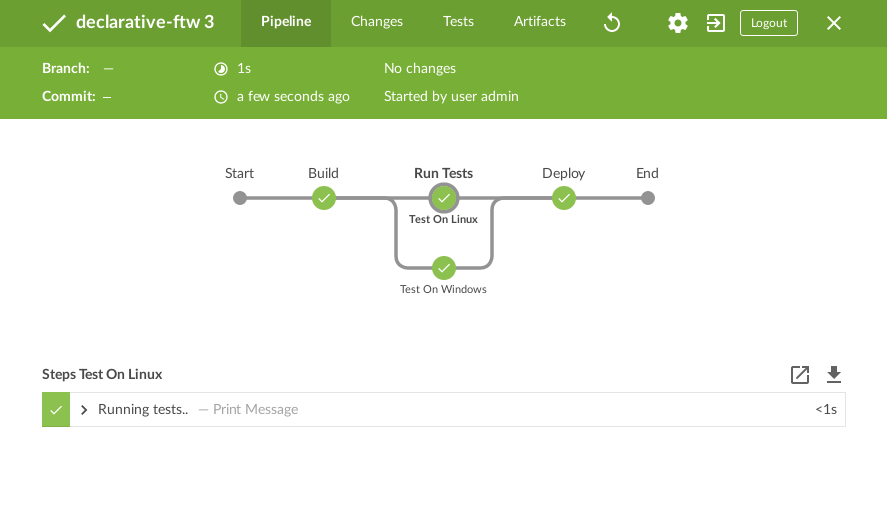
Parallel Stages
First, we’ve added syntax support for parallel stages. In earlier versions of Declarative Pipeline, the only way to run chunks of Pipeline code in parallel was to use the parallel step inside the steps block for a stage, like this:
/* .. snip .. */
stage('run-parallel-branches') {
  steps {
    parallel(
      a: {
        echo "This is branch a"
      },
      b: {
        echo "This is branch b"
      }
    )
  }
}
/* .. snip .. */
While this works, it doesn’t integrate well with the rest of the Declarative Pipeline syntax. For example, to run each parallel branch on a different agent, you need to use a node step, and if you do that, the output of the parallel branch won’t be available for post directives (at a stage or pipeline level). Basically the old parallel step required you to use Scripted Pipeline within a Declarative Pipeline.
But now with Declarative Pipeline 1.2, we’ve introduced a true Declarative syntax for running stages in parallel:
pipeline {
    agent none
    stages {
        stage('Run Tests') {
            parallel {
                stage('Test On Windows') {
                    agent {
                        label "windows"
                    }
                    steps {
                        bat "run-tests.bat"
                    }
                    post {
                        always {
                        junit "**/TEST-*.xml"
                        }
                    }
                }
                stage('Test On Linux') {
                    agent {
                        label "linux"
                    }
                    steps {
                        sh "run-tests.sh"
                    }
                    post {
                        always {
                        junit "**/TEST-*.xml"
                        }
                    }
                }
            }
        }
    }
}
You can now specify either steps or parallel for a stage, and within parallel, you can specify a list of stage directives to run in parallel, with all the configuration you’re used to for a stage in Declarative Pipeline. We think this will be really useful for cross-platform builds and testing, as an example. Support for parallel stages will be in the soon-to-be-released Blue Ocean Pipeline Editor 1.3 as well.
You can find more documentation on parallel stages in the User Handbook.
Defining Declarative Pipelines in Shared Libraries
Until the 1.2 release, Declarative Pipelines did not officially support defining your pipeline blocks in a shared library. Some of you may have tried that out and found that it could work in some cases, but since it was never an officially supported feature, it was vulnerable to breaking due to necessary changes for the supported use cases of Declarative. But with 1.2, we’ve added official support for defining pipeline blocks in src/*.groovy files in your shared libraries. Within your src/*.groovy file’s call method, you can call pipeline { ... }, or possibly different pipeline { ... } blocks depending on if conditions and the like. Note that only one pipeline { ... } block can actually be executed per run - you’ll get an error if a second one tries to execute!
Major Improvements to Parsing and Environment Variables
Hopefully, you’ll never actually care about this change, but we’re very happy about it nonetheless. The original approach used for actually taking the pipeline { ... } block and executing its contents was designed almost two years ago, and wasn’t very well suited to how you all are actually using Declarative Pipelines. In our attempts to work around some of those limitations, we made the parsing logic even more complicated and fragile, resulting in an impressive number of bugs, mainly relating to inconsistencies and bad behavior with environment variables.
In Declarative 1.2, we’ve replaced the runtime parsing logic completely with a far more robust system, which also happens to fix most of those bugs at the same time! While not every issue has been resolved, you may find that you can use environment variables in more places, escaping is more consistent, Windows paths are no longer handled incorrectly, and a lot more. Again, we’re hoping you’ve never had the misfortune to run into any of these bugs, but if you have, well, they’re fixed now, and it’s going to be a lot easier for us to fix any future issues that may arise relating to environment variables, when `expression`s, and more. Also, the parsing at the very beginning of your build may be about 0.5 seconds faster. =)
More to Come!
While we don’t have any concrete plans for what will be going into Declarative Pipelines 1.3, rest assured that we’ve got some great new features in mind, as well as our continuing dedication to fixing the bugs you encounter and report. So please do keep opening tickets for issues and feature requests. Thanks!
How to Schedule an Uber Ride for the Future
What’s New in macOS 10.13 High Sierra, Available Now
Geek Trivia: Which U.S. State Has The Lowest Average Elevation?
Monday, 25 September 2017
How to Enable Two-Factor Authentication on Your Nintendo Account
The Best Bluetooth Mechanical Keyboards
How to Block Calls from a Certain Number on an iPhone
How to Use Multiple Apps at Once on an iPad
What’s the Difference Between the “Program Files (x86)” and “Program Files” Folders in Windows?
IUC charge cut may trigger a faster shift to VoLTE services
Geek Trivia: The Oligodynamic Effect Is A Phenomenon That Describes?
Sunday, 24 September 2017
Don’t Believe What You Read: Social Media Screenshots Are Easy to Fake
Geek Trivia: Which Action Movie Star Won An Emmy For His Guest Appearance On The TV Show Friends?
Saturday, 23 September 2017
How to Automatically Block Spam Calls on an iPhone
How to Download Files with Your Synology NAS (and Avoid Leaving Your Computer On at Night)
How to Measure Distances in Google Maps for Running, Biking, and Hiking
Geek Trivia: The Medical Term For Sleepwalking Is?
Friday, 22 September 2017
How to See Twitter Notifications For Mentions, But Not Likes or Retweets
How to Set Your Preferred Autofill Manager in Android Oreo
How to Set Up a Facebook Page
VR needs more competition to build audience: Sony gaming chief
How to Enable Microsoft’s Precision Touchpad Drivers on Your Laptop
Baidu announces $1.5Bn fund for autonomous driving projects
UIDAI sends notice to Airtel for alleged flouting of Aadhaar rules over opening payments bank a/c
IIT Kharagpur develops solution to check hacking into IoT devices
Amazon said to be working on smart glasses with Alexa integration
How to Automatically Enable Do Not Disturb on Your iPhone While Driving
Geek Trivia: Brief Bright Flashes In The Night Sky Called “Iridium Flares” Are Caused By?
Thursday, 21 September 2017
How to Automatically Open Articles in Safari’s Reader Mode
How To Adjust Mouse Settings in Windows
How to Fix the “Screen Overlay Detected” Error on Android
How to Post Panoramas to Instagram
How to Use Android’s Built-In Tethering When Your Carrier Blocks It
iOS 11’s Control Center Doesn’t Truly Disable Wi-Fi or Bluetooth: Here’s What to Do Instead
How to Temporarily Disable Touch ID and Require a Passcode in iOS 11
How to Free Up Space on Your iPhone or iPad by Offloading Unused Apps
Geek Trivia: The Best Selling Debut Album In History Belongs To Which Of These Musical Acts?
Wednesday, 20 September 2017
Safari Now Disables Auto-Playing Videos. Here’s How to Allow Them for Certain Sites
How to Stop iPhone and iPad Apps From Asking for Ratings
How to Revoke Third-Party App Access From Soundcloud
How to Customize Your iPhone or iPad’s Control Center
How to Delete Your Instagram Search History
Are My Amazon Echo and Google Home Spying on Everything I Say?
Mahindra & Mahindra showcases driverless tractor, launch in 2019
How to Leave the iOS Beta Now that iOS 11 Is Out
Geek Trivia: In The American South, Millions Of People In The Early 1900s Suffered From A Crippling Dietary Deficiency Of?
Udacity opens registration for Intro to Self Driving Cars Nanodegree program
Tuesday, 19 September 2017
16 Finder Shortcuts Every Mac User Should Know
Is MoviePass, the $9.95 Movie Theater Subscription, Worth It?
What Is “Application Frame Host” and Why Is It Running on My PC?
US defence firms want control over tech in Make-in-India plan
How to Auto-Run Windows Programs When You Plug In a USB Drive
How to Snooze Notifications in Android Oreo
What Are Creative Commons Licenses?
What Does CCleaner Do, and Should You Use It?
Insurance firms use Chatbots to sell policies, and help you
China to allow use of smartphones on aircraft
12 Spoiler-Free Stardew Valley Tips and Tricks to Get You Started
How to Reopen Closed Tabs on an iPhone or iPad
Geek Trivia: The Iceland Word For Computer Literally Translates To?
Monday, 18 September 2017
How to Add Favicons to Safari on macOS
How to Start a Fundraiser After An Emergency Using Facebook
How to Save Google’s WEBP Images As JPEG or PNG
CCleaner Was Hacked: What You Need to Know
How to Make Windows 10’s Taskbar Clock Display Seconds
How to Boost Your Mouse Pointing Accuracy in Windows
Geek Trivia: A Popular African-Derived Rhythm Used In Rock and Pop Music Is Called The?
Bitcoins lose lustre in the face of flak
Rickshaws to jump start India's all-electric drive
Mitsubishi in talks to pick up stake in GreyOrange Robotics
Cryptocurrencies catches the fancy of Bengaluru's tech-driven millennials
Sunday, 17 September 2017
The Best Ways to Control All Your Smarthome Devices from One Place
Geek Trivia: The U.S. State With The Greatest Elevation Span Is?
Saturday, 16 September 2017
How to Make Sure a File Is Safe Before Downloading It
How to Manually and Automatically Shut Down and Restart Your Synology NAS
Know all about Bitcoin: What is bitcoin and how does it work?
How to Use Your Ecobee Smart Thermostat with Alexa
Geek Trivia: The First Electric Air Conditioning Unit Was Invented By?
Friday, 15 September 2017
Stupid Geek Tricks: Convince Your Friends You’re a Hollywood-Style Hacker with These Tools
Lease vs Finance vs Buy: How Should You Pay for the iPhone 8 or X?
How Much Better Is the iPhone X’s Camera?
How to Revoke Third-Party App Permissions From Spotify
Does Wireless Charging Work with a Case?
How To Find Out What Places Are a Specific Distance From You
How Does Wireless Charging Work?
How to Get the Most Out of Your Ring Doorbell
Geek Trivia: The Largest Free Concert In History, Based On Attendance, Was A Performance By?
Thursday, 14 September 2017
How to Check If a Twitter Account Is a Bot
How to See Who Has Logged Into Your Netflix Account
Is Wireless Charging Slower Than Wired Charging?
What’s the Difference Between a Font, a Typeface, and a Font Family?
What Are “Silent” Notifications on Android?
How to Get Verified On Twitter (or At Least Try)
How to Block Calls in Android, Manually and Automatically
Tesla to unveil electric semi-truck in October
Persistent Systems to build e-licensing system for Ohio Medical Marijuana Control Program
RBI looking into cryptocurrencies, 'not comfortable' with bitcoin
Scheme to push e-vehicles extended by six months
30% of bank jobs at risk from technology: Vikram Pandit
Karnataka school kids to be given personalized teaching in Kannada
How Much Free Space Should You Leave on Your iPhone?
Ecobee4 vs. Ecobee3 Lite: What Are the Differences?
Geek Trivia: People Who Modify Their Bodies With Cybernetic Enhancements Are Known As?
Wednesday, 13 September 2017
How to Find a Video’s Bitrate in Windows and macOS
How to Check a Video’s Bitrate In VLC
The Best Online Retailers for Cheap Imported Gadgets
How to Check if Your Extensions Will Stop Working With Firefox 57
How to Take Good Photos of the Moon
Coming soon: Smart traffic signals at CBD junctions
Dassault Systèmes to soon launch 3D printing marketplace
Bengaluru ranks among the top 25 high-tech cities in the world
Apple launches Apple TV 4K with 4K & HDR capabilities
Is It Worth Upgrading to the Apple Watch Series 3?
Is It Worth Upgrading to the Apple TV 4K?
Is It Worth Upgrading to the iPhone 8, or iPhone X?
What’s New in iOS 11 for iPhone and iPad, Arriving September 19, 2017
Nest vs. Ecobee3 vs. Honeywell Lyric: Which Smart Thermostat Should You Buy?
Geek Trivia: The Majority Of Expired Polaroid Film Cartridges Fail Because Of?
Tuesday, 12 September 2017
What Is “coreaudiod,” and Why Is It Running on My Mac?
How to Fix Windows and Linux Showing Different Times When Dual Booting
8 Reasons to Install LineageOS on Your Android Device
How to Use Android Oreo’s New Notification Channels for Ultra-Granular Notification Customization
How to Activate Twitter’s Night Mode
IIT Madras & Verizon Data brings solar technology to rural Telangana
An insider's view of omni-channel retail in the Middle East versus India
The Cheapest Way to Stream TV: Rotate Your Subscriptions
NewVoiceMedia recognised as one of Britain’s fastest growing tech firms by the Sunday Times
Peter Bengtsson: cache_memoize - a pretty decent cache decorator for Django
This is something that's grown up organically when working on Mozilla Symbol Server. It has served me very well and perhaps it's worth extracting into its own lib.
Usage
Basically, you are probably used to this in Django:
from django.core.cache import cache

def compute_something(user, special=False):
    cache_key = 'meatycomputation:{}:special={}'.format(user.id, special)
    value = cache.get(cache_key)
    if value is None:
        value = _call_the_meat(user.id, special)  # some really slow function
        cache.set(cache_key, value, 60 * 5)
    return value
Here's instead how you can do exactly the same with cache_memoize:
from wherever.decorators import cache_memoize

@cache_memoize(60 * 5)
def compute_something(user, special=False):
    return _call_the_meat(user.id, special)  # some really slow function
Cache invalidation
If you ever need to do non-trivial caching you know it's important to be able to invalidate the cache. Usually, to be able to do that you need to involved in how the cache key was created.
Consider our two examples above, here's first the common thing to do:
def save_user(user):
    do_something_that_will_need_to_cache_invalidate(user)

    cache_key = 'meatycomputation:{}:special={}'.format(user.id, False)
    cache.delete(cache_key)
    # And when it was special=True
    cache_key = 'meatycomputation:{}:special={}'.format(user.id, True)
    cache.delete(cache_key)
This works but it involves repeating the code that generates the cache key. You could extract that into its own function of course.
Here's how you do it with the cache_memoize decorator:
def save_user(user):
    do_something_that_will_need_to_cache_invalidate(user)

    compute_something.invalidate(user, special=False)
    compute_something.invalidate(user, special=True)
Other features
There are actually two ways to "invalidate" the cache. Calling the new myoriginalfunction.invalidate(...) function or passing a custom extra keyword argument called _refresh. For example: compute_something(user, _refresh=True).
You can pass callables that get called when the cache works in your favor or when it's a cache miss. For example:
def increment_hits(user, special=None):
    # use your imagination
    metrics.incr(user.email)

def cache_miss(user, special=None):
    print("cache miss on {}".format(user.email))

@cache_memoize(
    60 * 5,
    hit_callable=increment_hits,
    miss_callable=cache_miss,
)
def compute_something(user, special=False):
    return _call_the_meat(user.id, special)  # some really slow function
Sometimes you just want to use the memoizer to make sure something only gets called "once" (or once per time interval). In that case it might be smart to not flood your cache backend with the value of the function output if there is one. For example:
@cache_memoize(60 * 60, store_result=False)  # idempotent guard
def calculate_and_update(user):
    # do something expensive here that is best to only do once per hour
Internally cache_memoize will basically try to convert every argument and keyword argument to a string with, kinda, str(). That might not always be appropriate because you might know that you have two distinct objects whose __str__ will yield the same result. For that you can use the args_rewrite parameter. For example:
def simplify_special_objects(obj):
    # use your imagination
    return obj.hostname

@cache_memoize(60 * 5, args_rewrite=simplify_special_objects)
def compute_something(special_obj):
    return _call_the_meat(special_obj.hostname)
In conclusion
I've uploaded the code as a gist.
It's quite possible that there's already a perfectly good lib that does exactly this. If so, thanks for letting me know. If not, perhaps I ought to wrap this up and publish it on PyPI. Again, that's for letting me know.
Tonbo Imaging raises Rs 120 Cr in Series B funding led by WRV Capital
How to Get Premium Hard Drives for Cheap by “Shucking” External Drives
What Is “Spooler SubSystem App” (spoolsv.exe), and Why Is It Running on My PC?
Geek Trivia: The Phone Books On Which Of These Islands Include Nicknames For Citizens?
Monday, 11 September 2017
How to Get the Old Volume Control Back on Windows 10
How to Remove a Device From Your Netflix Downloads Allotment
How to Connect an Xbox One Controller to Windows with Bluetooth
Doug Hellmann: platform — System Version Information — PyMOTW 3
Continue reading "platform — System Version Information — PyMOTW 3"
Mike Driscoll: PyDev of the Week: Jeff Forcier
This week we welcome Jeff Forcier (@bitprophet) as our PyDev of the Week. Jeff is the current maintainer of the popular Fabric and Paramiko packages. He is also the creator of the Invoke package. You can check out other projects that Jeff contributes to on Github. He also has a blog that you might find interesting. Let’s take some time to get to know Jeff better!
Can you tell us a little about yourself (hobbies, education, etc):
My overall bio can be found at http://ift.tt/2wVdbs6, but here’s some basics!
- I’ve a bachelor’s degree in computer science (though I don’t hold with those who think one is required for a career in this field.)
- Most of my hobbies involve a computer or TV screen – for example, I’m a devout video game addict, spend more time than I should just surfing the Web, and enjoy watching video (anime, movies, TV; no Twitch habit yet!)
- When not glued to a display, I read a lot (mostly scifi & fantasy); take day trips around the beautiful, if disturbingly expensive, San Francisco Bay Area; and annoy my cats.
- Sometimes I combine these things – such as when my wife and I go on long walks playing Pokémon Go
Why did you start using Python?
My final semester of university included a course on mobile computing, which in 2004 was VERY different from what that term means today! The professor was a Python advocate and had us write our projects in it, to run on Sharp Zaurus PDAs. My project was a wifi-based advertising/bulletin-board server/client platform, written entirely in Python.
Prior to this I’d written Java for classwork and PHP for fun/jobs, and found I enjoyed Python’s expressiveness – it ‘clicked’ with how my mind works. Post-graduation, I wrote intranet apps in Plone and then Django, which further cemented Python as my language of choice.
What other programming languages do you know and which is your favorite?
Prior to Python I wrote Visual Basic, PHP and Java; haven’t used them since. After learning Python I also picked up Ruby and Clojure.
I enjoy Ruby; my ideal language would be Python with some Ruby syntax (blocks, trailing logic, etc) or Ruby with a more explicit import system and Python’s package ecosystem (i.e. not limited to mostly web and ops.) At the moment everything I’m working with is Python, so my Ruby is gathering dust.
Ruby and Python are more similar than distinct – so I employ Clojure for some personal projects. Being LISP, it stretches my brain and encourages me to work with paradigms I don’t use much in Python, but is modern enough to avoid most of the practical frustrations found in other LISPs.
What projects are you working on now?
Too many! Which is my own fault. A full list is at http://ift.tt/2w0D2Sd .
Fabric 2 and its underlying Invoke project are my primary foci right now. My time’s spent eyeballing the requirements for their 2.0 and 1.0 releases, respectively; and personal itch-scratching feature work. I’m privileged to use a lot of this OSS at my day job, so I allow myself tangents when something annoys me, or my users, enough.
Strongly related: Paramiko, which has high-priority feature areas needing a serious redo (like auth handling) on top of the usual ‘missing’ features and fixes.
Finally, I’ve been porting my test suites to a pytest-based test runner; the old one I used was based on nose and pytest has gotten so much neat stuff in the past few years, I made the jump. Plus the rewrite allowed for quality-of-life improvements on top of simply “you can use other pytest plugins with it”!
My other projects (including Alabaster, the Sphinx theme) get maintenance work and the occasional sprint.
How did you end up becoming the maintainer of the these project(s)?
In ~2008 I needed to do config management in Python and there weren’t many options at the time. Fabric was created by another dev (Christian) who based it on Capistrano from the Rails world; it was a single .py and (like early Capistrano) wasn’t very UNIX-y in behavior or invocation, at version 0.1.x.
I submitted a large (pre-Github) PR that turned it into a multi-file package, made it more like a traditional POSIX app, and added some features; as it turns out, Christian was at a turning point on his end and asked if I just wanted the project wholesale. I said yes. 0.9.x was born; and we’re now up to 1.13, with a full-rewrite 2.0 around the corner.
Paramiko has powered Fabric since the beginning; about 5 years into my Fabric stewardship, I forked Paramiko (around 1.7.7) to publish critical bugfixes Paramiko’s author (Robey) hadn’t time to merge. He eventually got back to me and asked if I wanted to take over the original. I said yes and merged my fork back in. Since then, I’ve published versions 1.7.7.x through 1.18, then a (non-rewrite) 2.0, 2.1, etc.
Alabaster started life as a (non-hostile) fork of Kenneth Reitz’s Sphinx theme, which in turn was a gentle rework of Armin Ronacher’s theme for his projects. Alabaster’s intent was to add a lot of configurability to the theme package, for example making it easier to use across multiple sites (as I do with most of my projects’ split www/docs sites.) It’s now the default Sphinx theme!
Invoke (née Fabric 2) is 100% original work, as is my barely-used-by-anyone-else test runner, spec (nose) / pytest-relaxed (pytest).
What challenges have you faced while developing/maintaining these popular packages?
The biggest challenge is simply scaling with the amount of activity the projects get. I’m able to work on them 1-2 days a week due to arrangement with my day job, but as with most OSS, these projects really want more like 1-2 full-time developers.
Making matters worse are my tendencies towards micromanagement and pickiness – they’ve prevented me from giving out full commit/release privileges to others, which would help get more patches out more quickly.
That said, I have a handful of awesome folks who help with ticket triage/patch review; I still feel compelled to at least skim nearly every ticket, but seeing a trusted name in the comments makes it much easier to defer, close or just-merge sometimes!
Backwards compatibility (something I take very, perhaps too, seriously – see “pickiness” above) introduces many challenges, not only around how to make certain changes, but also how to handle them in changelogs, release branches, etc.
Finally, I’m a poster child for impostor syndrome; it’s amazing how you can have millions of PyPI downloads and still beat yourself up for being “bad at computers”!
What sorts of things can we look forward to in Fabric 2?
I have a nice handy list at http://ift.tt/2wUeaZD, some of my personal favorites so far:
- Python 3 compatibility, finally.
- Explicit, single-responsibility-principle driven classes instead of functions referencing global module state, which brings a ton of other good stuff like “you can use threads instead of multiprocessing!”
- Massively expanded configuration system.
- POSIX/GNU style command-line flags for task arguments; no more weird custom stuff.
- Command/subprocess execution now way more powerful, more consistent between local/remote, and usable totally standalone (easy-to-use replacement for manual, stdlib subprocess based hacks!)
- Elegant nested SSH gateway support.
Which Python libraries are your favorite (core or 3rd party)?
In no particular order:
- requests and sphinx are near-ubiquitous, for good reason;
- cryptography has been great to work with, and its split high/low level API approach is increasingly valuable as the programming world gets more security-savvy;
- flake8 and coverage are invaluable for code insight;
- humanfriendly (or tqdm), tabulate, & blessings all make for attractive user interfaces (spinners, progress bars, tables, colors) – a feature area I’m increasingly utilizing;
- pathlib, which I should use more than I do;
- httpie is amazing for introspecting anything web/http based on the CLI.
Where do you see Python going as a programming language?
I’m not a programming language theorist, and I admit my firm Python bias, but I think it can learn (and is learning) from the current competition, such as Golang and Javascript. For example:
- Execution speed: Golang is hard to beat, but PyPy’s doing good work, and optional typing in Python 3 can only help (also just for those who like typing, period.)
- Deploying code: Python justifiably gets a bad rap compared to “copy a static binary”, but the Packaging Authority is doing awesome work and there’s more coming. Wheels are already a huge boon over sdists or eggs.
- Managing dependencies: npm has the benefit of being a next-gen system, with the bells & whistles that entails; but again, the PyPA does great work and I’m excited for upcoming changes (e.g. Pipfile.)
- Async: an increasingly common need in our multi-core age; Golang and JS have strong async paradigms, but Python 3.5+ has made solid gains in native async syntax and hopefully will keep improving (plus the built-in syntax is only one option!)
Not a comparison to another language, but: I think helping programmers write secure programs by default is rapidly increasing in importance. Python has an opportunity to be a leader here, given our community is blessed with no few security domain experts, and tends to encourage APIs which do the right thing by default while still being flexible.
What is your take on the current market for Python programmers?
It’s hard for me to be objective here, my resumé & overall visibility (presumably) means I get more recruiters contacting me than average – but as far as I can tell the market is doing quite well, at least as well as the overall tech sector and possibly moreso.
I think Pythonistas who have, or can get, a leg up on the interfaces between Python and the current hot topics (containers, functions-as-a-service, machine learning, etc) will get an edge when it comes to job opportunities. Take it from someone who lags behind on such topics!
Thanks for doing the interview!
Understanding the true impact of SQL Server deployments
How to Block Text Messages from a Certain Number on an iPhone
How to Find Compatible Lenses for Your Canon or Nikon Camera
Telensa Named “One to Watch” in Sunday Times Hiscox Tech Track 100
Telensa Named “One to Watch” in Sunday Times Hiscox Tech Track 100
How Much Free Space Should You Leave on Your Windows PC?
Geek Trivia: The English Dialects Found Within Ireland Are Collectively Referred To As?
Gibraltar National Archives chooses Preservica to safeguard its rich heritage
Gibraltar National Archives chooses Preservica to safeguard its rich heritage
Over a third of UK firms looking to globalise IT to access tech talent outside the UK
"Fredrik Håård's Blaag": What I Wish Recruiters Would Do
I spend a lot of time dealing with recruiters - responding to queries, and accepting or rejecting endless amount of LinkedIn contact requests. I mostly agree to those requests, unless it's obviously a spam account, since you never know what a new contact will give, but a quick review says that way less than 1% of the recruiters who contact me will actually end up signing a new contract. This means 99% of the time I spend on new contacts from recruiters is waste, and if my experiences hold up for the industry1, 99% of the recruiters' time spent on initial contact is wasted as well.
All this waste is not very lean 2.
I don't subscribe to the recruiter hate that a lot of contractors do - I've got little patience for sales, and so far almost all of my contracts come through recruiters who contact me out of the blue with a proposal too good to turn down. I simply can't afford to be hostile to recruiters when they bring me all of my business! On the other hand, while a handful of recruiters keeps my bills paid, it seems to me that the business as a whole could use a bit of a tweak to cause less annoyance and a lot less wasted time for all involved.
In the interest of not just complaining but actually offer suggestions for improvement, I've come up with a few points that would make my own interactions with recruiters much more pleasant and productive.
Read My Profile
Please, please, please read my profile before contacting me. What you can read at the very top of it is that I'm not interested in employment. At all. The next thing is normally my availability - for example, right now only remote work, and not full time.
If a recruiter's first contact with me shows obvious signs of not having read even this far - for example by offering me an on-site employment - they're really not off to a good start. Lets face it, since they have not done even the very most basic research and have no idea of who they're contacting, I have no reason to give them any benefit of the doubt at all.
In addition, if someone reads my entire profile description on LinkedIn, and maybe check out my homepage and blog, they may get a better idea if the proposal they have is a deal I'll ever seriously consider. All of this work probably would probably take half an hour or so, which is of course a lot more than just spamming requests to everyone who matches a search filter... which leads us to:
Stop With The Useless Spamming
Out of the thousands of pure recruiter spam emails I've gotten, exactly zero has lead to anything good and most has lead to an instant block of the spammer, and if I felt ambitious that day, their entire company. This is not because I'm hostile, this is for me to have a chance to read messages from recruiters that send me stuff I might actually be interested in without drowning in junk.
I can't fathom that the spamming actually pays off, but even if it does manage to scare up a desperate junior every now and than, it would be nice to add a "less than a year of experience" filter to the search criteria. That way the cost of spamming will go down, and people who would never ever even respond to such spam can save the time it would take to add the source to the spam filter - it's win win!
Respect The Client And The Contractor
Since the contractor is the source of the recruiters' income, and the clients are the ones actually paying, it would do to pay both just a little respect. I've had recruiter actually laugh when I tell them I don't want a long term contract or empoyment (end call politely, block), try to get me to agree to halve my rates (end call politely, block), or ask me to tell a client I know things I don't (hang up, block). This was annoying enough when I was a junior developer, but is for some reason bringing me close to a rage now that the recruiter often is ten years my junior and does not even have a quarter of my experience in the business.
Another, insidious, disrespect is the one aimed at the clients. Some recruiters seem to be intent on making me feel superior by trash-talking the client's representatives and especially the client's employees. I can just say that if the recruiter shows no respect for the client, I assume they'll try to sell any contractor to them whether they fit the job or not (me?), and I don't want anything to do with a business relationship that starts with mistrust and disrespect.
Of course, it would be equally bad to hide known problems on the client's side from me during the recruitment process, but the blatant talking down of clients just has no place in a professional environment and is only (I assume) meant to boost my ego3, make me feel important, and like the recruiter. It accomplishes none of these, and shows a lack of professionalism that is appalling.
Be An Agent, Not A Used-Car Salesman
In a perfect world, the recruiter would try to honestly represent both my interests and that of the client, while making money on successful deals. In this world, it seems to me that a lot of recruiters look at themselves more like salespeople than agents - the important part is to sell, not to build a working relationship. It is only seldom I feel that I can trust that a recruiter will represent me fairly to the client, and not oversell me and my skills if they can - and likewise, they almost always present the client like the ideal place on Earth4. In my experience, if those mythical "everything is perfect" workplaces exist, they don't hire contractors to help with their presumably non-existing issues.
So I'd like to be able to trust a recruiter to represent the client fairly including the issues they have, and to represent me equally fairly, including the gaps in my experience or skill set that might be important for the client.
Promote Transparency
Repeatedly, I've been told or gotten in writing that I should not, must not, discuss rates and pricing with the client, other contractors, or anyone else.
On one hand, it's like that the fact that the client is charged more than what I charge is some big secret, and the recruiter expects me to react badly to the fact that they, too, make money from their work.
On the other hand, the contracts that stipulates that I'm not allowed to discuss rates with other contractors is just weird - what rates one can charge is naturally very important for a contractor, and no amount of gag rules is going to hide the lay of the land from a freelancer. Those clauses are clearly anti-competitive in their nature, but fail to accomplish anything at all but cause irritation, as contractors follow their letter and willfully ignore and circumvent their intent.
Keep Recruiting, With Precision
After reading this far, you may get the picture that I really dislike recruiters - I don't! More than nine out of ten hours billed for me started with a call or message from a recruiter, and without them I'd be out of work. However, I think that my dealings with recruiters have become more and more of a hassle with more spam and unprofessional behavior lately, and I think there is great potential for great recruiters to stand out from the crowd and build profitable and lasting relationships. This is all obviously written from my personal experience, and other contractors - as well as recruiters themselves - may have wildly different experiences of the business. I'd love for this to lead to discussions that may move us all forward!
Kushal Das: Updating Qubes OS
Using updated software is a normal thing, also a few of us get more excited and use latest (not so stable) packages from the testing branch. This helps to detect bugs in the software before they go out the general availability.
As I was already using the RC1 release of Qubes, I thought of upgrading to the latest testing packages.
$ sudo qubes-dom0-update --enablerepo=qubes-dom0-current-testing
As we already know that dom0 does not connect to the network, it actually uses an UpdateVM to download the packages first, and then the packages are sent to dom0. DNF takes care of the actual install/update of the package.
I rebooted the box after the update was done. One of the major change I can see is with copy/pasting text. It is not asking to confirm the extra dialog box while pasting. I can simply copy text, press Ctrl+shift+c and then go to another domain and press Ctrl+shift+v, and then right click and paste (or press Ctrl+v).
I have also updated the Fedora25 templateVM to the latest from my local Fedora mirror. While trying to attach a local image file using loop device (in dom0) to a VM I got into this issue.
I could not find any Fedora 26 repo for Qubes yet, Fedora 25 is the latest there. Fedora 27 release date is in less than 2 months. And then in another month Fedora 25 will be EOL. I hope developers will release packages to upgrade to F26 at least by then.
E-vehicle drive: India may take Elon Musk's Australian policy for a spin
Nikola: Nikola v7.8.10 is out! (maintenance release)
On behalf of the Nikola team, I am pleased to announce the immediate availability of Nikola v7.8.10. This is a maintenance release for the v7 series.
Future releases in the v7 series are going to be small maintenance releases that include bugfixes only, as work on v8.0.0 is underway.
What is Nikola?
Nikola is a static site and blog generator, written in Python. It can use Mako and Jinja2 templates, and input in many popular markup formats, such as reStructuredText and Markdown — and can even turn Jupyter Notebooks into blog posts! It also supports image galleries, and is multilingual. Nikola is flexible, and page builds are extremely fast, courtesy of doit (which is rebuilding only what has been changed).
Find out more at the website: https://getnikola.com/
Changes
- Fix crashes with Jinja2 themes and tag indexes (Issue #2900)
- Ignore empty tags in HTML metadata reader (Issue #2890)
- Fix crash when compiling empty .html posts (Issue #2851)
Sunday, 10 September 2017
How to Stream Every NFL Game Live, Without Cable
Three Ways Chromebooks Are Better Than PCs or Macs
Geek Trivia: The Cinnabar Moth Has Been Actively Introduced To Regions As A Tool For Controlling?
Vladimir Iakolev: Building a graph of flights from airport codes in tweets
A lot of people (at least me) tweet airports codes like PRG ✈ AMS before flights. So I thought it will be interesting to draw a directed graph of flights and airports. Where airports are nodes and flights are edges.
First of all, I created a twitter application, authorized my account within it and got all necessary credentials:
TWITTER_CONSUMER_KEY = ''
TWITTER_CONSUMER_SECRET = ''
TWITTER_ACCESS_TOKEN = ''
TWITTER_ACCESS_TOKEN_SECRET = ''
USER_ID = ''
As a special marker I chose airplane emoji:
MARKER = '✈'
Then I tried to receive all my tweets with that marker but stuck with a huge problem, twitter REST API doesn’t work with emojis in a search query. So I decided to receive a whole timeline and filter it manually. So only the last 3200 tweets will be parsed. Working with twitter API is very easy with tweepy:
import tweepy


def get_tweets():
    auth = tweepy.OAuthHandler(TWITTER_CONSUMER_KEY, TWITTER_CONSUMER_SECRET)
    auth.set_access_token(TWITTER_ACCESS_TOKEN, TWITTER_ACCESS_TOKEN_SECRET)
    api = tweepy.API(auth)
    cursor = tweepy.Cursor(api.user_timeline,
                           user_id=USER_ID,
                           exclude_replies='true',
                           include_rts='false',
                           count=200)
    return cursor.items()
>>> for tweet in get_tweets():
...     print(tweet)
...
Status(_api=<tweepy.api.API object at 0x7f876a303ac8>, ...)
Then I filtered tweets with ✈ in its text:
flight_texts = (tweet.text for tweet in get_tweets()
                if MARKER in tweet.text)
>>> for text in flight_texts:
...     print(text)
...
ICN ✈️ IKT
IKT ✈️ ICN
DME ✈️ IKT
As some tweets may contain more than one flight, like LED ✈ DME ✈ AUH, it’s convenient to extract all three letter parts and build flights like LED ✈ DME and DME ✈ AUH:
def get_flights(text):
    parts = [part for part in text.split(' ') if len(part) == 3]
    if len(parts) < 2:
        return []

    return zip(parts[:-1], parts[1:])


flights = [flight for text in flight_texts
           for flight in get_flights(text)]
uniq_flights = list(set(flights))
>>> uniq_flights
[('ICN', 'IKT'), ('IKT', 'ICN'), ('DME', 'IKT')]
From edges in uniq_flights it’s very easy to get all nodes:
airports = [airport for flight in flights
            for airport in flight]
uniq_airports = list(set(airports))
>>> uniq_airports
['ICN', 'IKT', 'DME']
So now it’s possible to create a graph with networkx and draw it with matplotlib:
import networkx
from matplotlib import pyplot


graph = networkx.DiGraph()
graph.add_nodes_from(uniq_airports)
graph.add_edges_from(uniq_flights)
networkx.draw(graph, with_labels=True, node_size=1000)
pyplot.draw()
pyplot.show()
The graph is very ugly:
But it’s simple to improve it by using different colors depending on nodes and edges weight, and by using graphviz.
from collections import Counter
from matplotlib import cm


def get_colors(all_records, uniq_records):
    counter = Counter(all_records)
    max_val = max(counter.values())
    return [counter[record] / max_val
            for record in uniq_records]


networkx.draw(graph,
              with_labels=True,
              node_size=1000,
              width=1.5,
              pos=networkx.nx_pydot.graphviz_layout(graph, prog='neato'),
              cmap=cm.get_cmap('Pastel1'),
              edge_cmap=cm.get_cmap('Pastel2'),
              edge_color=get_colors(flights, uniq_flights),
              node_color=get_colors(airports, uniq_airports))
pyplot.draw()
pyplot.show()
So now it’s much nicer: